


 这篇博客介绍了在Spring Boot中配置自定义线程池实现异步任务,并探讨了@Async注解的限制,包括不能在同一个类内自我调用。博主提出两种解决方案,一是通过自我注入避免直接调用,二是使用ApplicationContext获取Bean来调用。同时,文中展示了如何在Controller中调用异步方法并等待其完成。
首先先使用自己定义的线程池
@Configuration
@EnableAsync
@Slf4j
public class AsyncConfiguration  implements AsyncConfigurer {

    @Bean(name = "executor")
    @ConditionalOnMissingBean
    public ThreadPoolTaskExecutor executor() {
        ThreadPoolTaskExecutor taskExecutor = new ThreadPoolTaskExecutor();
        //核心线程数
        taskExecutor.setCorePoolSize(2);
        //线程池维护线程的最大数量,只有在缓冲队列满了之后才会申请超过核心线程数的线程
        taskExecutor.setMaxPoolSize(10);
        //缓存队列
        taskExecutor.setQueueCapacity(50);
        //许的空闲时间,当超过了核心线程出之外的线程在空闲时间到达之后会被销毁
        taskExecutor.setKeepAliveSeconds(200);
        //异步方法内部线程名称
        taskExecutor.setThreadNamePrefix("async-");
        /**
         * 当线程池的任务缓存队列已满并且线程池中的线程数目达到maximumPoolSize,如果还有任务到来就会采取任务拒绝策略
         * 通常有以下四种策略:
         * ThreadPoolExecutor.AbortPolicy:丢弃任务并抛出RejectedExecutionException异常。
         * ThreadPoolExecutor.DiscardPolicy:也是丢弃任务,但是不抛出异常。
         * ThreadPoolExecutor.DiscardOldestPolicy:丢弃队列最前面的任务,然后重新尝试执行任务(重复此过程)
         * ThreadPoolExecutor.CallerRunsPolicy:重试添加当前的任务,自动重复调用 execute() 方法,直到成功
         */
        taskExecutor.setRejectedExecutionHandler(new ThreadPoolExecutor.CallerRunsPolicy());
        taskExecutor.initialize();
        return taskExecutor;
    }

    @Override
    public Executor getAsyncExecutor() {
        return executor();

    }

    @Override
    public AsyncUncaughtExceptionHandler getAsyncUncaughtExceptionHandler() {
        return (ex, method, params) ->
                log.error("线程池执行任务发送未知错误,执行方法:{}  {}", method.getName(), ex);
    }
}
异步方法
@Slf4j
@Component
public class AsyncTaskServices {
    @Autowired
    @Lazy
    private AsyncTaskServices self;

    @Async
    public Future<String> doTask1() {
        log.info("---------进入了方法1------------");
        long t1 = System.currentTimeMillis();
        try {
            TimeUnit.SECONDS.sleep(1);
        } catch (InterruptedException e) {
            e.printStackTrace();
        }
        long t2 = System.currentTimeMillis();
        log.info("task1 cost {} ms", t2 - t1);
        return new AsyncResult<>("成功1111");

    }


    @Async
    public Future<String> doTask2() {
        log.info("---------进入了方法2------------");
        long t1 = System.currentTimeMillis();
        try {
            Thread.sleep(3000);
        } catch (InterruptedException e) {
            e.printStackTrace();
        }
        long t2 = System.currentTimeMillis();
        log.info("task2 cost {} ms", t2 - t1);
        return new AsyncResult<>("成功2222");

    }

    @Async
    public Future<String> task3() {
        log.info("---------进入了方法3------------");

        log.warn("开始");
        self.doTask1();
        self.doTask2();
        try {
            TimeUnit.SECONDS.sleep(5);
        } catch (InterruptedException e) {
            e.printStackTrace();
        }
        log.warn("结束");
        return new AsyncResult<>("成功3333");

    }
}
调用
@RestController
public class TestController {
    @Resource
    private AsyncTaskServices threadService;

    @GetMapping
    public String test() throws ExecutionException, InterruptedException {
        System.out.println(111111);
        Future<String> future = threadService.task3();
        if(future.isDone()){
            System.out.println(future.get());
        }
        System.out.println(2222222);
        return "123";
    }
}
问题1
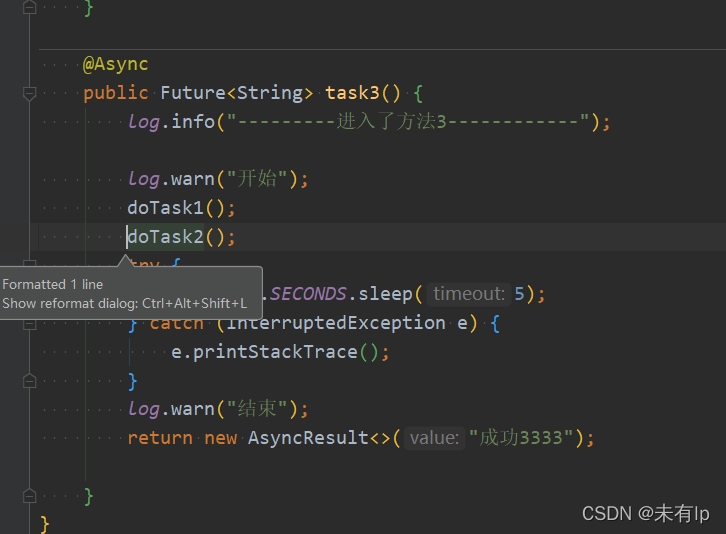
这里方法12 都是异步方法,方法3调用12,但是该方法没有异步,是在进行同步执行,原因为他直接调用底层方法,没有走代理
其实@Async的这个性质在官网上已经有过说明了
First – let’s go over the rules – @Async has two limitations:
it must be applied to public methods only
self-invocation – calling the async method from within the same class – won’t work
The reasons are simple – 「the method needs to be public」 so that it can be proxied. And 「self-invocation doesn’t work」 because it bypasses the proxy and calls the underlying method directly.
简单来说就是@Async有两个限制:
1.它只能应用于公共方法
2.从同一个类中调用异步方法将不起作用
原因很简单方法需要是公共以便可以代理。“自我调用不起作用”,因为它绕过了代理,直接调用底层方法。
解决方案
第一种
自我注入本身,调用内部方法,但是这里又出现了一个新的问题,注解执行顺序的问题,注入失败,我的解决将改方法改为懒加载即可
第二种
使用boot中appcontext中getbean方式获取对象进行调用





 扫一扫
扫一扫


 2582
2582

 被折叠的 条评论
为什么被折叠?
被折叠的 条评论
为什么被折叠?
 到【灌水乐园】发言





