



 本文详细介绍Redis单节点、主从复制集群及集群环境的部署过程。包括依赖安装、编译配置、启动服务等步骤,并涵盖Windows客户端访问及哨兵环境搭建。
目录
3、Redis的安装(单节点)
3.1. 安装依赖
yum -y install gcc-c++ autoconf automake
3.2. 下载并上传
- 本次安装用redis-5.0.3.tar.gz
3.3. 解压
tar zxvf redis-5.0.3.tar.gztar zxvf redis-5.0.3.tar.gz
3.4. 预编译和安装
cd redis-5.0.3/
## 编译源代码
make MALLOC=libc
## 创建redis的安装目录
mkdir -p /opt/bdp/redis
## 如果需要指定安装路径,需要添加PREFIX参数**
make PREFIX=/opt/bdp/redis/ install
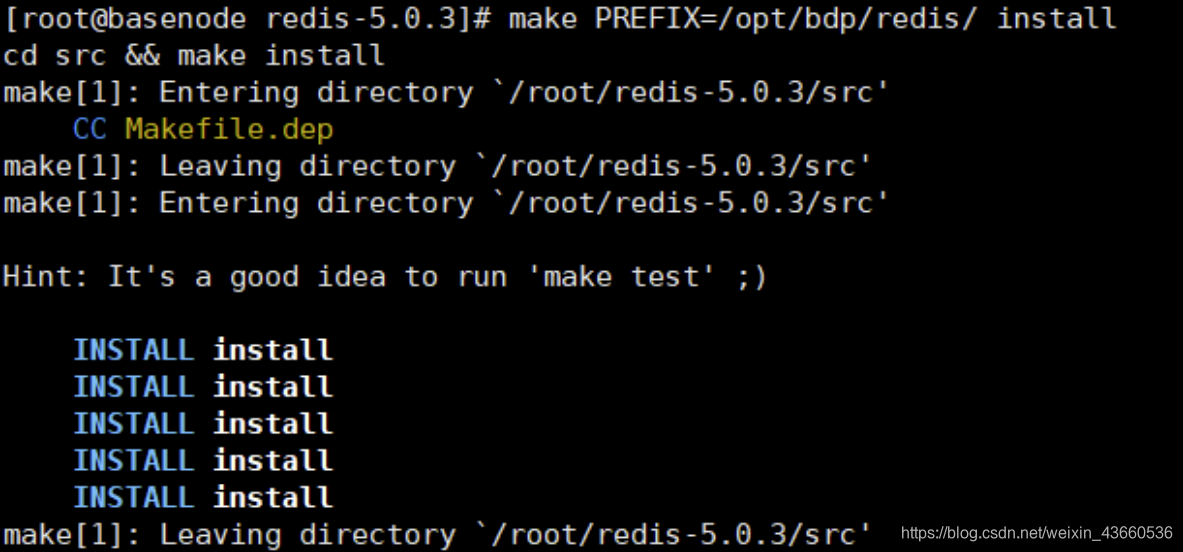
bin目录下
- Redis-cli :客户端
- Redis-server :服务器端
3.5. 启动
- 复制redis.conf至安装路径下
## 创建一个配置文件目录
mkdir -p /opt/bdp/redis/conf
## 拷贝配置文件到目录中
cp ~/redis-5.0.3/redis.conf /opt/bdp/redis/conf
- 修改安装路径下的redis.conf,将 daemonize 修改为yes

- 启动时,或指定配置文件路径即可
##redis服务默认端口号为6379
./redis-server

3.7. windows客户端访问
- 修改配置文件redis.conf
注释掉 bind 127.0.0.1 可以使所有的ip访问redis,若是想指定多个ip访问,但并不是全部的ip访问, 可以bind设置

关闭保护模式,修改为no

添加访问认证
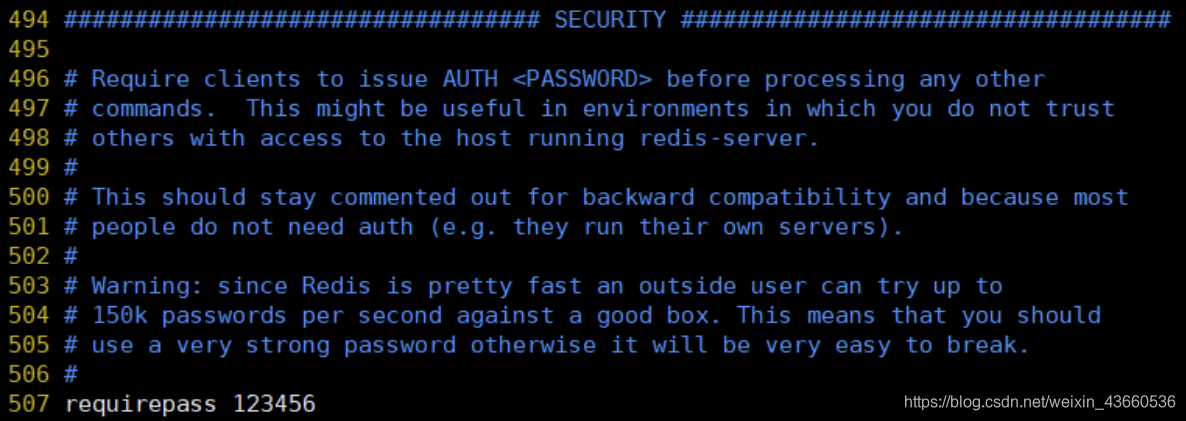
我们可以修改默认数据库的数量 默认16,修改database 32则默认为32个数据库
- 修改后kill -9 XXXX杀死redis进程,重启redis
- 启动成功可关机拍摄快照
7、主从复制集群
Redis虽然读取写入的速度都特别快,但是也会产生读压力特别大的情况。为了分担读压力,Redis 支持主从复制,Redis的主从结构可以采用一主多从或者级联结构,Redis主从复制可以根据是否是全量分为全量同步和增量同步。
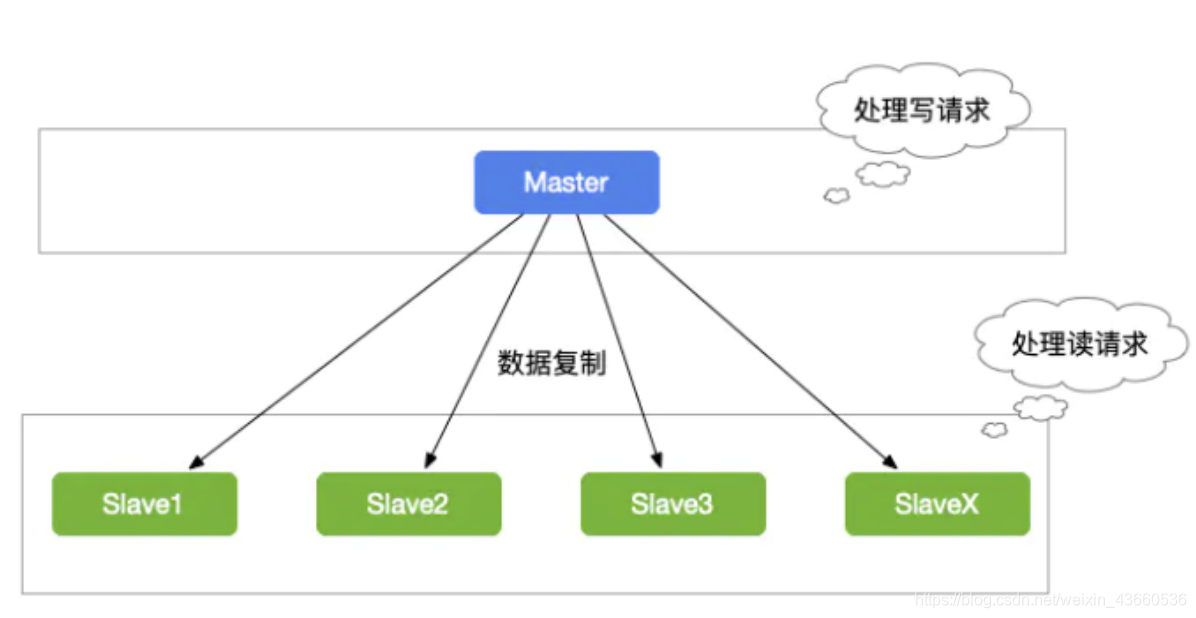
7.1. 搭建主从服务器
-
在三台虚拟机上安装redis。同上步骤可安装
-
拷贝配置文件到目录中
[123] cp ~/redis-5.0.3/redis.conf /opt/bdp/redis/conf -
拷贝配置文件并重命名为redis-7100.conf
[123] cd /opt/bdp/redis/conf/ [123] vim /opt/bdp/redis/conf/redis-7100.conf -
主节点配置文件[node01]
##[node01]中配置 ## 导入一个通用配置文件 include /opt/bdp/redis/conf/redis.conf ## 当前主服务器端口 port 7100 ## 设置主服务密码 requirepass 123456 ## 当前主服务进程ID pidfile /var/run/redis_7100.pid ## 当前主服务RDB文件名称 dbfilename dump7100.rdb ## 当前主服务文件存放路径 dir /opt/bdp/redis/conf/ -
从节点需要配置[23]
## 导入一个通用配置文件 include /opt/bdp/redis/conf/redis.conf ## 当前主服务器端口 port 7200 ## 当前主服务进程ID pidfile /var/run/redis_7200.pid ## 当前主服务RDB文件名称 dbfilename dump7200.rdb ## 当前主服务文件存放路径 dir /opt/bdp/redis/conf/ ## 同步master节点的网络信息(低版本必须使用slaveof,高版本推荐使用replicaof) replicaof 127.0.0.1 7100 ## 设置master节点的密码信息 masterauth 123456 ## 从节点只做读的操作,保证主从数据的一致性 slave-read-only yes -
启动
[123] cd ../bin/ [123] ./redis-server /opt/bdp/redis/conf/redis-7100.conf -
添加新的节点在redis客户端命令行中输入(临时添加)
- replicaof 127.0.0.1 7100
- config set masterauth 123456
-
结束从服务器的命运(结束)
- slaveof no one
8.4. 哨兵环境搭建
-
在上面redis安装的基础上同样步骤安装三台linux上
-
只注释掉
bind 127.0.0.1就可,其他配置无需动 -
搭建多台计算机的主从集群
| Host | 端口 | 节点分类 | Sentinel |
|---|---|---|---|
| 192.168.88.101 | 20601 | master | 20600 |
| 192.168.88.102 | 20601 | slave | 20600 |
| 192.168.88.103 | 20601 | slave | 20600 |
- Master节点
## [node01] 为主节点
make -p /opt/yjx/redis/conf/redis-20601.conf
vim /opt/yjx/redis/conf/redis-20601.conf
## 导入一个通用配置文件
include /opt/yjx/redis/conf/redis.conf
## 当前主服务器IP和端口
bind 0.0.0.0
port 20601
## 去掉安全模式
protected-mode no
## 设置主服务密码
requirepass 123456
## 当前主服务进程ID
pidfile /var/run/redis_20601.pid
## 当前主服务RDB文件名称
dbfilename dump20601.rdb
## 当前主服务文件存放路径
dir /opt/yjx/redis/conf/
## 设置master节点的密码信息
masterauth 123456
- Slave节点
## [node02,node03] 为从节点
[23]# make -p /opt/yjx/redis/conf/redis-20601.conf
[23]# vim /opt/yjx/redis/conf/redis-20601.conf
## 导入一个通用配置文件
include /opt/yjx/redis/conf/redis.conf
## 当前主服务器IP和端口
bind 0.0.0.0
port 20601
## 去掉安全模式
protected-mode no
## 设置主服务密码
requirepass 123456
## 当前主服务进程ID
pidfile /var/run/redis_20601.pid
## 当前主服务RDB文件名称
dbfilename dump20601.rdb
## 当前主服务文件存放路径
dir /opt/yjx/redis/conf/
## 同步master节点的网络信息(低版本必须使用slaveof,高版本推荐使用replicaof)
replicaof 192.168.88.101 20601
## 设置master节点的密码信息
masterauth 123456
## 从节点只做读的操作,保证主从数据的一致性
slave-read-only yes
- 一个稳健的RedisSentinel集群,应该使用至少三个Sentinel实例,并且保证将这些实例放到不同的 机器上,甚至不同的物理区域
## [123] 为Sentinel
[23]# make -p /opt/yjx/redis/conf/sentinel-20600.conf
[23]# vim /opt/yjx/redis/conf/redis-20600.conf
## 设置哨兵的接口
port 20600
## sentinel monitor 关键字
## master20601 给主从服务器集群起一个名字(监控主服务器,从服务器的信息也就获取了)
## 192.168.88.101 20601 主服务器的IP和端口
## 2主服务器失效的统计数,超过2票就认为失效
sentinel monitor master20601 192.168.88.101 20601 2
## 设置主服务器密码
sentinel auth-pass master20601 123456
## 主服务器下线超过10秒就进行切换(默认30S)
sentinel down-after-milliseconds master20601 10000
## 故障转移超时时间
sentinel failover-timeout master20601 180000
## 故障转移时,允许有多少个slave同时对新的master进行同步,这个数字越小,完成failover所需
的时间就越长
sentinel parallel-syncs master20601 1
## 关闭安全校验
protected-mode no
- 三台计算机分别启动Redis
##启动redis
[123] redis-server /opt/yjx/redis/conf/redis20601.conf
##启动Sentinel
[123] redis-sentinel /opt/yjx/redis/conf/sentinel.conf
10、搭建redis集群环境
10.1. 节点分布
| Host | Master | Slave |
|---|---|---|
| 192.168.88.101 | 30601 | 30602 |
| 192.168.88.102 | 30601 | 30602 |
| 192.168.88.103 | 30601 | 30602 |
-
在上面redis单机安装的基础上同样步骤安装三台linux上
-
只注释掉
bind 127.0.0.1就可,其他配置无需动 -
搭建多台计算机的主从集群
10.2. 配置文件
-
Master节点
- [123] 在redis的conf下创建redis30601.conf。
-
[123]## vim /opt/yjx/redis/conf/redis30601.conf
## 导入默认配置文件
include /opt/yjx/redis/conf/redis.conf
## 当前主服务器Host和端口
bind 0.0.0.0
port 30601
## 后台模式运行
daemonize no
## 关闭保护模式
protected-mode no
## 设置主服务密码
requirepass 123456
## 设置从服务器密码
masterauth 123456
## 当前主服务进程ID
pidfile /var/run/redis_30601.pid
## 当前主服务RDB文件名称
-
Slave节点
-
[123]在redis的conf的下创建redis30602.conf
-
[123]## vim /opt/yjx/redis/conf/redis30602.conf
-
## 导入默认配置文件
include /opt/yjx/redis/conf/redis.conf
## 当前主服务器Host和端口
bind 0.0.0.0
port 30602
## 后台模式运行
daemonize no
## 关闭保护模式
protected-mode no
## 设置主服务密码
requirepass 123456
## 设置从服务器密码
masterauth 123456
## 当前主服务进程ID
pidfile /var/run/redis_30602.pid
## 当前主服务RDB文件名称
- 启动6个节点
[123]# redis-server /opt/yjx/redis/conf/redis30601.conf
[123]# redis-server /opt/yjx/redis/conf/redis30602.conf
10.3. 构建集群
# --cluster-replicas 1 表示主从配置比,1表示的是1:1,前三个是主,后三个是从
# 若配置文件中设置的密码,则还需要加上-a passwod
redis-cli --cluster create 192.168.88.101:30601 192.168.88.102:30601 192.168.88.103:30601 192.168.88.101:30602 192.168.88.102:30602 192.168.88.103:30602 --cluster-replicas 1 -a 123456
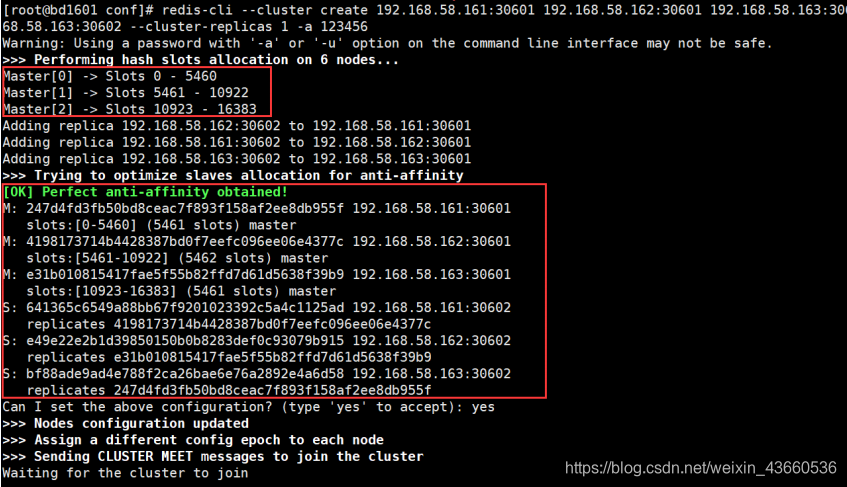
- 查看集群信息
redis-cli -h 127.0.0.1 -p 20601 -a 123456
# 查看集群信息
cluster info
# 查看节点列表
cluster nodes
10.4. 访问集群
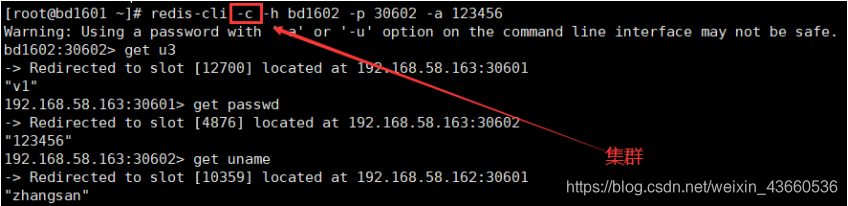
## 集群方式访问redis集群,这种方式权限高,增删改查都可以,集群自动匹配
[1/2/3]# redis-cli -c -h bd1602 -p 30602 -a 123456
## 单点方式访问redis集群,这种方式,创建key-vlaue可能会没有权限
[1/2/3]# redis-cli -h bd1602 -p 30602 -a 123456
10.5、关机拍照
- 关闭六个节点 Ctrl+C
- shutdown -h now
- 拍摄快照





 扫一扫
扫一扫


 1930
1930

 被折叠的 条评论
为什么被折叠?
被折叠的 条评论
为什么被折叠?
 到【灌水乐园】发言





