


 本文详细介绍如何在Maven项目中配置MyBatis Generator插件,包括设置数据库连接信息、生成器配置、目录结构及编译sql。重点讲解了配置文件的编写与注意事项,以及如何配合Spring Boot进行数据访问操作。
pom引入插件
<plugin>
    <groupId>org.mybatis.generator</groupId>
    <artifactId>mybatis-generator-maven-plugin</artifactId>
    <version>1.3.2</version>
    <configuration>
       <!-- 下面是地址 -->
        <configurationFile>GeneratorMapper.xml</configurationFile>
        <verbose>true</verbose>
        <overwrite>true</overwrite>
    </configuration>
</plugin>
在根目录下创建一个配置文件.xml
<?xml version="1.0" encoding="UTF-8"?>
<!DOCTYPE generatorConfiguration
        PUBLIC "-//mybatis.org//DTD MyBatis Generator Configuration 1.0//EN"
        "http://mybatis.org/dtd/mybatis-generator-config_1_0.dtd">

<generatorConfiguration>
    <!--下面是引入包的路径  可在官网寻找
		http://mvnrepository.com/artifact/mysql/mysql-connector-java
	-->
    <classPathEntry location="E:\rubbish\mysql-connector-java-8.0.16.jar" />
    <context id="testTables" targetRuntime="MyBatis3">
        <commentGenerator>
            <!-- 是否去除自动生成的注释 true:是 : false:否 -->
            <property name="suppressAllComments" value="true" />
        </commentGenerator>
        <!--数据库连接的信息:驱动类、连接地址、用户名、密码 -->
        <jdbcConnection driverClass="com.mysql.jdbc.Driver"
                        connectionURL="jdbc:mysql://localhost:3306/student?serverTimezone=UTC"
                        userId="root"
                        password="root">
        </jdbcConnection>

        <!-- <jdbcConnection driverClass="oracle.jdbc.OracleDriver" connectionURL="jdbc:oracle:thin:@127.0.0.1:1521:yycg"
            userId="yycg" password="yycg"> </jdbcConnection> -->

        <!-- 默认false,把JDBC DECIMAL 和 NUMERIC 类型解析为 Integer,为 true时把JDBC DECIMAL
            和 NUMERIC 类型解析为java.math.BigDecimal -->
        <javaTypeResolver>
            <property name="forceBigDecimals" value="false" />
        </javaTypeResolver>
<!--   targetPackage 表示包路径  targetProject 表示哪里工程     -->
        <!-- targetProject:生成PO类的位置 -->
        <javaModelGenerator targetPackage="com.littlenine.model"
                            targetProject="src/main/java">
            <!-- enableSubPackages:是否让schema作为包的后缀 -->
            <property name="enableSubPackages" value="false" />
            <!-- 从数据库返回的值被清理前后的空格 -->
            <property name="trimStrings" value="true" />
        </javaModelGenerator>
        <!-- targetProject:mapper映射文件生成的位置 -->
        <sqlMapGenerator targetPackage="com.littlenine.mapper"
                         targetProject="src/main/java">
            <!-- enableSubPackages:是否让schema作为包的后缀 -->
            <property name="enableSubPackages" value="false" />
        </sqlMapGenerator>
        <!-- targetPackage:mapper接口生成的位置 -->
        <javaClientGenerator type="XMLMAPPER"
                             targetPackage="com.littlenine.mapper" targetProject="src/main/java">
            <!-- enableSubPackages:是否让schema作为包的后缀 -->
            <property name="enableSubPackages" value="false" />
        </javaClientGenerator>
        <!-- 指定数据库表 -->
        <table tableName="student" domainObjectName="Student"
               enableCountByExample="false"
               enableUpdateByExample="false"
               enableDeleteByExample="false"
               enableSelectByExample="false"
               selectByExampleQueryId="false"
               ></table>
<!--        <table tableName="chat"></table>-->
<!--        <table tableName="discuss"></table>-->
<!--        <table tableName="dynamic"></table>-->
<!--        <table tableName="group"></table>-->
<!--        <table tableName="relation"></table>-->
<!--        <table tableName="resgister"></table>-->
<!--        <table tableName="user"></table>-->
    </context>
</generatorConfiguration>
上面的配置几个需要注意点的地方
- 一个是mysql-connector-java 版本 和 本地mysql 版本一致
- 一个mysql 链接参数需要加?serverTimezone=UTC 时差问题
- 可以在table标签定义少点东西
- 数据库字段名转化为对象属性 会把下划线转成 小驼峰
编译最后的目录结构
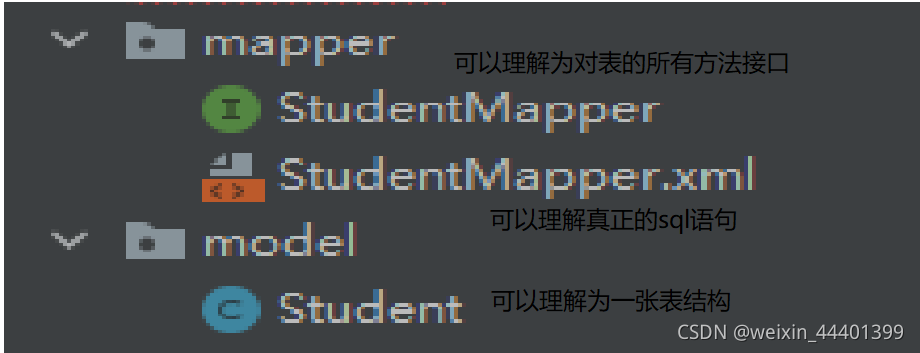
使用
访问(*/student?id=1)根据id返回学生信息
创建一个学生控制器
@Controller
public class StudentController {
//    注入业务层 暂时解释为数据库接口 需要注入
    //直接将接口作为类属性 需要autowired注解
    @Autowired
    private StudentService studentService;

//    根据请求参数返回学生对象
    @RequestMapping("/student")
    public @ResponseBody Object student(Integer id){
          Student student =  studentService.queryStudentById(id);
        return student;
    }
}
创建一个学生服务接口 里面有个queryStudentById方法 由于上面直接将接口作为属性所以需要实现这个类
public interface StudentService {
    Student queryStudentById(Integer id);
}
这里StudentMapper也是个dao接口所以直接在接口上添加@Mapper注解
@Service
public class StudentServiceImpl implements StudentService{
    //直接将接口作为类属性 需要autowired注解
    @Autowired
    private StudentMapper studentMapper;
    @Override
    public Student queryStudentById(Integer id) {
        return studentMapper.selectByPrimaryKey(id);
    }
}
@Mapper //这个接口是dao 有实现xml但是没有实现类所以需要这个注解
public interface StudentMapper {
    int deleteByPrimaryKey(Integer id);
    int insert(Student record);
    int insertSelective(Student record);
    Student selectByPrimaryKey(Integer id);
    int updateByPrimaryKeySelective(Student record);
    int updateByPrimaryKey(Student record);
}
最后还需要将xml编译进去在pom.xml配置
没有配置之前是没有这个类的所以会报错 因为在java下面默认只编译java
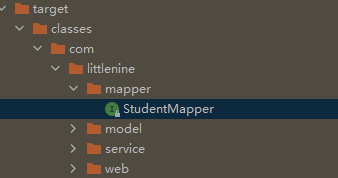
在pombuild标签配置
<!--        手动配置需要加载的文件-->
        <resources>
            <resource>
                <directory>src/main/java</directory>
                <includes>
                    <include>**/*.xml</include>
                </includes>
            </resource>
        </resources>
最后一步配置sql参数
#mysql 8版本以上
spring.datasource.driver-class-name=com.mysql.cj.jdbc.Driver
spring.datasource.url=jdbc:mysql://localhost:3306/student?serverTimezone=UTC
spring.datasource.username=root
spring.datasource.password=root





 扫一扫
扫一扫


 2684
2684

 被折叠的 条评论
为什么被折叠?
被折叠的 条评论
为什么被折叠?
 到【灌水乐园】发言





