
cppcheck入门

摘要

书写完代码后,如果有工具可以检查代码中存在的未定义行为,对于程序员来讲,乃至对于整个软件开发流程来讲都是大有裨益的。而cppcheck就是好用的工具之一。cppcheck作为C/C++代码检查的利器,使用方便高效,本文作为一个入门篇章,可让读者快速上手。

1. cppcheck是什么

cppcheck提供的文档中,对于cppcheck的介绍如下:

Cppcheck is an analysis tool for C/C++ code. It provides unique code analysis to detect bugs 
and focuses on detecting undefined behaviour and dangerous coding constructs. The goal is to
 detect   only real  errors in the code, and generate as few false positives (wrongly 
 reported warnings) as  possible. 

释义:
Cppcheck是一个用于C/C++代码的分析工具。它提供独特的代码分析来检测bug,并专注于检测未定义的行为和危险的编码结构。目标是只检测代码中的真实错误,并生成尽可能少的误报(错误报告的警告)。
由上文可知,cppcheck可用来检查C/C++代码中存在的未定义行为或危险的编码结构。那么借助它,可以帮助C/C++程序员可以将bug消除在萌芽中。那怎么用呢?

2. cppcheck的下载

下载地址:cppcheck下载连接

3. 使用cppcheck

安装完cppcheck软件后,可以通过三种方式使用该工具
> 使用cppcheck的GUI界面
> 将cppcheck的路径加入 到环境变量PATH中,直接使用命令行
> 将cppcheck作为VS的外部工具引入到VS中

3.1 GUI操作

打开cppcheck软件后,如下图所示
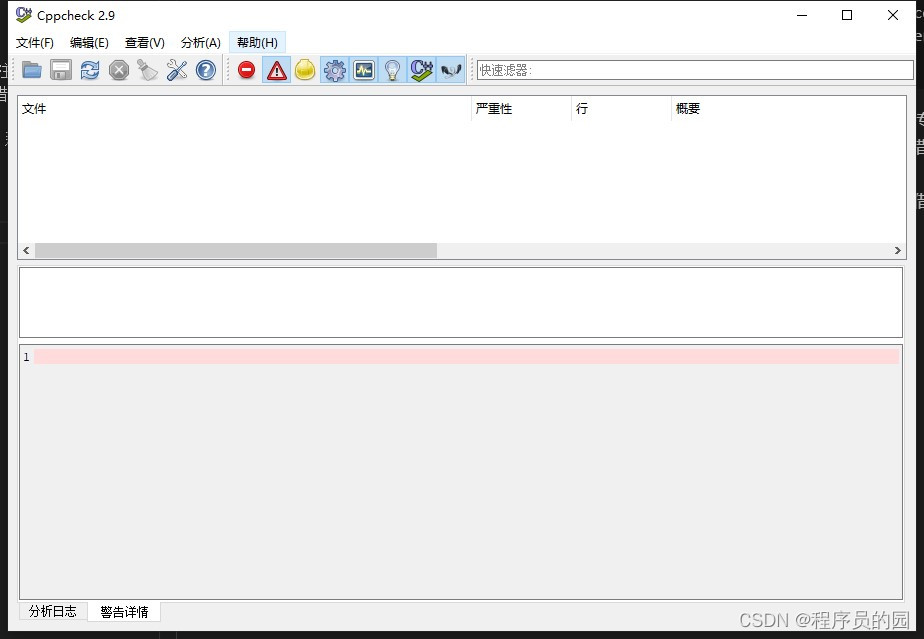
cppcheck GUI界面

单击菜单栏中的分析按钮,依据自身使用需求,在下拉菜单中选择不同的功能,如下图所示:
在这里插入图片描述

3.2命令行操作

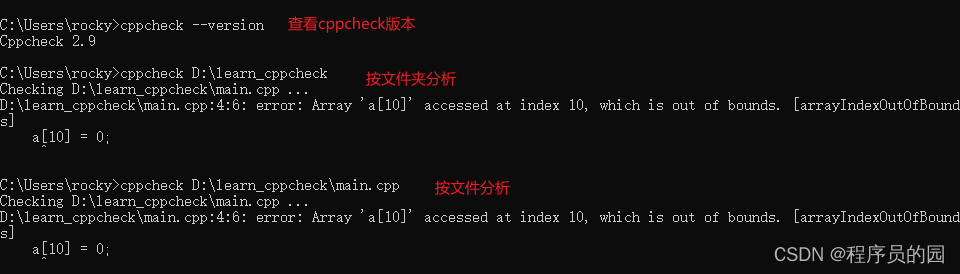
前提:需要将cppcheck的exe所在的路径添加到系统环境变量的PATH中去
操作示例如下:
在这里插入图片描述

  • 可以通过cppcheck --version指令判断当前cppcheck是否已经成功添加到PATH变量中,即能否通过命令行使用cppcheck,只有正确的输出cppcheck的版本方可执行后续的分析操作

  • 常用命令如下:

    • 分析文件 cppcheck main.cpp
    • 分析文件夹下的所有文件 cppcheck path
    • 启用不同的报告级别(如下的path为待分析文件夹的路径)
      • 警告 cppcheck --enable=warning path
      • 性能分析 cppcheck --enable=performance path
      • 信息通知 cppcheck --enable=information path
      • 警告和性能 cppcheck --enable=warning,performance path
    • 输出分析结果到文件 cppcheck path 2> d:/err.log //d:/err.log为自定义的文件路径

    3.3 集成到VS

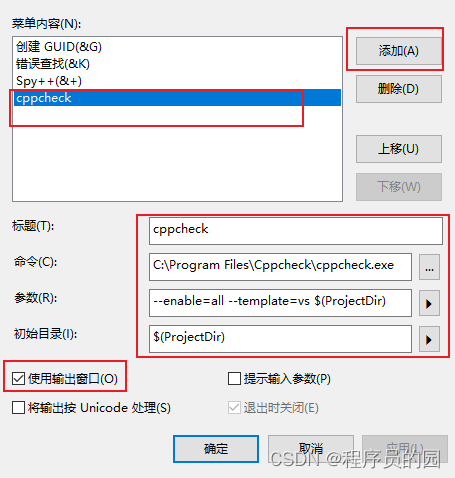
    首次需要添加cppcheck工具,方法如下: 菜单栏的 工具->外部工具,如下图
    在这里插入图片描述

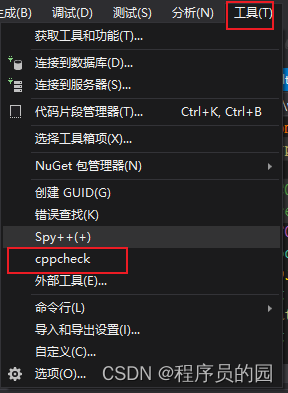
    后续使用cppcheck功能时,只需要单击菜单栏工具,下拉菜单找到cppcheck,单击即可
    在这里插入图片描述

========= Cppcheck ========= About The original name of this program is "C++check" but it was later changed to "cppcheck". Manual A manual is available online: http://cppcheck.sourceforge.net/manual.pdf Compiling Any C++11 compiler should work. For compilers with partial C++11 support it may work. If your compiler has the C++11 features that are available in Visual Studio 2010 then it will work. If nullptr is not supported by your compiler then this can be emulated using the header lib/cxx11emu.h. To build the GUI, you need Qt. When building the command line tool, PCRE is optional. It is used if you build with rules. There are multiple compilation choices: * qmake - cross platform build tool * cmake - cross platform build tool * Windows: Visual Studio * Windows: Qt Creator + mingw * gnu make * g++ 4.6 (or later) * clang++ qmake ===== You can use the gui/gui.pro file to build the GUI. cd gui qmake make Visual Studio ============= Use the cppcheck.sln file. The file is configured for Visual Studio 2013, but the platform toolset can be changed easily to older or newer versions. The solution contains platform targets for both x86 and x64. To compile with rules, select "Release-PCRE" or "Debug-PCRE" configuration. pcre.lib (pcre64.lib for x64 builds) and pcre.h are expected to be in /extlibs then. Qt Creator + mingw ================== The PCRE dll is needed to build the CLI. It can be downloaded here: http://software-download.name/pcre-library-windows/ gnu make ======== Simple build (no dependencies): make The recommended release build is: make SRCDIR=build CFGDIR=cfg HAVE_RULES=yes Flags: SRCDIR=build : Python is used to optimise cppcheck CFGDIR=cfg : Specify folder where .cfg files are found HAVE_RULES=yes : Enable rules (pcre is required if this is used) g++ (for experts) ================= If you just want to build Cppcheck without dependencies then you can use this command: g++ -o cppcheck -std=c++0x -include lib/cxx11emu.h -Iexternals/tinyxml -Ilib cli/*.cpp lib/*.cpp externals/tinyxml/*.cpp If you want to use --rule and --rule-file then dependencies are needed: g++ -o cppcheck -std=c++0x -include lib/cxx11emu.h -lpcre -DHAVE_RULES -Ilib -Iexternals/tinyxml cli/*.cpp lib/*.cpp externals/tinyxml/*.cpp mingw ===== The "LDFLAGS=-lshlwapi" is needed when building with mingw mingw32-make LDFLAGS=-lshlwapi other compilers/ide =================== 1. Create a empty project file / makefile. 2. Add all cpp files in the cppcheck cli and lib folders to the project file / makefile. 3. Compile. Cross compiling Win32 (CLI) version of Cppcheck in Linux sudo apt-get install mingw32 make CXX=i586-mingw32msvc-g++ LDFLAGS="-lshlwapi" mv cppcheck cppcheck.exe Webpage http://cppcheck.sourceforge.net/
评论
成就一亿技术人!
拼手气红包6.0元
还能输入1000个字符
 
红包 添加红包
表情包 插入表情
 条评论被折叠 查看
添加红包

请填写红包祝福语或标题

红包个数最小为10个

红包金额最低5元

当前余额3.43前往充值 >
需支付:10.00
成就一亿技术人!
领取后你会自动成为博主和红包主的粉丝 规则
hope_wisdom
发出的红包

打赏作者

程序员的园

你的鼓励将是我创作的最大动力

¥1 ¥2 ¥4 ¥6 ¥10 ¥20
扫码支付:¥1
获取中
扫码支付

您的余额不足,请更换扫码支付或充值

打赏作者

实付
使用余额支付
点击重新获取
扫码支付
钱包余额 0

抵扣说明:

1.余额是钱包充值的虚拟货币,按照1:1的比例进行支付金额的抵扣。
2.余额无法直接购买下载,可以购买VIP、付费专栏及课程。

余额充值


