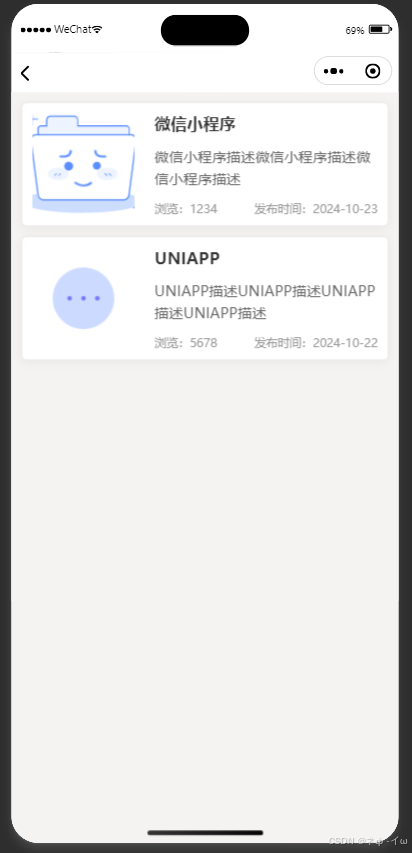
<view class="news-list">
  <block wx:for="{{newsList}}" wx:key="index">
    <view class="news-item" bindtap="showDetails" data-index="{{index}}">
      <image class="news-image" src="{{item.image}}" mode="aspectFill"></image>
      <view class="news-content">
        <view class="news-title-container">
          <text class="news-title">{{item.title}}</text>
        </view>
        <view class="news-description-container">
          <text class="news-description">{{item.description}}</text>
        </view>
        <view class="news-meta">
          <text class="news-view-count">浏览:{{item.viewCount}}</text>
          <text class="news-publish-time">发布时间:{{item.publishTime}}</text>
        </view>
      </view>
    </view>
  </block>
</view>
page {
  display: flex;
  flex-direction: column;
  background-color: #f5f2f2;
}

.news-list {
  display: flex;
  flex-direction: column;
  padding: 20rpx;
  width: 100%;
  padding-bottom: env(safe-area-inset-bottom);
}

.news-item {
  display: flex;
  padding: 20rpx;
  margin-bottom: 20rpx;
  border: 1px solid #eaeaea;
  border-radius: 12rpx;
  background-color: #ffffff;
  box-shadow: 0 2px 10px rgba(0, 0, 0, 0.05);
  width: calc(100% - 40rpx);
  box-sizing: border-box;
  flex-direction: row;
  cursor: pointer;
}

.news-image {
  width: 200rpx;
  height: 200rpx;
  margin-right: 20rpx;
  border-radius: 8rpx;
  object-fit: cover;
  flex-shrink: 0;
  flex-grow: 0;
}

.news-content {
  display: flex;
  flex-direction: column;
  justify-content: space-between;
  flex: 1;
  padding-left: 20rpx;
}

.news-title-container {
  display: flex;
  align-items: center;
}

.news-title {
  font-size: 32rpx;
  color: #333333;
  font-weight: bold;
  overflow: hidden;
  text-overflow: ellipsis;
  white-space: nowrap;
}

.news-description-container {
  margin-top: 10rpx;
}

.news-description {
  font-size: 28rpx;
  color: #666666;
  line-height: 1.5;
  overflow: hidden;
  text-overflow: ellipsis;
  display: -webkit-box;
  -webkit-line-clamp: 2;
  -webkit-box-orient: vertical;
}

.news-meta {
  display: flex;
  justify-content: space-between;
  margin-top: 10rpx;
  font-size: 24rpx;
  color: #999999;
}
Page({
  data: {
    newsList: [
      {
        image: '/images/none.png',
        title: '微信小程序',
        description: '微信小程序描述微信小程序描述微信小程序描述',
        viewCount: '1234',
        publishTime: '2024-10-23'
      },
      {
        image: '/images/more.png',
        title: 'UNIAPP',
        description: 'UNIAPP描述UNIAPP描述UNIAPP描述UNIAPP描述',
        viewCount: '5678',
        publishTime: '2024-10-22'
      },
    ]
  },
  showDetails: function (e) {
    const index = e.currentTarget.dataset.index;
    const item = this.data.newsList[index];

    wx.showModal({
      title: `${item.title}`,
      content: `${item.description}`,
      showCancel: true,
      cancelText: '取消',
      confirmText: '确认',
      success: function (res) {
        if (res.confirm) {
          console.log('用户点击确定');
        } else if (res.cancel) {
          console.log('用户点击取消');
        }
      }
    });
  },
  onLoad: function () {
  }
});





 扫一扫
扫一扫


 2296
2296

 被折叠的 条评论
为什么被折叠?
被折叠的 条评论
为什么被折叠?
 到【灌水乐园】发言





