



实现app自动更新升级版本
业务场景
用户登录前检测是否是最新版本,若不是,提醒用户更新
用户在设置模块下可以手动检测版本并升级
资源
uni-app
uView2.0
结果展示
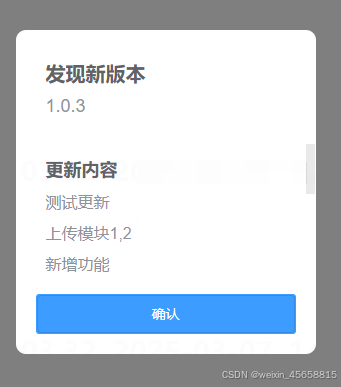
实现
该功能我是放在登录页以及设置模块下-检查更新里面的,大家可根据实际业务进行调整
开箱即用的测试版代码
(模拟后端接口及真机plus参数)
<template>
	<view>
		<u-popup
			:show="showUpdateDetail"
			@close="closeUpdateDetail"
			@open="openUpdateDetail"
			mode="center"
			:round="10"
			:closeOnClickOverlay="false"
			customStyle="width: 80%">
			<view style="margin: 20px">
				<u--text
					text="发现新版本"
					size="20"
					:bold="true"
					color="#606266"
					margin="10px"></u--text>
				<u--text
					:text="appInfo.versionName"
					size="18"
					color="#909399"
					margin="10px"
					style="margin-bottom: 40px"></u--text>
				<u--text
					text="更新内容"
					size="18"
					:bold="true"
					color="#606266"
					margin="10px"></u--text>
				<view v-for="item in appInfo.updateLog">
					<u--text
						:text="item"
						size="16"
						color="#909399"
						margin="10px"></u--text>
				</view>
				<u-button
					style="margin-top: 20px"
					type="primary"
					text="确认"
					@click="appUpdate"></u-button>
			</view>
		</u-popup>
	</view>
</template>

<script>
export default {
	name: 'Login',
	onLoad() {
		this.checkAppUpdate()
	},
	data() {
		return {
			showUpdateDetail: false, // 显示app更新
			appInfo: {
				versionName: '',
				updateLog: [],
				downloadUrl: ''
			}
		}
	},
	methods: {
		// 检查app版本更新
		checkAppUpdate() {
			let that = this
			// 真机plus参数
			// let versionName = plus.runtime.version
			// 非真机 模拟plus参数
			let versionName = '1.0.0'

			// 模拟后端接口,返回是否更新以及最新版本信息
			that.showUpdateDetail = true
			that.appInfo.versionName = '1.0.1'
			that.appInfo.updateLog = '功能修复&bug修复'.split('&')
			that.appInfo.downloadUrl = 'url'
		},
		closeUpdateDetail() {
			this.showUpdateDetail = false
		},
		openUpdateDetail() {
			this.showUpdateDetail = true
		},
		appUpdate() {
			this.showUpdateDetail = false
			uni.showLoading({
				title: '请稍候,安装包下载中...'
			})
			// 非真机,无plus参数,pc端仅做样式参考,真机调试去掉return即可
			return
			let url = this.appInfo.downloadUrl
			let dtask = plus.downloader.createDownload(url, {}, function (d, status) {
				uni.hideLoading()
				// 下载完成
				if (status === 200) {
					//下载成功后的回调函数
					let path = d.filename
					//安装程序,第一个参数是路径,默认的下载路径在_downloads里面
					plus.runtime.install(
						path,
						{},
						function () {
							plus.runtime.restart()
						},
						function () {
							uni.showToast({
								title: '安装失败',
								icon: 'none'
							})
						}
					)
					plus.nativeUI.closeWaiting()
				} else {
					uni.showToast({
						title: '安装包下载失败' + status,
						icon: 'none'
					})
				}
			})
			dtask.start()
		}
	}
}
</script>
真实的完整版代码
vue 文件
<template>
	<view>
		<u-popup
			:show="showUpdateDetail"
			@close="closeUpdateDetail"
			@open="openUpdateDetail"
			mode="center"
			:round="10"
			:closeOnClickOverlay="false"
			customStyle="width: 80%">
			<view style="margin: 20px">
				<u--text
					text="发现新版本"
					size="20"
					:bold="true"
					color="#606266"
					margin="10px"></u--text>
				<u--text
					:text="appInfo.versionName"
					size="18"
					color="#909399"
					margin="10px"
					style="margin-bottom: 40px"></u--text>
				<u--text
					text="更新内容"
					size="18"
					:bold="true"
					color="#606266"
					margin="10px"></u--text>
				<view v-for="item in appInfo.updateLog">
					<u--text
						:text="item"
						size="16"
						color="#909399"
						margin="10px"></u--text>
				</view>
				<u-button
					style="margin-top: 20px"
					type="primary"
					text="确认"
					@click="appUpdate"></u-button>
			</view>
		</u-popup>
	</view>
</template>

<script>
// 这是对应的后端接口,自己定义就好
import { checkVersion } from '@/api/system/app.js'
// 参考下方环境配置文件
import config from '@/utils/config.js'

export default {
	name: 'Login',
	onLoad() {
		this.checkAppUpdate()
	},
	data() {
		return {
			showUpdateDetail: false, // 显示app更新
			appInfo: {
				versionName: '',
				updateLog: [],
				downloadUrl: ''
			}
		}
	},
	methods: {
		// 检查app版本更新
		checkAppUpdate() {
			let that = this
			// plus参数只有真机才有,pc端调试会报错,所以配置了只有在test和pro环境才执行
			if (config.debug) {
				return
			}
			let versionName = plus.runtime.version
			// 调用后端接口
			checkVersion(versionName).then((res) => {
				const data = res.data
				if (data.isUpdate) {
					that.showUpdateDetail = true
					that.appInfo.versionName = data.versionName
					that.appInfo.updateLog = data.updateLog.split('&')
					that.appInfo.downloadUrl = data.downloadUrl
				}
			})
		},
		closeUpdateDetail() {
			this.showUpdateDetail = false
		},
		openUpdateDetail() {
			this.showUpdateDetail = true
		},
		appUpdate() {
			// plus参数只有真机才有,pc端调试会报错,所以配置了只有在test和pro环境才执行
			if (config.debug) {
				return
			}
			this.showUpdateDetail = false
			uni.showLoading({
				title: '请稍候,安装包下载中...'
			})
			let url = this.appInfo.downloadUrl
			let dtask = plus.downloader.createDownload(url, {}, function (d, status) {
				uni.hideLoading()
				// 下载完成
				if (status === 200) {
					//下载成功后的回调函数
					let path = d.filename
					//安装程序,第一个参数是路径,默认的下载路径在_downloads里面
					plus.runtime.install(
						path,
						{},
						function () {
							plus.runtime.restart()
						},
						function () {
							uni.showToast({
								title: '安装失败',
								icon: 'none'
							})
						}
					)
					plus.nativeUI.closeWaiting()
				} else {
					uni.showToast({
						title: '安装包下载失败' + status,
						icon: 'none'
					})
				}
			})
			dtask.start()
		}
	}
}
</script>
环境配置文件
utils/config.js
const config = {
	// 开发环境
	dev: {
		baseUrl: 'http://localhost:48094',
		baseApi: '/admin-api',
		debug: true
	},
	// 测试环境
	test: {
		baseUrl: 'http://ip:48094',
		baseApi: '/admin-api',
		debug: false
	},
	// 生产环境
	pro: {
		baseUrl: 'http://ip:48094',
		baseApi: '/admin-api',
		debug: false
	}
};

// 设置当前环境
const env = 'test';

// 导出当前环境的配置
export default config[env];





 扫一扫
扫一扫


 8025
8025

 被折叠的 条评论
为什么被折叠?
被折叠的 条评论
为什么被折叠?
 到【灌水乐园】发言





