Ansible项目案例

本文通过Ansible展示了多个服务的自动化部署,包括基础环境搭建,NFS、Redis、MariaDB、Nginx、PHP-fpm、Tomcat、Keepalived和Zabbix-agent的安装配置,覆盖了常见的运维任务。
Ansible项目案例

1.基础环境项目案例

#目录结构
[root@manage roles]# tree
.
├── ansible.cfg
├── base
│   ├── files
│   │   ├── clinet_push_data_server.sh.j2
│   │   └── sshd_config.j2
│   ├── handlers
│   │   └── main.yml
│   ├── tasks
│   │   └── main.yml
│   └── templates
├── group_vars
│   └── all
├── hosts
└── sity.yml

[root@manage roles]# cat ansible.cfg 
[defaults]
inventory      = ./hosts
host_key_checking = False
forks          = 100

[root@manage roles]# cat hosts 
[nfsservers]
10.0.0.31

[backupservers]
10.0.0.41


[lbservers]
10.0.0.5 
10.0.0.6

[webservers]
10.0.0.7 
10.0.0.8

[lbservers]
10.0.0.51

[root@manage roles]# cat base/tasks/main.yml 
#关闭防火墙
- name: Stoppend Firewalld Server
  systemd:
    name: firewalld
    state: stopped
    enabled: no

#关闭Selinux
- name: Stoppend Selinux Server
  selinux:
    state: disabled

#创建base源
- name: Create Base Yum Repo
  yum_repository:
    name: base
    description: EPEL YUM repo
    baseurl: http://mirrors.aliyun.com/centos/$releasever/os/$basearch/
    gpgcheck: no
    
#创建epel源
- name: Create Eple Yum Repo
  yum_repository:
    name: eple
    description: EPEL YUM epel
    baseurl: http://mirrors.aliyun.com/epel/7/$basearch
    gpgcheck: no

#创建nginx源
- name: Installed Nginx repo
  yum_repository:
    name: nginx
    description: nginx repos
    baseurl: http://nginx.org/packages/centos/$releasever/$basearch/
    gpgcheck: no
  when: ( ansible_hostname is match("web*")) or
        ( ansible_hostname is match("lb*"))
#创建php源
- name: Installed PHP repo
  yum_repository:
    name: webtatic-php
    description: php repos
    baseurl: http://us-east.repo.webtatic.com/yum/el7/x86_64/
    gpgcheck: no
  when: ( ansible_hostname is match("web*"))

#安装基础的命令
- name: Installed Packages All
  yum:
    name: "{{ packages }}"
    state: present

#创建用户组
- name: Create Group www
  group:
    name: "{{ web_group }}"
    gid: "{{ web_id }}"

#创建用户    
- name: Create User www
  user:
    name: "{{ web_user }}"
    uid: "{{ web_id }}"
    create_home: no
    shell: /sbin/nologin

#拷呗修改好的ssh文件
- name: Configure SSH Server
  copy:
    src: sshd_config.j2
    dest: /etc/ssh/sshd_config
    owner: root
    group: root
    mode: 0600
  notify: Restart SSH Server

#调整文件描述符
- name: Set sysctl file limiits  
  pam_limits:
    dest: "{{ item.dest }}"
    domain: '*'
    limit_type: "{{ item.limit_type }}"
    limit_item: "{{ item.limit_item }}"
    value: "{{ item.value }}"
  with_items:
    - { dest: '/etc/security/limits.conf',limit_type: 'soft',limit_item: 'nofile', value: '655350' }
    - { dest: '/etc/security/limits.conf',limit_type: 'hard',limit_item: 'nofile', value: '655350'}
  
#调整ip_forward
- sysctl:
    sysctl_file: /etc/sysctl.conf
    name: net.ipv4.ip_forward
    value: '1'
    sysctl_set: yes
    reload: yes

#拷呗Rsync备份脚本
- name: Rsync Backup Scripts
  copy:
    src: clinet_push_data_server.sh.j2
    dest: /tmp/clinet_push_data_server.sh
    mode: 0755

#创建定时任务
- name: Rsync cron
  cron:
    name: "Client Push Data to Backup Server"
    minute: "00"
    hour: "02"
    job: '/bin/bash /tmp/clinet_push_data_server.sh &>/dev/null'
[root@manage roles]# cat group_vars/all 
#Installed Packages All
packages:
  - vim
  - net-tools
  - wget
  - unzip
  - lrzsz
  - tree
  - rsync
  - nfs-utils
  - bash-completion
  - iftop
  - iotop
  - glances

##web
web_group: www
web_id: 666
web_user: www
[root@manage roles]# cat base/files/clinet_push_data_server.sh.j2 
#!/usr/bin/bash
# variables == 变量  ---> 一个固定的字符串表示一个不固定的值
PATH=/usr/local/sbin:/usr/local/bin:/usr/sbin:/usr/bin:/root/bin
Src=/backup
Host=$(hostname)
Addr=$(ifconfig eth1 | awk 'NR==2 {print $2}')
Date=$(date +%F)
Dest=${Host}_${Addr}_${Date}

#1.准备对应的备份目录
[ -d $Src/$Dest ] ||  mkdir -p $Src/$Dest

#2.将文件拷贝至备份目录
cd / && \
[ -f $Src/$Dest/sys.tar.gz ] ||  tar czf $Src/$Dest/sys.tar.gz etc/fstab etc/hosts etc/passwd && \
[ -f $Src/$Dest/other.tar.gz ] || tar czf $Src/$Dest/other.tar.gz var/spool/cron/ scripts/ && \

#3.添加标记
[ -f $Src/$Dest/flag_${Date} ] ||  md5sum $Src/$Dest/*.tar.gz > $Src/$Dest/flag_${Date}

#4.推送数据至远程仓库
export RSYNC_PASSWORD=123456
rsync -avz $Src/ rsync_backup@172.16.1.41::backup

#5.保留本地最近7天的数据
find $Src/ -type d -mtime +7 | xargs rm -rf
[root@manage roles]# cat base/files/sshd_config.j2 
#	$OpenBSD: sshd_config,v 1.100 2016/08/15 12:32:04 naddy Exp $

# This is the sshd server system-wide configuration file.  See
# sshd_config(5) for more information.

# This sshd was compiled with PATH=/usr/local/bin:/usr/bin

# The strategy used for options in the default sshd_config shipped with
# OpenSSH is to specify options with their default value where
# possible, but leave them commented.  Uncommented options override the
# default value.

# If you want to change the port on a SELinux system, you have to tell
# SELinux about this change.
# semanage port -a -t ssh_port_t -p tcp #PORTNUMBER
#
#Port 22
#AddressFamily any
#ListenAddress 0.0.0.0
#ListenAddress ::

HostKey /etc/ssh/ssh_host_rsa_key
#HostKey /etc/ssh/ssh_host_dsa_key
HostKey /etc/ssh/ssh_host_ecdsa_key
HostKey /etc/ssh/ssh_host_ed25519_key

# Ciphers and keying
#RekeyLimit default none

# Logging
#SyslogFacility AUTH
SyslogFacility AUTHPRIV
#LogLevel INFO

# Authentication:

#LoginGraceTime 2m
#PermitRootLogin yes
#StrictModes yes
#MaxAuthTries 6
#MaxSessions 10

#PubkeyAuthentication yes

# The default is to check both .ssh/authorized_keys and .ssh/authorized_keys2
# but this is overridden so installations will only check .ssh/authorized_keys
AuthorizedKeysFile	.ssh/authorized_keys

#AuthorizedPrincipalsFile none

#AuthorizedKeysCommand none
#AuthorizedKeysCommandUser nobody

# For this to work you will also need host keys in /etc/ssh/ssh_known_hosts
#HostbasedAuthentication no
# Change to yes if you don't trust ~/.ssh/known_hosts for
# HostbasedAuthentication
#IgnoreUserKnownHosts no
# Don't read the user's ~/.rhosts and ~/.shosts files
#IgnoreRhosts yes

# To disable tunneled clear text passwords, change to no here!
#PasswordAuthentication yes
#PermitEmptyPasswords no
PasswordAuthentication yes

# Change to no to disable s/key passwords
#ChallengeResponseAuthentication yes
ChallengeResponseAuthentication no

# Kerberos options
#KerberosAuthentication no
#KerberosOrLocalPasswd yes
#KerberosTicketCleanup yes
#KerberosGetAFSToken no
#KerberosUseKuserok yes

# GSSAPI options
GSSAPIAuthentication yes
GSSAPICleanupCredentials no
#GSSAPIStrictAcceptorCheck yes
#GSSAPIKeyExchange no
#GSSAPIEnablek5users no

# Set this to 'yes' to enable PAM authentication, account processing,
# and session processing. If this is enabled, PAM authentication will
# be allowed through the ChallengeResponseAuthentication and
# PasswordAuthentication.  Depending on your PAM configuration,
# PAM authentication via ChallengeResponseAuthentication may bypass
# the setting of "PermitRootLogin without-password".
# If you just want the PAM account and session checks to run without
# PAM authentication, then enable this but set PasswordAuthentication
# and ChallengeResponseAuthentication to 'no'.
# WARNING: 'UsePAM no' is not supported in Red Hat Enterprise Linux and may cause several
# problems.
UsePAM yes

#AllowAgentForwarding yes
#AllowTcpForwarding yes
#GatewayPorts no
X11Forwarding yes
#X11DisplayOffset 10
#X11UseLocalhost yes
#PermitTTY yes
#PrintMotd yes
#PrintLastLog yes
#TCPKeepAlive yes
#UseLogin no
#UsePrivilegeSeparation sandbox
#PermitUserEnvironment no
#Compression delayed
#ClientAliveInterval 0
#ClientAliveCountMax 3
#ShowPatchLevel no
UseDNS no
#PidFile /var/run/sshd.pid
#MaxStartups 10:30:100
#PermitTunnel no
#ChrootDirectory none
#VersionAddendum none

# no default banner path
#Banner none

# Accept locale-related environment variables
AcceptEnv LANG LC_CTYPE LC_NUMERIC LC_TIME LC_COLLATE LC_MONETARY LC_MESSAGES
AcceptEnv LC_PAPER LC_NAME LC_ADDRESS LC_TELEPHONE LC_MEASUREMENT
AcceptEnv LC_IDENTIFICATION LC_ALL LANGUAGE
AcceptEnv XMODIFIERS

# override default of no subsystems
Subsystem	sftp	/usr/libexec/openssh/sftp-server

# Example of overriding settings on a per-user basis
#Match User anoncvs
#	X11Forwarding no
#	AllowTcpForwarding no
#	PermitTTY no
#	ForceCommand cvs server
[root@manage roles]# cat base/handlers/main.yml 
- name: Restart SSH Server
  systemd:
    name: sshd
    state: restarted
[root@manage roles]# cat sity.yml 
- hosts: all
  roles:
    - role: base
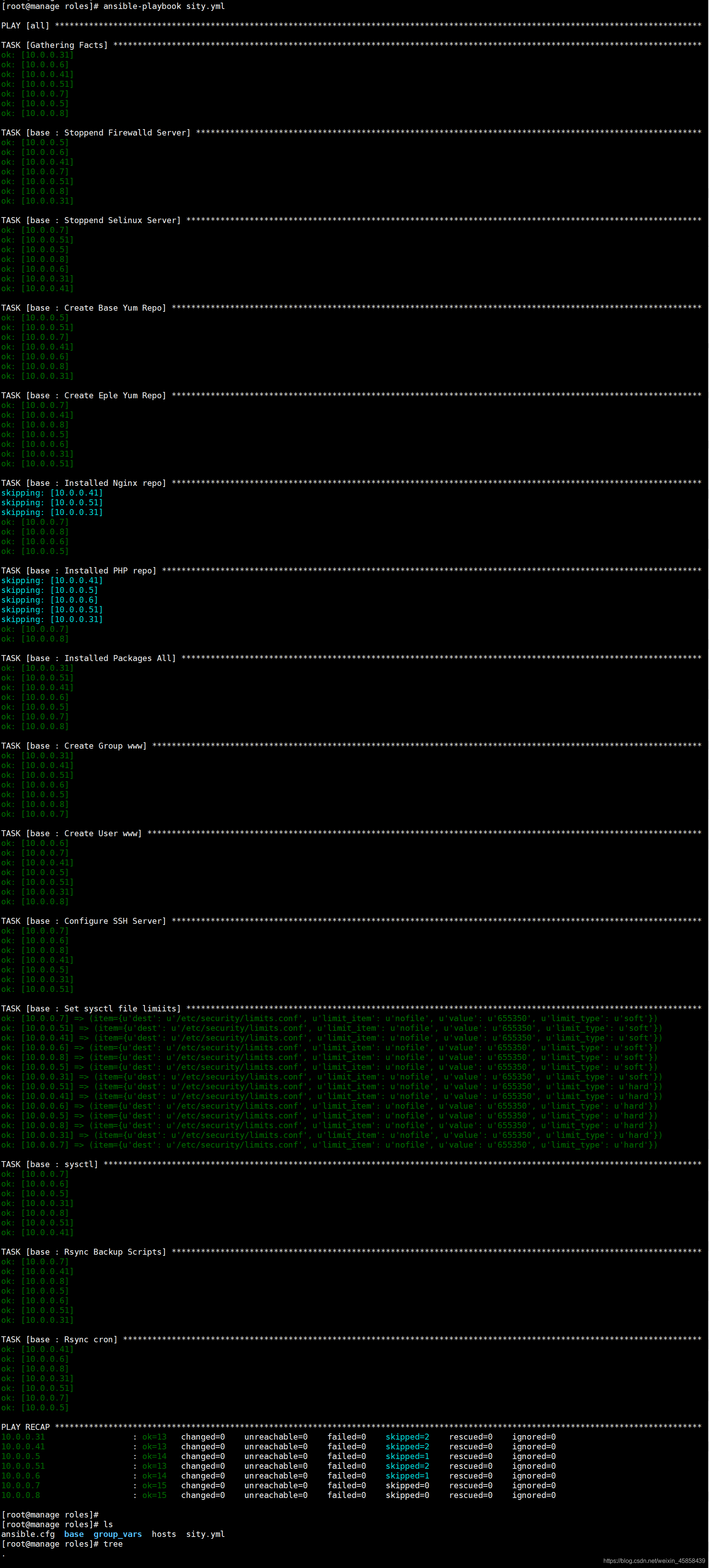
[root@manage roles]# ansible-playbook sity.yml

在这里插入图片描述

2.安装NFS服务

[root@manage roles]# tree nfs
nfs
├── handlers
│   └── main.yml
├── tasks
│   └── main.yml
└── templates
    └── export.j2
[root@manage roles]# cat nfs/handlers/main.yml 
- name: Restarted Nfs Server
  systemd:
    name: nfs
    state: restarted

[root@manage roles]# cat nfs/tasks/main.yml 
- name: Install Nfs Server
  yum:
    name: nfs-utils
    state: present

- name: Configure Nfs Server
  template:
    src: ./export.j2
    dest: /etc/exports
  notify: Restarted Nfs Server

- name: Create Nfs Share Data
  file:
    state: directory
    path: "{{ nfs_share_data }}"
    owner: "{{ web_user }}"
    group: "{{ web_group }}"
    mode: 0755
    recurse: yes

- name: Systemd Nfs Server
  systemd:
    name: nfs
    state: started
    enabled: yes

[root@manage roles]# cat nfs/templates/export.j2 
{{ nfs_share_data }} {{ nfs_share_ip }}(rw,sync,all_squash,anonuid={{ web_id }},anongid={{ web_id }})
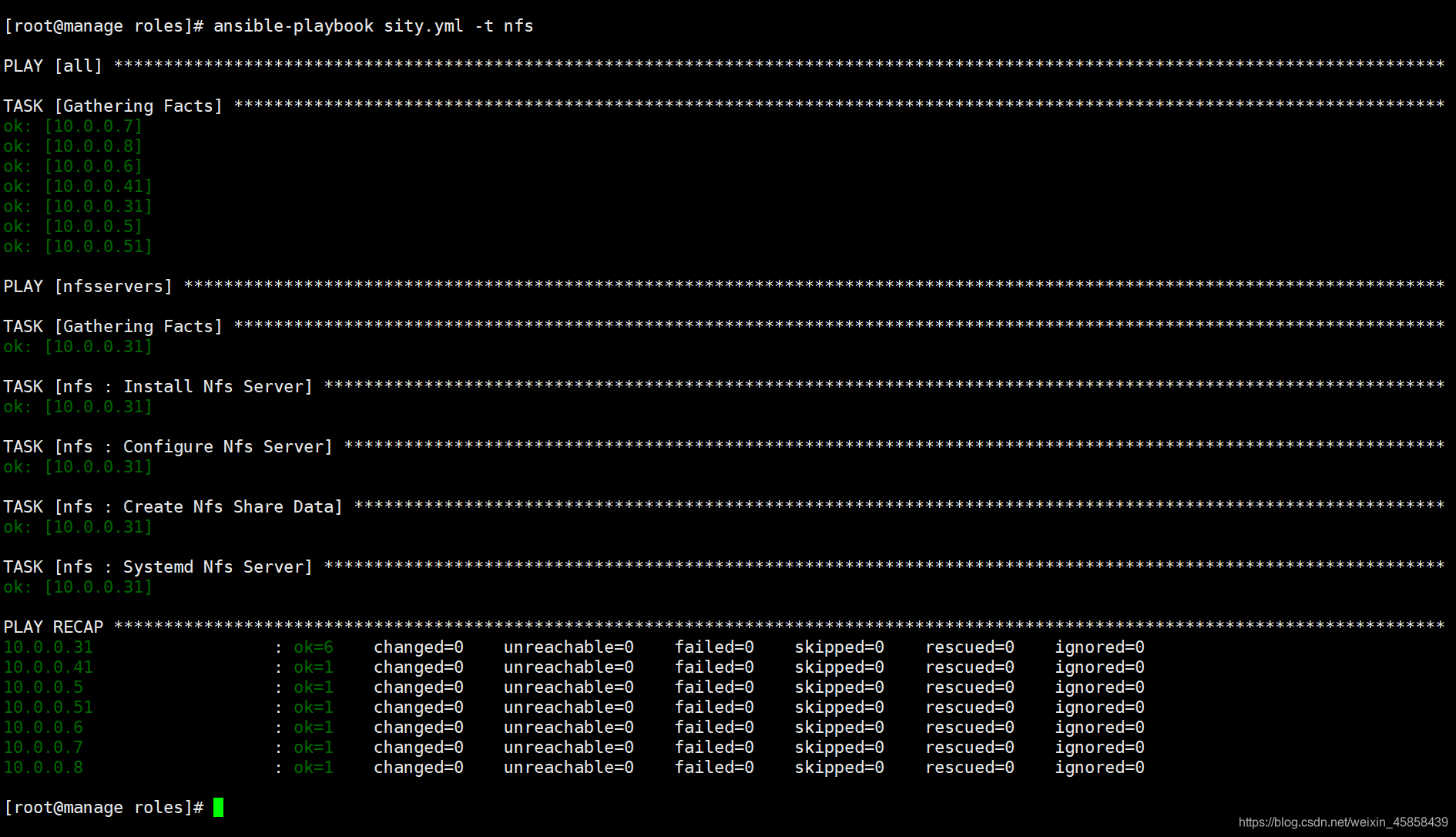
[root@manage roles]# ansible-playbook sity.yml -t nfs

在这里插入图片描述

3.安装redis服务

[root@manage roles]# tree redis
redis
├── handlers
│   └── main.yml
├── tasks
│   └── main.yml
└── templates
    └── redis.conf.j2

[root@manage roles]# cat hosts 
[nfsservers]
10.0.0.31

[backupservers]
10.0.0.41


[lbservers]
10.0.0.5 
10.0.0.6

[webservers]
10.0.0.7 
10.0.0.8

[dbservers]
10.0.0.51

[root@manage roles]# cat redis/tasks/main.yml 
- name: Installed Redis Server
  yum:
    name: redis
    state: present

- name: Configure Redis Server
  template:
    src: ./redis.conf.j2
    dest: /etc/redis.conf
  notify: Restart Redis Server

- name: Sysyemd Redis Server
  systemd:
    name: redis
    state: restarted
    enabled: yes

[root@manage roles]# cat redis/handlers/main.yml 
- name: Restart Redis Server
  systemd:
    name: redis
    state: restarted

#查看ansible系统变量
[root@manage roles]# ansible webservers -m setup -i hosts >2.txt


[root@manage roles]# cat redis/templates/redis.conf.j2.conf 
bind 127.0.0.1 {{ ansible_ens33.ipv4.address }}   #此处根据自己具体变量修改
protected-mode yes
port 6379
tcp-backlog 511
timeout 0
tcp-keepalive 300
daemonize no
supervised no
pidfile /var/run/redis_6379.pid
loglevel notice
logfile /var/log/redis/redis.log
databases 16
save 900 1
save 300 10
save 60 10000
stop-writes-on-bgsave-error yes
rdbcompression yes
rdbchecksum yes
dbfilename dump.rdb
dir /var/lib/redis
slave-serve-stale-data yes
slave-read-only yes
repl-diskless-sync no
repl-diskless-sync-delay 5
repl-disable-tcp-nodelay no
slave-priority 100
appendonly no
appendfilename "appendonly.aof"
appendfsync everysec
no-appendfsync-on-rewrite no
auto-aof-rewrite-percentage 100
auto-aof-rewrite-min-size 64mb
aof-load-truncated yes
lua-time-limit 5000
slowlog-log-slower-than 10000
slowlog-max-len 128
latency-monitor-threshold 0
notify-keyspace-events ""
hash-max-ziplist-entries 512
hash-max-ziplist-value 64
list-max-ziplist-size -2
list-compress-depth 0
set-max-intset-entries 512
zset-max-ziplist-entries 128
zset-max-ziplist-value 64
hll-sparse-max-bytes 3000
activerehashing yes
client-output-buffer-limit normal 0 0 0
client-output-buffer-limit slave 256mb 64mb 60
client-output-buffer-limit pubsub 32mb 8mb 60
hz 10
aof-rewrite-incremental-fsync yes

[root@manage roles]# cat sity.yml 
- hosts: all
  roles:
    - role: base

- hosts: nfsservers
  roles:
    - { role: nfs , tags: nfs }

#增加部分
- hosts: dbservers
  roles:
    - { role: redis , tags: redis }

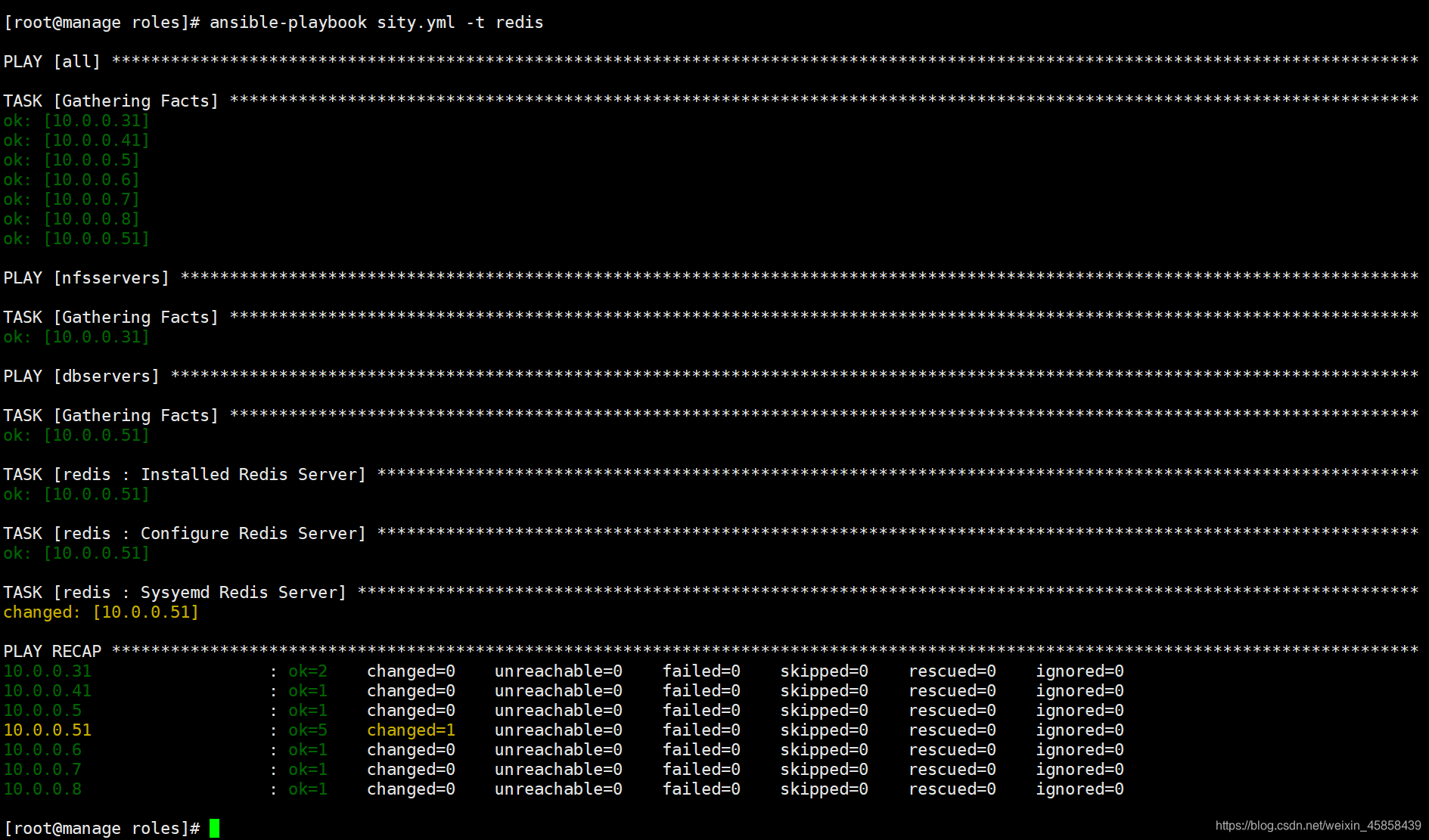
[root@manage roles]# ansible-playbook sity.yml -t redis

在这里插入图片描述

4.安装mariadb服务

[root@manage roles]# tree mysql
mysql
├── handlers
│   └── main.yml
├── tasks
│   └── main.yml
└── templates
    └── my.cnf.j2

[root@manage roles]# cat mysql/tasks/main.yml 
- name: Installed Mariadb Server
  yum:
    name: "{{ dbpackages }}"
    state: present

- name: Configure Mariadb Server
  template:
    src: my.cnf.j2
    dest: /etc/my.cnf
  notify: Restart Mariadb Server
    
- name: Systemd Mariadb Server
  systemd:
    name: mariadb
    state: started
    enabled: yes


- name: Create Mariadb Database
  mysql_db:
    #login_host: localhost
    #login_user: root
    #login_password: test.com
    name: "{{ item }}"
    state: present
  with_items:
    - wordpress
    - jpress


- name: Create Remote Conn User
  mysql_user:
    #login_host: localhost
    #login_user: root
    #login_password: test.com
    name: all
    password: test.com
    host: '%'
    priv: '*.*:ALL'

[root@manage roles]# cat group_vars/all 
###DB
dbpackages:
  - mariadb
  - mariadb-server
  - MySQL-python

[root@manage roles]# cat mysql/handlers/main.yml 
- name: Restart Mariadb Server
  systemd:
    name: mariadb
    state: restarted
[root@manage roles]# cat mysql/templates/my.cnf.j2 
[mysqld]
datadir=/var/lib/mysql
socket=/var/lib/mysql/mysql.sock
# Disabling symbolic-links is recommended to prevent assorted security risks
symbolic-links=0
# Settings user and group are ignored when systemd is used.
# If you need to run mysqld under a different user or group,
# customize your systemd unit file for mariadb according to the
# instructions in http://fedoraproject.org/wiki/Systemd

[mysqld_safe]
log-error=/var/log/mariadb/mariadb.log
pid-file=/var/run/mariadb/mariadb.pid

#
# include all files from the config directory
#
!includedir /etc/my.cnf.d

[root@manage roles]# cat group_vars/all 
- hosts: dbservers
  roles:
    - { role: redis , tags: redis }
    - { role: mysql , tags: mysql }
 
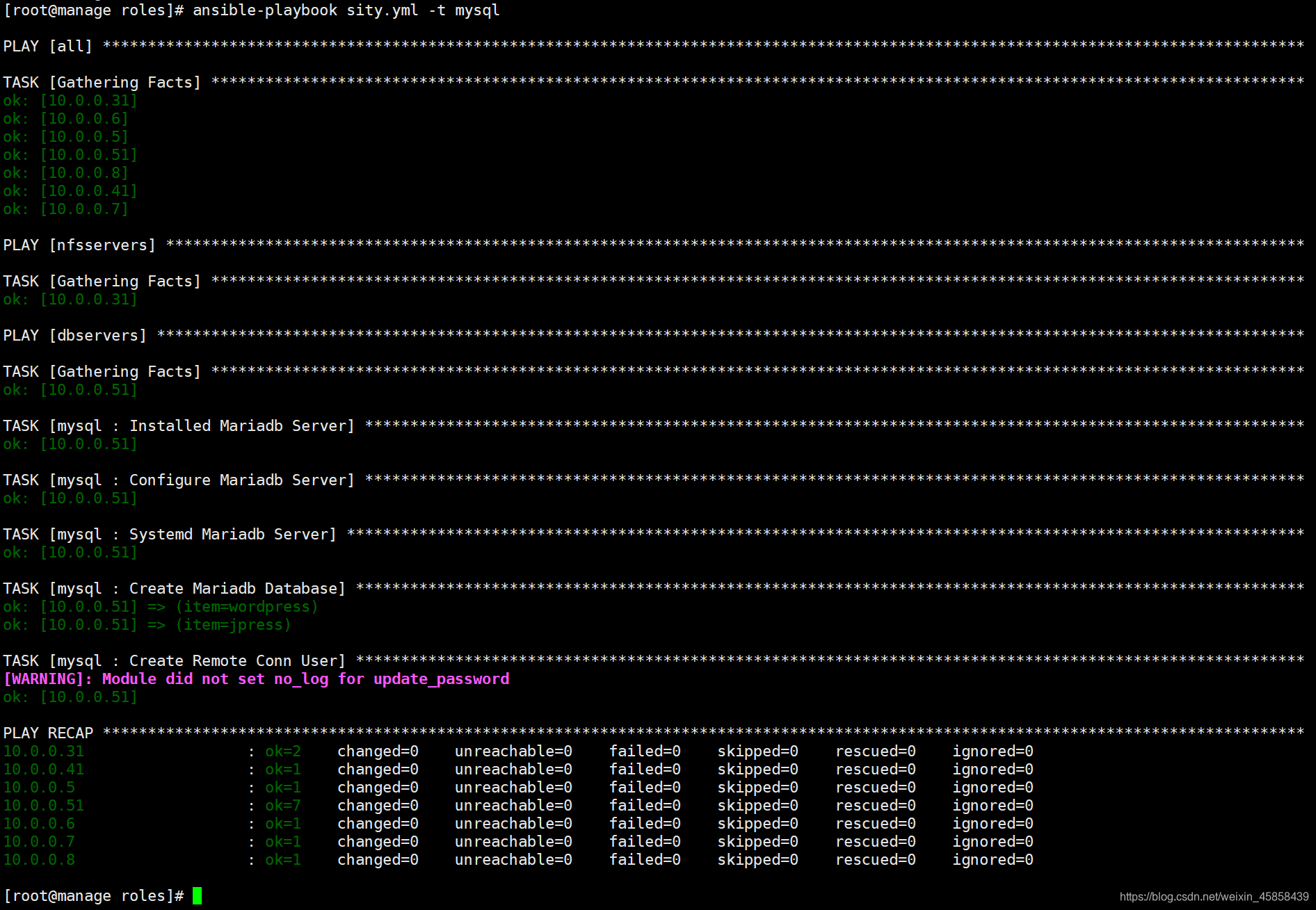
[root@manage roles]# ansible-playbook sity.yml -t mysql

在这里插入图片描述

5.安装nginx服务

[root@manage roles]# tree nginx
nginx
├── handlers
│   └── main.yml
├── tasks
│   └── main.yaml
└── templates
    └── nginx.conf.j2
[root@manage roles]# cat nginx/tasks/main.yaml 
- name: INstall nginx server
  yum:
    name: nginx
    state: present

- name: Configure Nginx server
  template:
    src: nginx.conf.j2
    dest: /etc/nginx/nginx.conf
  notify: Restart Nginx Server

- name: Check Nginx Server
  shell: nginx -t
  changed_when: false

- name: Systemd Nginx Server
  systemd:
    name: nginx
    state: started
    enabled: yes

[root@manage roles]# cat nginx/handlers/main.yml 
- name: Restart Nginx Server
  systemd:
    name: nginx
    state: restarted

[root@manage roles]# cat group_vars/all 
##web
web_group: www
web_id: 666
web_user: www
nginx_include_path: /etc/nginx/conf.d/*.conf

[root@manage roles]# cat nginx/templates/nginx.conf.j2 
user {{ web_user }};
worker_processes  auto;

error_log  /var/log/nginx/error.log notice;
pid        /var/run/nginx.pid;

events {
    worker_connections  2048;
}

http {
    include       /etc/nginx/mime.types;
    default_type  application/octet-stream;
    log_format  main  '$remote_addr - $remote_user [$time_local] "$request" '
                      '$status $body_bytes_sent "$http_referer" '
                      '"$http_user_agent" "$http_x_forwarded_for"';

	access_log /var/log/nginx/access.log main;

    sendfile        on;
    tcp_nopush     on;
    keepalive_timeout  65;
    gzip  on;
    include {{ nginx_include_path }};
}

[root@manage roles]# cat sity.yml 
- hosts: webservers
  roles:
    - { role: nginx , tags: nginx }

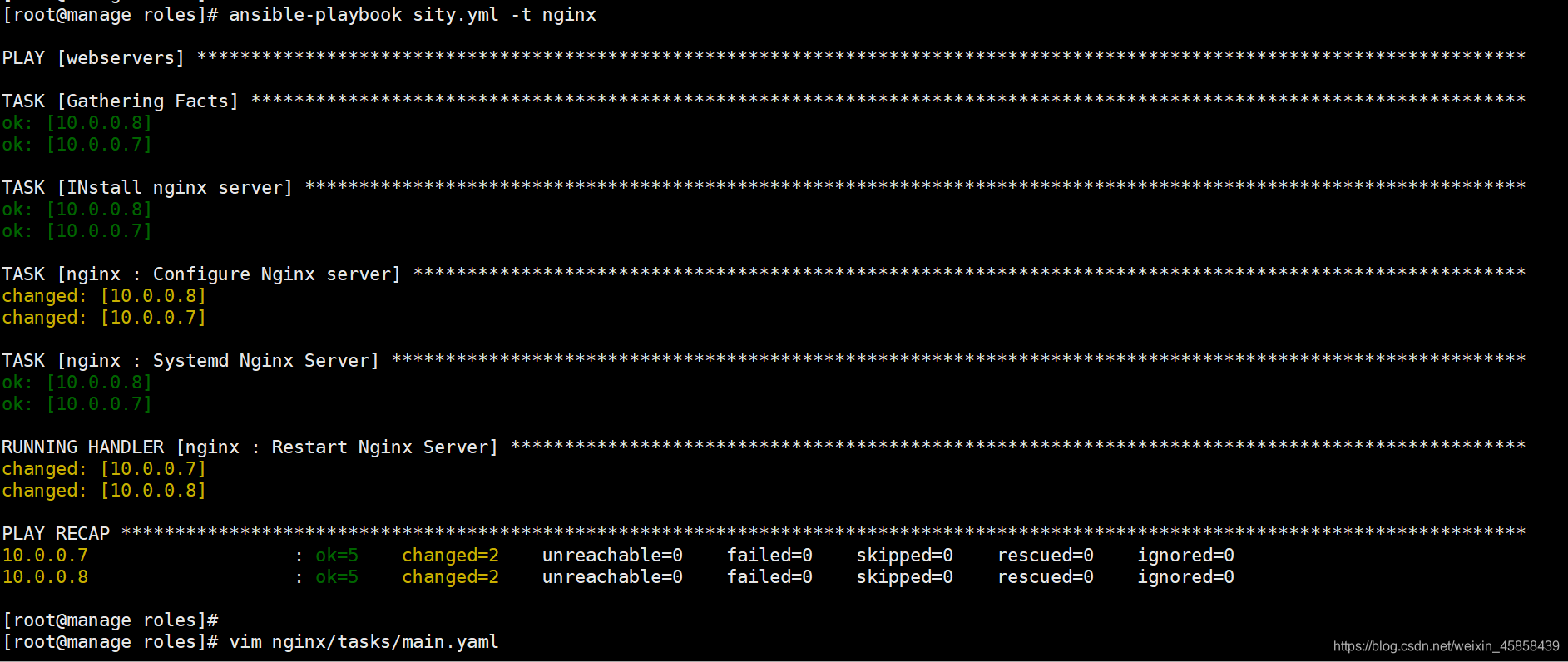
[root@manage roles]# ansible-playbook sity.yml -t nginx

在这里插入图片描述

6.安装PHP-fpm服务

[root@manage roles]# tree php
php
├── handlers
│   └── main.yml
├── tasks
│   └── main.yml
└── templates
    ├── php.ini.j2
    └── www.conf.j2
[root@manage roles]# cat php/tasks/main.yml 
- name: Installed PHP-FPM Server
  yum:
    name: "{{ fpmpackages }}"
    state: present


- name: Configure Php-fpm Server
  template:
    src: "{{ item.src }}"
    dest: "{{ item.dest }}"
  with_items:
    - { src: php.ini.j2 ,dest: /etc/php.ini }
    - { src: www.conf.j2 ,dest: /etc/php-fpm.d/www.conf }
  notify: Restart Php-fpm Server
  
- name: Check Php-fpm Server
  shell: php-fpm -t
  changed_when: false

- name: Systemd Php-fpm Server
  systemd: 
    name: php-fpm
    state: started
    enabled: yes

[root@manage roles]# cat php/handlers/main.yml 
- name: Restart Php-fpm Server
  systemd: 
    name: php-fpm
    state: restarted

[root@manage roles]# vim group_vars/all  #放置所有变量
###php
fpmpackages:
  - php71w
  - php71w-cli
  - php71w-common
  - php71w-devel
  - php71w-embedded
  - php71w-gd
  - php71w-mcrypt
  - php71w-mbstring
  - php71w-pdo
  - php71w-xml
  - php71w-fpm
  - php71w-mysqlnd
  - php71w-opcache
  - php71w-pecl-memcached
  - php71w-pecl-redis
  - php71w-pecl-mongodb
[root@manage roles]# cat php/templates/php.ini.j2.conf 
engine = On
short_open_tag = Off
precision = 14
output_buffering = 4096
zlib.output_compression = Off
implicit_flush = Off
unserialize_callback_func =
serialize_precision = 17
disable_functions =
disable_classes =
zend.enable_gc = On
expose_php = On
max_execution_time = 30
max_input_time = 60
memory_limit = 128M
error_reporting = E_ALL & ~E_DEPRECATED & ~E_STRICT
display_errors = Off
display_startup_errors = Off
log_errors = On
log_errors_max_len = 1024
ignore_repeated_errors = Off
ignore_repeated_source = Off
report_memleaks = On
track_errors = Off
html_errors = On
variables_order = "GPCS"
request_order = "GP"
register_argc_argv = Off
auto_globals_jit = On
post_max_size = 100M
auto_prepend_file =
auto_append_file =
default_mimetype = "text/html"
default_charset = "UTF-8"
doc_root =
user_dir =
enable_dl = Off
file_uploads = On
upload_max_filesize = 100M
max_file_uploads = 20
allow_url_fopen = On
allow_url_include = Off
default_socket_timeout = 60
cli_server.color = On
pdo_mysql.cache_size = 2000
pdo_mysql.default_socket=
sendmail_path = /usr/sbin/sendmail -t -i
mail.add_x_header = On
sql.safe_mode = Off
odbc.allow_persistent = On
odbc.check_persistent = On
odbc.max_persistent = -1
odbc.max_links = -1
odbc.defaultlrl = 4096
odbc.defaultbinmode = 1
ibase.allow_persistent = 1
ibase.max_persistent = -1
ibase.max_links = -1
ibase.timestampformat = "%Y-%m-%d %H:%M:%S"
ibase.dateformat = "%Y-%m-%d"
ibase.timeformat = "%H:%M:%S"
mysqli.max_persistent = -1
mysqli.allow_persistent = On
mysqli.max_links = -1
mysqli.cache_size = 2000
mysqli.default_port = 3306
mysqli.default_socket =
mysqli.default_host =
mysqli.default_user =
mysqli.default_pw =
mysqli.reconnect = Off
mysqlnd.collect_statistics = On
mysqlnd.collect_memory_statistics = Off
pgsql.allow_persistent = On
pgsql.auto_reset_persistent = Off
pgsql.max_persistent = -1
pgsql.max_links = -1
pgsql.ignore_notice = 0
pgsql.log_notice = 0
bcmath.scale = 0
session.save_handler = redis
session.save_path = "tcp://{{ redis_server_ip }}:{{ redis_server_port }}?weight=1"
session.use_strict_mode = 0
session.use_cookies = 1
session.use_only_cookies = 1
session.name = PHPSESSID
session.auto_start = 0
session.cookie_lifetime = 0
session.cookie_path = /
session.cookie_domain =
session.cookie_httponly =
session.serialize_handler = php
session.gc_probability = 1
session.gc_divisor = 1000
session.gc_maxlifetime = 1440
session.referer_check =
session.cache_limiter = nocache
session.cache_expire = 180
session.use_trans_sid = 0
session.hash_function = 0
session.hash_bits_per_character = 5
url_rewriter.tags = "a=href,area=href,frame=src,input=src,form=fakeentry"
zend.assertions = -1
tidy.clean_output = Off
soap.wsdl_cache_enabled=1
soap.wsdl_cache_dir="/tmp"
soap.wsdl_cache_ttl=86400
soap.wsdl_cache_limit = 5
ldap.max_links = -1

[root@manage roles]# cat php/templates/www.conf.j2 
[www]
user = {{ web_user }}
group = {{ web_group }}
listen = 127.0.0.1:9000
listen.allowed_clients = 127.0.0.1
pm = dynamic
pm.max_children = 50
pm.start_servers = 5
pm.min_spare_servers = 5
pm.max_spare_servers = 35
slowlog = /var/log/php-fpm/www-slow.log
php_admin_value[error_log] = /var/log/php-fpm/www-error.log
php_admin_flag[log_errors] = on
php_value[soap.wsdl_cache_dir]  = /var/lib/php/wsdlcache
[root@manage roles]# cat sity.yml 
- hosts: webservers
  roles:
    - { role: nginx , tags: nginx }
    - { role: php , tags: php }
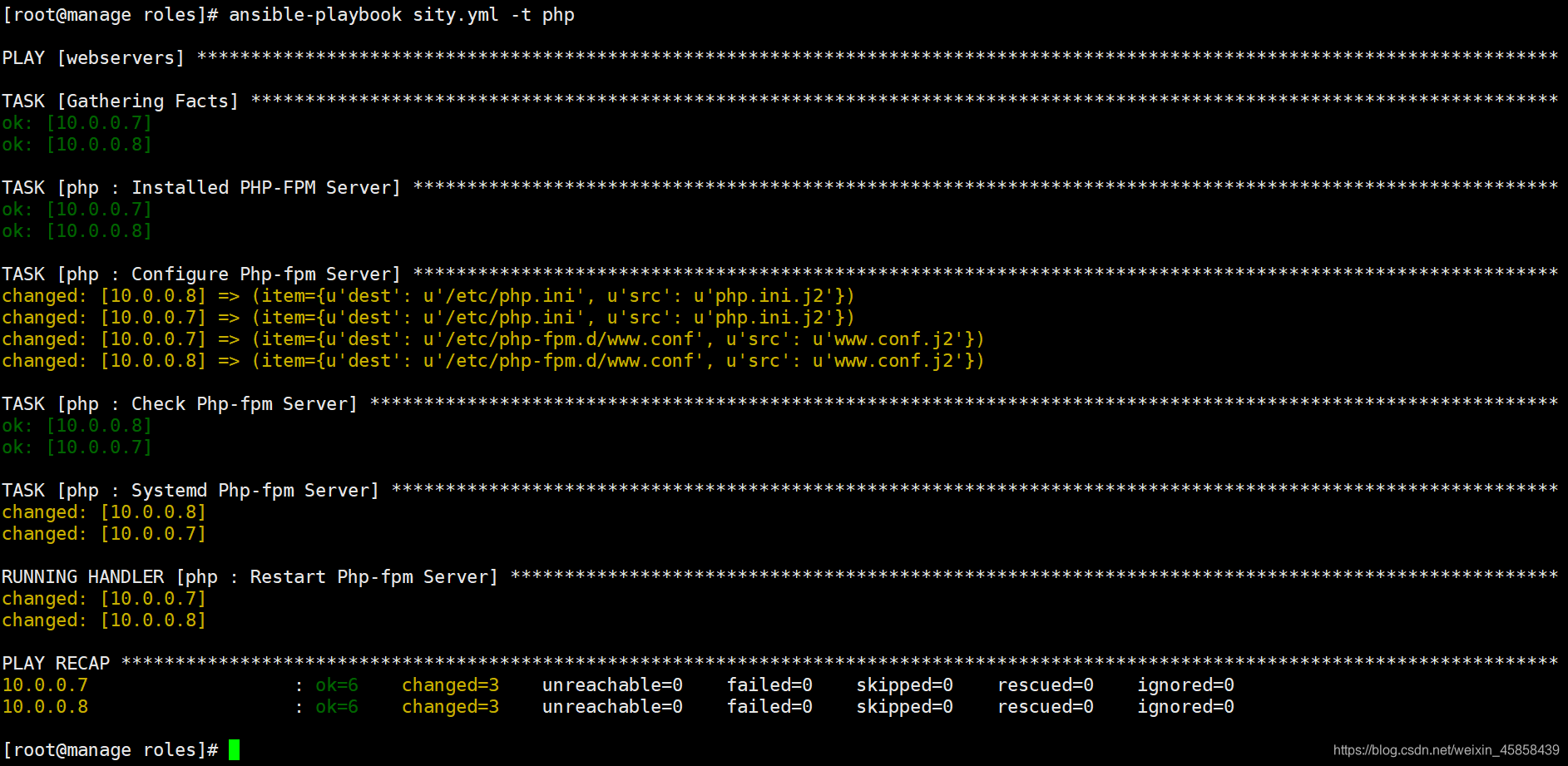
[root@manage roles]# ansible-playbook sity.yml -t php

在这里插入图片描述

7.安装Tomcat

[root@manage roles]# tree tomcat
tomcat
├── files
│   └── apache-tomcat-9.0.26.tar.gz
├── handlers
├── tasks
│   └── main.yml
└── templates

[root@manage roles]# cat group_vars/all 
#Installed Packages All
packages:
  - vim
  - net-tools
  - wget
  - unzip
  - lrzsz
  - tree
  - rsync
  - nfs-utils
  - bash-completion
  - iftop
  - iotop
  - glances
  - java

##tomcat
tomcat_version: 9.0.26
tomcat_install: /soft
[root@manage roles]# cat tomcat/tasks/main.yml 
- name: Create Tomcat Server Directory
  file:
    path: "{{ tomcat_install }}"
    state: directory

- name: Unarchive Tomcat Server
  unarchive:
    src: apache-tomcat-{{ tomcat_version }}.tar.gz
    dest: "{{ tomcat_install }}"
    creates: "{{ tomcat_install }}/apache-tomcat-{{ tomcat_version }}/conf/server.xml"

- name: Create Tomcat  symbolic link
  file:
    src: "{{ tomcat_install }}/apache-tomcat-{{ tomcat_version }}"
    dest: "{{ tomcat_install }}/tomcat"
    state: link

- name: Check Tomcat Process Started
  shell: netstat -lntp|grep 8080
  register: check_tomcat
  ignore_errors: yes

- name: Start Tomcat Server
  shell: nohup {{ tomcat_install }}/tomcat/bin/startup.sh &
  when: ( check_tomcat.rc != 0 )

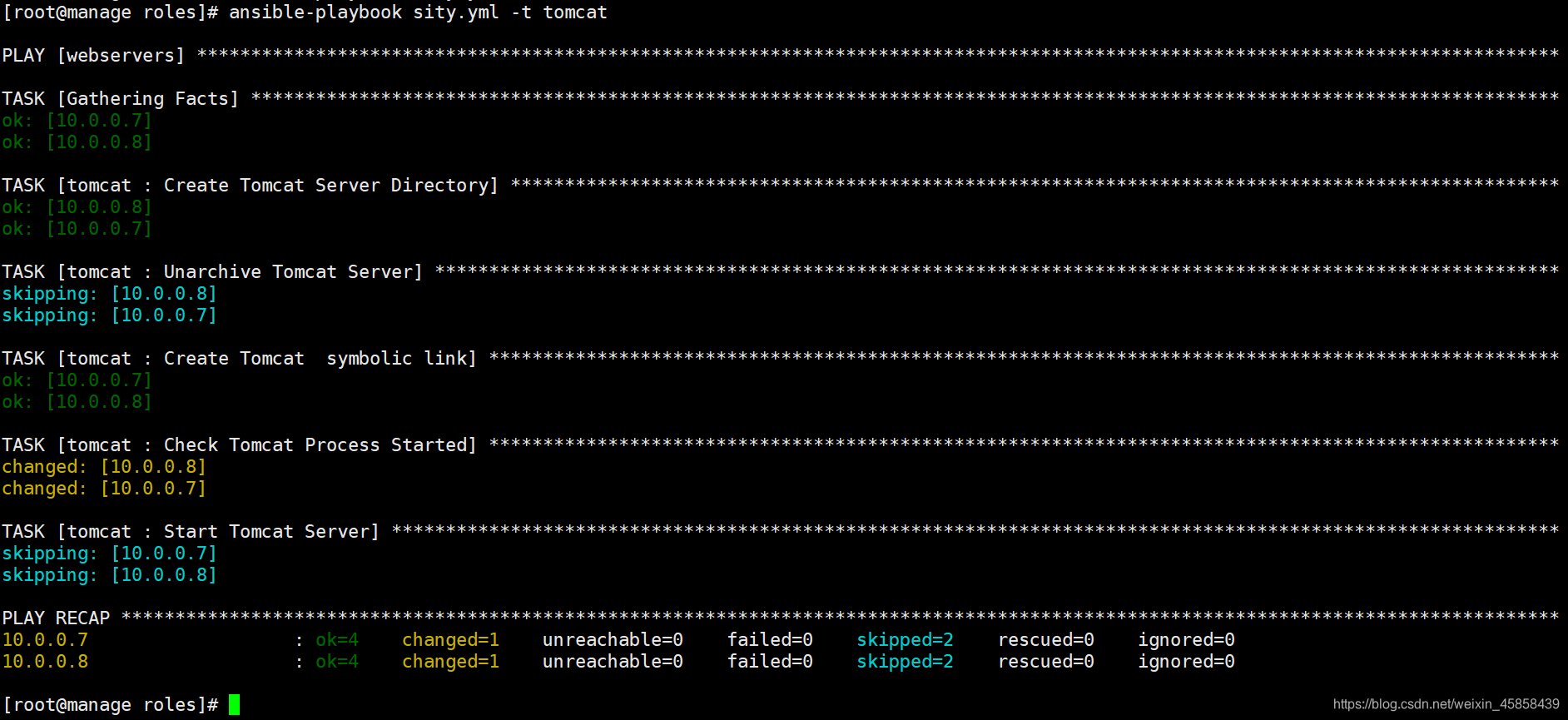
[root@manage roles]# ansible-playbook sity.yml -t tomcat

在这里插入图片描述

8.安装Keepalived

[root@manage roles]# mkdir keepalived/{tasks,handlers,templates} -p
[root@manage roles]# tree keepalived
keepalived
├── handlers
│   └── main.yml
├── tasks
│   └── main.yml
└── templates
    └── keepalived.conf.j2
[root@manage roles]# cat keepalived/tasks/main.yml 
- name: Installed Keepalived Server
  yum:
    name: keepalived
    state: present


- name: Configure Keepalived Server
  template:
    src: keepalived.conf.j2
    dest: /etc/keepalived/keepalived.conf
  notify: Restart Keepalived Server

- name: Systemd Keepalived Server
  systemd:
    name: keepalived
    state: started
    enabled: yes

[root@manage roles]# cat keepalived/handlers/main.yml 
- name: Restart Keepalived Server
  systemd:
    name: keepalived
    state: restarted

[root@manage roles]# cat keepalived/templates/keepalived.conf.j2 
global_defs {     
    router_id {{ ansible_hostname }}
}

vrrp_instance VI_1 {
{% if ansible_hostname == "lb01" %}
    state  MASTER
    priority 150
{% elif ansible_hostname == "lb02" %}
    state  BACKUP
    priority 100
{% endif %}
    interface eth0
    virtual_router_id 50
    advert_int 1
    authentication {
        auth_type PASS
        auth_pass 1111
}
    virtual_ipaddress {
        10.0.0.3
    }
}

[root@manage roles]# cat sity.yml 
- hosts: lbservers
  roles:
    - { role: keepalived , tags: keepalived }

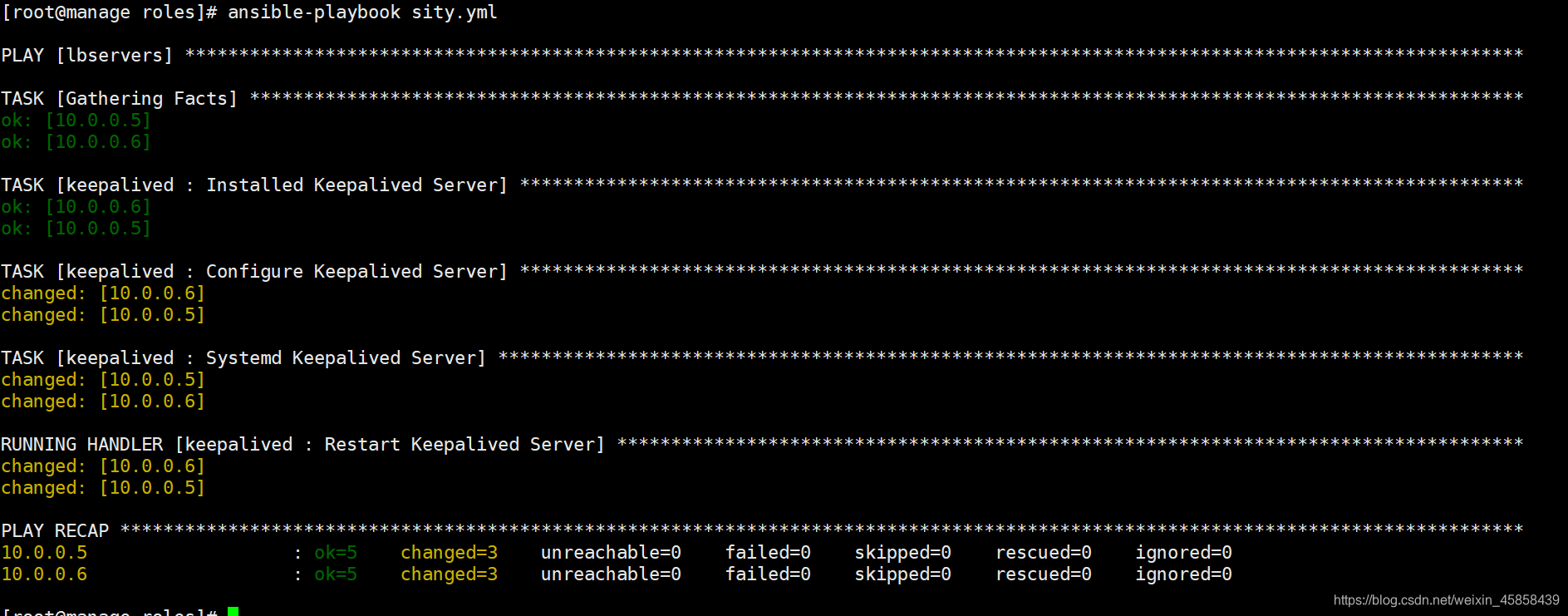
[root@manage roles]# ansible-playbook sity.yml

在这里插入图片描述

9.安装zabbix-agent

[root@manage roles]# tree zabbix-agent
zabbix-agent
├── handlers
│   └── main.yml
├── tasks
│   └── main.yml
└── templates
    └── zabbix_agentd.conf.j2
[root@manage roles]# cat zabbix-agent/tasks/main.yml 
- name: Installed Zabbix-agent Server
  yum:
    name: https://mirrors.aliyun.com/zabbix/zabbix/4.0/rhel/7/x86_64/zabbix-agent-4.0.9-3.el7.x86_64.rpm
    state: present 

- name: Configure Zabbix-agent Server
  template:
    src: zabbix_agentd.conf.j2
    dest: /etc/zabbix/zabbix_agentd.conf
  notify: Restart Zabbix-agent Server

- name: Systemd Zabbix-agent Server
  systemd:
    name: zabbix-agent
    state: started
    enabled: yes

[root@manage roles]# cat zabbix-agent/handlers/main.yml 
- name: Restart Zabbix-agent Server
  systemd:
    name: zabbix-agent
    state: restarted
[root@manage roles]# grep '^[A-Z]' zabbix-agent/templates/zabbix_agentd.conf.j2 
PidFile=/var/run/zabbix/zabbix_agentd.pid
LogFile=/var/log/zabbix/zabbix_agentd.log
LogFileSize=0
Server={{ zabbix_server_ip }}
ServerActive={{ zabbix_server_ip }}
Hostname={{ ansible_hostname }}
Include=/etc/zabbix/zabbix_agentd.d/*.conf
[root@manage roles]# cat group_vars/all
##zabbix
zabbix_server_ip: 10.0.0.61
[root@manage roles]# cat sity.yml
- hosts: all #全部机器都装
  roles:
    - { role: zabbix-agent , tags: zabbix-agent }
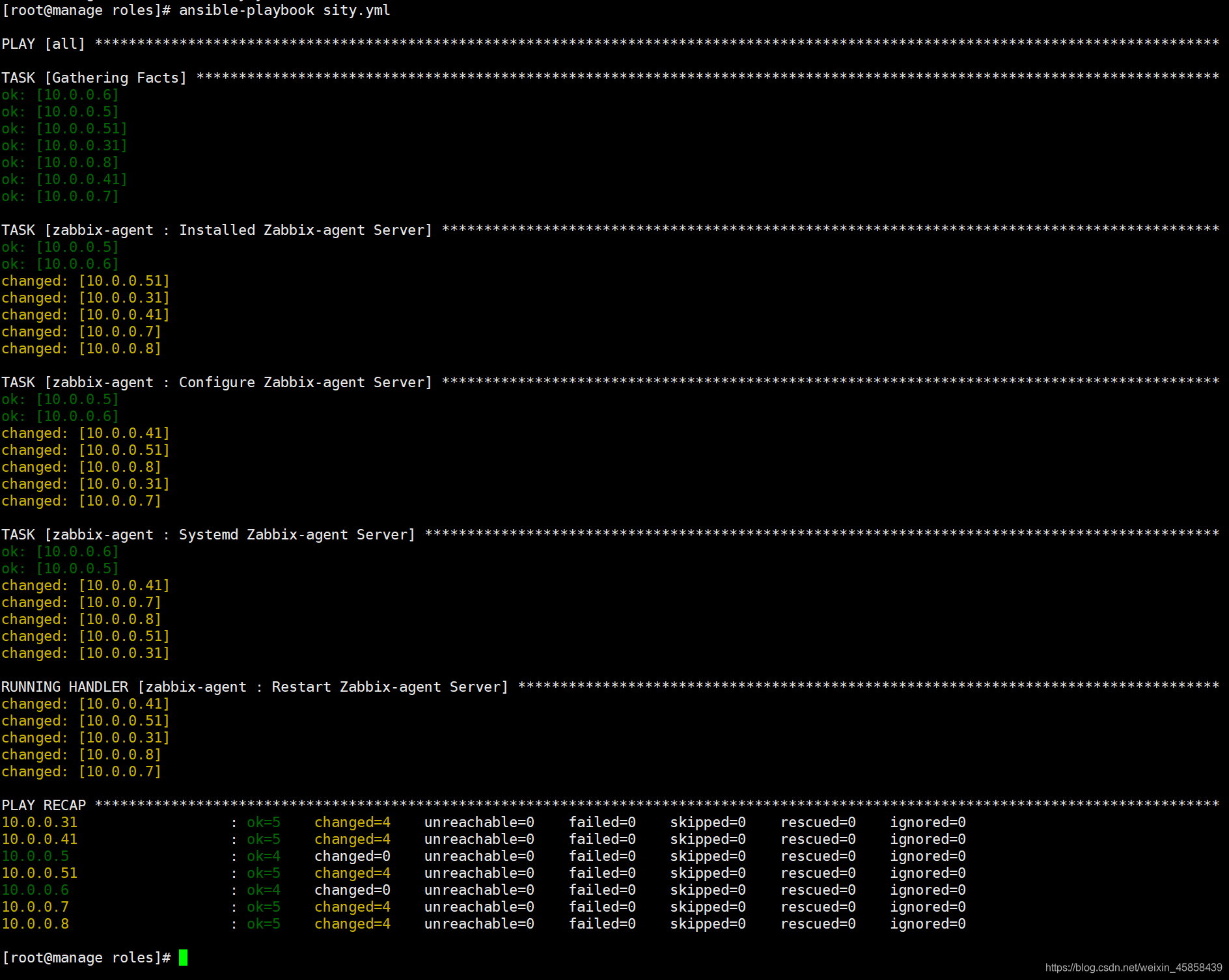
[root@manage roles]# ansible-playbook sity.yml

在这里插入图片描述

评论
成就一亿技术人!
拼手气红包6.0元
还能输入1000个字符
 
红包 添加红包
表情包 插入表情
 条评论被折叠 查看
添加红包

请填写红包祝福语或标题

红包个数最小为10个

红包金额最低5元

当前余额3.43前往充值 >
需支付:10.00
成就一亿技术人!
领取后你会自动成为博主和红包主的粉丝 规则
hope_wisdom
发出的红包
实付
使用余额支付
点击重新获取
扫码支付
钱包余额 0

抵扣说明:

1.余额是钱包充值的虚拟货币,按照1:1的比例进行支付金额的抵扣。
2.余额无法直接购买下载,可以购买VIP、付费专栏及课程。

余额充值