



目录
linux目录结构及文件操作
linux命令
Windows采用的命令:DOS命令
Linux采用的命令:Shell命令
linux文件目录分布
Linux文件目录是呈现一个树状的数据结构
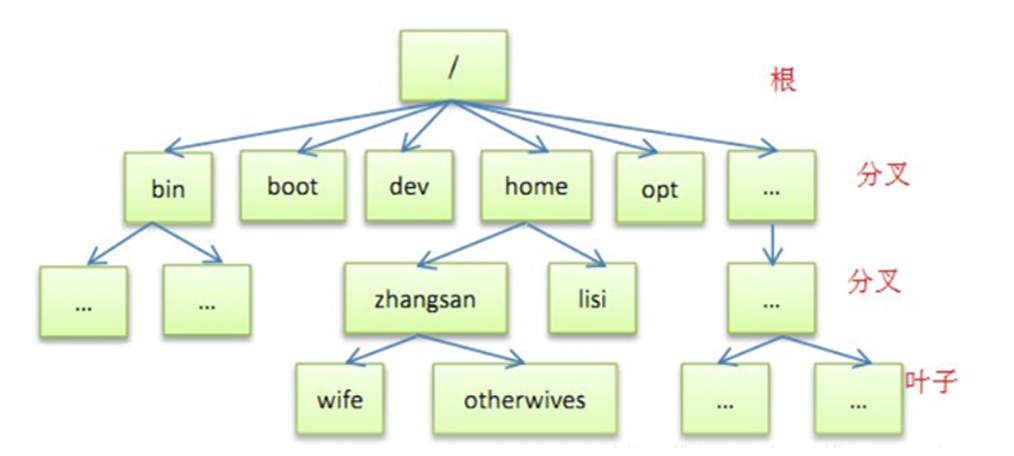 根目录: / 也就是说目录的一个源头
用户目录:~ 或者 /home/username
常用linux命令
cd + 文件夹名字: 访问某个文件夹
ls:显示当前所在目录的文件
touch + 文件名:创建文件
rm + 文件名:删除文件
mkdir + 目录名:创建目录
rm -rf + 目录名:删除目录
TAB键:补全
sudo + 命令:用管理员权限执行命令
pwd: 显示当前目录的绝对路径
Vim编辑器
vi和vim的区别:vim是vi的升级版,基础功能两者一致,不过在嵌入式开发板中 只有vi没有vim,但是在Ubuntu上我们可以使用vim编辑器,它的功能更加丰富。
sudo apt‐get install vim
vi + 文件名 用vi打开/创建某个文本文件
vi常用两种模式
命令行模式
按ESC进入,在这个状态下,可以输入命令常用命令
: + 行号:跳转到某一行
G:跳转到文本末尾
yy: 复制某一行,复制的位置由光标所在位置决定
yx:复制若干行,x代表行数,输入2,就是复制当前行和它下面的两行(总共三行), 复制的位置由光标所在位置决定
p:把刚刚复制的内容进行粘贴,粘贴的位置由光标所在位置决定
:+wq 保存文本并退出
:+q 正常退出文本
:+q! 强制退出文本
:set nu 程序显示行号
:dd 删除一行
ESC: gg=G 自动整理代码
文本输入模式
按i进入
安装 gcc linux编译器: sudo apt‐get install gcc
将写完的程序 进行编译,生成二进制文件 gcc test.c
a.out:编译完之后默认生成的文件
指定生成的文件名 gcc test.c –o hello
linux文件函数
open函数
1.Linux自带的工具:man手册
man 1 是普通的shell命令,比如ls
man 2 是系统调用函数,比如open,write说明
在Linux系统库的定义:
int open(const char *pathname, int flags); /* 比较常用*/
int open(const char *pathname, int flags, mode_tmode);
包含的头文件:
#include <sys/types.h>//这里提供类型pid_t和size_t的定义
#include <sys/stat.h>
#include <fcnt1.h>
2.返回值:
成功,返回句柄,我们后面对于文件的读写,关闭等都通过句柄来操作。
失败,返回-1
3.参数说明:
grep -nr "xxxx"./ cd - 返回上级工作目录
在 /usr/include 中查找
pathname:文件的路径名,如果只写文件名,就默认当前目录,如果在文件名加上路径,就按照绝对路径来打开文件。
flags:表示打开文件后用的操作
底层是一个宏,它可能以十六进制的形式存放。
O_RDONLY:只读模式 0x 0000 0000
O_WRONLY:只写模式 0x 00000001
O_RDWR:可读可写 0x 00000002
O_APPEND:表示追加,如果原来文件里面有内容,则这次写入会写在文件的最末尾。0x00002000
O_CREAT:表示如果指定文件不存在,则创建这个文件 0x0000 0100
O_EXCL:表示如果要创建的文件已存在,则出错,同时返回-1,并且修改errno 的值。
O_TRUNC:表示截断,如果文件存在,并且以只写、读写方式打开,则将其长度截断为0。
O_NOCTTY:如果路径名指向终端设备,不要把这个设备用作控制终端
Close函数
在Linux系统库的定义:
int close(int fd);
包含的头文件:
#include <unistd.h>
功能就是简单的关闭文件
Linux文件权限:Linux 系统中采用三位十进制数表示权限,如0755, 0644.
ABCD
A - 0, 表示十进制 | B-用户 | C-组用户 | D-其他用户
‐‐‐ ‐> 0 (no excute , nowrite ,no read)
‐‐x ‐> 1 execute, (nowrite, no read)
‐w‐ ‐> 2 write
‐wx ‐> 3 write, execute
r‐‐ ‐> 4 read
r‐x ‐> 5 read, execute
rw‐ ‐> 6 read, write
rwx ‐> 7 read, write , execute
#include <stdio.h>
#include <sys/types.h>
#include <sys/stat.h>
#include <fcntl.h>
#include <unistd.h>

int main()
{
        int fd;     //file describe
        fd = open("/home/u/procedure/mm",O_RDONLY | O_CREAT);
        if( fd == -1)
        {
                printf("open failed\n");
                return -1;
        }

        printf("open successod\n");

        close(fd);

        return 0;

}
Write函数
write()会把参数buf所指的内存写入count个字节到参数fd所指的文件内。
ssize_twrite (int fd,const void * buf, size_t count);
fd: 文件描述符
*buf: 写入的数据的首地址
count: 写入数据个数
返回值:如果顺利write()会返回实际写入的字节数(len)。当有错误发生时则返回-1,错误代码存入errno中
Read函数
从打开的fd设备或文件中读取count个字节到buf中
ssize_t read(int fd,void * buf, size_tcount);
fd: 文件描述符
*buf: 读入数据的首地址
count: 读入数据的个数
返回值:成功返回读取的字节数,出错返回-1并设置errno,如果在调read之前已到达文件末尾,则这次read 返回0
#include <stdio.h>
#include <sys/types.h>
#include <sys/stat.h>
#include <fcntl.h>
#include <unistd.h>
#include <string.h>

#define fileName "mm"
#define writeNum 108
#define readNum 12

//int open(const char *pathname, int flags);
//int open(const char *pathname, int flags, mode_t mode);
//ssize_t write(int fd, const void *buf, size_t count);
//ssize_t read(int fd, void *buf, size_t count);

int main()
{
        int fd;
        char writebuff[writeNum] = {0};
        char readbuff[readNum] = {0};
        char *p = "hello world!";


        if(writeNum < (strlen(p) + 1))
        {
                printf("Error:writeBuff less than p\n");
                return -1;
        }

        strcpy(writebuff,p);

        fd = open(fileName,O_RDWR | O_CREAT,0755);
        if(fd == -1)
        {
                printf("open file failded\n");
                perror("why");
                return -1;
        }
        printf("open file successed\n");

        //write(fd,writebuff,11);

        read(fd,readbuff,11);
        printf("%s\n",readbuff);
        close(fd);

        return 0;
}
注:1.write和read函数不能一起使用,光标的偏移
2.如果readnum中没有‘\0’,会出错
main函数参数
int main(int argc,char *argv[])
{
return 0;
}
1.C语言规定了main函数的参数只能有两个,一个是argc,一个是argv并且,argc只能是整数,第二个必须是指向字符串的指针数组。
2.main函数的参数值是从操作系统命令行上获得的。当我们要运行一个可执行文件时, 在DOS提示符下键入文件名,再输入实际参数即可把这些实参传送到main的形参中去。
DOS提示符下命令行 的一般形式为: C:>可执行文件名 参数 参数……; 但是应该特别注意的是,main 的两个形参和命令行中的参数在 位置上不是一一对 应的。
#include <stdio.h>

int main(int argc,char *argv[])
{
        printf("parameter toral %d\n",argc);
        printf("parameter first %s\n",argv[0]);
        printf("parameter second %s\n",argv[1]);
        printf("parameter third %s\n",argv[2]);
        return 0;
}
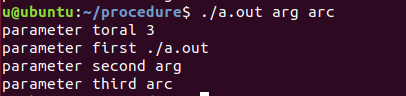
3.argc: 参数表示命令行中参数的个数(注意 文本名本身也是一个参数),argc的值是在输入命令行时由系统按实际参数的个数自动赋予的。
argv :参数是字符串指针数组,其各元素值为命令行中各字符串(参数均按字符串处理)的首地址。 指针数组 的长度即为参数个数。数组元素初值由系统自动赋予。
实现CP指令
src 源文件,des 目标文件
执行流程:
打开源文件(src)open
打开目标文件(des) open
写入目标文件 write
读取src文件到缓存数组 read
关闭目标文件和源文件 close
./a.out src.c des.c
#include <stdio.h>
#include <sys/types.h>
#include <sys/stat.h>
#include <fcntl.h>
#include <unistd.h>
#include <string.h>

int main(int argc,char *argv[])
{
        int src_fd;
        int des_fd;
        int nRet = 0;
        char readBuff[120] = {0};

        if(argc != 3)
        {
                printf("ERROR\n");
                return -1;
        }

        src_fd = open(argv[1],O_RDWR);
        if(src_fd < 0)
        {
                printf("open file %d  failed\n",src_fd);
                return -2;
        }

        des_fd = open(argv[2],O_RDWR | O_CREAT,0755);
        if(des_fd < 0)
        {
                printf("open file %d  failed\n",des_fd);
                return -3;
        }

        while(1)
        {
                nRet = read(src_fd,readBuff,128);
                if(nRet < 128)
                        break;
                write(des_fd,readBuff,nRet);
                memset(readBuff,128,0);
        }

        write(des_fd,readBuff,nRet);

        close(src_fd);
        close(des_fd);

        return 0;
}
lseek函数
off_t lseek(int fd, off_t offset, int whence); //光标的偏移量
fd : 文件描述符
Offset :偏移量
Whence :
SEEK_SET: 参数offset即为新的读写位置
SEEK_CUR: 以目前的读写位置往后增加offset个偏移量
SEEK_END: 将读写位置指向文件尾后再增加offset个位移量,当whence值为SEEK_CUR或SEEK_END时, 参数offset允许负值的出现。
返回值: 文件读写距离文件开头的字节大小,出错返回 -1
#include <stdio.h>
#include <sys/types.h>
#include <sys/stat.h>
#include <fcntl.h>
#include <unistd.h>
#include <string.h>

#define fileName "mm"
#define writeNum 108
#define readNum 12


int main()
{
        int fd;
        int offset;
        char writebuff[writeNum] = {0};
        char readbuff[readNum] = {0};

        char *p = "hello world!";

        if(writeNum < (strlen(p) + 1))
        {
                printf("Error:writeBuff less than p\n");
                return -1;
        }

        strcpy(writebuff,p);


        fd = open(fileName,O_RDWR | O_CREAT,0755);
        if(fd == -1)
        {
                printf("open file failded\n");
                perror("why");
                return -1;
        }
        printf("open file successed\n");

        offset = lseek(fd,-2,SEEK_END);
        printf("offset is %d\n",offset);

        write(fd,writebuff,12);

        read(fd,readbuff,12);
        printf("%s\n",readbuff);

        return 0;
}
文件IO与标准IO
1.linux标准文件描述符

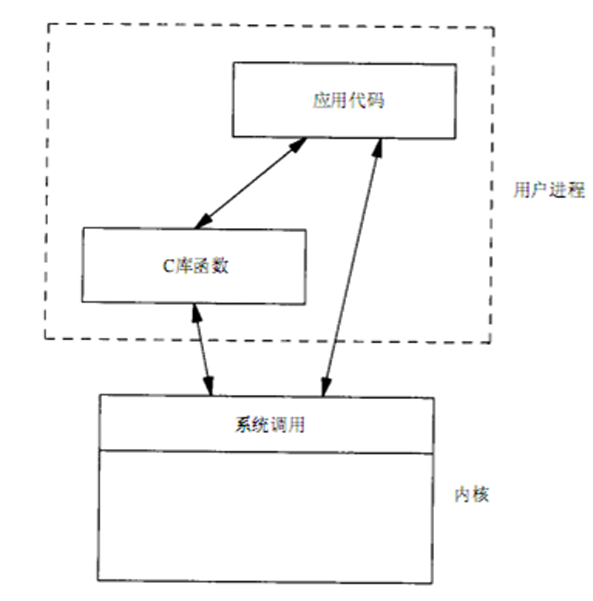
文件IO:是直接调用内核提供的系统调用函数, 头文件是unistd.h
标准IO:是间接调用系统调用函数,头文件是: stdio.h
之前学过:输入输入相关的函数,都是和标准的输入(键盘),标准的输出(显示器)
getchar(),putchar() ‐‐‐‐一个字符
gets(buf),puts(buf) ‐‐‐‐一串字符
scanf(),printf() ‐‐‐‐ 一个字符,一串字符都可以
与一些普通文件的读写没有关系,也即这些函数不能读写普通文件。
标准IO中的相关函数,不仅可以读写普通文件,也可以向标准的输入或标准的输出中读或写
缓存
1.我们的程序中的缓存,就是你想从内核读写的缓存(数组)----用户空间的缓存
2.每打开一个文件,内核在内核空间中也会开辟一块缓存,这个叫内核空间的缓存
文件IO中的写即是将用户空间中的缓存写到内核空间的缓存中。
文件IO中的读即是将内核空间的缓存写到用户空间中的缓存中。
3.标准IO的库函数中也有一个缓存,这个缓存称为----库缓存
C库缓存的特点:
1.遇到\n 时,会将库缓存的内容写到内核缓存中,即调用了系统调用函数。
2.库缓存写满时,会调用系统调用函数,将库缓存内容写到内核缓存中。1024
3.调用系统函数,write
4.fflush
验证库缓存的存在
#include <stdio.h>
#include <unistd.h>

int main()
{
        char readBuff[] = "hello,world!";
        printf("%s",readBuff);
        while(1);
        return 0;
}
无法显示
#include <stdio.h>
#include <unistd.h>

int main()
{
        char readBuff[] = "hello,world!";
        printf("%s\n",readBuff);
        while(1);
        return 0;
}

#include <stdio.h>
#include <unistd.h>

int main()
{
        char readBuff[] = "hello,world!";
        //printf("%s\n",readBuff);
        write(1,readBuff,sizeof(readBuff));//STDOUT
        while(1);
        return 0;
}

系统调用,跳过缓存区
fopen函数
fopen fwrite fread fclose ... 属于标准C库
open close write read 属于Linux系统调用
include<stdio.h> standard io lib
可移植性:fopen 强过于 open ...

fopen 在用户态是缓存的
open 在用户态是没有缓存的
FILE * fopen(constchar *path , cost char *mode)
/*
* @description : 打开一个文件,返回指向该文件的指针
* @param ‐ path : 指定文件路径,如:"./test.txt"
* @param ‐ mode :指定文件的打开方式,如下图:
* @return : 成功,返回指向该文件的文件指针; 若失败,返回NULL
*/
参数说明:第一个参数为欲打开文件的文件路径及文件名,第二个参数表示对文件的打开方式
注:mode有以下值:
r:只读方式打开,文件必须存在
r+:可读写,文件必须存在
rb+:打开二进制文件,可以读写
rt+:打开文本文件,可读写
w:只写,文件存在则文件长度清0,文件不存在则建立该文件
w+:可读写,文件存在则文件长度清0,文件不存在则建立该文件
a:附加方式打开只写,不存在建立该文件,存在写入的数据加到文件尾,EOF符保留
a+:附加方式打开可读写,不存在建立该文件,存在写入的数据加到文件尾,EOF符不保留
wb:打开二进制文件,只写
wb+:打开或建立二进制文件,可读写
wt+:打开或建立文本文件,可读写
at+:打开文本文件,可读写,写的数据加在文本末尾
ab+:打开二进制文件,可读写,写的数据加在文件末尾
由mode字符可知,上述如r、w、a在其后都可以加一个b,表示以二进制形式打开文件
例:
FILE *pfile=fopen(constchar *filename,"rb");
返回值: 文件打开了,返回一个指向该打开文件的指针(FILE结构);文件打开失败,错误上存errorcode(错误代码)。
注意:在fopen操作后要进行判断,是否文件打开,文件真正打开了才能进行后面的读或写操作,如有错误要进行错误处理。
fread函数
size_t fread(void*buff , size_t size, size_t count , FILE* stream)
/*
* @description :对已打开的流进行数据读取 //从文件中读入数据到指定的地址中
* @param ‐ ptr :指向数据块的指针
* @param ‐ size :指定读取的每个数据项的字节数
* @param ‐ nmemb : 指定要读取的数据项的个数
* @param ‐ stream :要读取的文件流
* @return : 返回实际读取数据项的个数;
*/
参数:
第一个参数为接收数据的指针(buff),也即数据存储的地址
第二个参数为单个元素的大小,即由指针写入地址的数据大小,注意单位是字节
第三个参数为元素个数,即要读取的数据大小为size的元素个素
第四个参数为提供数据的文件指针,该指针指向文件内部数据
返回值:读取的总数据元素个数
例
int num,count;
int* pr=new int[num*count];
fread(pr, num*4, count, stream); //stream为fopen中返回的FILE指针
要将数据写入pr中,必须为pr分配内存,一个int为4个字节,所以要x4
memset函数
int fread(void *buffer,int size,int count,FILE*fp)
void *memset(void*buffer, int c, int count)
buffer:为指针或是数组
c:是赋给buffer的值
count:是buffer的长度
memset(void*buff,0,sizeof(buff)); 用来对一段内存空间全部设置为某个字符,一般用在对定义的字符串进行初始化为‘ ’或‘/0’;
fwrite函数
int fwrite(void*buffer,int size,int count,FILE*fp)
/*
* @description :对已打开的流进行写入数据块
* @param ‐ ptr :指向 数据块的指针
* @param ‐ size :指定写入的每个数据项的字节数,如调用sizeof(char)
* @param ‐ nmemb :指定写入的数据项的个数
* @param ‐ stream :要写入的文件流
* @return : 返回实际写入的数据项的个数
*/
fread()──从fp所指向文件的当前位置开始,一次读入size个字节,重复count次,并将读入的数据存放到从buffer开始的内存中; buffer是存放读入数据的起始地址(即存放何处)。
fwrite()──从buffer开始,一次输出size个字节,重复count次,并将输出的数据存放到fp所指向的文件中。buffer是要输出数据在内存中的起始地址(即从何处开始输出)。
一般用于二进制文件的处理。
fseek函数
//重定位文件内部的指针
函数原型: int fseek(FILE *stream,long offset,int framewhere)
参数:
第一个为文件指针,第二个是指针的偏移量,第三个是指针偏移起始位置
返回值:重定位成功返回0,否则返回非零值
需要注意的是该函数不是重定位文件指针,而是重定位文件内部的指针,让指向文件内部数据的指针移到文件中我们感兴趣的数据上,重定位主要是这个目的。
说明:执行成功,则stream指向以fromwhere为基准,偏移offset个字节的位置。执行失败(比方说offset偏移的位置超出了文件大小),则保留原来stream的位置不变
分别用3个宏
SEEK_SET 既0 文件开头
SEEK_CUR 既1 文件当前位置
SEEK_END 既2 文件结尾
但不推荐用数字,最好用宏
简言之:
1. fseek(fp,100L,SEEK_SET);把fp指针移动到离文件开头100字节处;
2. fseek(fp,100L,SEEK_CUR);把fp指针移动到离文件当前位置100字节处;
3. fseek(fp,100L,SEEK_END);把fp指针退回到离文件结尾100字节处。
fclose函数
//关闭一个文件流,使用fclose就可以把缓冲区内最后剩余的数据输出到磁盘文件中,并释放文件指针和有关的缓冲区
函数原型:int fclose(FILE*stream)
/*
* @description :关闭一个已打开的流
* @param ‐ stream
* @return : 成功,返回0; 若失败,返回EOF
*/
#include <stdio.h>
#include <string.h>

int main()
{
        FILE *fp = NULL;
        int nRet = 0;
        char readBuff[12];
        memset(readBuff,0,12);
        char *writeBuff = "hello world";

        fp = fopen("mm","r+");
        if(fp == NULL)
        {
                printf("open file failed\n");
                return -1;
        }
        printf("oprn success\n");

        nRet = fread(readBuff,4,2,fp);
        if(nRet <= 0)
        {
                printf("read failed\n");
                return -2;
        }
        printf("read success\n");
        printf("read %s\n",readBuff);

        nRet = fseek(fp,1,SEEK_SET);
        if(nRet)
        {
                printf("fseek failed\n");
        }

        nRet = fwrite(writeBuff,4,1,fp);
        if(nRet <= 0)
        {
                printf("wrote failed\n");
        }

        nRet = fclose(fp);
        if(nRet)
        {
                printf("close failed\n");
                return -2;
        }
        printf("close success\n");

        return 0;
}
三类读写函数
1.行缓存 ,遇到换新行(\n),或者写满缓存时,即调用系统调用函数
读:fgets,gets,printf,fprintf,sprintf
写:fputs,puts,scanf
2.无缓存,只要用户调这个函数,就会将其内容写到内核中
stderr
3.全缓存,只有写满缓存再调用系统调用函数
读:fread
写:fwrite
行缓存的读写函数fgets和fputs
char *fgets (char *s, int size,FILE *stream)
第一个参数:缓存,即读到哪里去
第二个参数:读多少个字节
第三个参数:从什么地方读
返回值:若成功则为s(缓存的地址),若已处文件尾端或出错则为null
int fputs(const char *s,FILE *stream);
第一个参数:缓存,即写什么内容
第二个参数:写到哪里去
若成功则为非负值,若出错则为EOF -1 。
#include <stdio.h>

int main()
{
        FILE *fp;
        char writeBuff[] = "hello world";

        fp = fopen("aa","w+");
        fputs(writeBuff,fp);
        while(1);
        fclose(fp);
        return 0;
}
注:没有while(1),fputs会写入,fclose会清缓存
刷新缓存函数
fflush(FIFE *fp)
把库函数中的缓存内容强制写到内核中。
#include <stdio.h>

int main()
{
        fputs("hello",stdout);
        fflush(stdout);
        while(1);
        return 0;
}
调整读写位置指针函数
1.fseek()参数与lseek是一样的但是返回值不一样
lseek的返回值是:当前文件的位置指针值;
fseek()的返回值是:成功返回0,失败返回-11;
#include <stdio.h>

int main()
{
        FILE *fp;
        char writeBuff[128] = "hello world";
        char readBuff[128] = {0};

        fp = fopen("aa","w+");
        if(fp == NULL)
        {
                printf("open file failed\n");
                return -1;
        }

        fputs(writeBuff,fp);

        fseek(fp,0,SEEK_SET);
        fgets(readBuff,128,fp);
        printf("%s\n",readBuff);

        fclose(fp);

        return 0;
}

2.rewind(FILE *fp) 用于设定流的文件位置指示为文件开始,该函数调用成功无返回值。
rewind()等价于(void)fseek(fp 0, SEEK_SET);
3.ftell(FILE *fp) 用于取得当前的文件位置,调用成功则为当前文件位置指示,若出错则为-1L
#include <stdio.h>

int main()
{
        FILE *fp;
        int r;
        char writeBuff[128] = "hello world";
        char readBuff[128] = {0};

        fp = fopen("aa","w+");
        if(fp == NULL)
        {
                printf("open file failed\n");
                return -1;
        }

        fputs(writeBuff,fp);

        rewind(fp);
        fgets(readBuff,128,fp);
        printf("%s\n",readBuff);

        r = ftell(fp);
        printf("ftell is %d\n",r);

        fclose(fp);

        return 0;
}
行缓存的读写函数gets和puts
1.char *gets(char*s);
int puts(const char *s);
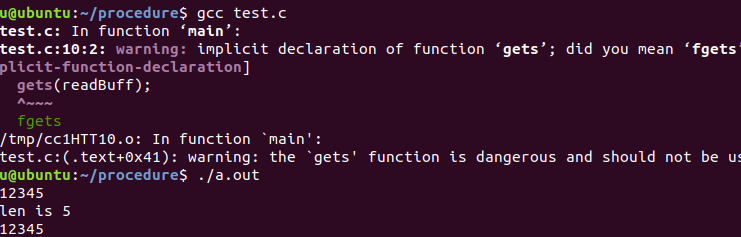
2.gets 与fgets的区别:
gets()时不能指定缓存的长度,这样就可能造成缓存越界(如若该行长于缓存长度),写到缓存之后的存储空间中,从而产生不可预料的后果;
gets()只能从标准输入中读;
gets()与fgets()的另一个区别是:gets()并不将新行符存入缓存中, fgets 将新行符存入缓存中;
3.puts 与fputs的区别:
puts()只能向标准输出中写;
puts()与fputs()的另一个区别是: puts 输出时会添加一个新行符,fputs不会添加;
4.fprintf、printf、sprintf 行缓存的函数
int fprintf(FILE *stream,”字符串格式”)
fprintf可以输出到文件中,也可输出到显示器, printf 只能输出到显示器中。
int sprintf(str *, “字符串格式”) 输出内容到一个字符串中
#include <stdio.h>
#include <string.h>

int main()
{
        char readBuff[128] = {0};
        int len;

        fgets(readBuff,128,stdin);

        len = strlen(readBuff);
        printf("len is %d\n",len);

        fputs(readBuff,stdout);

        return 0;
}

#include <stdio.h>
#include <string.h>

int main()
{
        char readBuff[128] = {0};
        int len;

        //fgets(readBuff,128,stdin);
        gets(readBuff);

        len = strlen(readBuff);
        printf("len is %d\n",len);

        //fputs(readBuff,stdout);
        puts(readBuff);

        return 0;
}
#include <stdio.h>

int main()
{
        FILE *fp;
        int i = 10;

        fp = fopen("aa","w+");
        if(fp == NULL)
        {
                printf("open file failed\n");
                return -1;
        }

        fprintf(fp,"hello,you is %d!",i);

        return 0;
}

#include <stdio.h>

int main()
{
	char buf[128] = {0};
	int i = 10;

	sprintf(buf,"i id %d\n",i);

	printf("%s\n",buf);

	return 0;
}
一个字符读写函数fgetc和fputc
int fgetc(FILE *fp)
功能:从文件中读取一个字符;
参数:文件流
返回值:正确为读取的字符,到文件结尾或出错时返回EOF。
int fputc(int c, FILE *fp)
功能:写一个字符到文件中
参数:第一个参数为要写的字符,第二个参数为文件流
返回值:成功则返回输入的字符,出错返回EOF。
是否是行缓存函数? 证明 fputc有缓存,但不是行缓存函数
#include <stdio.h>

int main()
{
        FILE *fp;

        fp = fopen("aa","w+");
        if(fp == NULL)
        {
                printf("open filr failed\n");
                return -1;
        }

        fputc('a',fp);

        //验证是不是行缓存
        fflush(fp);
        while(1);
        fclose(fp);

        return 0;
}
#include <stdio.h>

int main()
{
	FILE *fp;
	int nRet;

	fp = fopen("aa","w+");
	if(fp == NULL)
	{
		printf("open file failed\n");
		return -1;
	}

	fputc('a',fp);

	rewind(fp);

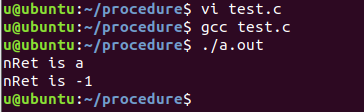
	nRet = fgetc(fp);
	printf("nRet is %c\n",nRet);

	nRet = fgetc(fp);
	printf("nRet is %d\n",nRet);

	fclose(fp);

	return 0;
}
int feof(FILE *stream);
功能:判断是否已经到文件结束
参数:文件流
返回值:到文件结束,返回为非0,没有则返回0
int ferror(FILE *stream);
功能:判断是否读写错误
参数:文件流
返回值:是读写错误,返回为非0,不是则返回0
void clearerr(FILE *stream);
功能:清除流错误
参数:文件流
#include <stdio.h>

int main()
{
        FILE *fp;
        int nRet;

        fp = fopen("aa","w+");
        if(fp == NULL)
        {
                printf("open file failed\n");
                return -1;
        }

        fputc('a',fp);

        rewind(fp);

        nRet = fgetc(fp);
        printf("nRet is %c\n",nRet);

        nRet = fgetc(fp);
        printf("nRet is %d\n",nRet);

        printf("feof is %d,ferror is %d\n",feof(fp),ferror(fp));
        clearerr(fp);
        printf("feof is %d,ferror is %d\n",feof(fp),ferror(fp));

        fclose(fp);

        return 0;
}

#include <stdio.h>

int main()
{
        FILE *fp;
        char *nRet;
        char writeBuff[128] = "hello world";
        char readBuff[128] = {0};

        fp = fopen("aa","w+");
        if(fp == NULL)
        {
                printf("open file failed\n");
                return -1;
        }

        fputs(writeBuff,fp);

        rewind(fp);
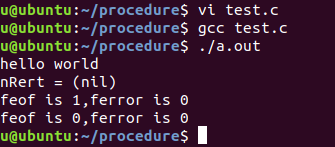
        nRet = fgets(readBuff,128,fp);
        printf("%s\n",readBuff);

        nRet = fgets(readBuff,128,fp);
        printf("nRert = %p\n",nRet);

        printf("feof is %d,ferror is %d\n",feof(fp),ferror(fp));
        clearerr(fp);
        printf("feof is %d,ferror is %d\n",feof(fp),ferror(fp));

        fclose(fp);

        return 0;
}
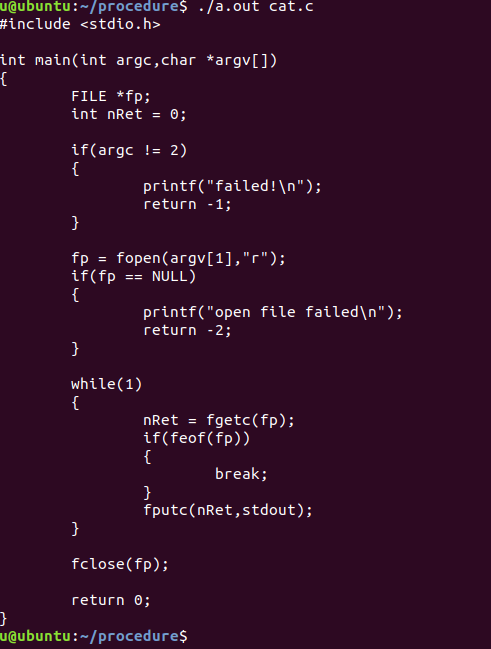
cat命令的实现
#include <stdio.h>

int main(int argc,char *argv[])
{
        FILE *fp;
        int nRet = 0;

        if(argc != 2)
        {
                printf("failed\n");
                return -1;
        }

        fp = fopen(argv[1],"r");
        if(fp == NULL)
        {
                printf("open file failed\n");
                return -2;
        }

        while(1)
        {
                nRet = fgetc(fp);
                if(feof(fp))
                {
                        break;
                }
                fputc(nRet,stdout);
        }

        fclose(fp);

        return 0;
}
静态库和动态库
Linux操作系统支持的函数库分为:
静态库,libxxx.a,在编译时就将库编译进可执行程序中。
优点:程序的运行环境中不需要外部的函数库。
缺点:可执行程序大
动态库,又称共享库,libxxx.so,在运行时将库加载到可执行程序中。
优点:可执行程序小。
缺点:程序的运行环境中必须提供相应的库。
函数库目录:/usr/lib
静态库的制作
1.生成目标文件:gcc -c file.c .o (gcc sub.c -c -o sub.o)
2.静态函数库创建命令ar
ar ‐cr libfile.a file.o = ar libfile.a -cr file.o (ar -cr -o libsub.a sub.o)
‐c: create的意思 ,只编译不链接,生成目标文件
‐r: replace的意思,表示当插入的模块file.o已经存在libfile.a中,则覆盖。反之ar显示一个错误消息。
(
-
如果
libfile.a不存在:创建新库并将file.o添加进去 -
如果
libfile.a已存在:用新的file.o替换库中同名的目标文件
)
3.操作静态库的几个实例:
如果从别处得到一个静态库libunknown.a,想知道其中包含哪些模块。 命令:ar -t libunknown.a
静态库的编译:gcc -o main main.c -L. -lfile
编译main.c就会把静态函数库整合进main。
其中:-L指定静态函数库的位置供查找,注意L后面还有'.',表示静态函数库在本目录下查找。
-l则指定了静态函数库名,由于静态函数库的命名方式是lib***.a,其中的lib和.a忽略。
删除libaddsub.a后main依然可以运行,因为静态库的内容已经整合进去了。
例
#include <stdio.h>

int main()
{
        int x,y;
        int nRet;

        x = 10;
        y = 5;

        nRet = sub(x,y);
        printf("%d\n",nRet);
        return 0;
}
int sub(int x,int y)
{
        return (x + y);
}
gcc sub.c -c -o sub.o
ar -cr -o libsub.a sub.o
gcc main.c -L. -lsub

动态函数库的制作
1.生成目标文件:gcc -c file.c
2.gcc -shared -fpic -o libfile.so file.o
‐fpic:产生位置无关代码。
‐shared:生成共享库。
用上述命令生成libaddsub.so 动态函数库。
gcc ‐o out main.c ‐L. ‐lfile
例
gcc -c -o sub.o sub.c
gcc -fpic -shared -o libsub.so sub.o
gcc -o main main.c -L. -lsub
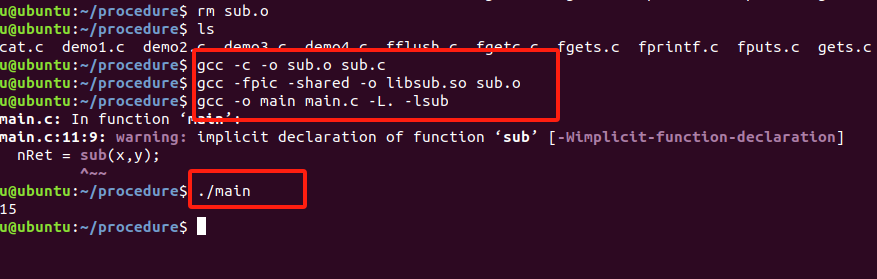

此时还不能立即./out,因为在动态函数库使用时,会查找/usr/lib /lib目录下的动态函数库,而此时我们生成的库不在里边。
第一种方法:
libaddsub.so放到/usr/lib或/lib中去。
mv libsub.so /usr/lib
第二种方法,假设libfile.so在/home/linux/file 环境变量方法
export LD_LIBRARY_PATH=/home/linux/addsub
echo $LD_LIBRARY_PATH //查看当前环境变量
export LD_LIBRARY_PATH=/home/u/procrdure(当前路径)
echo $LD_LIBRARY_PATH
第三种方法:
在/etc/ld.so.conf文件里加入我们生成的库的目录,然后/sbin/ldconfig。
/etc/ld.so.conf是非常重要的一个目录,里面存放的是链接器和加载器搜索共享库时要检查的目录,默认是从/usr/lib /lib中读取的,所以想要顺利运行,可以把我们库的目录加入到这个文件中并执行/sbin/ldconfig。
sudo vi /etc/ld.so.conf
加入当前路径
sudo ldconfig /etc/ld.so.conf 使用ldconfig编译进去





 扫一扫
扫一扫


 被折叠的 条评论
为什么被折叠?
被折叠的 条评论
为什么被折叠?
 到【灌水乐园】发言





