


第一步:基础准备
1.登录你的微信
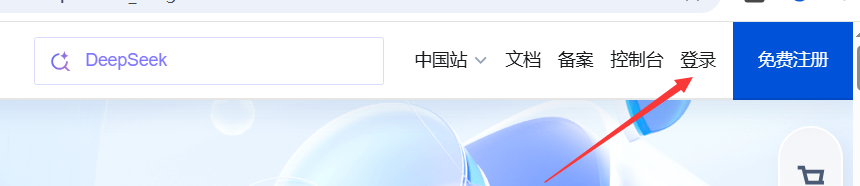
2.进入控制台
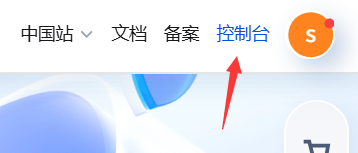
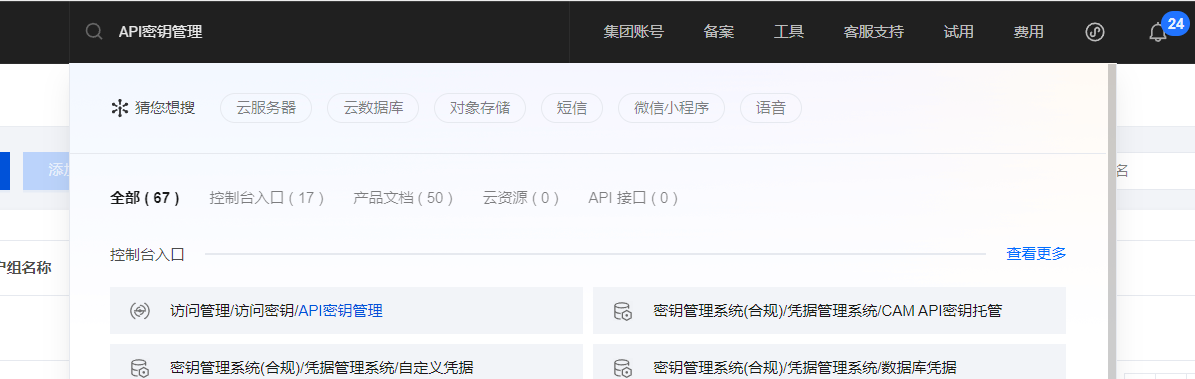
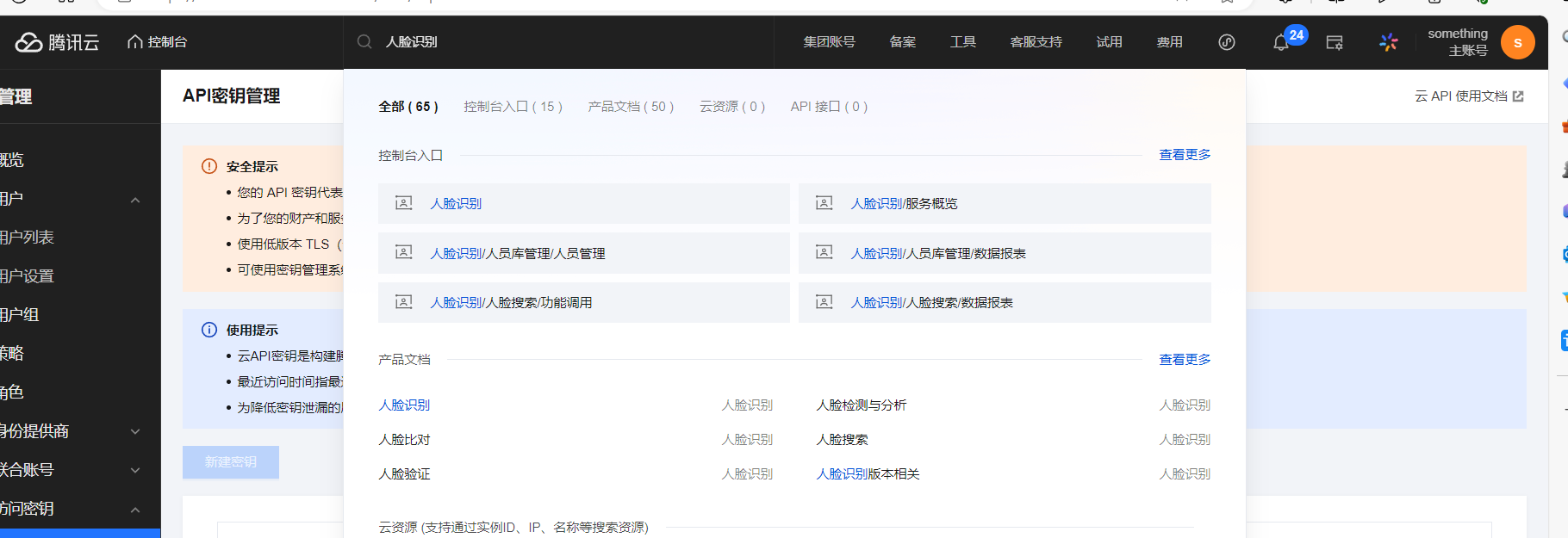
3.搜索API密钥管理
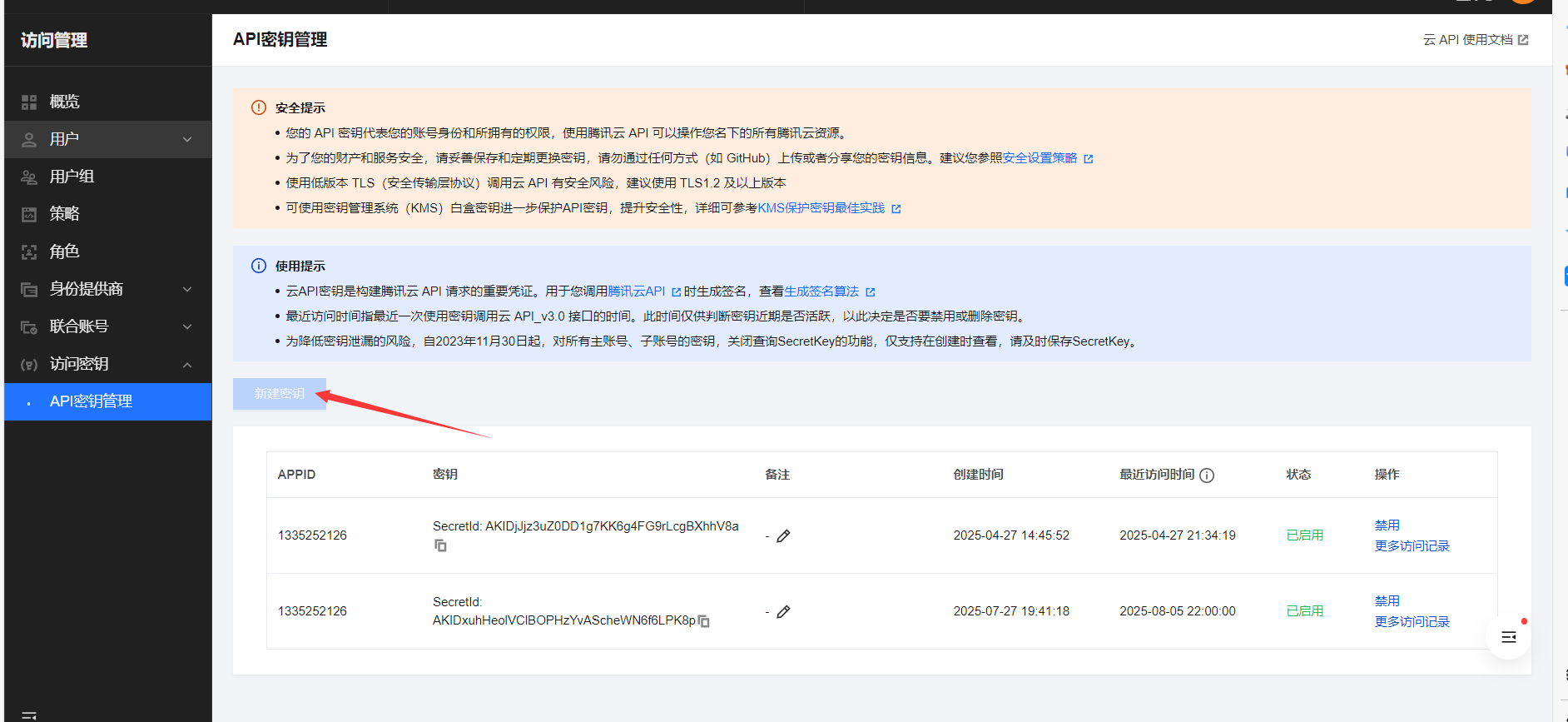
4.新建密钥(我的已经上限了记得保存你的Key一定要下载文件)
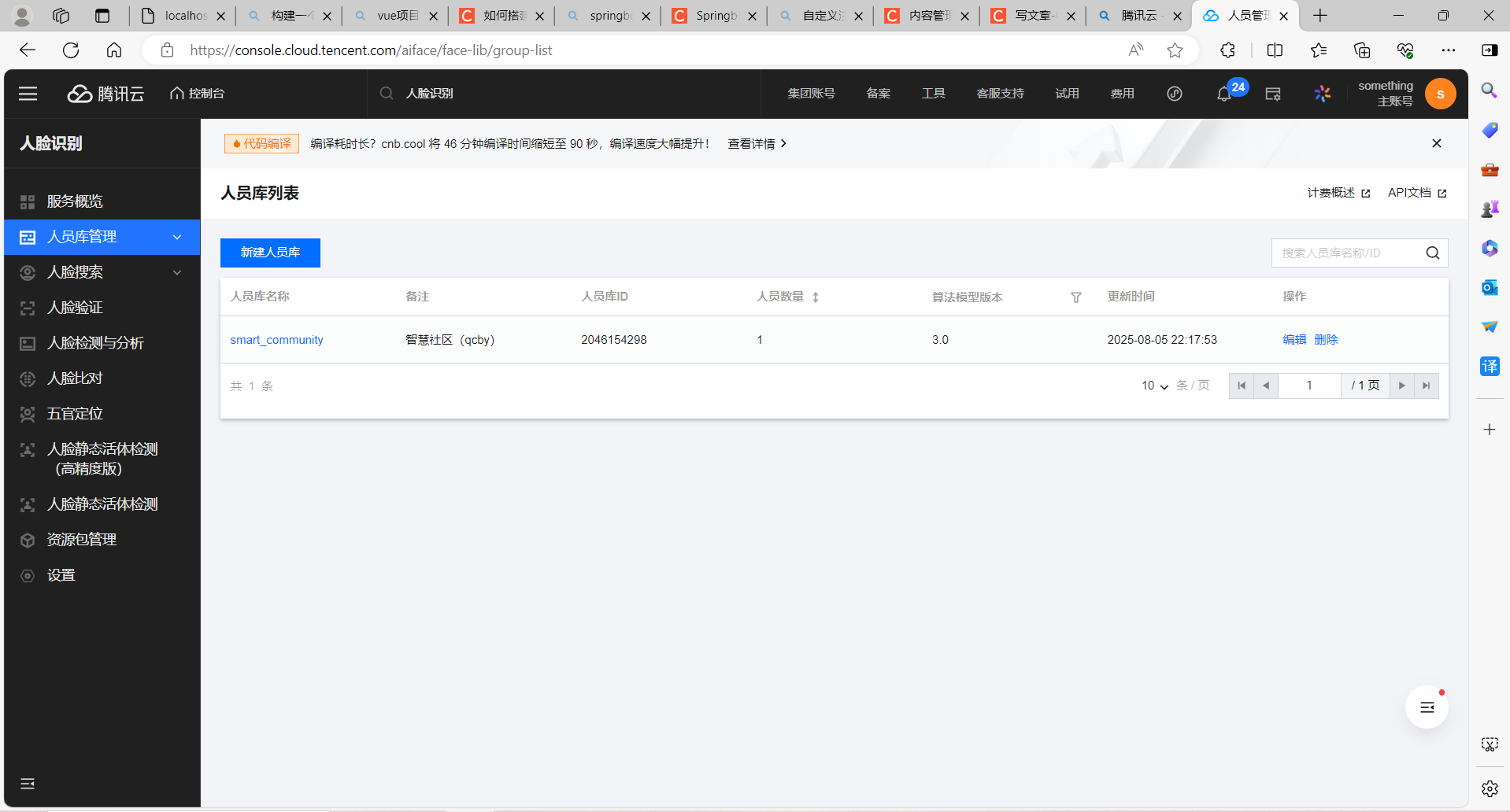
5.搜索人脸识别建立人员库
第二步:配置文件
application.yaml
plateocr:
  secretId: AKIDxuhHeolVClBOPHzYvAScheWN6f6LPK8p
  secretKey: a0Mk0McfeOvFMI2b7RacT7btzsoo24vZ
  server: iai.tencentcloudapi.com
  area: ap-beijing
  groupId: 2046154298 #组Id
  used: true
  passPercent: 80
pom.xml
        <dependency>
            <groupId>com.tencentcloudapi</groupId>
            <artifactId>tencentcloud-sdk-java</artifactId>
            <version>3.1.62</version>
        </dependency>
第三步:工具类
package com.qcby.utils;

import com.alibaba.fastjson.JSON;

public class RootResp {
    private int ret = 0;

    public int getRet() {
        return this.ret;
    }

    public void setRet(int ret) {
        this.ret = ret;
    }

    private String msg;

    public String getMsg() {
        return this.msg;
    }

    public void setMsg(String msg) {
        this.msg = msg;
    }

    private Object data;

    public Object getData() {
        return this.data;
    }

    public void setData(Object data) {
        this.data = data;
    }

    @Override
    public String toString() {
        return JSON.toJSONString(this);
    }
}
package com.qcby.utils;

import com.alibaba.fastjson.JSONArray;
import com.alibaba.fastjson.JSONObject;
import com.qcby.config.ApiConfiguration;
import com.qcby.config.ApiConfiguration;
import com.tencentcloudapi.common.Credential;
import com.tencentcloudapi.common.exception.TencentCloudSDKException;
import com.tencentcloudapi.common.profile.ClientProfile;
import com.tencentcloudapi.common.profile.HttpProfile;
import com.tencentcloudapi.iai.v20180301.IaiClient;
import com.tencentcloudapi.iai.v20180301.models.*;
import org.apache.log4j.Logger;

public class FaceApi {

    private Logger logger = Logger.getLogger(FaceApi.class);

    //人脸分析
    public RootResp detectFace(ApiConfiguration config, String url) {
        RootResp result = new RootResp();
        try{
            Credential cred = new Credential(config.getSecretId(), config.getSecretKey());
            HttpProfile httpProfile = new HttpProfile();
            httpProfile.setEndpoint(config.getServerIp());
            ClientProfile clientProfile = new ClientProfile();
            clientProfile.setHttpProfile(httpProfile);
            IaiClient client = new IaiClient(cred, config.getArea(), clientProfile);
            JSONObject paramObj = new JSONObject();
            paramObj.put("Url", url);
            paramObj.put("MaxFaceNum",1);
            paramObj.put("MinFaceSize",34);
            paramObj.put("NeedFaceAttributes",0);
            paramObj.put("NeedQualityDetection",1);
            DetectFaceRequest req = DetectFaceRequest.fromJsonString(paramObj.toJSONString(),DetectFaceRequest.class);
            DetectFaceResponse resp = client.DetectFace(req);
            result.setData(DetectFaceResponse.toJsonString(resp));
        } catch (TencentCloudSDKException e) {
            result.setRet(-1);
            result.setMsg(e.toString());
            logger.error(e.toString());
        }
        logger.info(result);
        return result;
    }

    //添加个体
    public RootResp newperson(ApiConfiguration config, String personId, String personName, String image) {
        RootResp result = new RootResp();
        try{
            Credential cred = new Credential(config.getSecretId(), config.getSecretKey());
            HttpProfile httpProfile = new HttpProfile();
            httpProfile.setEndpoint(config.getServerIp());
            ClientProfile clientProfile = new ClientProfile();
            clientProfile.setHttpProfile(httpProfile);
            IaiClient client = new IaiClient(cred, config.getArea(), clientProfile);
            JSONObject paramObj = new JSONObject();
            paramObj.put("GroupId", config.getGroupId());
            paramObj.put("PersonId", config.getPersonIdPre() + personId);
            paramObj.put("PersonName", personName);
            paramObj.put("Image", image);
            CreatePersonRequest req = CreatePersonRequest.fromJsonString(paramObj.toJSONString(), CreatePersonRequest.class);
            CreatePersonResponse resp = client.CreatePerson(req);
            result.setData(CreatePersonResponse.toJsonString(resp));
        } catch (TencentCloudSDKException e) {
            result.setRet(-1);
            result.setMsg(e.toString());
            logger.error(e.toString());
        }
        logger.info(result);
        System.out.println("*************************************************");
        System.out.println("Result"+result);
        System.out.println("*************************************************");
        return result;
    }

    //删除个体
    public RootResp delperson(ApiConfiguration config, String personId) {
        RootResp result = new RootResp();
        try{
            Credential cred = new Credential(config.getSecretId(), config.getSecretKey());
            HttpProfile httpProfile = new HttpProfile();
            httpProfile.setEndpoint(config.getServerIp());
            ClientProfile clientProfile = new ClientProfile();
            clientProfile.setHttpProfile(httpProfile);
            IaiClient client = new IaiClient(cred, config.getArea(), clientProfile);
            JSONObject paramObj = new JSONObject();
            paramObj.put("PersonId", config.getPersonIdPre() + personId);
            DeletePersonRequest req = DeletePersonRequest.fromJsonString(paramObj.toJSONString(), DeletePersonRequest.class);
            DeletePersonResponse resp = client.DeletePerson(req);
            result.setData(DeletePersonResponse.toJsonString(resp));
        } catch (TencentCloudSDKException e) {
            result.setRet(-1);
            result.setMsg(e.toString());
            logger.error(e.toString());
        }
        logger.info(result);
        return result;
    }

    //增加人脸
    public RootResp addface(ApiConfiguration config, String personId, String image) {
        RootResp result = new RootResp();
        try{
            Credential cred = new Credential(config.getSecretId(), config.getSecretKey());
            HttpProfile httpProfile = new HttpProfile();
            httpProfile.setEndpoint(config.getServerIp());
            ClientProfile clientProfile = new ClientProfile();
            clientProfile.setHttpProfile(httpProfile);
            IaiClient client = new IaiClient(cred, config.getArea(), clientProfile);
            JSONObject paramObj = new JSONObject();
            JSONArray images = new JSONArray();
            images.add(image);
            paramObj.put("PersonId", config.getPersonIdPre() + personId);
            paramObj.put("Images", images);
            CreateFaceRequest req = CreateFaceRequest.fromJsonString(paramObj.toJSONString(), CreateFaceRequest.class);
            CreateFaceResponse resp = client.CreateFace(req);
            result.setData(CreateFaceResponse.toJsonString(resp));
        } catch (TencentCloudSDKException e) {
            result.setRet(-1);
            result.setMsg(e.toString());
            logger.error(e.toString());
        }
        logger.info(result);
        return result;
    }

    //删除人脸
    public RootResp delface(ApiConfiguration config, String personId, String faceId) {
        RootResp result = new RootResp();
        try{
            Credential cred = new Credential(config.getSecretId(), config.getSecretKey());
            HttpProfile httpProfile = new HttpProfile();
            httpProfile.setEndpoint(config.getServerIp());
            ClientProfile clientProfile = new ClientProfile();
            clientProfile.setHttpProfile(httpProfile);
            IaiClient client = new IaiClient(cred, config.getArea(), clientProfile);
            JSONObject paramObj = new JSONObject();
            JSONArray faces = new JSONArray();
            faces.add(faceId);
            paramObj.put("PersonId", config.getPersonIdPre() + personId);
            paramObj.put("FaceIds", faces);
            DeleteFaceRequest req = DeleteFaceRequest.fromJsonString(paramObj.toJSONString(), DeleteFaceRequest.class);
            DeleteFaceResponse resp = client.DeleteFace(req);
            result.setData(DeleteFaceResponse.toJsonString(resp));
        } catch (TencentCloudSDKException e) {
            result.setRet(-1);
            result.setMsg(e.toString());
            logger.error(e.toString());
        }
        logger.info(result);
        return result;
    }

    //人脸验证
    public RootResp faceVerify(ApiConfiguration config, String personId, String image) {
        RootResp result = new RootResp();
        try{
            Credential cred = new Credential(config.getSecretId(), config.getSecretKey());
            HttpProfile httpProfile = new HttpProfile();
            httpProfile.setEndpoint(config.getServerIp());
            ClientProfile clientProfile = new ClientProfile();
            clientProfile.setHttpProfile(httpProfile);
            IaiClient client = new IaiClient(cred, config.getArea(), clientProfile);
            JSONObject paramObj = new JSONObject();
            paramObj.put("PersonId", config.getPersonIdPre() + personId);
            paramObj.put("Image", image);
            VerifyFaceRequest req = VerifyFaceRequest.fromJsonString(paramObj.toJSONString(), VerifyFaceRequest.class);
            VerifyFaceResponse resp = client.VerifyFace(req);
            result.setData(VerifyFaceResponse.toJsonString(resp));
        } catch (TencentCloudSDKException e) {
            result.setRet(-1);
            result.setMsg(e.toString());
            logger.error(e.toString());
        }
        logger.info(result);
        return result;
    }

    //人员搜索按库返回
    public RootResp searchPersonsReturnsByGroup(ApiConfiguration config, String image) {
        RootResp result = new RootResp();
        try{
            Credential cred = new Credential(config.getSecretId(), config.getSecretKey());
            HttpProfile httpProfile = new HttpProfile();
            httpProfile.setEndpoint(config.getServerIp());
            ClientProfile clientProfile = new ClientProfile();
            clientProfile.setHttpProfile(httpProfile);
            IaiClient client = new IaiClient(cred, config.getArea(), clientProfile);
            JSONObject paramObj = new JSONObject();
            paramObj.put("GroupIds", new String[] {config.getGroupId()});
            paramObj.put("Image", image);
            //最多返回的最相似人员数目
            paramObj.put("MaxPersonNumPerGroup", 5);
            //返回人员具体信息
            paramObj.put("NeedPersonInfo", 1);
            //最多识别的人脸数目
            paramObj.put("MaxFaceNum", 1);
            SearchFacesReturnsByGroupRequest req = SearchFacesReturnsByGroupRequest.fromJsonString(paramObj.toJSONString(), SearchFacesReturnsByGroupRequest.class);
            SearchFacesReturnsByGroupResponse resp = client.SearchFacesReturnsByGroup(req);
            result.setData(VerifyFaceResponse.toJsonString(resp));
        } catch (TencentCloudSDKException e) {
            result.setRet(-1);
            result.setMsg(e.toString());
            logger.error(e.toString());
        }
        logger.info(result);
        return result;
    }
}
package com.qcby.utils;

import org.apache.commons.codec.binary.Base64;

import java.io.*;
import java.net.HttpURLConnection;
import java.net.URL;

public class Base64Util {
    /**
     * 将二进制数据编码为BASE64字符串
     *
     * @param binaryData
     * @return
     */
    public static String encode(byte[] binaryData) {
        try {
            return new String(Base64.encodeBase64(binaryData), "UTF-8");
        } catch (UnsupportedEncodingException e) {
            return null;
        }
    }

    /**
     * 将BASE64字符串恢复为二进制数据
     *
     * @param base64String
     * @return
     */
    public static byte[] decode(String base64String) {
        try {
            return Base64.decodeBase64(base64String.getBytes("UTF-8"));
        } catch (UnsupportedEncodingException e) {
            return null;
        }
    }

    /**
     * 将文件转成base64 字符串
     *
     *  path文件路径
     * @return *
     * @throws Exception
     */

    public static String encodeBase64File(String path) throws Exception {
        File file = new File(path);
        FileInputStream inputFile = new FileInputStream(file);
        byte[] buffer = new byte[(int) file.length()];
        inputFile.read(buffer);
        inputFile.close();
        return encode(buffer);
    }
    //读取网络图片
    public static String encodeBase64URLFile(String path) throws Exception {
        URL url = new URL(path);
        HttpURLConnection conn = (HttpURLConnection)url.openConnection();
        conn.setRequestMethod("GET");
        conn.setConnectTimeout(5*1000);
        InputStream is = conn.getInputStream();
        byte[] data = readInputStream(is);
        is.close();
        conn.disconnect();
        return encode(data);
    }
    public static byte[] readInputStream(InputStream inStream) throws Exception{
        ByteArrayOutputStream outStream = new ByteArrayOutputStream();
        //创建一个Buffer字符串
        byte[] buffer = new byte[1024];
        //每次读取的字符串长度,如果为-1,代表全部读取完毕
        int len = 0;
        //使用一个输入流从buffer里把数据读取出来
        while( (len=inStream.read(buffer)) != -1 ){
            //用输出流往buffer里写入数据,中间参数代表从哪个位置开始读,len代表读取的长度
            outStream.write(buffer, 0, len);
        }
        //关闭输入流
        inStream.close();
        //把outStream里的数据写入内存
        return outStream.toByteArray();
    }
    /**
     * 将base64字符解码保存文件
     *
     * @param base64Code
     * @param targetPath
     * @throws Exception
     */

    public static void decoderBase64File(String base64Code, String targetPath) throws Exception {
        byte[] buffer = decode(base64Code);
        FileOutputStream out = new FileOutputStream(targetPath);
        out.write(buffer);
        out.close();
    }

    /**
     * 将base64字符保存文本文件
     *
     * @param base64Code
     * @param targetPath
     * @throws Exception
     */

    public static void toFile(String base64Code, String targetPath) throws Exception {

        byte[] buffer = base64Code.getBytes();
        FileOutputStream out = new FileOutputStream(targetPath);
        out.write(buffer);
        out.close();
    }
}
第四步:配置类
package com.qcby.config;

        import io.swagger.annotations.ApiModel;
        import io.swagger.annotations.ApiModelProperty;
        import lombok.Data;
        import org.springframework.boot.context.properties.ConfigurationProperties;
        import org.springframework.stereotype.Component;

@ConfigurationProperties(value="plateocr")
@Component
@Data
@ApiModel(value = "ApiConfiguration",description = "人脸识别参数描述")
public class ApiConfiguration {

    @ApiModelProperty("人脸识别secretId")
    private String secretId;
    @ApiModelProperty("人脸识别secretKey")
    private String secretKey;
    //	服务器ip
    @ApiModelProperty("人脸识别服务器ip")
    private String serverIp;
    //	服务器区域
    @ApiModelProperty("人脸识别服务器区域")
    private String area;
    //	默认分组
    @ApiModelProperty("人脸识别默认分组")
    private String groupId;
    //	用户id前缀
    @ApiModelProperty("人脸识别用户id前缀")
    private String personIdPre;
    //	随机数
    @ApiModelProperty("人脸识别随机数")
    private String nonceStr;
    //	是否使用
    @ApiModelProperty("人脸识别,是否启用人脸识别功能")
    private boolean used = false;
    //	识别准确率
    @ApiModelProperty("人脸识别比对准确度,如符合80%就识别通过")
    private float passPercent;
}
第五步:前端的参数
package com.qcby.form;

import lombok.Data;

@Data
public class FaceForm {
    private Integer personId;
    private String  extName;
    private String fileBase64;
}
第五步:调用API和处理参数
    @PostMapping("/addPerson")
    public Result addPerson(@RequestBody FaceForm faceForm){

        Person person = personService.getById(faceForm.getPersonId());
        //系统安全验证
        if(faceForm.getFileBase64()==null ||faceForm.getFileBase64().equals("")) return Result.error("请上传人脸照片");
        if(apiConfiguration.isUsed()){
           String faceId=newPerson (faceForm,person.getUserName());
           if (faceId==null){
               return Result.error("人脸验证失败");
           }else {
               String FileName=faceId +"."+faceForm.getExtName();
               String faceurl=uploadUrlpath + facepath.substring(3)+FileName ;
               //修改状态位:已经录入人脸
               person.setState(2);
               //修改图片路径
               person.setFaceUrl(faceurl);
               //更新数据库---->数据库所需数据已全部存入数据库
               personService.updateById(person);
               return Result.ok();
           }
        }else{
            return Result.error("人脸识别失败");
        }
    }
    /**
     * 创建人脸信息,调用人脸识别API,进行人脸比对
     *
     * @Author 刘庆亮
     * @Date 2025-08-03 22:10
      * @param: faceForm
         * @param: userName
     * @return String
     */
    private String newPerson(FaceForm faceForm, String userName) {
        String faceId=null;
        String fileBase64=faceForm.getFileBase64();
        String extName=faceForm.getExtName();
        String personId=faceForm.getPersonId()+"";
        String savePath=facepath;
        //严谨性判断
        if (fileBase64!=null && !fileBase64.equals("")){
            FaceApi faceApi = new FaceApi();
            RootResp newperson = faceApi.newperson(apiConfiguration, personId, userName, fileBase64);
            //添加个体成功
            if (newperson.getRet()==0){
                //解读返回的对象
                JSONObject jsonObject = JSON.parseObject(newperson.getData().toString());
                faceId=jsonObject.getString("FaceId");
                //faceId如果有值证明上传上去了
                if (faceId!=null){
                    savePath =savePath + faceId+"."+extName;
                    try {
                        Base64Util.decoderBase64File(fileBase64,savePath);
                    } catch (Exception e) {
                        e.printStackTrace();
                    }
                }
            } else {
                return faceId;
            }
        }
        return faceId;
    }
}





 扫一扫
扫一扫


 672
672

 被折叠的 条评论
为什么被折叠?
被折叠的 条评论
为什么被折叠?
 到【灌水乐园】发言





