



 这是一个使用Java开发的简单扫雷游戏,包含不同难度等级选择及自定义设置。游戏通过图形界面展示,利用Java Swing库实现。玩家可以标记地雷并尝试清除所有非雷区域。
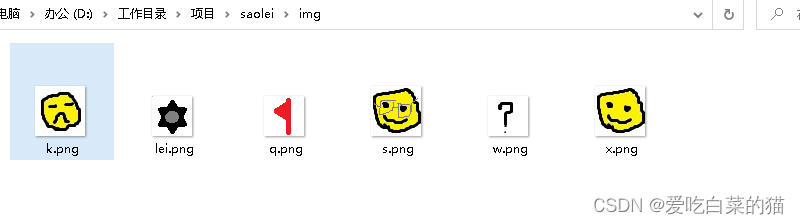
记录下在学校无聊使用java开发的扫雷小游戏 仅供参考 就一个文件 几个自己画的图片
预览图
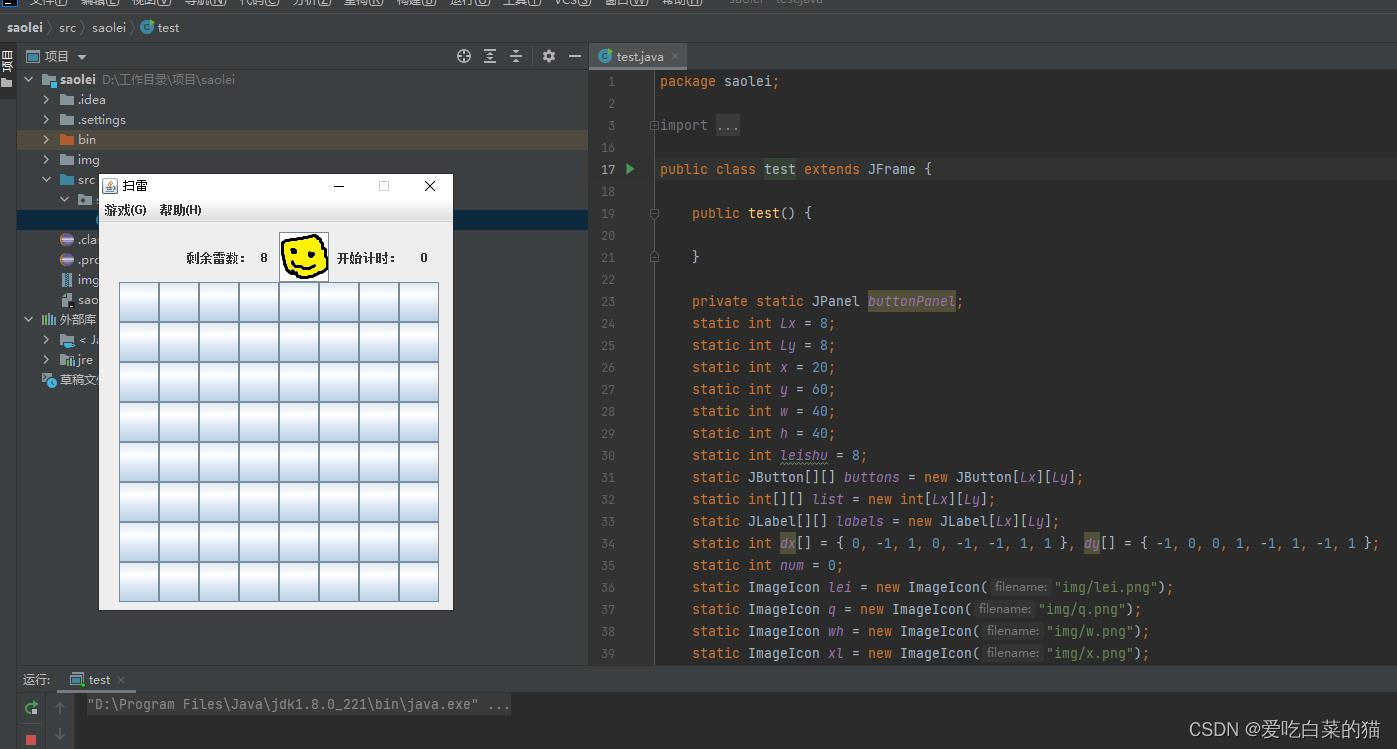
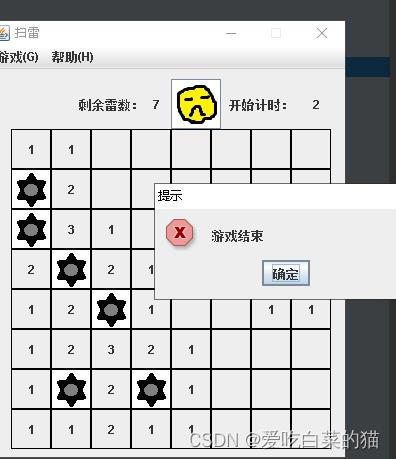
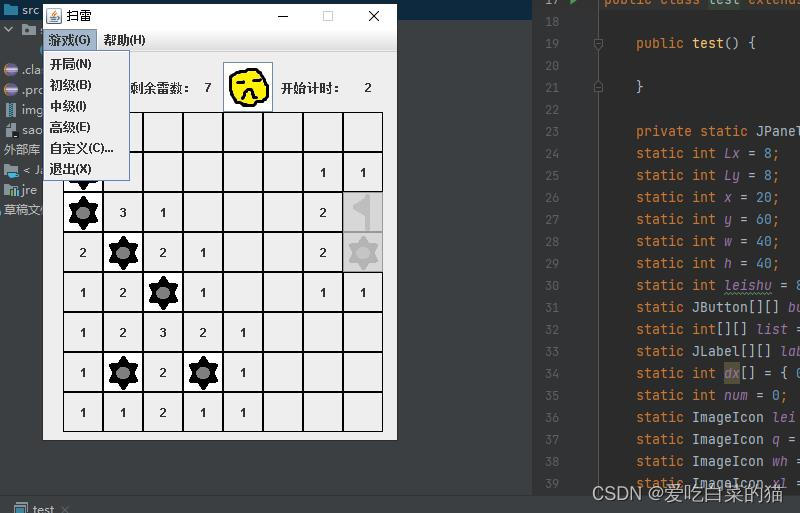
package saolei;

import java.awt.Component;
import java.awt.event.*;
import java.util.Random;
import javax.swing.ImageIcon;
import javax.swing.JButton;
import javax.swing.JFrame;
import javax.swing.JLabel;
import javax.swing.JMenu;
import javax.swing.JMenuBar;
import javax.swing.JMenuItem;
import javax.swing.JOptionPane;
import javax.swing.JPanel;
import javax.swing.Timer;

public class test extends JFrame {

	public test() {

	}

	private static JPanel buttonPanel;
	static int Lx = 8;
	static int Ly = 8;
	static int x = 20;
	static int y = 60;
	static int w = 40;
	static int h = 40;
	static int leishu = 8;
	static JButton[][] buttons = new JButton[Lx][Ly];
	static int[][] list = new int[Lx][Ly];
	static JLabel[][] labels = new JLabel[Lx][Ly];
	static int dx[] = { 0, -1, 1, 0, -1, -1, 1, 1 }, dy[] = { -1, 0, 0, 1, -1, 1, -1, 1 };
	static int num = 0;
	static ImageIcon lei = new ImageIcon("img/lei.png");
	static ImageIcon q = new ImageIcon("img/q.png");
	static ImageIcon wh = new ImageIcon("img/w.png");
	static ImageIcon xl = new ImageIcon("img/x.png");
	static ImageIcon k = new ImageIcon("img/k.png");
	static ImageIcon s = new ImageIcon("img/s.png");
	static JButton lbbblei = new JButton();
	static JFrame frame = new JFrame("扫雷");
	static JLabel lblei = new JLabel();
	static JLabel lbltme = new JLabel();
	static Timer tme = new Timer(1000, new ActionListener() {
		@Override
		public void actionPerformed(ActionEvent e) {
			lbltme.setText(Integer.parseInt(lbltme.getText()) + 1 + "");
		}
	});
	static int width = 8, height = 8;

	public static void gg() {
		for (int i = 0; i < Lx; i++) {
			for (int j = 0; j < Ly; j++) {
				if (buttons[i][j].getIcon() == null) {
					buttons[i][j].setVisible(false);
				}
				buttons[i][j].setEnabled(false);
			}
		}
	}

	public static void guanlian(JButton b) {

		// System.out.println(b.getName());
		int x = Integer.parseInt(b.getName().split(",")[0]);
		int y = Integer.parseInt(b.getName().split(",")[1]);

		ClickBlank(x, y);

	}

	static void ClickBlank(int x, int y) {
		int i;
		buttons[x][y].setVisible(false);
		if (0 != list[x][y])
			return;
		else {
			for (i = 0; i < 8; i++) {
				if ((x + dx[i]) >= 0 && (y + dy[i]) >= 0 && (x + dx[i]) < Lx && (y + dy[i]) < Ly)// 如果不越界
				{
					if (buttons[x + dx[i]][y + dy[i]].isVisible() && buttons[x + dx[i]][y + dy[i]].getIcon() == null)
						ClickBlank(x + dx[i], y + dy[i]);// 递归

				}

			}
			return;

		}
	}

	public static void shenli() {
		int zong = 0;
		int qz = 0;
		int zqz = 0;
		for (int i = 0; i < Lx; i++) {
			for (int j = 0; j < Ly; j++) {
				if (buttons[i][j].isVisible())
					zong++;
				if (buttons[i][j].isVisible() && buttons[i][j].getIcon() == q)
					qz++;
				if (buttons[i][j].isVisible() && buttons[i][j].getIcon() == q && list[i][j] == 9)
					zqz++;

			}
		}
		if (zong == leishu) {
			for (int i = 0; i < Lx; i++) {
				for (int j = 0; j < Ly; j++) {
					if (buttons[i][j].getIcon() == null && buttons[i][j].isVisible()) {
						buttons[i][j].setIcon(q);
						buttons[i][j].setEnabled(false);
					}

				}
			}
			lbbblei.setIcon(s);
			lblei.setText("0");
			JOptionPane.showMessageDialog(null, "通關", "提示", JOptionPane.ERROR_MESSAGE);
		} else if (qz == zqz && zqz == leishu) {
			for (int i = 0; i < Lx; i++) {
				for (int j = 0; j < Ly; j++) {
					if (buttons[i][j].getIcon() == null && buttons[i][j].isVisible()) {
						buttons[i][j].setVisible(false);

					}
					buttons[i][j].setEnabled(false);
				}
			}
			lbbblei.setIcon(s);
			lblei.setText("0");
			JOptionPane.showMessageDialog(null, "通關", "提示", JOptionPane.ERROR_MESSAGE);
		}

	}

	public static void main(String[] args) {

		// create button
		frame.setTitle("扫雷");

		frame.setBounds(300, 200, 40 + width * 40, 120 + height * 40);
		frame.setLocation(700, 200);
		frame.setDefaultCloseOperation(JFrame.EXIT_ON_CLOSE);
		frame.setVisible(true);
		frame.setResizable(false);

		JMenuBar bar = new JMenuBar();
		JMenu menu = new JMenu("游戏(G)");

		JMenuItem item = new JMenuItem("开局(N)");
		item.addActionListener(new ActionListener() {

			@Override
			public void actionPerformed(ActionEvent e) {
				cz();

			}
		});
		menu.add(item);
		item = new JMenuItem("初级(B)");
		item.addActionListener(new ActionListener() {

			@Override
			public void actionPerformed(ActionEvent e) {
				width = 9;
				height = 9;
				leishu = 10;
				cz();

			}
		});
		menu.add(item);
		item = new JMenuItem("中级(I)");
		item.addActionListener(new ActionListener() {

			@Override
			public void actionPerformed(ActionEvent e) {
				width = 16;
				height = 16;
				leishu = 40;
				cz();

			}
		});
		menu.add(item);
		item = new JMenuItem("高级(E)");
		item.addActionListener(new ActionListener() {

			@Override
			public void actionPerformed(ActionEvent e) {
				width = 32;
				height = 16;
				leishu = 99;
				cz();

			}
		});
		menu.add(item);
		item = new JMenuItem("自定义(C)...");
		item.addActionListener(new ActionListener() {

			@Override
			public void actionPerformed(ActionEvent e) {
				width = 9;
				height = 9;
				leishu = 10;
				cz();

			}
		});
		menu.add(item);
		item = new JMenuItem("退出(X)");
		menu.add(item);
		bar.add(menu);
		menu = new JMenu("帮助(H)");
		item = new JMenuItem("关于扫雷(A)...");
		menu.add(item);
		bar.add(menu);
		frame.setJMenuBar(bar);
		cz();

	}

	@SuppressWarnings("deprecation")
	private static void cz() {
		buttonPanel = new JPanel();
		Lx = height;
		Ly = width;
		x = 20;
		y = 60;
		w = 40;
		h = 40;
		buttons = new JButton[Lx][Ly];
		list = new int[Lx][Ly];
		labels = new JLabel[Lx][Ly];
		num = 0;

		buttonPanel.setLayout(null);
		JLabel lbblei = new JLabel("", JLabel.CENTER);
		lbblei.setText("剩余雷数:");
		lbblei.setBounds(Ly * 40 / 2 / 2, 10, 80, 50);
		buttonPanel.add(lbblei);
		lblei = new JLabel("", JLabel.CENTER);
		lblei.setText("" + leishu);
		lblei.setBounds(60 + Ly * 40 / 2 / 2, 10, 50, 50);
		buttonPanel.add(lblei);
		lbbblei = new JButton("");
		lbbblei.setIcon(xl);
		lbbblei.setBounds(100 + Ly * 40 / 2 / 2, 10, 50, 50);
		lbbblei.addActionListener(new ActionListener() {
			@Override
			public void actionPerformed(ActionEvent e) {
				// TODO Auto-generated method stub
				cz();
				lbbblei.setIcon(xl);

			}

		});
		JLabel lbltmetxt = new JLabel("", JLabel.CENTER);
		lbltmetxt.setText("开始计时:");
		lbltmetxt.setBounds(150 + Ly * 40 / 2 / 2, 10, 80, 50);
		buttonPanel.add(lbltmetxt);
		lbltme = new JLabel("", JLabel.CENTER);
		lbltme.setText("" + 0);
		lbltme.setBounds(220 + Ly * 40 / 2 / 2, 10, 50, 50);
		buttonPanel.add(lbltme);

		buttonPanel.add(lbbblei);
		for (int j = 0; j < Lx; j++) {
			for (int i = 0; i < Ly; i++) {
				labels[j][i] = new JLabel("", JLabel.CENTER);
				labels[j][i].setName(j + "," + i);
				labels[j][i].setBounds(x, y, w, h);
				labels[j][i].setBorder(javax.swing.BorderFactory.createLineBorder(new java.awt.Color(0, 0, 0)));
				buttons[j][i] = new JButton();
				// buttons[j][i].setVisible(false);
				buttons[j][i].setName(j + "," + i);
				buttons[j][i].setBounds(x, y, w, h);
				JLabel a = labels[j][i];
				JButton b = buttons[j][i];
				buttons[j][i].addMouseListener(new MouseAdapter() {
					public void mousePressed(MouseEvent e) {
						if (e.getButton() == e.BUTTON1 && b.isEnabled() && b.getIcon() == null) {

							if (a.getIcon() == lei) {

								b.setIcon(new ImageIcon("img/lei.png"));
								gg();
								lbbblei.setIcon(k);
								tme.stop();
								JOptionPane.showMessageDialog(null, "游戏结束", "提示", JOptionPane.ERROR_MESSAGE);
							} else {

								b.setVisible(false);
								if (num == 0) {
									lbltme.setText("" + 0);
									tme.start(); // 开始定时器
									innt(leishu, lei);
								}
								shenli();
								guanlian(b);
								num++;
							}
						}
						if (e.getButton() == e.BUTTON2 && b.isEnabled()) {

							System.out.println(b.getName());

						}
						if (e.getButton() == e.BUTTON3 && b.isEnabled()) {
							if (b.getIcon() == null) {
								lblei.setText(Integer.parseInt(lblei.getText()) - 1 + "");
								b.setIcon(q);
								shenli();
							} else if (b.getIcon() == q) {
								lblei.setText(Integer.parseInt(lblei.getText()) + 1 + "");
								b.setIcon(wh);
							} else if (b.getIcon() == wh) {
								b.setText("");
								b.setIcon(null);
							}
						}

					}
				});
				if (x + 40 < width * 40) {
					x += 40;
				} else {
					y += 40;
					x = 20;
				}
				buttonPanel.add(buttons[j][i]);
				buttonPanel.add(labels[j][i]);

			}
		}
		frame.setBounds(Lx, Ly, 40 + width * 40, 120 + 40 * height);
		frame.setContentPane(buttonPanel);
		frame.show();
	}

	private static void innt(int leishu, ImageIcon lei) {
		Object[] values = new Object[leishu];
		Random random = new Random();

		for (int i = 0; i < values.length; i++) {
			int lx = random.nextInt(Lx);
			int ly = random.nextInt(Ly);
			if (list[lx][ly] != 9 && buttons[lx][ly].isVisible()) {
				labels[lx][ly].setIcon(lei);

				list[lx][ly] = 9;
			} else {
				i--;
			}
		}

		for (int i = 0; i < Lx; i++) {
			for (int j = 0; j < Ly; j++) {
				if (list[i][j] != 9) {
					if ((i - 1) >= 0 && (j - 1) >= 0) {
						if (list[i - 1][j - 1] == 9)
							list[i][j]++;

					}
					if ((i - 1) >= 0) {
						if (list[i - 1][j] == 9)
							list[i][j]++;
					}
					if ((i - 1) >= 0 && (j + 1) < Ly) {
						if (list[i - 1][j + 1] == 9)
							list[i][j]++;

					}
					if ((j - 1) >= 0) {
						if (list[i][j - 1] == 9)
							list[i][j]++;

					}
					if ((j + 1) < Ly) {
						if (list[i][j + 1] == 9)
							list[i][j]++;

					}
					if ((j - 1) >= 0 && (i + 1) < Lx) {
						if (list[i + 1][j - 1] == 9)
							list[i][j]++;

					}
					if ((i + 1) < Lx) {
						if (list[i + 1][j] == 9)
							list[i][j]++;

					}
					if ((i + 1) < Lx && (j + 1) < Ly) {
						if (list[i + 1][j + 1] == 9)
							list[i][j]++;

					}
					if (list[i][j] != 0)
						labels[i][j].setText(Integer.toString(list[i][j]));
				}
			}

		}
	}

}





 扫一扫
扫一扫


 2878
2878


 到【灌水乐园】发言



