



 本文介绍了AbsoluteLayout绝对位置布局的特点及使用方法。通过设置子元素的android:layout_x和android:layout_y属性,可以精确控制视图的位置。文章还提供了一个示例,展示了如何创建重叠的视图组件。
AbsoluteLayout是绝对位置布局。在此布局中的子元素的android:layout_x和android:layout_y属性将生效,用于描述该子元素的坐标位置。屏幕左上角为坐标原点(0,0),第一个0代表横坐标,向右移动此值增大,第二个0代表纵坐标,向下移动,此值增大。在此布局中的子元素可以相互重叠。在实际开发中,通常不采用此布局格式,因为它的界面代码过于刚性,以至于有可能不能很好的适配各种终端。显示效果如下:
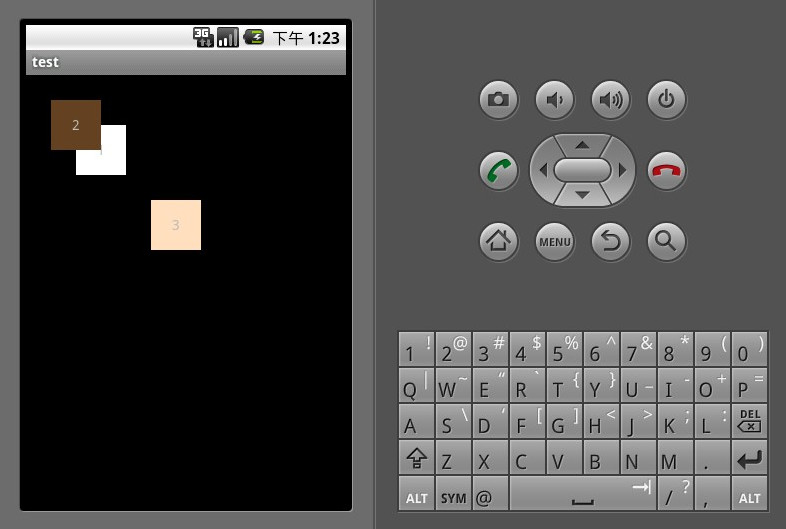
<?xml version="1.0" encoding="utf-8"?>
<AbsoluteLayout xmlns:android="http://schemas.android.com/apk/res/android" android:orientation="vertical" android:layout_width="fill_parent" android:layout_height="fill_parent">
<TextView android:layout_width="50dp" android:layout_height="50dp" android:background="#ffffffff" android:gravity="center" android:layout_x="50dp" android:layout_y="50dp" android:text="1"/>
<TextView android:layout_width="50dp" android:layout_height="50dp" android:background="#ff654321" android:gravity="center" android:layout_x="25dp" android:layout_y="25dp" android:text="2"/>
<TextView  android:layout_width="50dp" android:layout_height="50dp" android:background="#fffedcba" android:gravity="center" android:layout_x="125dp" android:layout_y="125dp" android:text="3"/>
</AbsoluteLayout>





 扫一扫
扫一扫


 6112
6112

 被折叠的 条评论
为什么被折叠?
被折叠的 条评论
为什么被折叠?
 到【灌水乐园】发言





