



 本文详细记录了Windows环境下Maven的环境搭建过程,包括JDK与Maven的安装配置,通过创建HelloWorld项目体验Maven的功能,以及如何在本地仓库管理依赖包。
Maven之——环境搭建
摘要:主要记录Windows下Maven的环境的搭建(Linux暂时还没有弄、后面补充)、以及不借助IDE工具建立第一个Maven项目、体会一下Maven的结构、以及作用。
一:环境的搭建
1.1 所需材料:
a) JDK1.6或者JDK1.7(我这里是JDK1.7)
b) Maven3的压缩包——下载地址:http://maven.apache.org/download.cgi。我下载的是:apache-maven-3.2.1-bin.zip
1.2具体搭建:
1.2.1 安装jdk、并配置环境变量。
Maven是要基于jdk的先决条件的、应该先安装jdk、这一步应该没有什么难度。
可以使用下面命令查看JDK是否正确安装:
                java–version
                echo%JAVA_HOME%
1.2.2 Maven安装
Maven的安装很简单、解压、配置环境变量就OK
a) 将下载的Maven的zip文件解压到指定文件夹、比如我这里的是:C:\Program Files\Apache Software Foundation
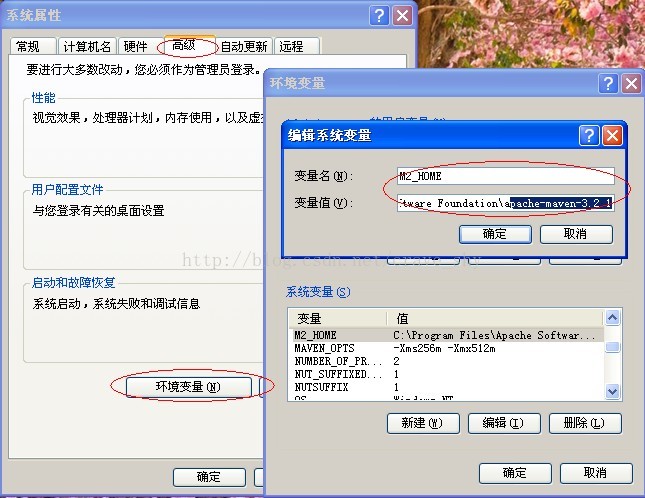
b) 设置环境变量、打开系统属性面板(桌面上右键单击“我的电脑”→“属性”),点击高级系统设置,再点击环境变量,在系统变量中新建一个变量,变量名为M2_HOME,变量值为Maven的安装目录C:\Program Files\Apache Software Foundation\apache-maven-3.2.1。点击确定,接着在系统变量中找到一个名为Path的变量,在变量值的末尾加上%M2_HOME%\bin;,注意多个值之间需要有分号隔开,然后点击确定。至此,环境变量设置完成。具体如下图:
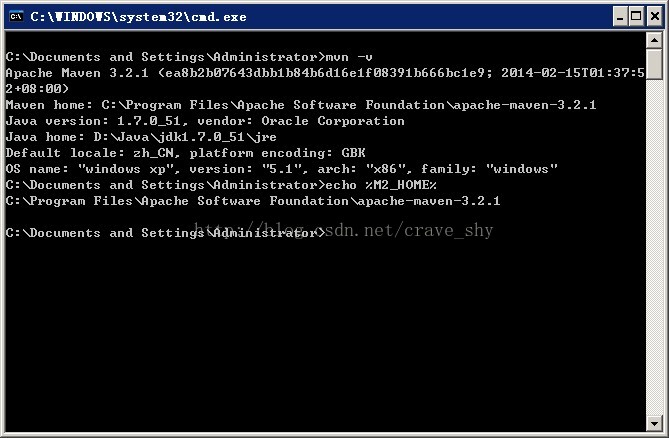
c) 查看Maven安装情况:
                mvn –v
                echo %M2_HOME%
如下图输出则安装成功:
二:项目的构建
2.1 Maven的settings.xml
Maven的setting.xml文件是Maven的全局配置文件、这里提到是主要修改Maven的本地仓库位置。先做、以后再详细了解各个概念、目前最重要的就是弄个项目出来、看看Maven到底是干嘛的。setting.xml文件位置:C:\Program Files\Apache Software Foundation\apache-maven-3.2.1\conf
修改setting.xml文件:
<settings xmlns="http://maven.apache.org/SETTINGS/1.0.0"
          xmlns:xsi="http://www.w3.org/2001/XMLSchema-instance"
          xsi:schemaLocation="http://maven.apache.org/SETTINGS/1.0.0 http://maven.apache.org/xsd/settings-1.0.0.xsd">
  <!-- localRepository
   | The path to the local repository maven will use to store artifacts.
   |
   | Default: ${user.home}/.m2/repository
  <localRepository>/path/to/local/repo</localRepository>
  -->
<span style="color:#ff0000;">  <localRepository>F:/maven/repo</localRepository></span>
红色部分是自己添加的、意思就是Maven会将以后用到的包从中央仓库下载到本地仓库中、以后将我们自己的项目打成的jar包也会放到本地仓库中去、而本地仓库的目录就是F:/maven/repo。
2.2 Maven的骨架格式
Maven的主配置文件是pom.xml、是放在项目的根目录下的。
Maven的主代码是放在/src/main/java下的。
Maven的测试代码是放在/src/test/java下的。
target是用于存放一些额外信息的。可以自己使用不同的Maven命令查看。
2.3 HelloWorld的搭建
假如我们现在想创建一个HelloWorld、项目名称为helloworld。我的项目放在自己指定的文件夹下:D:\maven
a) 在D:\maven下创建helloworld文件夹
b) 在helloworl文件夹下建立一个pom.xml文件、内容为:
<?xml version="1.0" encoding="UTF-8"?>
<project xmlns="http://maven.apache.org/POM/4.0.0"
         xmlns:xsi="http://www.w3.org/2001/XMLSchema-instance"
         xsi:schemaLocation="http://maven.apache.org/POM/4.0.0 http://maven.apache.org/xsd/maven-4.0.0.xsd">
    <modelVersion>4.0.0</modelVersion>

    <groupId>com.chy.maven.helloworld</groupId>
    <artifactId>helloworld-first</artifactId>
    <version>1.0-SNAPSHOT</version>
    <name>Project HelloWorld Maven</name>

    <dependencies>
        <dependency>
            <groupId>junit</groupId>
            <artifactId>junit</artifactId>
            <version>4.10</version>
        </dependency>
    </dependencies>
</project>
c) 创建主代码文件夹目录、这里可以使用命令行的形式创建、比如我的HelloWorld.java的包名为:com/chy/helloworld 、可在命令窗口下执行下面命令:md D:\maven\helloworld\src\main\java\com\chy\helloworld
d) 打开上面最后一个helloworld文件夹、创建HelloWorld.java。
e) 创建测试代码目录:同样使用上面形式创建:md D:\maven\helloworld\src\test\java\com\chy\helloworld
f) 打开上面最后一个helloworld文件夹、创建HelloWorldTest.java
完整的项目结构图:

在命令窗口中执行:
mvn compileD:\maven\helloworld>mvn compile
[INFO] Scanning for projects...
[INFO]
[INFO] Using the builder org.apache.maven.lifecycle.internal.builder.singlethrea
ded.SingleThreadedBuilder with a thread count of 1
[INFO]
[INFO] ------------------------------------------------------------------------
[INFO] Building Project HelloWorld Maven 1.0-SNAPSHOT
[INFO] ------------------------------------------------------------------------
[INFO]
[INFO] --- maven-resources-plugin:2.6:resources (default-resources) @ helloworld
-first ---
[WARNING] Using platform encoding (GBK actually) to copy filtered resources, i.e
. build is platform dependent!
[INFO] skip non existing resourceDirectory D:\maven\helloworld\src\main\resource
s
[INFO]
[INFO] --- maven-compiler-plugin:2.5.1:compile (default-compile) @ helloworld-fi
rst ---
[WARNING] File encoding has not been set, using platform encoding GBK, i.e. buil
d is platform dependent!
[INFO] Compiling 1 source file to D:\maven\helloworld\target\classes
[INFO] ------------------------------------------------------------------------
[INFO] BUILD SUCCESS
[INFO] ------------------------------------------------------------------------
[INFO] Total time: 0.922 s
[INFO] Finished at: 2014-04-17T16:41:59+08:00
[INFO] Final Memory: 12M/247M
[INFO] ------------------------------------------------------------------------第一次编译、会根据项目中牵扯到的类去中央仓库自动下载jar包到本地仓库。所以比较慢。以后如果还用到相同的jar包、就会直接从本地仓库中取、这样就比较快了。
编译完成之后就会在项目目录下多出一个target文件、此文件夹下会存放执行命令的结果。比如target文件夹下的classes和test-classes会存放src下HelloWorld.java和HelloWorldTest.java的class文件。
在命令窗口中执行:
mvn testD:\maven\helloworld>mvn test
[INFO] Scanning for projects...
[INFO]
[INFO] Using the builder org.apache.maven.lifecycle.internal.builder.singlethrea
ded.SingleThreadedBuilder with a thread count of 1
[INFO]
[INFO] ------------------------------------------------------------------------
[INFO] Building Project HelloWorld Maven 1.0-SNAPSHOT
[INFO] ------------------------------------------------------------------------
[INFO]
[INFO] --- maven-resources-plugin:2.6:resources (default-resources) @ helloworld
-first ---
[WARNING] Using platform encoding (GBK actually) to copy filtered resources, i.e
. build is platform dependent!
[INFO] skip non existing resourceDirectory D:\maven\helloworld\src\main\resource
s
[INFO]
[INFO] --- maven-compiler-plugin:2.5.1:compile (default-compile) @ helloworld-fi
rst ---
[INFO] Nothing to compile - all classes are up to date
[INFO]
[INFO] --- maven-resources-plugin:2.6:testResources (default-testResources) @ he
lloworld-first ---
[WARNING] Using platform encoding (GBK actually) to copy filtered resources, i.e
. build is platform dependent!
[INFO] skip non existing resourceDirectory D:\maven\helloworld\src\test\resource
s
[INFO]
[INFO] --- maven-compiler-plugin:2.5.1:testCompile (default-testCompile) @ hello
world-first ---
[WARNING] File encoding has not been set, using platform encoding GBK, i.e. buil
d is platform dependent!
[INFO] Compiling 1 source file to D:\maven\helloworld\target\test-classes
[INFO]
[INFO] --- maven-surefire-plugin:2.12.4:test (default-test) @ helloworld-first -
--
[INFO] Surefire report directory: D:\maven\helloworld\target\surefire-reports
-------------------------------------------------------
T E S T S
-------------------------------------------------------
Running com.chy.helloworld.HelloWorldTest
Tests run: 1, Failures: 0, Errors: 0, Skipped: 0, Time elapsed: 0.047 sec
Results :
Tests run: 1, Failures: 0, Errors: 0, Skipped: 0
[INFO] ------------------------------------------------------------------------
[INFO] BUILD SUCCESS
[INFO] ------------------------------------------------------------------------
[INFO] Total time: 1.563 s
[INFO] Finished at: 2014-04-17T16:42:42+08:00
[INFO] Final Memory: 12M/247M
[INFO] ------------------------------------------------------------------------
D:\maven\helloworld>会先编译、然后进行测试、具体可以观察输出。
在命令窗口执行:
mvn clean installD:\maven\helloworld>mvn clean install
[INFO] Scanning for projects...
[INFO]
[INFO] Using the builder org.apache.maven.lifecycle.internal.builder.singlethrea
ded.SingleThreadedBuilder with a thread count of 1
[INFO]
[INFO] ------------------------------------------------------------------------
[INFO] Building Project HelloWorld Maven 1.0-SNAPSHOT
[INFO] ------------------------------------------------------------------------
[INFO]
[INFO] --- maven-clean-plugin:2.5:clean (default-clean) @ helloworld-first ---
[INFO] Deleting D:\maven\helloworld\target
[INFO]
[INFO] --- maven-resources-plugin:2.6:resources (default-resources) @ helloworld
-first ---
[WARNING] Using platform encoding (GBK actually) to copy filtered resources, i.e
. build is platform dependent!
[INFO] skip non existing resourceDirectory D:\maven\helloworld\src\main\resource
s
[INFO]
[INFO] --- maven-compiler-plugin:2.5.1:compile (default-compile) @ helloworld-fi
rst ---
[WARNING] File encoding has not been set, using platform encoding GBK, i.e. buil
d is platform dependent!
[INFO] Compiling 1 source file to D:\maven\helloworld\target\classes
[INFO]
[INFO] --- maven-resources-plugin:2.6:testResources (default-testResources) @ he
lloworld-first ---
[WARNING] Using platform encoding (GBK actually) to copy filtered resources, i.e
. build is platform dependent!
[INFO] skip non existing resourceDirectory D:\maven\helloworld\src\test\resource
s
[INFO]
[INFO] --- maven-compiler-plugin:2.5.1:testCompile (default-testCompile) @ hello
world-first ---
[WARNING] File encoding has not been set, using platform encoding GBK, i.e. buil
d is platform dependent!
[INFO] Compiling 1 source file to D:\maven\helloworld\target\test-classes
[INFO]
[INFO] --- maven-surefire-plugin:2.12.4:test (default-test) @ helloworld-first -
--
[INFO] Surefire report directory: D:\maven\helloworld\target\surefire-reports
-------------------------------------------------------
T E S T S
-------------------------------------------------------
Running com.chy.helloworld.HelloWorldTest
Tests run: 1, Failures: 0, Errors: 0, Skipped: 0, Time elapsed: 0.031 sec
Results :
Tests run: 1, Failures: 0, Errors: 0, Skipped: 0
[INFO]
[INFO] --- maven-jar-plugin:2.4:jar (default-jar) @ helloworld-first ---
[INFO] Building jar: D:\maven\helloworld\target\helloworld-first-1.0-SNAPSHOT.ja
r
[INFO]
[INFO] --- maven-install-plugin:2.4:install (default-install) @ helloworld-first
---
[INFO] Installing D:\maven\helloworld\target\helloworld-first-1.0-SNAPSHOT.jar t
o F:\maven\repo\com\chy\maven\helloworld\helloworld-first\1.0-SNAPSHOT\helloworl
d-first-1.0-SNAPSHOT.jar
[INFO] Installing D:\maven\helloworld\pom.xml to F:\maven\repo\com\chy\maven\hel
loworld\helloworld-first\1.0-SNAPSHOT\helloworld-first-1.0-SNAPSHOT.pom
[INFO] ------------------------------------------------------------------------
[INFO] BUILD SUCCESS
[INFO] ------------------------------------------------------------------------
[INFO] Total time: 2.250 s
[INFO] Finished at: 2014-04-17T16:43:26+08:00
[INFO] Final Memory: 14M/247M
[INFO] ------------------------------------------------------------------------
D:\maven\helloworld>这条命令相当于执行两个操作、先clean、此时项目文件夹helloworld中的target文件夹就会被清理掉。然后在我们的本地仓库中就可以看到此项目的jar包、F:/maven/com/xxx下面。
2.4:另一种创建方式
Maven的骨架格式是固定的、所以可以直接使用下面命令来创建Maven项目:
D:\maven>mvn archetype:generate他会让你输入一些信息:
971: remote -> uk.ac.rdg.resc:edal-ncwms-based-webapp(-)
Choose a number or apply filter (format:[groupId:]artifactId, case sensitive co
ntains): 376: 376

Chooseorg.apache.maven.archetypes:maven-archetype-quickstart version:
1: 1.0-alpha-1
2: 1.0-alpha-2
3: 1.0-alpha-3
4: 1.0-alpha-4
5: 1.0
6: 1.1
Choose a number: 6: 6

Define value for property 'groupId': :com.chy.helloworld
Define value for property 'artifactId': :helloworld-second
Define value for property 'version':  1.0-SNAPSHOT: :
Define value for property 'package':  com.chy.helloworld: :

Confirm properties configuration:
groupId: com.chy.helloworld
artifactId: helloworld-second
version: 1.0-SNAPSHOT
package: com.chy.helloworld
 Y: :Y
最后有如下输出、则创建成功:
[INFO]-------------------------------------------------------------------------
---
[INFO] Using following parameters forcreating project from Old (1.x) Archetype:
 maven-archetype-quickstart:1.1
[INFO]-------------------------------------------------------------------------
---
[INFO] Parameter: groupId, Value:com.chy.helloworld
[INFO] Parameter: packageName, Value:com.chy.helloworld
[INFO] Parameter: package, Value:com.chy.helloworld
[INFO] Parameter: artifactId, Value:helloworld-second
[INFO] Parameter: basedir, Value: D:\maven
[INFO] Parameter: version, Value:1.0-SNAPSHOT
[INFO] project created from Old (1.x)Archetype in dir: D:\maven\helloworld-seco
nd
[INFO]------------------------------------------------------------------------
[INFO] BUILD SUCCESS
[INFO]------------------------------------------------------------------------
[INFO] Total time: 02:48 min
[INFO] Finished at:2014-04-17T16:27:02+08:00
[INFO] Final Memory: 15M/247M
[INFO]------------------------------------------------------------------------
D:\maven>
可以到D:\maven文件夹下查看、跟我自动创建的很相似。pom.xml也为我们创建好。自动生成两个java类、
上面的过程需要手动填写很多参数、下面的可以直接将必须参数一次写完、自动生成。
D:\maven>mvnarchetype:create -DgroupId=com.chy.hello -DartifactId=hello-three -Dversion=1.0SNAPSHOT-D其实是java设置环境变量的一个参数。
到这里mvn命令窗口创建项目就完成了。
总结:
起码现在知道Maven不用我们在手动去寻找包、导入包、并且还要特别小心的处理包之间的依赖、它可以自动帮我们完成(当然也要我们配合指定)、可以将我们自己写的项目打成jar包、以后我们想要使用自己生成的jar包就可以这样来弄。
更多内容:maven学习笔记之——目录





 扫一扫
扫一扫


 2027
2027


 被折叠的 条评论
为什么被折叠?
被折叠的 条评论
为什么被折叠?
 到【灌水乐园】发言




