



 本文介绍如何从Git仓库克隆OpenCV源代码,并在Ubuntu系统中进行编译安装,同时提供了使用CMake及Ninja加速构建过程的方法。此外,还详细说明了如何为Android平台构建OpenCV。
I am going to show you how to clone the opencv source from Git repository. After cloing the source, I will build and install it.
Build for ubuntu
Download the source of opencv and opencv_contrib from github and checkout to the tag, 3.1.0:
Use cmake:
If your environment contains CUDA, by default, it will build it with CUDA. If you don't want to build it with CUDA,
add
Start to build and install to /usr/local/include and /usr/local/lib. You can change the installed dir by change CMAKE_INSTALL_PREFIX
-DWITH_CUDA=OFF
to your
cmake
command line.
Start to build and install to /usr/local/include and /usr/local/lib. You can change the installed dir by change CMAKE_INSTALL_PREFIX
You can check your current opencv version:
$ pkg-config --modversion opencv
It will be 3.1.0 !
You can also look at the headers or libs installed. Using pkg-config can tell you where they are:
$ pkg-config --cflags opencv
$ pkg-config --libs opencv
$ pkg-config --libs opencv
Actually, you can use the latest stable OpenCV version available in sourceforge without building the source.
How to speed up building process?
You can use Ninja to speed up instead of using Makefile
Build for Android version:
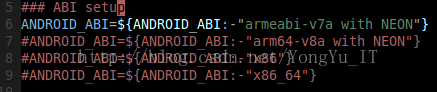
You can change your target API in build_android_opencv.sh. For example, you can build the target for arm by changing the variable, ANDROID_ABI, in build_android_opencv.sh which you clone from the above commands.
The final output will be installed and located in ~/<my_working _directory>/android_opencv/
Alternatively, you can refer to https://github.com/tzutalin/build-opencv-for-android
References:
http://code.opencv.org/projects/opencv/wiki/Building_OpenCV4Android_from_trunk
http://docs.opencv.org/3.1-beta/doc/tutorials/introduction/linux_install/linux_install.html
https://github.com/Itseez/opencv/wiki/Building_OpenCV4Android_from_trunk
https://github.com/alexkarargyris/Caffe_OpenCV_Android_App





 扫一扫
扫一扫


 3654
3654

 被折叠的 条评论
为什么被折叠?
被折叠的 条评论
为什么被折叠?
 到【灌水乐园】发言





