周公的专栏

弱水三千,只取一瓢饮。你看见我的瓢了吗?

用户操作
[即时聊天] [发私信] [加为好友]
周公ID:zhoufoxcn
206239次访问,排名343(-1)好友274人,关注者334
6年的Java和.net开发经验。熟悉数据库及软件性能优化。
zhoufoxcn的文章
原创 149 篇
翻译 5 篇
转载 70 篇
评论 585 篇
周公的公告
英文名:zhoufoxcn
昵称:周公
职业:程序开发
成为MVP时间:2008.07
爱好:编程,旅游,写作
转载本人原创文章请注明出处,并且请勿用于商业用途,谢谢合作!
MVP Open Day拉票:欢迎投我一票投票,谢谢。
最近评论
awei0916:非常好,谢谢!
awei0916:非常好,谢谢!
chenshu123120:为什么我的gridview不能输出,内容为空啊
yzbsd:document.getElementById("errorMsg1").innerText=Test.CheckAge(parseInt(age)).value;
应该改为:
document.getElementById("errorMsg1").innerText=Test.CheckAge(parseInt(age.value)).value;
文章分类
收藏
    相册
    .net
    mengyao||Andy 路鑫(RSS)
    The Code Project
    剑了(RSS)
    山西.net俱乐部
    张子阳(RSS)
    Java
    张森炜的博客(RSS)
    娱乐资源
    天下网
    天下网生活论坛(RSS)
    存档
    订阅我的博客
    XML聚合  FeedSky
    订阅到鲜果
    订阅到Google
    订阅到抓虾
    订阅到BlogLines
    订阅到Yahoo
    订阅到GouGou
    订阅到飞鸽
    订阅到Rojo
    订阅到newsgator
    订阅到netvibes

    原创 用C#制作飘动的窗体效果收藏

    新一篇: WinForm中的特殊窗体效果:渐变窗口和信息提示窗口 | 旧一篇: 仿QQ面板的WinForm窗体

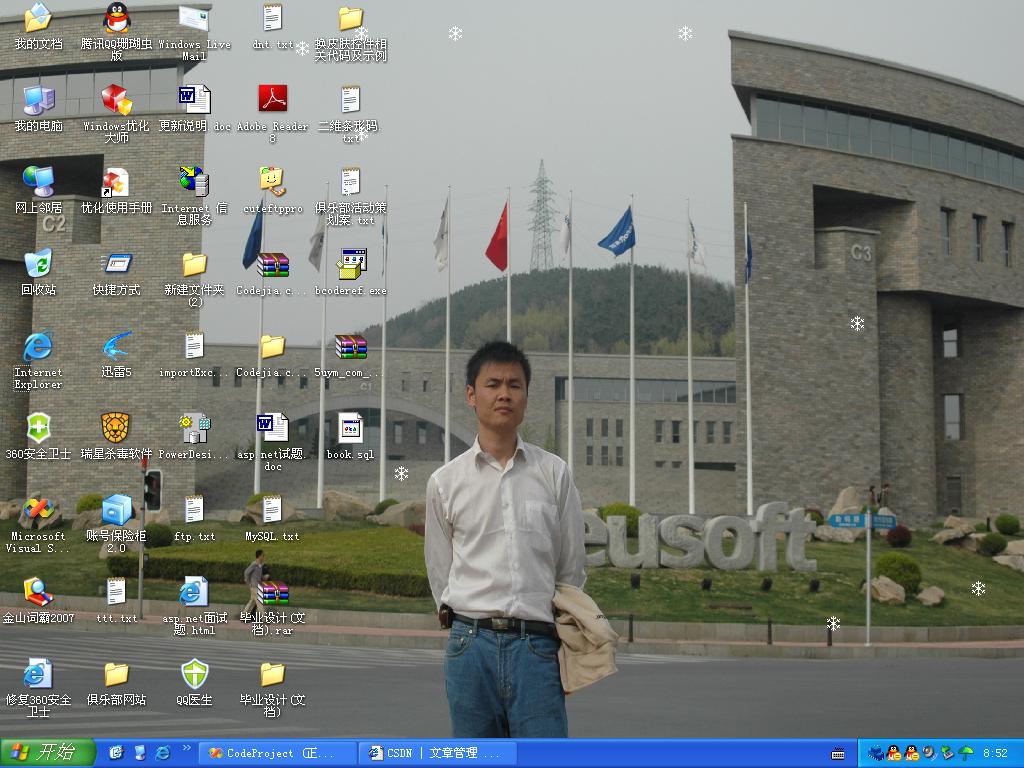
    效果图:

    最近翻看以前的学习C#的联系代码,无意之中发现一个很有趣的项目。是一个飘动窗体的效果,运行程序之后,在当前屏幕上会像雪花般飘动很多自定义图标,并且它们就像雪花般轻盈地从屏幕上方飘落到屏幕下方,直到消失。在程序运行过程中,屏幕上会维持一定数目的雪花。在系统托盘区域会有一个图标,点击这个图标,可以退出程序。这个联系代码联系了如何使用不规则窗体和系统托盘控件。

    程序中核心部分源代码:

    using System;
    using System.Drawing;
    using System.Drawing.Drawing2D;
    using System.Windows.Forms;
    
    namespace FallingGold
    {
        /// 
        /// 说明:图片轮廓类,通过这个类提供的方法得到图片的外围轮廓
        /// 作者:周公
        /// 原创地址:http://blog.csdn.net/zhoufoxcn/archive/2008/06/06/2515753.aspx
        /// 
        public class BitmapRegion
        {
            public BitmapRegion()
            { }
    
            public static void CreateControlRegion(Control control, Bitmap bitmap)
            {
                //如果控件或者图象为空
                if (control == null || bitmap == null)
                {
                    return;
                }
                //将控件设置成图象一样的尺寸
                control.Width = bitmap.Width;
                control.Height = bitmap.Height;
                //如果处理的是一个窗体对象
                if (control is System.Windows.Forms.Form)
                {
                    Form form = control as Form;//强制转换为Form实例
                    //将窗体的尺寸设置成比图片稍微大一点,这样就不用显示窗体边框
                    form.Width += 15;
                    form.Height += 35;
                    //设置窗体无边框
                    form.FormBorderStyle = FormBorderStyle.None;
                    //设置窗体背景
                    form.BackgroundImage = bitmap;
                    //根据图片计算路径
                    GraphicsPath graphicsPath = CalculateControlGraphicsPath(bitmap);
                    //应用区域
                    form.Region = new Region(graphicsPath);
                }
                //如果处理的是一个按钮对象
                else if (control is System.Windows.Forms.Button)
                {
                    Button button = control as Button;//强制转换为Button实例
                    //不显示文字
                    button.Text = "";
                    //当鼠标处在上方时更改光标状态
                    button.Cursor = Cursors.Hand;
                    //设置背景图片
                    button.BackgroundImage = bitmap;
                    //根据图片计算路径
                    GraphicsPath graphicsPath = CalculateControlGraphicsPath(bitmap);
                    //应用区域
                    button.Region = new Region(graphicsPath);
                }
               
            }
            /// 
            /// 通过逼近的方式扫描图片的轮廓
            /// 
            /// 要扫描的图片
            /// 
            private static GraphicsPath CalculateControlGraphicsPath(Bitmap bitmap)
            {
                GraphicsPath graphicsPath = new GraphicsPath();
                //将图片的(0,0)处的颜色定义为透明色
                Color transparentColor = bitmap.GetPixel(0, 0);
                //存储发现的第一个不透明的象素的列值(即x坐标),这个值将定义我们扫描不透明区域的边缘
                int opaquePixelX = 0;
                //从纵向开始
                for (int y = 0; y < bitmap.Height; y++)
                {
                    opaquePixelX = 0;
                    for (int x = 0; x < bitmap.Width; x++)
                    {
                        if (bitmap.GetPixel(x, y) != transparentColor)
                        {
                            //标记不透明象素的位置
                            opaquePixelX = x;
                            //记录当前位置
                            int nextX = x;
                            for (nextX = opaquePixelX; nextX < bitmap.Width; nextX++)
                            {
                                if (bitmap.GetPixel(nextX, y) == transparentColor)
                                {
                                    break;
                                }
                            }
    
                            graphicsPath.AddRectangle(new Rectangle(opaquePixelX, y, nextX - opaquePixelX, 1));
                            x = nextX;
                        }
                    }
                }
                return graphicsPath;
            }
        }
    }
    using System;
    using System.Collections.Generic;
    using System.ComponentModel;
    using System.Data;
    using System.Drawing;
    using System.Text;
    using System.Windows.Forms;
    
    namespace FallingGold
    {
        /// 
        /// 说明:飘动的窗体
        /// 作者:周公
        /// 原创地址:http://blog.csdn.net/zhoufoxcn/archive/2008/06/06/2515753.aspx
        /// 
        public partial class GoldForm : Form
        {
            private int currentX;//图片的当前横坐标
            private int currentY;//图片的当前纵坐标
            private int screenHeight;//屏幕高度
            private int screenWidth;//屏幕宽度
            private int counter;//图片数量
            private int increment;//移动增量
            private int interval;//移动时间间隔
    
            private Bitmap bmpFlake = Properties.Resources.snow;
            /// 
            /// 构造函数
            /// 
            /// 移动间隔
            /// 飘动窗体的横坐标
            public GoldForm(int interval, int currentX)
            {
                this.interval = interval + 10;
                this.currentX = currentX;
                InitializeComponent();
    
                BitmapRegion.CreateControlRegion(this, bmpFlake);
            }
    
            private void GoldForm_Load(object sender, EventArgs e)
            {
                //获取屏幕的工作区域,不包括状态栏
                Rectangle rectangleWorkArea = Screen.PrimaryScreen.WorkingArea;
                screenHeight = rectangleWorkArea.Height;
                screenWidth = rectangleWorkArea.Width;
                timerMove.Interval = interval;//设置timer的间隔
                this.Left = currentX;//设置窗体的起始横坐标
                timerMove.Start();//运行timer
            }
            //timer的事件
            private void timerMove_Tick(object sender, EventArgs e)
            {
                timerMove.Stop();
                currentY += 5;
                counter++;
    
                Random random = new Random();
                if (counter == 15)
                {
                    if ((random.Next(10) - 5) > 0)
                    {
                        increment = 1;
                    }
                    else
                    {
                        increment = -1;
                    }
                    counter = 0;
                }
    
                currentX += increment;
                if (currentY > screenHeight)
                {
                    currentY = 0;
                    currentX = random.Next(screenWidth);
                    interval = random.Next(50,100);
                }
                //设置窗体位置,相当于移动窗体
                this.Location = new Point(currentX, currentY);
    
                timerMove.Interval = interval;
                timerMove.Start();
            }
        }
    }
     
    整个程序的源代码请到http://download.csdn.net/source/484535下载。

    发表于 @ 2008年06月06日 09:02:00|评论(loading...)|收藏

    新一篇: WinForm中的特殊窗体效果:渐变窗口和信息提示窗口 | 旧一篇: 仿QQ面板的WinForm窗体

    评论

    #only_endure 发表于2008-06-06 10:04:45  IP: 222.45.95.*
    @周公
    没用过winform,这段代码可以直接运行吗,在winform窗体?
    2008-06-06 11:24:48作者回复
    这个就是WinForm做的,全部代码需要下载整个程序。<br />请到我给的链接下载。<br />里面有可以直接运行的程序。
    #wokaosini163 发表于2008-06-06 16:53:24  IP: 210.22.72.*
    javascript比你做的好,
    我还以为你做的是游戏呢.
    原来不过是个小玩意!
    #BlueHope1987 发表于2008-06-06 18:47:44  IP: 222.222.119.*
    楼上捣乱~~;
    你用javascript做个在桌面上飘的雪花试试
    #linjf520 发表于2008-06-06 21:02:07  IP: 58.63.40.*
    就是就是...

    说话前...先把自己的作品拿出来...你才有资格说...
    #yiziyi9 发表于2008-06-07 12:32:05  IP: 125.122.54.*
    javascriptB/S结构上的,楼主这个有点意思。学到不少谢谢!
    #lemontree1213 发表于2008-06-07 16:55:52  IP: 122.159.25.*
    学习了 谢谢!!
    #aimeast 发表于2008-06-09 12:23:49  IP: 222.243.236.*
    哈哈,那个计算轮廓的类太常见了。
    我那到有个飘雪的东西,好玩咦。
    http://blog.csdn.net/aimeast/archive/2008/06/01/2500189.aspx
    2008-06-09 16:52:10作者回复
    我看了一下你的,里面用到了系统API库,我这里是纯C#实现的。
    #zj77063806 发表于2008-06-13 19:58:48  IP: 121.63.17.*
    受益匪浅,谢谢了
    #qlu0634 发表于2008-06-14 14:44:15  IP: 218.58.71.*
    真好 借用啦
    #aimeast 发表于2008-06-22 14:51:54  IP: 220.170.83.*
    呵呵,回博主的话。貌似在.net库里没有直接获取。修改桌面像素点的方法吧。
    要说有,也是用gdi+吧。那样的设置像素点速度还行,获取就慢了。
    不知周公有何高见?
    2008-06-22 16:49:31作者回复
    其实每个飘动的雪花就是一个移动的窗体。
    #snkht 发表于2008-06-25 16:05:35  IP: 221.224.161.*

    小弟愚钝,周公的CalculateControlGraphicsPath方法是否可以写为如下:


    private static GraphicsPath CalculateControlGraphicsPath(Bitmap bitmap)
    {
    GraphicsPath graphicsPath = new GraphicsPath();
    //将图片的(0,0)处的颜色定义为透明色
    Color transparentColor = bitmap.GetPixel(0, 0);
    //存储发现的第一个不透明的象素的列值(即x坐标),这个值将定义我们扫描不透明区域的边缘
    //int opaquePixelX = 0;
    //从纵向开始
    for (int y = 0; y < bitmap.Height; y++)
    {
    //opaquePixelX = 0;
    for (int x = 0; x < bitmap.Width; x++)
    {
    if (bitmap.GetPixel(x, y) != transparentColor)
    {
    graphicsPath.AddRectangle(new Rectangle(x, y, 1, 1));
    }
    }
    }
    return graphicsPath;
    }

    发表评论  


    登录
    Csdn Blog version 3.1a
    Copyright © 周公


