



 本文介绍了如何在Android应用中创建一个独立的导航栏布局文件,并在BaseActivity中引入并根据需求动态设置。还展示了如何创建一个BaseActivity作为所有活动基类,提供统一的UI初始化方法。
1.写一个单独的布局文件,并在主要的活动布局中引入改ui布局文件
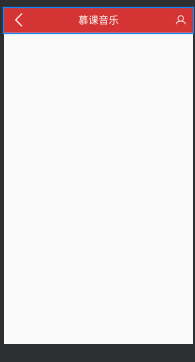
<?xml version="1.0" encoding="utf-8"?>
<FrameLayout
    xmlns:android="http://schemas.android.com/apk/res/android"
    android:layout_width="match_parent"
    android:layout_height="@dimen/navBarHeight"
    android:background="@color/mainColor"
    android:paddingLeft="@dimen/marginSize"
    android:paddingRight="@dimen/marginSize">
    <ImageView
        android:id="@+id/iv_back"
        android:layout_width="wrap_content"
        android:layout_height="wrap_content"
        android:src="@mipmap/back"
        android:layout_gravity="center_vertical"/>
    <TextView
        android:id="@+id/tv_title"
        android:layout_width="wrap_content"
        android:layout_height="wrap_content"
        android:text="慕课音乐"
        android:textSize="@dimen/navBarTitleSize"
        android:layout_gravity="center"
        android:textColor="@android:color/white"/>
    <ImageView
        android:id="@+id/iv_me"
        android:layout_width="wrap_content"
        android:layout_height="wrap_content"
        android:src="@mipmap/me"
        android:layout_gravity="right|center_vertical"/>


</FrameLayout>
引入布局的语句
<include layout="@layout/nav_bar"/>2.创建一行BaseActivity作为所有活动的父类。在BaseActivity中创建一个函数,该函数实现ui的赋值以及设置如何显示。在这里插入代码片
public class BaseActivity extends Activity {
    protected TextView mTvTitle;//null
    protected ImageView mIvBack, mIvMe;//null

    /**
     * 泛型方法
     * findViewById 方法的简写
     * @param id
     * @param <T> 继承自View的泛型类
     * @return
     */
    protected <T extends View> T fd (@IdRes int id){
        return findViewById(id);
    }

    /**
     * 初始化NavigationBar
     * @param isShowBack
     * @param title
     * @param isShowMe
     */
    protected void  initNavBar(boolean isShowBack, String title, boolean isShowMe){
        mIvBack =fd(R.id.iv_back);
        mIvMe = fd(R.id.iv_me);
        mTvTitle =fd(R.id.tv_title);
        mIvBack.setVisibility(isShowBack ? View.VISIBLE: View.GONE);//设置是否可见
        mIvMe.setVisibility(isShowBack ? View.VISIBLE: View.GONE);
        mTvTitle.setText(title);
        //为back设置点击事件
        mIvBack.setOnClickListener(new View.OnClickListener() {
            @Override
            public void onClick(View v) {
                onBackPressed();
            }
        });


    }

}
最后在活动中引用该函数,通过传入相应的参数来实现UI控件的不同表现。
【LoginActivity.java】
private void initView() {
    initNavBar(false, "登录",false);
}





 扫一扫
扫一扫


 974
974

 被折叠的 条评论
为什么被折叠?
被折叠的 条评论
为什么被折叠?
 到【灌水乐园】发言





