


一、概述
QMessageBox 的 6 种核心样式 + 1 种自定义按钮场景。
二、案例
1.信息对话框(Information)
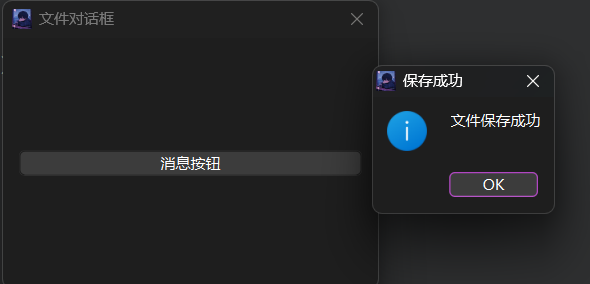
功能场景:用于 无风险的操作反馈(如文件保存成功、数据加载完成),仅需用户确认信息,无后续复杂交互。
代码:
#include "maindialog.h"
#include "ui_maindialog.h"
#include<QMessageBox>

maindialog::maindialog(QWidget *parent)//构造函数在对象创建时运行(比如当这个对话框被实例化时)
    : QDialog(parent)
    , ui(new Ui::maindialog)
{
    ui->setupUi(this);

   layout=new QGridLayout(this);

  btn1=new QPushButton("消息按钮");

   layout->addWidget(btn1,0,0);
  connect(btn1,&QPushButton::clicked,this,&maindialog::btn1chick);


}
 void maindialog::btn1chick()
{
     QMessageBox::information(this,tr("保存成功"),tr("文件保存成功"),QMessageBox::Ok);


}
maindialog::~maindialog()
{
    delete ui;
}
结果:
2. 警告对话框(Warning)
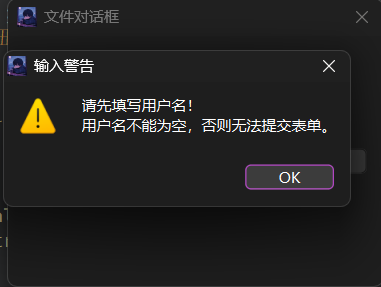
功能场景:用于 需用户注意但无严重后果的场景(如输入不完整、操作可能有小风险),提醒用户修正或确认。
代码:
maindialog::maindialog(QWidget *parent)//构造函数在对象创建时运行(比如当这个对话框被实例化时)
    : QDialog(parent)
    , ui(new Ui::maindialog)
{
    ui->setupUi(this);

   layout=new QGridLayout(this);
   btn1=new QPushButton("消息按钮");
   layout->addWidget(btn1,0,0);

  connect(btn1,&QPushButton::clicked,this,&maindialog::showWarningDialog);


}
void maindialog::showWarningDialog() {
    QMessageBox::warning(this,tr("输入警告"),tr("请先填写用户名!\n用户名不能为空,否则无法提交表单。"));
}
功能:
3. 错误对话框(Critical/Error)
功能场景
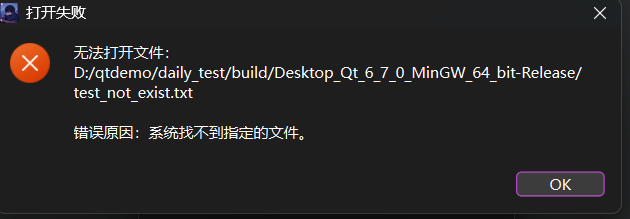
用于 关键操作失败的场景(如文件打开失败、网络连接中断),需明确告知错误原因,帮助用户排查问题。
代码:
maindialog::maindialog(QWidget *parent)//构造函数在对象创建时运行(比如当这个对话框被实例化时)
    : QDialog(parent)
    , ui(new Ui::maindialog)
{
    ui->setupUi(this);

   layout=new QGridLayout(this);
   btn1=new QPushButton("消息按钮");
   layout->addWidget(btn1,0,0);

  connect(btn1,&QPushButton::clicked,this,&maindialog::showCriticalDialog);


}
void maindialog::showCriticalDialog() {
    // 模拟一个不存在的文件路径
    QString filePath = QDir::currentPath() + "/test_not_exist.txt";
    QFile file(filePath);

    // 尝试打开文件,失败则显示错误对话框
    if (!file.open(QFile::ReadOnly)) {
        QMessageBox::critical(
            this,
            tr("打开失败"),
            tr("无法打开文件:\n%1\n\n错误原因:%2") .arg(filePath) .arg(file.errorString())
            );
    }
}
结果:
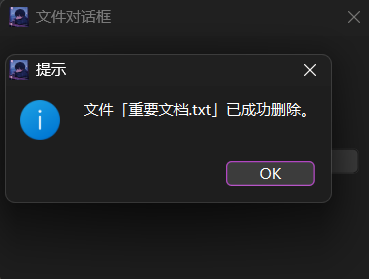
4. 询问对话框(Question)
功能场景
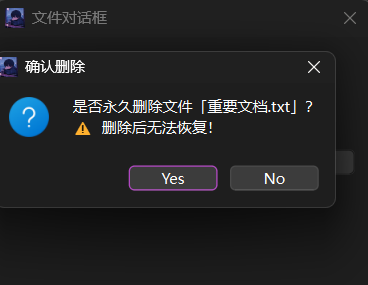
用于 需要用户确认的危险 / 不可逆操作(如删除文件、覆盖数据),需根据用户选择执行不同逻辑(是 / 否)。
代码:
maindialog::maindialog(QWidget *parent)//构造函数在对象创建时运行(比如当这个对话框被实例化时)
    : QDialog(parent)
    , ui(new Ui::maindialog)
{
    ui->setupUi(this);

   layout=new QGridLayout(this);
   btn1=new QPushButton("消息按钮");
   layout->addWidget(btn1,0,0);

  connect(btn1,&QPushButton::clicked,this,&maindialog::showQuestionDialog);


}
void maindialog::showQuestionDialog() {
    QString fileName = "重要文档.txt";
    // 显示询问对话框,获取用户选择(返回值为 QMessageBox::Yes/No)
    int userChoice = QMessageBox::question(
        this,
        tr("确认删除"),          // 标题带“确认”,强调需用户决策
        tr("是否永久删除文件「%1」?\n⚠️  删除后无法恢复!").arg(fileName), // 明确风险
        QMessageBox::Yes | QMessageBox::No // 显示“是”和“否”两个按钮
        );

    // 根据用户选择执行逻辑
    if (userChoice == QMessageBox::Yes) {
        // 模拟删除操作
        QMessageBox::information(this, tr("提示"), tr("文件「%1」已成功删除。").arg(fileName));
    } else {
        // 取消删除
        QMessageBox::information(this, tr("提示"), tr("删除操作已取消。"));
    }
}
结果:
5. 关于对话框(About)
功能场景
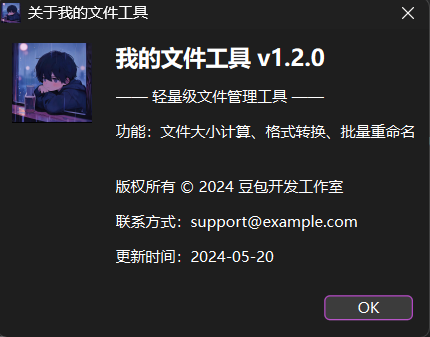
用于 展示软件版本、版权、联系方式等静态信息,通常在 “帮助” 菜单的 “关于” 选项中调用。
代码:
maindialog::maindialog(QWidget *parent)//构造函数在对象创建时运行(比如当这个对话框被实例化时)
    : QDialog(parent)
    , ui(new Ui::maindialog)
{
    ui->setupUi(this);

   layout=new QGridLayout(this);
   btn1=new QPushButton("消息按钮");
   layout->addWidget(btn1,0,0);

  connect(btn1,&QPushButton::clicked,this,&maindialog::showAboutDialog);


}
void maindialog::showAboutDialog() {
    QMessageBox::about(
        this,
        tr("关于我的文件工具"),  // 标题带软件名
        // 支持 HTML 格式,可美化排版(如换行、标题、加粗)
        tr("<h2>我的文件工具 v1.2.0</h2>"
           "<p>—— 轻量级文件管理工具 ——</p>"
           "<p>功能:文件大小计算、格式转换、批量重命名</p>"
           "<p><br>版权所有 © 2024 豆包开发工作室</p>"
           "<p>联系方式:support@example.com</p>"
           "<p>更新时间:2024-05-20</p>")
        );
}
结果:
6. 关于 Qt 对话框(AboutQt)
功能场景
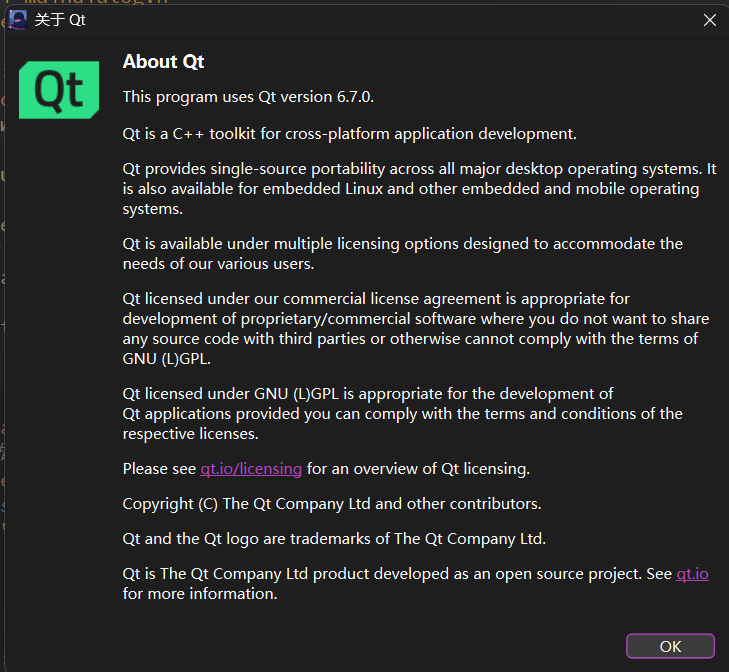
用于 展示当前使用的 Qt 版本信息,是 Qt 提供的预制对话框,无需自定义内容,通常放在 “帮助” 菜单中。
代码:
maindialog::maindialog(QWidget *parent)//构造函数在对象创建时运行(比如当这个对话框被实例化时)
    : QDialog(parent)
    , ui(new Ui::maindialog)
{
    ui->setupUi(this);

   layout=new QGridLayout(this);
   btn1=new QPushButton("消息按钮");
   layout->addWidget(btn1,0,0);

  connect(btn1,&QPushButton::clicked,this,&maindialog::showAboutQtDialog);


}
void maindialog::showAboutQtDialog() {
    // 仅需指定父窗口和标题(内容由 Qt 自动填充)
    QMessageBox::aboutQt(
        this,
        tr("关于 Qt")  // 标题(可选,默认是“About Qt”)
        );
}
结果:
7.自定义按钮与样式
功能场景
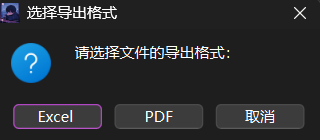
用于 预定义按钮(是 / 否 / 确定)无法满足的场景(如多选项选择,如 “导出格式选择”),需自定义按钮文本和逻辑。
代码:
maindialog::maindialog(QWidget *parent)//构造函数在对象创建时运行(比如当这个对话框被实例化时)
    : QDialog(parent)
    , ui(new Ui::maindialog)
{
    ui->setupUi(this);

   layout=new QGridLayout(this);
   btn1=new QPushButton("消息按钮");
   layout->addWidget(btn1,0,0);

  connect(btn1,&QPushButton::clicked,this,&maindialog::showCustomBtnDialog);


}
void maindialog::showCustomBtnDialog() {
    // 1. 实例化 QMessageBox(不使用静态函数,需手动配置)
    QMessageBox customMsgBox(this);
    customMsgBox.setWindowTitle(tr("选择导出格式"));
    customMsgBox.setText(tr("请选择文件的导出格式:"));
    customMsgBox.setIcon(QMessageBox::Question); // 设置图标为问号,提示用户选择

    // 2. 添加自定义按钮(指定按钮角色:ActionRole 表示“操作按钮”,RejectRole 表示“取消按钮”)
    QPushButton *btnExcel = customMsgBox.addButton(tr("Excel "), QMessageBox::ActionRole);
    QPushButton *btnPdf = customMsgBox.addButton(tr("PDF"), QMessageBox::ActionRole);
    QPushButton *btnCancel = customMsgBox.addButton(tr("取消"), QMessageBox::RejectRole);

    // 3. 显示对话框(阻塞式,直到用户点击按钮)
    customMsgBox.exec();

    // 4. 判断用户点击的按钮,执行对应逻辑
    if (customMsgBox.clickedButton() == btnExcel) {
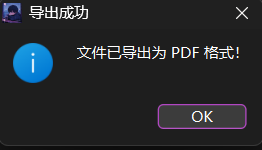
        QMessageBox::information(this, tr("导出成功"), tr("文件已导出为 Excel 格式!"));
    } else if (customMsgBox.clickedButton() == btnPdf) {
        QMessageBox::information(this, tr("导出成功"), tr("文件已导出为 PDF 格式!"));
    } else if (customMsgBox.clickedButton() == btnCancel) {
        QMessageBox::information(this, tr("提示"), tr("导出操作已取消。"));
    }
}
结果:





 扫一扫
扫一扫


 529
529

 被折叠的 条评论
为什么被折叠?
被折叠的 条评论
为什么被折叠?
 到【灌水乐园】发言





