



 本文介绍如何通过修改注册表,在Windows资源管理器的文件夹背景右键菜单中添加Git Bash启动选项,方便用户快速打开指定目录下的Git Bash。
Step 1 : 在cmd中输入 “regedit”
Step 2 : 运行注册表管理器
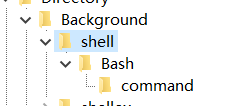
Step 3:定位到HKEY_CURRENT_USER\Software\Classes\Directory\Background\shell
在 [Background] 下如果没有 [shell],则右键-新建项 [shell];

Step 4:右键点击 “shell” 选择 New > Key. 将KEY命名为 “Bash”
Step 5 : 设置值为 “open in Bash”
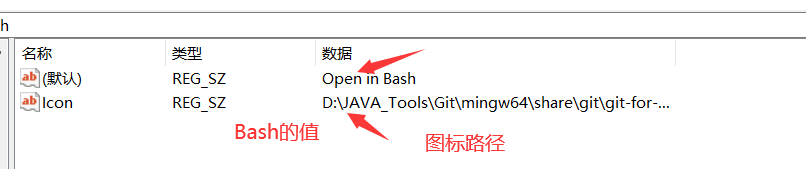
Step 6 : 创建一个新的KEY命名为"command". 设置值为你的git-bash.exe 路径.

Step 7:关闭注册表管理器。
然后鼠标右键就有 Git Bash了。





 扫一扫
扫一扫


 1098
1098

 被折叠的 条评论
为什么被折叠?
被折叠的 条评论
为什么被折叠?
 到【灌水乐园】发言





