win server 2008服务器System.outofmemory.exception解决方法

作者在阿里云服务器上部署VB.NET程序时遭遇内存溢出问题,通过售后工程师的帮助发现是由于未配置虚拟内存导致。文章分享了解决方案。

        这些天要在阿里云服务器上挂个服务器程序(VB.NET写的EXE程序),在电脑上运行和调试一切正常,但是到最后一步,挂载到服务器运行的时候就一致挂掉,提示System.outofmemory.exception的错误警告,在网上看了很多关于内存溢出的解决方案都没能解决这个问题,最后只能联系阿里云售后工程师帮忙解决,在他们的帮助下,今天问题得以解决,感谢阿里强大的售后工程师团队!不多说,下面就把我遇到的问题和阿里工程师给的解决方案与大家分享,希望能帮助其他人。

        我使用的服务器配置如下:windows server 2008 R2 Enterprise(x64)  4G内存   几百块钱一个月呢。。。好贵


1.刚看时碰到的问题就是这个。。老是提示内存溢出,但是我的程序都没开始跑起来啊,虽然有很多大数组比如array(9999, 1500),但是都还没redim好空间就崩了好么,刚开始一直以为是我开的数组太大了,就尝试把数组开小一些,像array(500, 500),也不行啊,所以根本就不是数组大小的问题,9999*1500的数组对于4G内存的服务器来说还是小k斯,我在本地开发的时候用的是win7 x64  4G内存,在开发和调试的时候根本没有这个错误好么,一切正常,所以就开始怀疑是阿里云服务器的配置问题了,有问题就找售后工程师,这个是个比较明智的做法,省得浪费太多时间去折腾一些不是自己错误的事情。。。
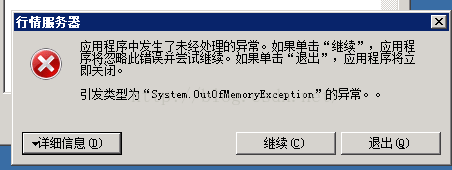
2.下面是售后工程师帮忙检测到的问题以及解决方案,可以供大家参考
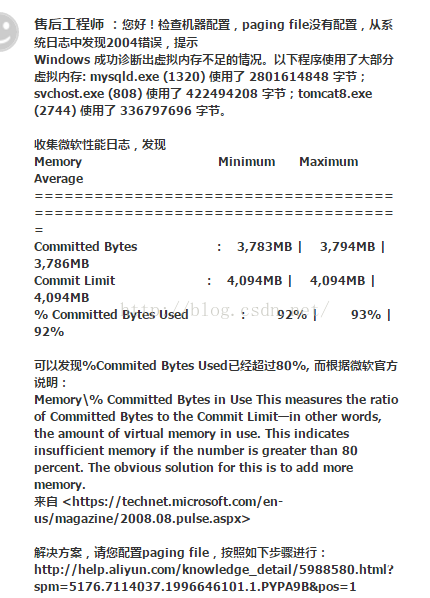

3.其实就是虚拟内存不足的问题,由于开启虚拟内存会导致硬盘IO性能下降,所以阿里云服务器默认初始状态不配置虚拟内存,如果需要开启虚拟内存,可以手动打开,打开虚拟内存的链接如下(http://help.aliyun.com/knowledge_detail/5988580.html?spm=5176.7114037.1996646101.1.PYPA9B&pos=1),OK了,问题解决!!

PS C:\Users\Administrator\Desktop> # E:\AI_System\web_ui\install.ps1 PS C:\Users\Administrator\Desktop> PS C:\Users\Administrator\Desktop> # 设置工作目录 PS C:\Users\Administrator\Desktop> $workingDir = "E:\AI_System\web_ui" PS C:\Users\Administrator\Desktop> Set-Location $workingDir PS E:\AI_System\web_ui> PS E:\AI_System\web_ui> # 检查虚拟环境 PS E:\AI_System\web_ui> $venvPath = "$workingDir\.venv" PS E:\AI_System\web_ui> if (-not (Test-Path $venvPath)) { >> Write-Host "创建虚拟环境..." -ForegroundColor Cyan >> python -m venv .venv >> } PS E:\AI_System\web_ui> PS E:\AI_System\web_ui> # 激活虚拟环境 PS E:\AI_System\web_ui> . "$venvPath\Scripts\Activate.ps1" (.venv) PS E:\AI_System\web_ui> (.venv) PS E:\AI_System\web_ui> # 安装核心依赖 (.venv) PS E:\AI_System\web_ui> Write-Host "安装依赖..." -ForegroundColor Cyan 安装依赖... (.venv) PS E:\AI_System\web_ui> pip install pywin32 flask psutil Looking in indexes: https://pypi.tuna.tsinghua.edu.cn/simple Requirement already satisfied: pywin32 in e:\ai_system\web_ui\.venv\lib\site-packages (306) Requirement already satisfied: flask in e:\ai_system\web_ui\.venv\lib\site-packages (3.0.2) Requirement already satisfied: psutil in e:\ai_system\web_ui\.venv\lib\site-packages (5.9.7) Requirement already satisfied: blinker>=1.6.2 in e:\ai_system\web_ui\.venv\lib\site-packages (from flask) (1.9.0) Requirement already satisfied: Werkzeug>=3.0.0 in e:\ai_system\web_ui\.venv\lib\site-packages (from flask) (3.1.3) Requirement already satisfied: click>=8.1.3 in e:\ai_system\web_ui\.venv\lib\site-packages (from flask) (8.2.1) Requirement already satisfied: Jinja2>=3.1.2 in e:\ai_system\web_ui\.venv\lib\site-packages (from flask) (3.1.6) Requirement already satisfied: itsdangerous>=2.1.2 in e:\ai_system\web_ui\.venv\lib\site-packages (from flask) (2.2.0) Requirement already satisfied: colorama in e:\ai_system\web_ui\.venv\lib\site-packages (from click>=8.1.3->flask) (0.4.6) Requirement already satisfied: MarkupSafe>=2.0 in e:\ai_system\web_ui\.venv\lib\site-packages (from Jinja2>=3.1.2->flask) (2.1.5) [notice] A new release of pip available: 22.3.1 -> 25.2 [notice] To update, run: python.exe -m pip install --upgrade pip (.venv) PS E:\AI_System\web_ui> (.venv) PS E:\AI_System\web_ui> # 创建桌面快捷方式 (.venv) PS E:\AI_System\web_ui> Write-Host "创建桌面快捷方式..." -ForegroundColor Cyan 创建桌面快捷方式... (.venv) PS E:\AI_System\web_ui> $shortcutPath = "$env:USERPROFILE\Desktop\AI_System.lnk" (.venv) PS E:\AI_System\web_ui> $WshShell = New-Object -ComObject WScript.Shell (.venv) PS E:\AI_System\web_ui> $shortcut = $WshShell.CreateShortcut($shortcutPath) (.venv) PS E:\AI_System\web_ui> $shortcut.TargetPath = "powershell.exe" (.venv) PS E:\AI_System\web_ui> $shortcut.Arguments = "-NoExit -Command `"cd '$workingDir'; .\.venv\Scripts\Activate.ps1; python server.py`"" (.venv) PS E:\AI_System\web_ui> $shortcut.IconLocation = "C:\Windows\System32\WindowsPowerShell\v1.0\powershell.exe" (.venv) PS E:\AI_System\web_ui> $shortcut.Save() (.venv) PS E:\AI_System\web_ui> (.venv) PS E:\AI_System\web_ui> # 创建智能体系统目录结构 (.venv) PS E:\AI_System\web_ui> $agentDir = "E:\AI_System\agent" (.venv) PS E:\AI_System\web_ui> if (-not (Test-Path $agentDir)) { >> Write-Host "创建智能体系统目录..." -ForegroundColor Cyan >> New-Item -Path $agentDir -ItemType Directory -Force >> >> # 创建示例模块 >> @' >> # E:\AI_System\agent\autonomous_agent.py >> class AutonomousAgent: >> def __init__(self): >> self.cognitive_system = None >> self.consciousness_system = None >> >> def start(self): >> print("智能体系统启动") >> >> def shutdown(self): >> print("智能体系统关闭") >> '@ | Out-File -FilePath "$agentDir\autonomous_agent.py" -Encoding utf8 >> >> @' >> # E:\AI_System\agent\cognitive_system.py >> class CognitiveSystem: >> def __init__(self, model_path): >> self.model_path = model_path >> self.running = False >> self.cycle_count = 0 >> >> def start(self): >> self.running = True >> print(f"认知系统启动,模型路径: {self.model_path}") >> >> def shutdown(self): >> self.running = False >> print("认知系统关闭") >> '@ | Out-File -FilePath "$agentDir\cognitive_system.py" -Encoding utf8 >> >> @' >> # E:\AI_System\agent\consciousness_system.py >> class ConsciousnessSystem: >> def __init__(self): >> self.current_focus = "系统初始化" >> self.running = False >> >> def start(self): >> self.running = True >> print("意识系统启动") >> >> def shutdown(self): >> self.running = False >> print("意识系统关闭") >> '@ | Out-File -FilePath "$agentDir\consciousness_system.py" -Encoding utf8 >> } (.venv) PS E:\AI_System\web_ui> (.venv) PS E:\AI_System\web_ui> Write-Host "✅ 安装完成" -ForegroundColor Green ✅ 安装完成 (.venv) PS E:\AI_System\web_ui> Write-Host "1. 桌面快捷方式已创建: AI_System.lnk" -ForegroundColor Yellow 1. 桌面快捷方式已创建: AI_System.lnk (.venv) PS E:\AI_System\web_ui> Write-Host "2. 启动服务: 双击桌面快捷方式" -ForegroundColor Yellow 2. 启动服务: 双击桌面快捷方式 (.venv) PS E:\AI_System\web_ui> Write-Host "3. 访问地址: http://localhost:5000" -ForegroundColor Yellow 3. 访问地址: http://localhost:5000 (.venv) PS E:\AI_System\web_ui> # E:\AI_System\web_ui\verify.ps1 (.venv) PS E:\AI_System\web_ui> (.venv) PS E:\AI_System\web_ui> # 检查5000端口服务 (.venv) PS E:\AI_System\web_ui> Write-Host "`n=== 检查5000端口服务 ===" -ForegroundColor Cyan === 检查5000端口服务 === (.venv) PS E:\AI_System\web_ui> try { >> $response = Invoke-WebRequest -Uri "http://localhost:5000/api/status" -UseBasicParsing -ErrorAction Stop >> $status = $response.Content | ConvertFrom-Json >> Write-Host "✅ 服务状态: 运行中" -ForegroundColor Green >> Write-Host " CPU使用率: $($status.'CPU使用率')%" >> Write-Host " 内存使用率: $($status.'内存使用率')%" >> Write-Host " 运行时间: $($status.'运行时间')" >> } >> catch { >> Write-Host "❌ 5000端口服务未响应" -ForegroundColor Red >> Write-Host " 可能原因: 服务未启动或端口冲突" -ForegroundColor Yellow >> } ❌ 5000端口服务未响应 可能原因: 服务未启动或端口冲突 (.venv) PS E:\AI_System\web_ui> (.venv) PS E:\AI_System\web_ui> # 检查模块加载状态 (.venv) PS E:\AI_System\web_ui> Write-Host "`n=== 模块加载状态 ===" -ForegroundColor Cyan === 模块加载状态 === (.venv) PS E:\AI_System\web_ui> try { >> $response = Invoke-WebRequest -Uri "http://localhost:5000/api/modules" -UseBasicParsing -ErrorAction Stop >> $modules = $response.Content | ConvertFrom-Json >> >> Write-Host "智能体模块状态:" >> Write-Host " AutonomousAgent: $($modules.AutonomousAgent)" >> Write-Host " CognitiveSystem: $($modules.CognitiveSystem)" >> Write-Host " ConsciousnessSystem: $($modules.ConsciousnessSystem)" >> >> if ($modules.AutonomousAgent -eq "已加载" -and >> $modules.CognitiveSystem -eq "已加载" -and >> $modules.ConsciousnessSystem -eq "已加载") { >> Write-Host "✅ 所有关键模块已加载" -ForegroundColor Green >> } else { >> Write-Host "❌ 部分模块未加载" -ForegroundColor Red >> } >> } >> catch { >> Write-Host "❌ 无法获取模块状态" -ForegroundColor Red >> } ❌ 无法获取模块状态 (.venv) PS E:\AI_System\web_ui> (.venv) PS E:\AI_System\web_ui> # 检查路径信息 (.venv) PS E:\AI_System\web_ui> Write-Host "`n=== 路径信息验证 ===" -ForegroundColor Cyan === 路径信息验证 === (.venv) PS E:\AI_System\web_ui> try { >> $response = Invoke-WebRequest -Uri "http://localhost:5000/api/paths" -UseBasicParsing -ErrorAction Stop >> $paths = $response.Content | ConvertFrom-Json >> >> Write-Host "工作区路径: $($paths.workspace)" >> Write-Host "模型路径: $($paths.models)" >> Write-Host "当前模型: $($paths.current_model)" >> >> # 验证模型路径是否存在 >> if (Test-Path $paths.current_model) { >> Write-Host "✅ 模型路径验证通过" -ForegroundColor Green >> } else { >> Write-Host "❌ 模型路径不存在: $($paths.current_model)" -ForegroundColor Red >> Write-Host " 解决方案: 检查模型是否已下载" -ForegroundColor Yellow >> } >> } >> catch { >> Write-Host "❌ 无法获取路径信息" -ForegroundColor Red >> } ❌ 无法获取路径信息 (.venv) PS E:\AI_System\web_ui> (.venv) PS E:\AI_System\web_ui> # 检查日志文件 (.venv) PS E:\AI_System\web_ui> $logPath = "E:\AI_Models\logs\server.log" (.venv) PS E:\AI_System\web_ui> if (Test-Path $logPath) { >> Write-Host "`n=== 日志文件检查 ===" -ForegroundColor Cyan >> $logSize = (Get-Item $logPath).Length / 1KB >> $lastModified = (Get-Item $logPath).LastWriteTime >> >> Write-Host "日志路径: $logPath" >> Write-Host "文件大小: {0:N2} KB" -f $logSize >> Write-Host "最后修改: $lastModified" >> >> # 检查错误日志 >> $errorLines = Get-Content $logPath | Select-String "ERROR" -CaseSensitive >> if ($errorLines) { >> Write-Host "❌ 发现错误日志: $($errorLines.Count) 条" -ForegroundColor Red >> $errorLines | Select-Object -First 3 | ForEach-Object { >> Write-Host " $_" -ForegroundColor Yellow >> } >> } else { >> Write-Host "✅ 未发现错误日志" -ForegroundColor Green >> } >> } else { >> Write-Host "❌ 日志文件不存在: $logPath" -ForegroundColor Red >> } ❌ 日志文件不存在: E:\AI_Models\logs\server.log (.venv) PS E:\AI_System\web_ui> (.venv) PS E:\AI_System\web_ui> Write-Host "`n验证完成" -ForegroundColor Cyan 验证完成 (.venv) PS E:\AI_System\web_ui>
最新发布
08-24
评论
添加红包

请填写红包祝福语或标题

红包个数最小为10个

红包金额最低5元

当前余额3.43前往充值 >
需支付:10.00
成就一亿技术人!
领取后你会自动成为博主和红包主的粉丝 规则
hope_wisdom
发出的红包
实付
使用余额支付
点击重新获取
扫码支付
钱包余额 0

抵扣说明:

1.余额是钱包充值的虚拟货币,按照1:1的比例进行支付金额的抵扣。
2.余额无法直接购买下载,可以购买VIP、付费专栏及课程。

余额充值


