



1 微服务模块
微服务模块:Eureka(注册中心)、Gateway(网关)、User(用户模块)、DataProcess(数据处理模块),使用Swagger2管理各个模块接口,通过Gateway聚合单体(原子)服务的Swagger2,即通过Gateway管理各个模块的Swagger,统一Swagger2管理。
- Eureka
<dependencyManagement>
    <dependencies>
        <dependency>
            <groupId>org.springframework.cloud</groupId>
            <artifactId>spring-cloud-dependencies</artifactId>
            <!-- <version>Finchley.SR1</version> -->
            <!-- <version>Greenwich.SR1</version> -->
            <version>Hoxton.SR5</version>
            <type>pom</type>
            <scope>import</scope>
        </dependency>
    </dependencies>
</dependencyManagement>
- Gateway
<dependency>
	<groupId>org.springframework.cloud</groupId>
	<artifactId>spring-cloud-starter-gateway</artifactId>
	<version>2.2.3.RELEASE</version>
</dependency>
- Swagger
<dependency>
	<groupId>io.springfox</groupId>
	<artifactId>springfox-swagger2</artifactId>
	<version>2.9.2</version>
</dependency>
<!--swagger-ui-->
<dependency>
	<groupId>io.springfox</groupId>
	<artifactId>springfox-swagger-ui</artifactId>
	<version>2.9.2</version>
</dependency>
- User
- DataProcess
2 Swagger配置
Swagger2在子模块中和普通单体服务是一致的,微服务中不同的是,在Gateway中需要配置Swagger2,实现Swagger2聚合。
2.1 User模块Swagger配置
package com.company.msuser.config;

import springfox.documentation.service.Contact;
import org.springframework.context.annotation.Bean;
import org.springframework.context.annotation.Configuration;
import springfox.documentation.builders.ApiInfoBuilder;
import springfox.documentation.builders.PathSelectors;
import springfox.documentation.builders.RequestHandlerSelectors;
import springfox.documentation.service.ApiInfo;
import springfox.documentation.spi.DocumentationType;
import springfox.documentation.spring.web.plugins.Docket;
import springfox.documentation.swagger2.annotations.EnableSwagger2;
import org.springframework.core.env.Profiles;
import org.springframework.core.env.Environment;

/**
 * Swagger configure.
 * @author xindaqi
 * @since 2020-11-03
 */
@Configuration
@EnableSwagger2
public class SwaggerConfig {
    @Bean
    public Docket createRestApi(Environment environment){
        // 配置Swagger显示,仅dev和test环境显示
        Profiles profiles = Profiles.of("dev", "test");
        boolean b = environment.acceptsProfiles(profiles);
        return new Docket(DocumentationType.SWAGGER_2)
                .apiInfo(apiInfo())
                .enable(b)
                .select()
                .apis(RequestHandlerSelectors.basePackage("com.company.msuser.controller"))
                .paths(PathSelectors.any())
                .build();
    }

    private ApiInfo apiInfo(){
        return new ApiInfoBuilder()
                .title("接口文档")
                .contact(new Contact("xindaqi", "***@qq.com", "***@qq.com"))
                .version("1.0")
                .description("个人信息")
                .termsOfServiceUrl("http://localhost:8888/api/v1")
                .build();
    }

}
2.2 DataProcess模块Swagger配置
package com.company.msdataprocess.config;

import springfox.documentation.service.Contact;
import org.springframework.context.annotation.Bean;
import org.springframework.context.annotation.Configuration;
import springfox.documentation.builders.ApiInfoBuilder;
import springfox.documentation.builders.PathSelectors;
import springfox.documentation.builders.RequestHandlerSelectors;
import springfox.documentation.service.ApiInfo;
import springfox.documentation.spi.DocumentationType;
import springfox.documentation.spring.web.plugins.Docket;
import springfox.documentation.swagger2.annotations.EnableSwagger2;
import org.springframework.core.env.Profiles;
import org.springframework.core.env.Environment;

/**
 * Swagger configure.
 * @author xindaqi
 * @since 2020-11-03
 */
@Configuration
@EnableSwagger2
public class SwaggerConfig {
    @Bean
    public Docket createRestApi(Environment environment){
        // 配置Swagger显示,仅dev和test环境显示
        Profiles profiles = Profiles.of("dev", "test");
        boolean b = environment.acceptsProfiles(profiles);
        return new Docket(DocumentationType.SWAGGER_2)
                .apiInfo(apiInfo())
                .enable(b)
                .select()
                .apis(RequestHandlerSelectors.basePackage("com.company.msdataprocess.controller"))
                .paths(PathSelectors.any())
                .build();
    }

    private ApiInfo apiInfo(){
        return new ApiInfoBuilder()
                .title("接口文档")
                .contact(new Contact("xindaqi", "***@qq.com", "***@qq.com"))
                .version("1.0")
                .description("个人信息")
                .termsOfServiceUrl("http://localhost:8888/api/v1")
                .build();
    }

}
2.3 Gateway模块Swagger配置
package com.company.msgateway.config;

import org.springframework.beans.factory.annotation.Autowired;
import org.springframework.beans.factory.annotation.Value;
import org.springframework.cloud.gateway.route.RouteLocator;
import org.springframework.stereotype.Component;
import springfox.documentation.swagger.web.SwaggerResource;
import springfox.documentation.swagger.web.SwaggerResourcesProvider;

import java.util.*;

/**
 * Aggregate swagger.
 * @author xindaqi
 * @since 2020-11-03
 */
@Component
public class MySwaggerResourceProvider implements SwaggerResourcesProvider {

    private static final String SWAGGER2URL = "/v2/api-docs";

    private final RouteLocator routeLocator;

    @Value("${spring.application.name}")
    private String self;

    @Autowired
    public MySwaggerResourceProvider(RouteLocator routeLocator) {
        this.routeLocator = routeLocator;
    }

    @Override
    public List<SwaggerResource> get() {
        List<SwaggerResource> resources = new ArrayList<>();
        List<String> routeHosts = new ArrayList<>();
        routeLocator.getRoutes().filter(route -> route.getUri().getHost() != null)
                    .filter(route -> !self.equals(route.getUri().getHost()))
                    .subscribe(route -> routeHosts.add(route.getUri().getHost()));

        Set<String> dealed = new HashSet<>();
        routeHosts.forEach(instance -> {
            String url = "/" + instance.toLowerCase() + SWAGGER2URL;
            if(!dealed.contains(url)) {
                dealed.add(url);
                SwaggerResource swaggerResource = new SwaggerResource();
                swaggerResource.setUrl(url);
                swaggerResource.setName(instance);
                resources.add(swaggerResource);
            }
        });
        return resources;
    }

}
2.4 Gateway模块Controller
package com.company.msgateway.controller;

import com.company.msgateway.config.MySwaggerResourceProvider;

import org.springframework.beans.factory.annotation.Autowired;
import org.springframework.http.HttpStatus;
import org.springframework.http.ResponseEntity;
import org.springframework.web.bind.annotation.RequestMapping;
import org.springframework.web.bind.annotation.RestController;
import org.springframework.web.bind.annotation.CrossOrigin;
import springfox.documentation.swagger.web.*;

import java.util.List;

/**
 * Swagger.
 * @author xindaqi
 * @since 2020-11-03
 */
@CrossOrigin(origins = "*", maxAge = 3600)
@RestController
@RequestMapping("/swagger-resources")
public class SwaggerResourceController {

    private MySwaggerResourceProvider swaggerResourceProvider;

    @Autowired
    public SwaggerResourceController(MySwaggerResourceProvider swaggerResourceProvider) {
        this.swaggerResourceProvider = swaggerResourceProvider;
    }

    @RequestMapping(value = "/configuration/security")
    public ResponseEntity<SecurityConfiguration> securityConfiguration() {
        return new ResponseEntity<>(SecurityConfigurationBuilder.builder().build(), HttpStatus.OK);
    }

    @RequestMapping(value = "/configuration/ui")
    public ResponseEntity<UiConfiguration> uiConfiguration() {
        return new ResponseEntity<>(UiConfigurationBuilder.builder().build(), HttpStatus.OK);
    }

    @RequestMapping
    public ResponseEntity<List<SwaggerResource>> swaggerResources() {
        return new ResponseEntity<>(swaggerResourceProvider.get(), HttpStatus.OK);
    }
}
3 聚合结果
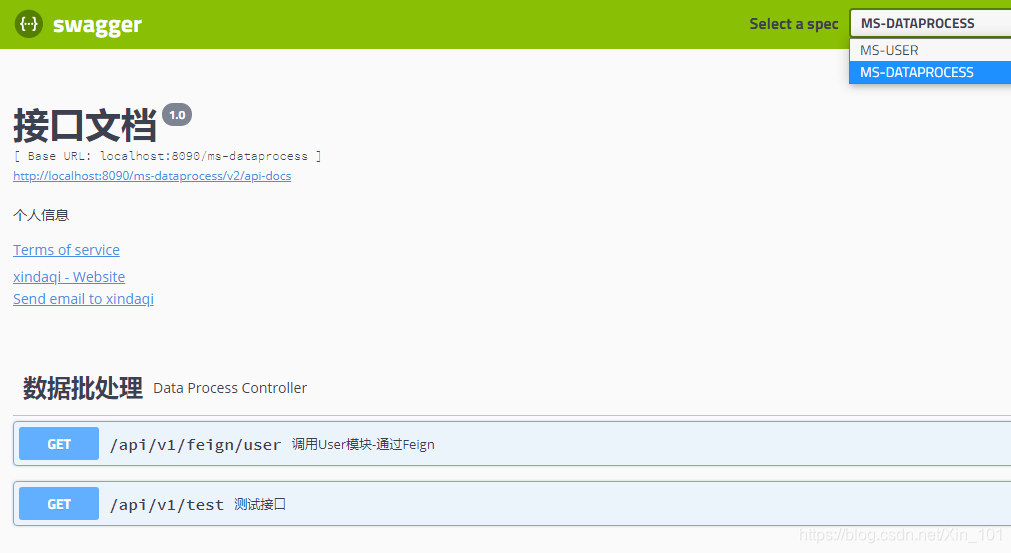
各模块聚合结果如图3.1所示,右上角Select a spec展示了各个模块的Swagger标题(application-name),通过application-name切换不同的模块。
4 小结
- 使用网关聚合各个模块微服务,Gateway需要配置Swagger以及Controller
- 各个模块的Swagger与普通的Swagger配置没有差别
- 所有的Swagger都在Gateway通过application-name聚合
【参考文献】
[1]https://blog.csdn.net/qq_31748587/article/details/102563155





 扫一扫
扫一扫


 2353
2353

 被折叠的 条评论
为什么被折叠?
被折叠的 条评论
为什么被折叠?
 到【灌水乐园】发言





