


 文章详细介绍了如何使用SpringSecurity进行用户认证,包括实现UserDetails服务,自定义LoginUser实体类以封装用户信息和权限,以及配置JWT认证过滤器。同时,文章提到了权限控制和异常处理,如AccessDeniedHandler和AuthenticationEntryPoint,以及自定义的权限表达式根类。另外,还涉及到MyBatis-Plus的Mapper文件,用于查询用户权限。
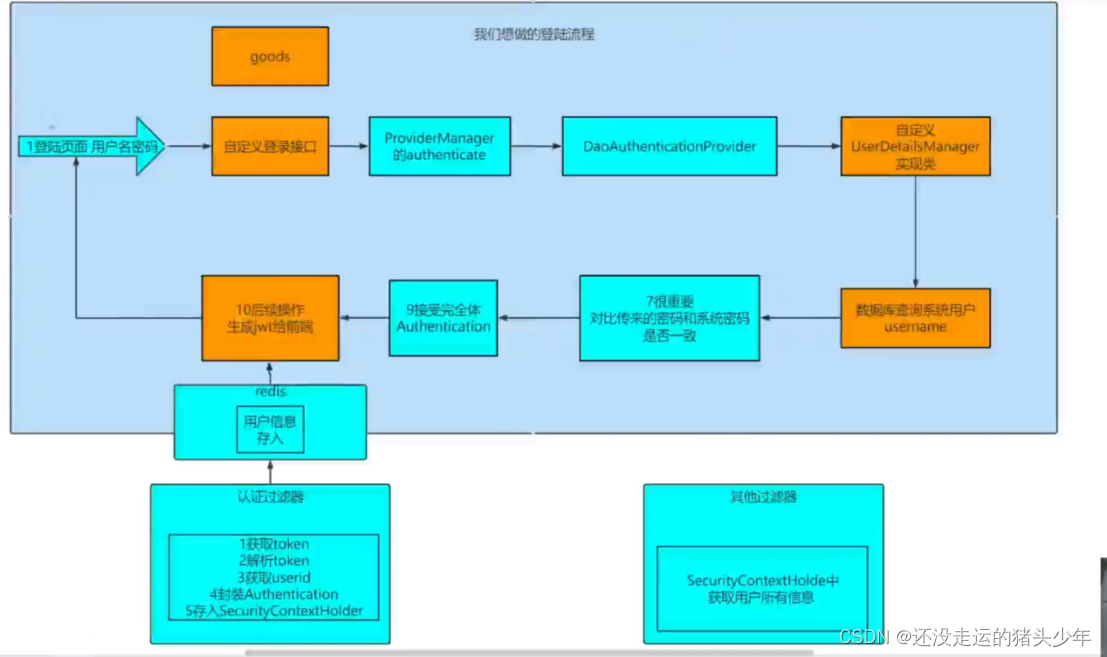
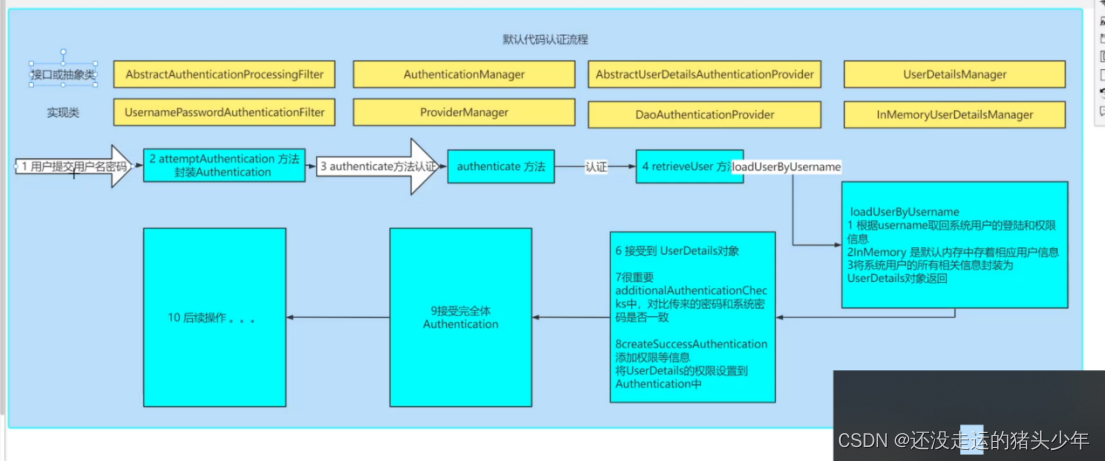
1.
@Service
public class UserDetailsServiceImpl implements UserDetailsService {
实现服务接口,查询DB用户信息和所有权限,返回到LoginUser封装类中。
package com.example.securitydemo1.service.impl;

import com.baomidou.mybatisplus.core.conditions.query.LambdaQueryWrapper;
import com.example.securitydemo1.entity.LoginUser;
import com.example.securitydemo1.entity.User;
import com.example.securitydemo1.mapp.MenuMapper;
import com.example.securitydemo1.mapp.UserMapper;
import org.springframework.beans.factory.annotation.Autowired;
import org.springframework.security.core.userdetails.UserDetails;
import org.springframework.security.core.userdetails.UserDetailsService;
import org.springframework.security.core.userdetails.UsernameNotFoundException;
import org.springframework.stereotype.Service;

import java.util.ArrayList;
import java.util.Arrays;
import java.util.List;
import java.util.Objects;

/**
 * @author 朱大仙
 */
@Service
public class UserDetailsServiceImpl implements UserDetailsService {

    @Autowired
    private UserMapper userMapper;

    @Autowired
    MenuMapper menuMapper;

    @Override
    public UserDetails loadUserByUsername(String username) throws UsernameNotFoundException {
        //根据用户名查询用户信息
        LambdaQueryWrapper<User> wrapper = new LambdaQueryWrapper<>();
        wrapper.eq(User::getUserName,username);
        User user = userMapper.selectOne(wrapper);
        //如果查询不到数据就通过抛出异常来给出提示
        if(Objects.isNull(user)){
            throw new RuntimeException("用户名错误");
        }
        // 根据用户查询权限信息 添加到LoginUser中 现在只是给了个假
        List<String> perms = menuMapper.selectPermsByUserId(user.getId());

        //封装成UserDetails对象返回
        return new LoginUser(user,perms);
    }
}
2.用户实现类LoginUser
在使用spring security时需要一个用户实现类LoginUser
去实现UserDetails并且带有User 变量。这里有7个继承方法
getAuthorities() UserDetails返回用户权限
getPassword() { UserDetails返回用户密码
getUsername() { UserDetails返回用户名
isAccountNonExpired() { UserDetails指示用户的帐户是否已过期。无法对过期的帐户进行身份验证。
isAccountNonLocked() { UserDetails指示用户是已锁定还是未锁定。无法对锁定的用户进行身份验证
isCredentialsNonExpired() { UserDetails指示用户的凭据(密码)是否已过期。过期的凭据阻止身份验证。
isEnabled() { UserDetails指示用户是启用还是禁用。无法对禁用的用户进行身份验证。
package com.example.securitydemo1.entity;

import com.alibaba.fastjson.annotation.JSONField;
import lombok.AllArgsConstructor;
import lombok.Data;
import lombok.NoArgsConstructor;
import org.springframework.security.core.GrantedAuthority;
import org.springframework.security.core.authority.SimpleGrantedAuthority;
import org.springframework.security.core.userdetails.UserDetails;

import java.util.Collection;
import java.util.List;
import java.util.stream.Collectors;

/**
 * @author 朱大仙
 */
@Data
@NoArgsConstructor
@AllArgsConstructor
public class LoginUser implements UserDetails {

    private User user;

    List<String> permissions;

    public LoginUser(User user, List<String> permissions) {
        this.user = user;
        this.permissions = permissions;
    }

    @JSONField(serialize = false)
    List<SimpleGrantedAuthority> authorities;

    @Override
    public Collection<? extends GrantedAuthority> getAuthorities() {
       /* List<SimpleGrantedAuthority> list= new ArrayList<>();
        for (String permission : permissions) {
            SimpleGrantedAuthority simpleGrantedAuthority = new SimpleGrantedAuthority(permission);
            list.add(simpleGrantedAuthority);
        }*/

        if (authorities != null) {
            return authorities;
        }
        //变式stream
        authorities= permissions.stream().map(SimpleGrantedAuthority::new).collect(Collectors.toList());
        return authorities;
    }

    @Override
    public String getPassword() {
        return user.getPassword();
    }

    @Override
    public String getUsername() {
        return user.getUserName();
    }

    @Override
    public boolean isAccountNonExpired() {
        return true;
    }

    @Override
    public boolean isAccountNonLocked() {
        return true;
    }

    @Override
    public boolean isCredentialsNonExpired() {
        return true;
    }

    @Override
    public boolean isEnabled() {
        return true;
    }
}
3.security配置类
package com.example.securitydemo1.config;

import com.example.securitydemo1.filter.JwtAuthenticationTokenFilter;
import com.example.securitydemo1.handle.AccessDeniedHandlerImpl;
import com.example.securitydemo1.handle.AuthenticationEntryPointImpl;
import org.springframework.beans.factory.annotation.Autowired;
import org.springframework.context.annotation.Bean;
import org.springframework.context.annotation.Configuration;
import org.springframework.security.authentication.AuthenticationManager;
import org.springframework.security.config.annotation.authentication.configuration.AuthenticationConfiguration;
import org.springframework.security.config.annotation.method.configuration.EnableGlobalMethodSecurity;
import org.springframework.security.config.annotation.web.builders.HttpSecurity;
import org.springframework.security.config.annotation.web.configuration.WebSecurityConfigurerAdapter;
import org.springframework.security.config.http.SessionCreationPolicy;
import org.springframework.security.crypto.bcrypt.BCryptPasswordEncoder;
import org.springframework.security.crypto.password.PasswordEncoder;
import org.springframework.security.web.SecurityFilterChain;
import org.springframework.security.web.authentication.UsernamePasswordAuthenticationFilter;

/**
 * @author 朱大仙
 */
@Configuration
@EnableGlobalMethodSecurity(prePostEnabled = true)
public class SecurityConfig {

    @Autowired
    JwtAuthenticationTokenFilter jwtAuthenticationTokenFilter;
    @Autowired
    AuthenticationEntryPointImpl authenticationEntryPoint;
    @Autowired
    AccessDeniedHandlerImpl accessDeniedHandler;
    /**
     * 密码加密存储 BCryptPasswordEncoder 自动加盐
     */
    @Bean
    public PasswordEncoder passwordEncoder(){
        return new BCryptPasswordEncoder();
    }

    /**
     * 以前我们自定义类继承自 WebSecurityConfigurerAdapter 来配置我们的 Spring Security,我们主要是配置两个东西:
     *
     * configure(HttpSecurity)
     * configure(WebSecurity)
     * 前者主要是配置 Spring Security 中的过滤器链,后者则主要是配置一些路径放行规则。
     *
     * 现在在 WebSecurityConfigurerAdapter 的注释中,人家已经把意思说的很明白了:
     *
     * 以后如果想要配置过滤器链,可以通过自定义 SecurityFilterChainBean来实现。
     * 以后如果想要配置 WebSecurity,可以通过 WebSecurityCustomizerBean来实现。
     */
    @Bean
    public SecurityFilterChain filterChain(HttpSecurity http) throws Exception {
        http
                //关闭csrf
                .csrf().disable()
                //不通过Session获取SecurityContext
                .sessionManagement().sessionCreationPolicy(SessionCreationPolicy.STATELESS)
                .and()
                .authorizeRequests()
                // 对于登录接口 允许匿名访问
                .antMatchers("/user/login").anonymous()
                // 除上面外的所有请求全部需要鉴权认证
                .anyRequest().authenticated();

        //添加过滤器,在UsernamePasswordAuthenticationFilter过滤器前
        http.addFilterBefore(jwtAuthenticationTokenFilter, UsernamePasswordAuthenticationFilter.class);

        //security自定义异常处理
        http.exceptionHandling().authenticationEntryPoint(authenticationEntryPoint)
                .accessDeniedHandler(accessDeniedHandler);

        //允许跨域
        http.cors();
        return http.build();
    }

    @Autowired
    private AuthenticationConfiguration authenticationConfiguration;

    @Bean
    public AuthenticationManager authenticationManager() throws Exception{
        AuthenticationManager authenticationManager = authenticationConfiguration.getAuthenticationManager();
        return authenticationManager;
    }

}
没有实现WebSecurityConfigurerAdapter接口。
@aEnbleGlobalMethodSecurity(prePostEnabled = true) 开启全局注解
注入了authenticationManager的bean,以从获得权限认证方法

其中配置了JwtAuthenticationTokenFilter用户认证过滤器,放在UsernamePasswordAuthenticationFilter过滤器前面。
package com.example.securitydemo1.filter;

import com.alibaba.fastjson.JSON;
import com.example.securitydemo1.entity.LoginUser;
import com.example.securitydemo1.utils.JwtUtil;
import com.example.securitydemo1.utils.RedisCache;
import io.jsonwebtoken.Claims;
import lombok.extern.slf4j.Slf4j;
import org.springframework.beans.factory.annotation.Autowired;
import org.springframework.security.authentication.UsernamePasswordAuthenticationToken;
import org.springframework.security.core.context.SecurityContextHolder;
import org.springframework.stereotype.Component;
import org.springframework.web.filter.OncePerRequestFilter;

import javax.servlet.FilterChain;
import javax.servlet.ServletException;
import javax.servlet.http.HttpServletRequest;
import javax.servlet.http.HttpServletResponse;
import java.io.IOException;
import java.util.Objects;

/**
 * @author 朱大仙
 */
@Component
@Slf4j
public class JwtAuthenticationTokenFilter extends OncePerRequestFilter {
    @Autowired
    RedisCache redisCache;

    @Override
    protected void doFilterInternal(HttpServletRequest request, HttpServletResponse response, FilterChain filterChain) throws ServletException, IOException {
//        1.获取token 前端指定存在header的
        String token = request.getHeader("token");
        if (Objects.isNull(token)) {
            //放行 让后面的过滤器执行
            filterChain.doFilter(request,response);
            return;
        }
//        2.解析token
        String userId;
        try {
            Claims claims = JwtUtil.parseJWT(token);
            userId = claims.getSubject();
        } catch (Exception e) {
            throw new RuntimeException("token不合法!");
        }

//        3.获取userid
        LoginUser loginUser =redisCache.getCacheObject("login:" + userId);
        log.info("loginUser:{}",loginUser);
        if (Objects.isNull(loginUser)) {
            throw new RuntimeException("当前用户未登入");
        }
//        4.封装Authentication
        UsernamePasswordAuthenticationToken usernamePasswordAuthenticationToken =
                new UsernamePasswordAuthenticationToken(loginUser, null, loginUser.getAuthorities());

//        5.存入SecurityContextHolder
        SecurityContextHolder.getContext().setAuthentication(usernamePasswordAuthenticationToken);

        filterChain.doFilter(request,response);
    }
}
JwtAuthenticationTokenFilter 中的token是通过工具类JwtUtil 实现,整个过程中我们的JWT只是在自定义过滤器中判断是否存在,进而判断是否经过登入访问。userId就是放在jwt的载荷当中。
JSON Web Token (JWT)是一个非常轻巧的规范。这个规范允许我们使用JWT在用户和服务器之间传递安全可靠的信息.一个JWT实际上就是一个字符串,它由三部分组成,头部、载荷与签名。
头部(Header)
头部用于描述关于该JWT的最基本的信息,例如其类型以及签名所用的算法等。这也可以被表示成一个JSON对象.["typ";"JWT""alg":"HS256"}
在头部指明了签名算法是HS256算法。我们进行BASE64编码http://base64.xpcha.com/,编码后的字符串如下:
eyJ@eXAi0iJKV1QiLCJhbGci0iJIUzI1NiJ9
载荷 (playload)
载荷就是存放有效信息的地方。
定义一个payload:
("sub";"1234567890","name";"itlils""admin";true,"age":18}
然后将其进行base64加密,得到wt的第二部分
签证 (signature)
eyJzdwIi0iIxMjM0NTY30DkwIiwibmFtZSI6Iml0bGlscyIsImFkbwluIjp0cnV1LCJhZ2Ui0jE4fQ=
jwt的第三部分是一个签证信息,
配置了自定义用户认证、权限认证异常类。
package com.example.securitydemo1.handle;

import com.alibaba.fastjson.JSON;
import com.example.securitydemo1.comm.ResponseResult;
import com.example.securitydemo1.utils.WebUtils;
import org.springframework.http.HttpStatus;
import org.springframework.security.access.AccessDeniedException;
import org.springframework.security.web.access.AccessDeniedHandler;
import org.springframework.stereotype.Component;

import javax.servlet.ServletException;
import javax.servlet.http.HttpServletRequest;
import javax.servlet.http.HttpServletResponse;
import java.io.IOException;

/**
 * @author 朱大仙
 * 权限认证失败返回消息
 */
@Component
public class AccessDeniedHandlerImpl implements AccessDeniedHandler {
    @Override
    public void handle(HttpServletRequest request, HttpServletResponse response, AccessDeniedException accessDeniedException) throws IOException, ServletException {
        //给前端的ResponseResult 的json
        ResponseResult responseResult = new ResponseResult(HttpStatus.FORBIDDEN.value(), "权限不足");
        String jsonString = JSON.toJSONString(responseResult);
        WebUtils.renderString(response, jsonString);
    }
}
package com.example.securitydemo1.handle;

import com.alibaba.fastjson.JSON;
import com.example.securitydemo1.comm.ResponseResult;
import com.example.securitydemo1.utils.WebUtils;
import org.springframework.http.HttpStatus;
import org.springframework.security.core.AuthenticationException;
import org.springframework.security.web.AuthenticationEntryPoint;
import org.springframework.stereotype.Component;

import javax.servlet.ServletException;
import javax.servlet.http.HttpServletRequest;
import javax.servlet.http.HttpServletResponse;
import java.io.IOException;

/**
 * @author 朱大仙
 * 身份验证失败返回消息
 */
@Component
public class AuthenticationEntryPointImpl implements AuthenticationEntryPoint {
    @Override
    public void commence(HttpServletRequest request, HttpServletResponse response, AuthenticationException authException) throws IOException, ServletException {
        //给前端的ResponseResult 的json
        ResponseResult responseResult = new ResponseResult(HttpStatus.UNAUTHORIZED.value(), "登入认证失败,请重试");
        String jsonString = JSON.toJSONString(responseResult);
        WebUtils.renderString(response, jsonString);
    }
}
SpringSecurity去防止CSRF攻击的方式就是通过csrf_token。后端会生成一个csrf_token,前端发起请求的时候需要携带这个csrf_token,后端会有过滤器进行校验,如果没有携带或者是伪造的就不允许访问。
我们可以发现CSRF攻击依靠的是cookie中所携带的认证信息。但是在前后端分离的项目中我们的认证信息其实是token,而token并不是存储中cookie中,并且需要前端代码去把token设置到请求头中才可以,关闭csrf
跨域配置类
package com.example.securitydemo1.config;

import org.springframework.context.annotation.Configuration;
import org.springframework.web.servlet.config.annotation.CorsRegistry;
import org.springframework.web.servlet.config.annotation.WebMvcConfigurer;

/**
 * @author 朱大仙
 * 跨域配置
 */
@Configuration
public class CorsConfig implements WebMvcConfigurer {

    @Override
    public void addCorsMappings(CorsRegistry registry) {
      // 设置允许跨域的路径
        registry.addMapping("/**")
                // 设置允许跨域请求的域名
                .allowedOriginPatterns("*")
                // 是否允许cookie
                .allowCredentials(true)
                // 设置允许的请求方式
                .allowedMethods("GET", "POST", "DELETE", "PUT")
                // 设置允许的header属性
                .allowedHeaders("*")
                // 跨域允许时间
                .maxAge(3600);
    }
}
自定义配置权限控制代码
package com.example.securitydemo1.comm;

import com.example.securitydemo1.entity.LoginUser;
import org.springframework.security.core.Authentication;
import org.springframework.security.core.context.SecurityContextHolder;
import org.springframework.stereotype.Component;

import java.util.List;

/**
 * @author 朱大仙
 * 自定义配置权限控制
 */
@Component("ex")
public class LLSExpressionRoot {

    public boolean hasAuthority(String authority){
        //获取当前用户的权限
        Authentication authentication = SecurityContextHolder.getContext().getAuthentication();
        LoginUser loginUser = (LoginUser) authentication.getPrincipal();
        List<String> permissions = loginUser.getPermissions();
        //判断用户权限集合中是否存在authority
        return permissions.contains(authority);
    }
}
用户通过security的过滤器链后,loginUser会保存在SecurityContextHolder中,再保存到redis中
在使用redis中,配置类的序列化和反序列化使用时需要注意,是否可以经行正确的对象mapper映射,如果错误,就要判断是否为fastjson的依赖版本问题 或者 反系列化的配置类是否有问题。
序列化配置类
package com.example.securitydemo1.config;

import com.alibaba.fastjson.JSON;
import com.alibaba.fastjson.serializer.SerializerFeature;
import com.fasterxml.jackson.databind.JavaType;
import com.fasterxml.jackson.databind.type.TypeFactory;
import org.springframework.data.redis.serializer.RedisSerializer;
import org.springframework.data.redis.serializer.SerializationException;
import com.alibaba.fastjson.parser.ParserConfig;

import java.nio.charset.Charset;

/**
 * Redis使用FastJson序列化
 *
 * @author itlils
 */
public class FastJsonRedisSerializer<T> implements RedisSerializer<T>
{

    public static final Charset DEFAULT_CHARSET = Charset.forName("UTF-8");

    private Class<T> clazz;

    static
    {
        ParserConfig.getGlobalInstance().setAutoTypeSupport(true);
    }

    public FastJsonRedisSerializer(Class<T> clazz)
    {
        super();
        this.clazz = clazz;
    }

    @Override
    public byte[] serialize(T t) throws SerializationException
    {
        if (t == null)
        {
            return new byte[0];
        }
        return JSON.toJSONString(t, SerializerFeature.WriteClassName).getBytes(DEFAULT_CHARSET);
    }

    @Override
    public T deserialize(byte[] bytes) throws SerializationException
    {
        if (bytes == null || bytes.length <= 0)
        {
            return null;
        }
        String str = new String(bytes, DEFAULT_CHARSET);

        return JSON.parseObject(str, clazz);
    }


    protected JavaType getJavaType(Class<?> clazz)
    {
        return TypeFactory.defaultInstance().constructType(clazz);
    }
}
所有自带权限校验方法
@PreAuthorize("hasAuthority('dev:code:pull1')")
@PreAuthorize("hasAnyAuthority('dev:code:pull1','dev:code:pull')") 只要有其中一个就成功
@PreAuthorize("hasRole('dev:code:pull1')") 每个权限字符串追加ROLE_ 这个前缀
@PreAuthorize("hasAnyRole('dev:code:pull1','dev:code:pull')")每个权限字符串追加ROLE_ 这个前缀,只要有其中一个就成功
@PreAuthorize("ex.hasAuthority('dev:code:pull1')") 自定义权限校验方法
还有对mybatis-plus的 自定义方法,所以需要创建对应的mapper文件,定义对应的sql语句
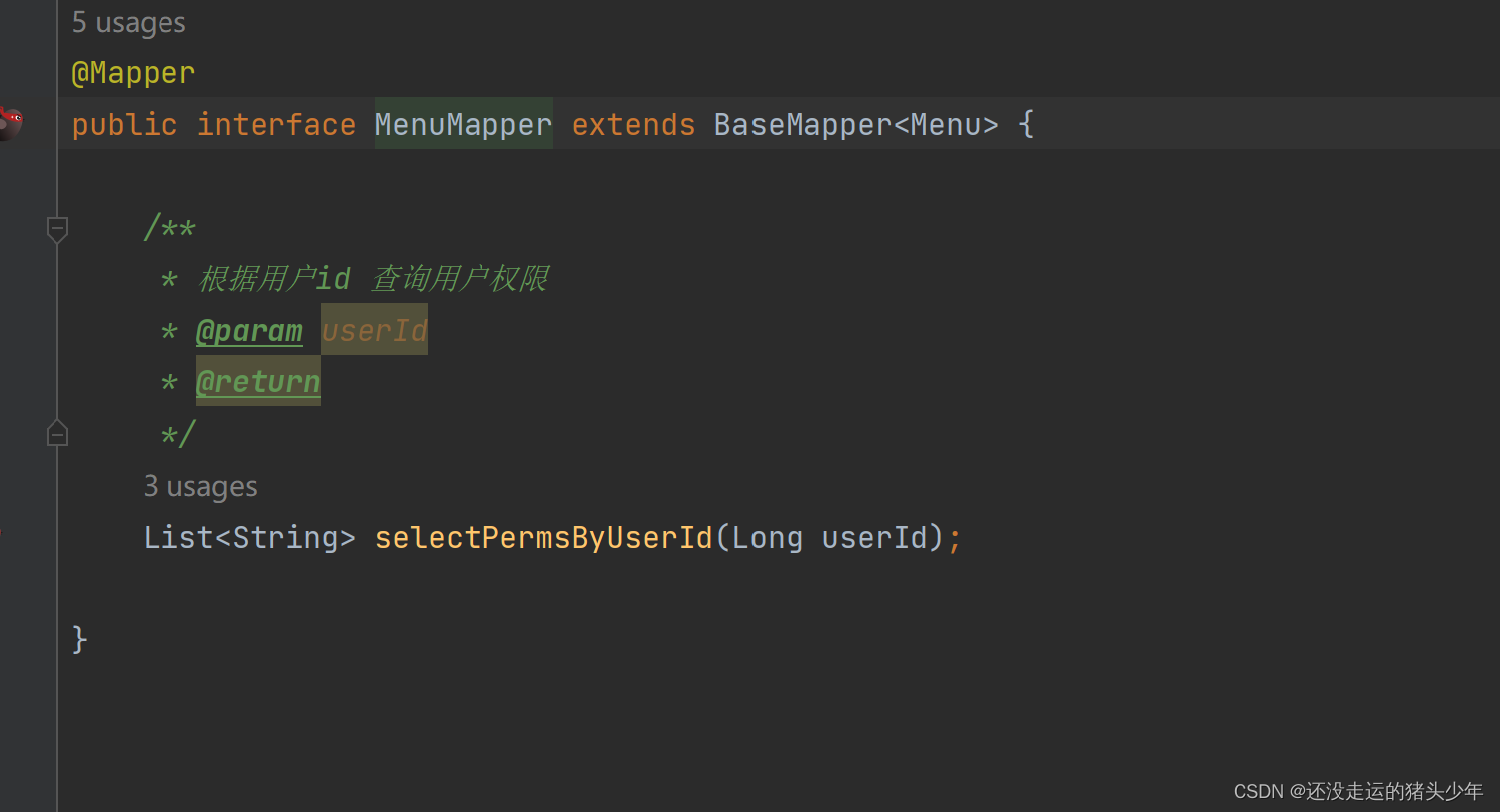
MenuMapper.xml
<mapper namespace="com.example.securitydemo1.mapp.MenuMapper"> 是带@mapper的接口
<?xml version="1.0" encoding="UTF-8" ?>
<!DOCTYPE mapper PUBLIC "-//mybatis.org//DTD Mapper 3.0//EN" "http://mybatis.org/dtd/mybatis-3-mapper.dtd" >
<mapper namespace="com.example.securitydemo1.mapp.MenuMapper">
    <select id="selectPermsByUserId" parameterType="long" resultType="string">
        SELECT DISTINCT perms from sys_menu where id in (
            SELECT menu_id  from sys_role_menu where role_id in (
                SELECT role_id from sys_user_role  where user_id=#{userId}
            )
        ) and status='0'
    </select>
</mapper>





 扫一扫
扫一扫


 4055
4055

 被折叠的 条评论
为什么被折叠?
被折叠的 条评论
为什么被折叠?
 到【灌水乐园】发言





