<Zhuuu_ZZ>行转列

SQL行转列技巧详解
本文深入探讨了SQL中行转列的实用技巧,重点介绍了如何利用CASEWHEN语句和PIVOT运算符实现数据转换,同时提供了具体示例,如学生分数表的行转列操作。此外,还讲解了CASEWHEN的使用要点和collect_list/set函数的应用场景。

一 行转列

行转列,列转行是我们在开发过程中经常碰到的问题。行转列一般通过CASE WHEN 语句来实现,也可以通过 SQL SERVER 2005 新增的运算符PIVOT来实现。用传统的方法,比较好理解。层次清晰,而且比较习惯。

CREATE TABLE students_score(
    cname VARCHAR(10),
    course VARCHAR(10),
    score INT(6)
);

INSERT INTO students_score VALUES
('张三','语文',74),
('张三','数学',83),
('张三','物理',93),
('李四','语文',65),
('李四','数学',87),
('李四','物理',90);
 
CREATE TABLE student(
    stu_id INT(4) UNSIGNED PRIMARY KEY AUTO_INCREMENT,
    stu_name VARCHAR(20)
);
 
INSERT INTO student(stu_name) VALUES
('张三'),('李四');

原表的输出结果如下:
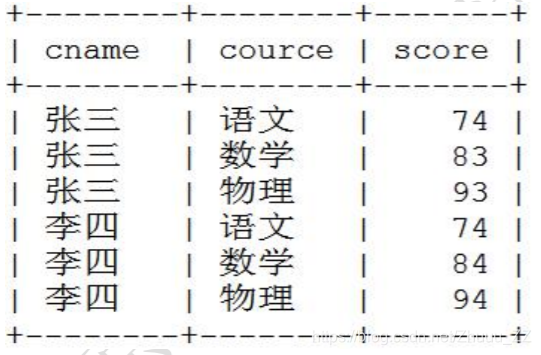
在这里插入图片描述
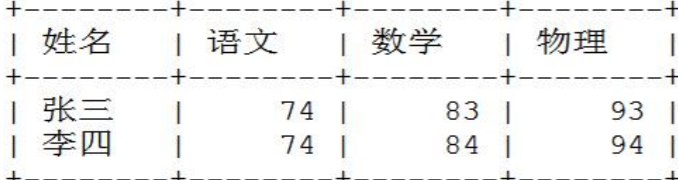
经过行转列之后,也就是说分别合并张三和李四的四行变两行
在这里插入图片描述

SELECT cname 姓名,
MAX(CASE course WHEN '语文' THEN score ELSE 0 END ) 语文,
MAX(CASE course WHEN '数学' THEN score ELSE 0 END ) 数学,
MAX(CASE course WHEN '物理' THEN score ELSE 0 END ) 物理
FROM students_score
GROUP BY cname;
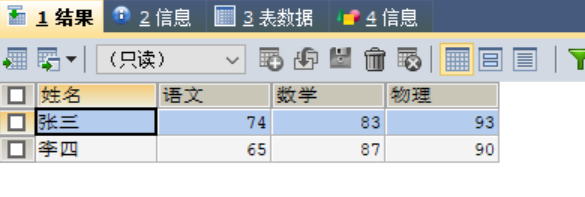
在这里插入图片描述

二 case when总结

  • 当仅仅是case when然后需要group by 时,case when里面的字段就需要放在group by后
  • 当sum(case when then else end) 时,因为其在sum,max等聚合字段里,case when里的字段就不需要放在group by后

三 collect_list/set

  • concat_ws(“分隔符”,String或者Array[String])----第一个为分隔符,后面是将多个String类型拼接,或者一个String类型的数组(会将该数组类似于flatMap扁平化,将里面元素拿出来按照分隔符拼接)
  • collect_set collect_list -----前面去重,后面不去重。行转列用法,将多行中的某一列聚合成一个集合放在一列中。
  • 上面两个可以联合使用,select id,concat_ws(",",collect_list(字段)) from biao group by id; 标准行转列
  • 因为collect_list/set是聚合操作,那么需要分组group by id聚合成一列。如果单纯是concat_ws就不需要分组。
<?xml version="1.0"?> <robot name="car" xmlns:xacro="http://ros.org/wiki/xacro"> <!-- 1. Base Links --> <link name="base_footprint"> <visual> <geometry> <sphere radius="0.001"/> </geometry> </visual> </link> <link name="base_link"> <inertial> <mass value="2.0"/> <inertia ixx="0.01" ixy="0.0" ixz="0.0" iyy="0.01" iyz="0.0" izz="0.01"/> </inertial> <visual> <geometry> <cylinder radius="0.1" length="0.08"/> </geometry> <origin xyz="0 0 0" rpy="0 0 0"/> <material name="base"> <color rgba="1 0 0 1"/> </material> </visual> <collision> <geometry> <cylinder radius="0.1" length="0.08"/> </geometry> </collision> </link> <joint name="ltf" type="fixed"> <parent link="base_footprint"/> <child link="base_link"/> <origin xyz="0 0 0.055" rpy="0 0 0"/> </joint> <!-- 2. Wheels --> <link name="left"> <inertial> <mass value="0.1"/> <inertia ixx="0.001" ixy="0.0" ixz="0.0" iyy="0.001" iyz="0.0" izz="0.001"/> </inertial> <visual> <geometry> <cylinder radius="0.0325" length="0.015"/> </geometry> <origin xyz="0 0 0" rpy="1.5708 0 0"/> <material name="left"> <color rgba="0 0 0 1"/> </material> </visual> <collision> <geometry> <cylinder radius="0.0325" length="0.015"/> </geometry> </collision> </link> <link name="right"> <inertial> <mass value="0.1"/> <inertia ixx="0.001" ixy="0.0" ixz="0.0" iyy="0.001" iyz="0.0" izz="0.001"/> </inertial> <visual> <geometry> <cylinder radius="0.0325" length="0.015"/> </geometry> <origin xyz="0 0 0" rpy="1.5708 0 0"/> <material name="right"> <color rgba="0 0 0 1"/> </material> </visual> <collision> <geometry> <cylinder radius="0.0325" length="0.015"/> </geometry> </collision> </link> <joint name="base_l_wheel_joint" type="continuous"> <parent link="base_link"/> <child link="left"/> <origin xyz="0 0.1 -0.0225" rpy="0 0 0"/> <axis xyz="0 1 0"/> <dynamics damping="0.1" friction="1.0"/> </joint> <joint name="base_r_wheel_joint" type="continuous"> <parent link="base_link"/> <child link="right"/> <origin xyz="0 -0.1 -0.0225" rpy="0 0 0"/> <axis xyz="0 1 0"/> <dynamics damping="0.1" friction="1.0"/> </joint> <!-- 3. Caster Wheels --> <link name="qwx"> <inertial> <mass value="0.05"/> <inertia ixx="0.0001" ixy="0.0" ixz="0.0" iyy="0.0001" iyz="0.0" izz="0.0001"/> </inertial> <visual> <geometry> <sphere radius="0.0075"/> </geometry> <material name="caster"> <color rgba="0 0 0 1"/> </material> </visual> <collision> <geometry> <sphere radius="0.0075"/> </geometry> </collision> </link> <link name="hwx"> <inertial> <mass value="0.05"/> <inertia ixx="0.0001" ixy="0.0" ixz="0.0" iyy="0.0001" iyz="0.0" izz="0.0001"/> </inertial> <visual> <geometry> <sphere radius="0.0075"/> </geometry> <material name="caster"> <color rgba="0 0 0 1"/> </material> </visual> <collision> <geometry> <sphere radius="0.0075"/> </geometry> </collision> </link> <joint name="qtb" type="continuous"> <parent link="base_link"/> <child link="qwx"/> <origin xyz="0.08 0 -0.0425" rpy="0 0 0"/> <axis xyz="0 1 0"/> </joint> <joint name="htb" type="continuous"> <parent link="base_link"/> <child link="hwx"/> <origin xyz="-0.08 0 -0.0425" rpy="0 0 0"/> <axis xyz="0 1 0"/> </joint> <!-- 4. Laser Sensor --> <link name="laserzj"> <visual> <geometry> <cylinder radius="0.01" length="0.05"/> </geometry> <material name="laserzj"> <color rgba="0 1 0 1"/> </material> </visual> </link> <link name="laser"> <visual> <geometry> <cylinder radius="0.02" length="0.02"/> </geometry> <material name="laser"> <color rgba="1 0 0 1"/> </material> </visual> </link> <joint name="zjtb" type="fixed"> <parent link="base_link"/> <child link="laserzj"/> <origin xyz="0 0 0.06" rpy="0 0 0"/> </joint> <joint name="lasertb" type="fixed"> <parent link="laserzj"/> <child link="laser"/> <origin xyz="0 0 0.03" rpy="0 0 0"/> </joint> <!-- Gazebo Plugins --> <gazebo> <plugin name="gazebo_ros_control" filename="libgazebo_ros_control.so"> <robotNamespace>/</robotNamespace> </plugin> </gazebo> <gazebo reference="laser"> <sensor type="ray" name="laser"> <pose>0 0 0 0 0 0</pose> <visualize>true</visualize> <update_rate>40</update_rate> <ray> <scan> <horizontal> <samples>360</samples> <resolution>1</resolution> <min_angle>-1.5708</min_angle> <max_angle>1.5708</max_angle> </horizontal> </scan> <range> <min>0.1</min> <max>3.0</max> <resolution>0.01</resolution> </range> <noise> <type>gaussian</type> <mean>0.0</mean> <stddev>0.01</stddev> </noise> </ray> <plugin name="gazebo_ros_ray_sensor" filename="libgazebo_ros_ray_sensor.so"> <topicName>/scan</topicName> <frameId>laser</frameId> </plugin> </sensor> </gazebo> </robot>
09-18
你提供的是一份 **Xacro 格式的 URDF 模型文件**(虽然扩展名未标明 `.xacro`,但包含 `xmlns:xacro` 声明),用于在 Gazebo 中仿真一个差速驱动小车。 --- ## ✅ 问题分析 当前模型存在以下几个关键问题,会导致: - Gazebo 启动失败 - 模型无法正确加载 - 物理仿真异常或机器人“爆炸”(飞出场景) - 激光雷达不发布数据 --- ## ❌ 存在的问题及修复方案 ### 🔴 1. 缺少 `<inertial>` 惯性参数 —— 导致物理仿真不稳定 > **问题部件**:`laserzj`, `laser` 这两个 link 完全没有 `<inertial>` 标签,Gazebo 会认为其质量为 0 或无穷大,导致刚体动力学计算崩溃。 #### ✅ 修复方法:添加合理的惯性参数 ```xml <link name="laserzj"> <inertial> <mass value="0.05"/> <!-- 细长圆柱体 --> <inertia ixx="1e-6" ixy="0.0" ixz="0.0" iyy="1e-6" iyz="0.0" izz="1e-6"/> </inertial> <visual> <geometry> <cylinder radius="0.01" length="0.05"/> </geometry> <material name="laserzj"> <color rgba="0 1 0 1"/> </material> </visual> <collision> <geometry> <cylinder radius="0.01" length="0.05"/> </geometry> </collision> </link> <link name="laser"> <inertial> <mass value="0.1"/> <!-- 小圆柱体 --> <inertia ixx="3.4e-5" ixy="0.0" ixz="0.0" iyy="3.4e-5" iyz="0.0" izz="2.0e-5"/> </inertial> <visual> <geometry> <cylinder radius="0.02" length="0.02"/> </geometry> <material name="laser"> <color rgba="1 0 0 1"/> </material> </visual> <collision> <geometry> <cylinder radius="0.02" length="0.02"/> </geometry> </collision> </link> ``` > 💡 提示:`<collision>` 是必须的,否则 Gazebo 不会参与碰撞检测。 --- ### 🔴 2. 轮子和万向轮的惯性张量不合理 你给 `left/right/qwx/hwx` 设置了过大的惯性值(如 `iyy=0.001` 对于一个小轮子来说太大)。 #### ✅ 正确计算方式(以左轮为例) 轮子是实心圆柱体: - 半径 $ r = 0.0325 $ - 长度 $ l = 0.015 $ - 质量 $ m = 0.1 $ 惯性公式: $$ I_{xx} = I_{zz} = \frac{m}{12}(3r^2 + h^2),\quad I_{yy} = \frac{1}{2}mr^2 $$ 代入得: - $ I_{yy} = 0.5 × 0.1 × (0.0325)^2 ≈ 5.28×10^{-5} $ #### ✅ 修改后: ```xml <link name="left"> <inertial> <mass value="0.1"/> <inertia ixx="5.28e-5" ixy="0.0" ixz="0.0" iyy="5.28e-5" iyz="0.0" izz="5.28e-5"/> </inertial> ... </link> ``` 右轮同理。 对于万向球(sphere): - $ I = \frac{2}{5}mr^2 = \frac{2}{5}×0.05×(0.0075)^2 ≈ 1.125×10^{-6} $ ```xml <inertia ixx="1.125e-6" iyy="1.125e-6" izz="1.125e-6" ixy="0" ixz="0" iyz="0"/> ``` --- ### 🔴 3. 视觉颜色单一,不利于调试识别 所有部件几乎都是黑/红/绿,难以区分。 #### ✅ 推荐修改为不同颜色: | Link | 推荐颜色 | RGBA | |------------|------------------|------------------------| | base_link | 红色 | `1 0 0 1` | | left | 蓝色 | `0 0 1 1` | | right | 青色 | `0 1 1 1` | | qwx | 黄色 | `1 1 0 1` | | hwx | 橙色 | `1 0.5 0 1` | | laserzj | 绿色 | `0 1 0 1` | | laser | 品红 | `1 0 1 1` | --- ### 🔴 4. Gazebo 插件命名错误 ```xml <plugin name="gazebo_ros_ray_sensor" filename="libgazebo_ros_ray_sensor.so"> ``` 这个插件名称错误!正确的插件是: ✅ 正确写法: ```xml <plugin name="gazebo_ros_laser" filename="libgazebo_ros_laser.so"> ``` 并且不需要 `<sensor>` 外层再包裹一层 `<sensor>`。 #### ✅ 正确激光雷达定义方式: ```xml <gazebo reference="laser"> <material>Gazebo/Red</material> <sensor type="ray" name="hokuyo"> <pose>0 0 0 0 0 0</pose> <update_rate>40</update_rate> <ray> <scan> <horizontal> <samples>360</samples> <resolution>1</resolution> <min_angle>-1.5708</min_angle> <max_angle>1.5708</max_angle> </horizontal> </scan> <range> <min>0.1</min> <max>3.0</max> <resolution>0.01</resolution> </range> <noise> <type>gaussian</type> <mean>0.0</mean> <stddev>0.01</stddev> </noise> </ray> <plugin name="gazebo_ros_laser" filename="libgazebo_ros_laser.so"> <topicName>/scan</topicName> <frameName>laser</frameName> </plugin> </sensor> </gazebo> ``` --- ### 🔴 5. 缺少物理摩擦参数(轮子打滑) 添加轮子与地面之间的摩擦力: ```xml <gazebo reference="left"> <mu1>1.0</mu1> <mu2>1.0</mu2> <kp>1e6</kp> <kd>1.0</kd> </gazebo> <gazebo reference="right"> <mu1>1.0</mu1> <mu2>1.0</mu2> <kp>1e6</kp> <kd>1.0</kd> </gazebo> ``` --- ## ✅ 修复后的完整 Xacro 文件片段(仅关键部分) ```xml <!-- Laser Mount --> <link name="laserzj"> <inertial> <mass value="0.05"/> <inertia ixx="1e-6" ixy="0.0" ixz="0.0" iyy="1e-6" iyz="0.0" izz="1e-6"/> </inertial> <visual> <geometry> <cylinder radius="0.01" length="0.05"/> </geometry> <material name="laserzj"> <color rgba="0 1 0 1"/> </material> </visual> <collision> <geometry> <cylinder radius="0.01" length="0.05"/> </geometry> </collision> </link> <link name="laser"> <inertial> <mass value="0.1"/> <inertia ixx="3.4e-5" ixy="0.0" ixz="0.0" iyy="3.4e-5" iyz="0.0" izz="2.0e-5"/> </inertial> <visual> <geometry> <cylinder radius="0.02" length="0.02"/> </geometry> <material name="laser"> <color rgba="1 0 1 1"/> <!-- Magenta --> </material> </visual> <collision> <geometry> <cylinder radius="0.02" length="0.02"/> </geometry> </collision> </link> <!-- Gazebo Plugins --> <gazebo reference="laser"> <sensor type="ray" name="hokuyo"> <update_rate>40</update_rate> <ray> <scan> <horizontal> <samples>360</samples> <resolution>1</resolution> <min_angle>-1.5708</min_angle> <max_angle>1.5708</max_angle> </horizontal> </scan> <range> <min>0.1</min> <max>3.0</max> </range> </ray> <plugin name="gazebo_ros_laser" filename="libgazebo_ros_laser.so"> <topicName>/scan</topicName> <frameName>laser</frameName> </plugin> </sensor> </gazebo> <!-- Friction for wheels --> <gazebo reference="left"> <mu1>1.0</mu1> <mu2>1.0</mu2> </gazebo> <gazebo reference="right"> <mu1>1.0</mu1> <mu2>1.0</mu2> </gazebo> ``` --- ## ✅ 如何验证是否成功? 1. **检查 URDF 是否合法** ```bash rosrun xacro xacro car.xacro > car.urdf check_urdf car.urdf ``` 2. **启动 Gazebo 并加载模型** ```bash roslaunch your_package display.launch ``` 3. **查看话题是否有 `/scan` 数据** ```bash rostopic echo /scan ``` --- ##
评论 1
成就一亿技术人!
拼手气红包6.0元
还能输入1000个字符
 
红包 添加红包
表情包 插入表情
 条评论被折叠 查看
添加红包

请填写红包祝福语或标题

红包个数最小为10个

红包金额最低5元

当前余额3.43前往充值 >
需支付:10.00
成就一亿技术人!
领取后你会自动成为博主和红包主的粉丝 规则
hope_wisdom
发出的红包
实付
使用余额支付
点击重新获取
扫码支付
钱包余额 0

抵扣说明:

1.余额是钱包充值的虚拟货币,按照1:1的比例进行支付金额的抵扣。
2.余额无法直接购买下载,可以购买VIP、付费专栏及课程。

余额充值