


This is quite easy to do, and it makes browsing the smb network fast.
Configuring the server:
simply edit smb.conf (typically located at /etc/samba/smb.conf)
locate the the wins support and enable it.:
# Windows Internet Name Serving Support Section:
# WINS Support - Tells the NMBD component of Samba to enable it's WINS Server
wins support = yes
setup the way samba should resolve the hosts:
# What naming service and in what order should we use to resolve host names
# to IP addresses
#   name resolve order = lmhosts host wins bcast
   name resolve order = host wins bcast
The following option should be addet to the linux DHCP server (if you use linux as a DHCP server):
option netbios-name-servers x.x.x.x;
where x.x.x.x is the IP of the WINS server
If you use a normal router, sometimes they support pushing out the wins server, if you use a router running dd-wrt
go tothe basic setup and add the WINS server IP, there.
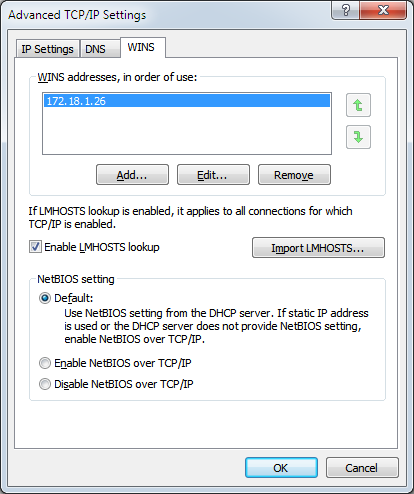
If this fails you can add the WINS server manually to windows:
go to the control panel, and press the View network status and tasks, then press the change adapter setting
right click the network interface and select properties, select the TCP/IP (for windows 7 select TCP/IPv4)
and press properties again click advanced and select the WINS and add the IP of the WINS server and you are ready to go
For linux clients simply edit the smb.conf and add the following:
# WINS Server - Tells the NMBD components of Samba to be a WINS Client
# Note: Samba can be either a WINS Server, or a WINS Client, but NOT both
   wins server = x.x.x.x
replace x.x.x.x with the IP of the WINS server
Happy smb surfing





 扫一扫
扫一扫


 2764
2764

 被折叠的 条评论
为什么被折叠?
被折叠的 条评论
为什么被折叠?
 到【灌水乐园】发言





