



 这篇博客详细介绍了如何在IntelliJIDEA中构建SpringBoot项目,涉及到SpringBoot的配置文件、ORM、JPA和SpringDataJPA等数据库访问方式。同时,文章涵盖了SpringBoot的控制器注解、业务层注解和映射方法,以及如何利用Postman进行数据交互。在实际应用中,展示了从列表显示、添加、详情、更新到删除的各种功能实现,并提到了前端table表格数据加载的问题。
相关链接:
IntelliJ IDEA中构建Spring Boot的项目
Spring Boot中的配置文件(application.properties、application.yml与pom.xml)
ORM、JPA、Spring Data JPA和常用的五种访问数据库方式
SpringBoot–页面显示列表功能
SpringBoot–列表添加详情功能
SpringBoot–列表添加新增功能
SpringBoot–列表更新功能
SpringBoot–列表删除功能
SpringBoot的控制层注解(@Controller与@RestController)
SpringBoot的业务层注解(@Resource、@Autowired与@Qualifier)
SpringBoot的映射(@RequestMapping、@GetMapping与@PostMapping)
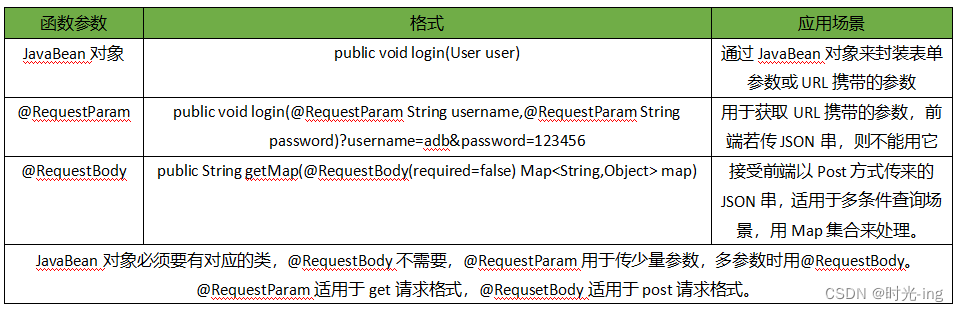
SpringBoot的函数参数(JavaBean对象、@RequestParam与@RequestBody)
SpringBoot的返回数据(@ResponseBody、返回templates下的网页 与 返回公共网页)
利用postman完成JSON串的发送功能(springboot)
利用postman完成数据的分页查询功能(springboot)
利用postman完成向数据库中添加数据的功能(springboot)
Please refer to dump files (if any exist) [date].dump, [date]-jvmRun[N].dump and [date].dumpstream.
Preparing: insert into user(uuid,username,gender,age,phone,address) values(?,?,?,?,?,?,?)
Could not autowire. No beans of ‘UserMapper‘ type found.
Error starting ApplicationContext. To display the conditions report re-run your application with
Loading class com.mysql.jdbc.Driver‘. This is deprecated. The new driver class is com.mysql.cj.jdb
Plugin ‘org.springframework.boot:spring-boot-maven-plugin:‘ not found
Failed to configure a DataSource: ‘url‘ attribute is not specified and no embedded datasource could
This application has no explicit mapping for /error, so you are seeing this as a fallback.
BootStrap-SpringBoot的使用过程中前端table表格无法加载出数据。





 扫一扫
扫一扫


 1万+
1万+

 被折叠的 条评论
为什么被折叠?
被折叠的 条评论
为什么被折叠?
 到【灌水乐园】发言





