


文章目录
1,安装gitlab-ce-16
1.1,rpm安装gitlab问题: NOKEY、signature check fail
解决办法
- 参考:https://docs.gitlab.com/omnibus/update/package_signatures.html
rpm --import https://packages.gitlab.com/gitlab/gitlab-ce/gpgkey/gitlab-gitlab-ce-3D645A26AB9FBD22.pub.gpg
# gitlab-ce-16可能会遇到以下问题
test1:/opt # rpm -ivh gitlab-ce-16.0.3-ce.0.el7.x86_64.rpm  --force
warning: gitlab-ce-16.0.3-ce.0.el7.x86_64.rpm: Header V4 RSA/SHA1 Signature, key ID f27eab47: NOKEY
error: [upel]: gitlab-ce NOKEY
error: [upel]: gitlab-ce signature check fail
error: [upel]: gitlab-ce NOKEY
error: [upel]: gitlab-ce signature check fail
1.2, docker 启动 gitlab: ThreadError: can’t create Thread: Operation not permitted
- 解决办法:添加参数 --privileged=true ,将docker容器提权到root
docker run --privileged=true -d --publish 8888:80 --name gitlab --restart always gitlab/gitlab-ce
2,安装gitlab-ce-14
| 虚拟机主机名 | cpu、内存配置 | 启动gitlab后内存占用 |
|---|---|---|
| c71 | 1core, 2g | 1.5G |
# gitlab-ce-14 安装很顺利, 提示依赖问题(直接用--nodeps忽略即可)
[root@c74 ~]# rpm -ivh gitlab-ce-14.0.6-ce.0.el7.x86_64.rpm
warning: gitlab-ce-14.0.6-ce.0.el7.x86_64.rpm: Header V4 RSA/SHA1 Signature, key ID f27eab47: NOKEY
error: Failed dependencies:
        policycoreutils-python is needed by gitlab-ce-14.0.6-ce.0.el7.x86_64

[root@c71 ~]# rpm -ivh  gitlab-ce-14.0.6-ce.0.el7.x86_64.rpm --nodeps
...
It looks like GitLab has not been configured yet; skipping the upgrade script.

       *.                  *.
      ***                 ***
     *****               *****
    .******             *******
    ********            ********
   ,,,,,,,,,***********,,,,,,,,,
  ,,,,,,,,,,,*********,,,,,,,,,,,
  .,,,,,,,,,,,*******,,,,,,,,,,,,
      ,,,,,,,,,*****,,,,,,,,,.
         ,,,,,,,****,,,,,,
            .,,,***,,,,
                ,*,.


     _______ __  __          __
    / ____(_) /_/ /   ____ _/ /_
   / / __/ / __/ /   / __ `/ __ \
  / /_/ / / /_/ /___/ /_/ / /_/ /
  \____/_/\__/_____/\__,_/_.___/


Thank you for installing GitLab!
GitLab was unable to detect a valid hostname for your instance.
Please configure a URL for your GitLab instance by setting `external_url`
configuration in /etc/gitlab/gitlab.rb file.
Then, you can start your GitLab instance by running the following command:
  sudo gitlab-ctl reconfigure

For a comprehensive list of configuration options please see the Omnibus GitLab readme
https://gitlab.com/gitlab-org/omnibus-gitlab/blob/master/README.md

Help us improve the installation experience, let us know how we did with a 1 minute survey:
https://gitlab.fra1.qualtrics.com/jfe/form/SV_6kVqZANThUQ1bZb?installation=omnibus&release=14-0
#以下是 yum install 会下载的依赖包,此次仅作备忘记录
Dependency Installed:
  audit-libs-python.x86_64 0:2.8.5-4.el7   checkpolicy.x86_64 0:2.5-8.el7               libcgroup.x86_64 0:0.41-21.el7
  libsemanage-python.x86_64 0:2.5-14.el7   policycoreutils-python.x86_64 0:2.5-34.el7   python-IPy.noarch 0:0.75-6.el7
  setools-libs.x86_64 0:3.3.8-4.el7

Dependency Updated:
  policycoreutils.x86_64 0:2.5-34.el7

Complete!
2.1 修改配置,重新编译
#1,修改配置
[root@c71 gitlab]# grep ^external gitlab.rb
external_url 'http://192.168.56.71:8888'

[root@c71 gitlab]# grep 'worker_process' gitlab.rb
# puma['worker_processes'] = 2
 puma['worker_processes'] = 1
# postgresql['max_worker_processes'] = 8
 postgresql['max_worker_processes'] = 1
# nginx['worker_processes'] = 4
 nginx['worker_processes'] = 1
# patroni['postgresql']['max_worker_processes'] = 8
 patroni['postgresql']['max_worker_processes'] = 1

## 修改端口号(未验证是否正常启动):sed -E "s@#(.*port'\] = )'?([0-9]+)'?@\11\2@" gitlab.rb  |egrep "port'\] = '?[0-9]+'?"
#2,重新编译 (大概持续时间8分钟)
[root@c71 gitlab]# gitlab-ctl reconfigure
....
    * link[Link /opt/gitlab/embedded/service/gitlab-rails/.gitlab_shell_secret to /var/opt/gitlab/gitlab-rails/etc/gitlab_shell_secret] action create
      - create symlink at /opt/gitlab/embedded/service/gitlab-rails/.gitlab_shell_secret to /var/opt/gitlab/gitlab-rails/etc/gitlab_shell_secret

  * templatesymlink[Create a gitlab_pages_secret and create a symlink to Rails root] action create
    * template[/var/opt/gitlab/gitlab-rails/etc/gitlab_pages_secret] action create
      - create new file /var/opt/gitlab/gitlab-rails/etc/gitlab_pages_secret
      - update content in file /var/opt/gitlab/gitlab-rails/etc/gitlab_pages_secret from none to 9fa9a2
      - suppressed sensitive resource
      - change mode from '' to '0644'
      - change owner from '' to 'root'
      - change group from '' to 'root'
      - restore selinux security context
    * link[Link /opt/gitlab/embedded/service/gitlab-rails/.gitlab_pages_secret to /var/opt/gitlab/gitlab-rails/etc/gitlab_pages_secret] action create
      - create symlink at /opt/gitlab/embedded/service/gitlab-rails/.gitlab_pages_secret to /var/opt/gitlab/gitlab-rails/etc/gitlab_pages_secret
	 ....
Recipe: package::sysctl
  * execute[reload all sysctl conf] action run
    [execute] * Applying /usr/lib/sysctl.d/00-system.conf ...
              * Applying /usr/lib/sysctl.d/10-default-yama-scope.conf ...
              kernel.yama.ptrace_scope = 0
              * Applying /usr/lib/sysctl.d/50-default.conf ...
              kernel.sysrq = 16
              kernel.core_uses_pid = 1
              net.ipv4.conf.default.rp_filter = 1
              net.ipv4.conf.all.rp_filter = 1
              net.ipv4.conf.default.accept_source_route = 0
              net.ipv4.conf.all.accept_source_route = 0
              net.ipv4.conf.default.promote_secondaries = 1
              net.ipv4.conf.all.promote_secondaries = 1
              fs.protected_hardlinks = 1
              fs.protected_symlinks = 1
              * Applying /etc/sysctl.d/90-omnibus-gitlab-kernel.sem.conf ...
              kernel.sem = 250 32000 32 262
              * Applying /etc/sysctl.d/90-omnibus-gitlab-kernel.shmall.conf ...
              kernel.shmall = 4194304
              * Applying /etc/sysctl.d/90-omnibus-gitlab-kernel.shmmax.conf ...
              kernel.shmmax = 17179869184
              * Applying /etc/sysctl.d/90-omnibus-gitlab-net.core.somaxconn.conf ...
              net.core.somaxconn = 1024
              * Applying /etc/sysctl.d/99-sysctl.conf ...
              vm.max_map_count = 262144
              * Applying /etc/sysctl.conf ...
              vm.max_map_count = 262144
    - execute sysctl -e --system
Recipe: gitlab::gitlab-workhorse
  * runit_service[gitlab-workhorse] action restart (up to date)
Recipe: monitoring::node-exporter
  * runit_service[node-exporter] action restart (up to date)
Recipe: monitoring::gitlab-exporter
  * runit_service[gitlab-exporter] action restart (up to date)
Recipe: monitoring::redis-exporter
  * runit_service[redis-exporter] action restart (up to date)
Recipe: monitoring::prometheus
  * runit_service[prometheus] action restart (up to date)
  * execute[reload prometheus] action run
    - execute /opt/gitlab/bin/gitlab-ctl hup prometheus
Recipe: monitoring::alertmanager
  * runit_service[alertmanager] action restart (up to date)
Recipe: monitoring::postgres-exporter
  * runit_service[postgres-exporter] action restart (up to date)
Recipe: monitoring::grafana
  * runit_service[grafana] action restart (up to date)

Running handlers:
Running handlers complete
Chef Infra Client finished, 572/1516 resources updated in 07 minutes 56 seconds

Notes:
Default admin account has been configured with following details:
Username: root
Password: You didn't opt-in to print initial root password to STDOUT.
Password stored to /etc/gitlab/initial_root_password. This file will be cleaned up in first reconfigure run after 24 hours.

NOTE: Because these credentials might be present in your log files in plain text, it is highly recommended to reset the password following https://docs.gitlab.com/ee/security/reset_user_password.html#reset-your-root-password.

gitlab Reconfigured!
2.2 root用户启动gitlab,查看数据目录权限
#1,root启动gitlab (秒级启动)
[root@c71 gitlab]# gitlab-ctl start
ok: run: alertmanager: (pid 8342) 109s
ok: run: gitaly: (pid 8222) 112s
ok: run: gitlab-exporter: (pid 8229) 112s
ok: run: gitlab-workhorse: (pid 8182) 114s
ok: run: grafana: (pid 8364) 108s
ok: run: logrotate: (pid 5227) 542s
ok: run: nginx: (pid 6318) 453s
ok: run: node-exporter: (pid 8198) 113s
ok: run: postgres-exporter: (pid 8358) 109s
ok: run: postgresql: (pid 5595) 523s
ok: run: prometheus: (pid 8323) 111s
ok: run: puma: (pid 6095) 472s
ok: run: redis: (pid 5305) 536s
ok: run: redis-exporter: (pid 8237) 111s
ok: run: sidekiq: (pid 6161) 465s

#2, 查看数据目录及权限
[root@c71 packs]# ll /var/opt/gitlab/
total 12
drwxr-x---. 3 gitlab-prometheus root        42 Oct 21 08:07 alertmanager
drwx------. 2 git               root         6 Oct 21 08:04 backups
-rw-------. 1 root              root        38 Oct 21 08:06 bootstrapped
drwx------. 3 git               root       123 Oct 21 08:12 gitaly
drwx------. 3 git               git         26 Oct 21 08:04 git-data
drwxr-xr-x. 3 git               root        20 Oct 21 08:04 gitlab-ci
drwxr-xr-x. 2 git               root        53 Oct 21 08:06 gitlab-exporter
drwxr-xr-x. 9 git               root       160 Oct 21 08:06 gitlab-rails
drwx------. 2 git               root        24 Oct 21 08:04 gitlab-shell
drwxr-x---. 3 git               gitlab-www  55 Oct 21 08:06 gitlab-workhorse
drwx------. 4 gitlab-prometheus root        83 Oct 21 08:11 grafana
drwx------. 3 root              root        71 Oct 21 08:15 logrotate
drwxr-x---. 9 root              gitlab-www 163 Oct 21 08:06 nginx
drwxr-xr-x. 3 root              root        32 Oct 21 08:06 node-exporter
drwx------. 2 gitlab-psql       root        26 Oct 21 08:07 postgres-exporter
drwxr-xr-x. 3 gitlab-psql       root        81 Oct 21 08:05 postgresql
drwxr-x---. 4 gitlab-prometheus root        53 Oct 21 08:07 prometheus
-rw-r--r--. 1 root              root       181 Oct 21 08:12 public_attributes.json
drwxr-x---. 2 gitlab-redis      git         60 Oct 21 08:15 redis
-rw-r--r--. 1 root              root        40 Oct 21 08:04 trusted-certs-directory-hash
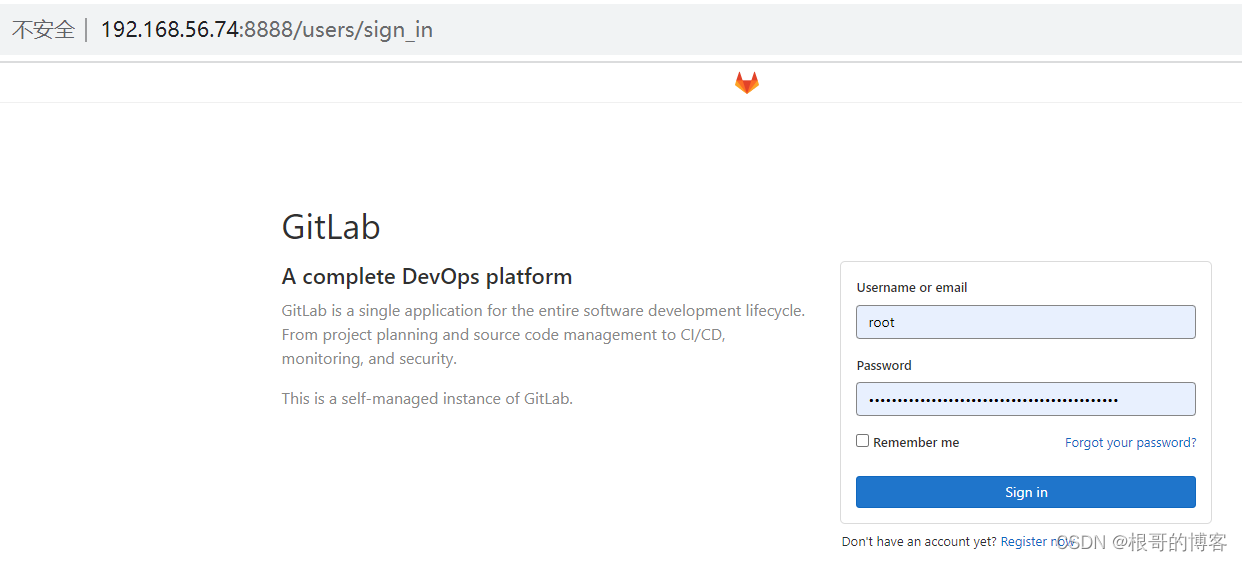
2.3 登录web页面
获取root密码
[root@c74 ~]# cat /etc/gitlab/initial_root_password
# WARNING: This value is valid only in the following conditions
#          1. If provided manually (either via `GITLAB_ROOT_PASSWORD` environment variable or via `gitlab_rails['initial_root_password']` setting in `gitlab.rb`, it was provided before database was seeded for the first time (usually, the first reconfigure run).
#          2. Password hasn't been changed manually, either via UI or via command line.
#
#          If the password shown here doesn't work, you must reset the admin password following https://docs.gitlab.com/ee/security/reset_user_password.html#reset-your-root-password.

Password: tqeVom/jSx0GlfrSFlI7DLSyhIVdoJmOxWlek5UF4bE=

# NOTE: This file will be automatically deleted in the first reconfigure run after 24 hours.
2.4 停止gitlab
[root@c71 gitlab]# free -h
              total        used        free      shared  buff/cache   available
Mem:           1.8G        1.5G         74M         38M        246M        136M
Swap:          2.0G        1.0G        1.0G

[root@c71 gitlab]# gitlab-ctl stop
ok: down: alertmanager: 1s, normally up
ok: down: gitaly: 0s, normally up
ok: down: gitlab-exporter: 0s, normally up
ok: down: gitlab-workhorse: 0s, normally up
ok: down: grafana: 1s, normally up
ok: down: logrotate: 0s, normally up
ok: down: nginx: 1s, normally up
ok: down: node-exporter: 0s, normally up
ok: down: postgres-exporter: 1s, normally up
ok: down: postgresql: 0s, normally up
ok: down: prometheus: 0s, normally up
ok: down: puma: 0s, normally up
ok: down: redis: 0s, normally up
ok: down: redis-exporter: 0s, normally up
ok: down: sidekiq: 0s, normally up

[root@c71 gitlab]# free -h
              total        used        free      shared  buff/cache   available
Mem:           1.8G        111M        1.3G          9M        357M        1.5G
Swap:          2.0G         52M        1.9G

[root@c71 gitlab]# ps -ef |grep gitlab
root      5171     1  0 08:04 ?        00:00:00 runsvdir -P /opt/gitlab/service log: ...........................................................................................................................................................................................................................................................................................................................................................................................................
root      5276  5225  0 08:05 ?        00:00:00 svlogd -tt /var/log/gitlab/logrotate
root      5319  5303  0 08:05 ?        00:00:00 svlogd -tt /var/log/gitlab/redis
root      5415  5381  0 08:05 ?        00:00:00 svlogd /var/log/gitlab/gitaly
root      5660  5593  0 08:05 ?        00:00:00 svlogd -tt /var/log/gitlab/postgresql
root      6128  6093  0 08:06 ?        00:00:00 svlogd -tt /var/log/gitlab/puma
root      6185  6159  0 08:06 ?        00:00:00 svlogd /var/log/gitlab/sidekiq
root      6222  5171  0 08:06 ?        00:00:00 runsv gitlab-workhorse
root      6245  6222  0 08:06 ?        00:00:00 svlogd /var/log/gitlab/gitlab-workhorse
root      6332  6316  0 08:06 ?        00:00:00 svlogd -tt /var/log/gitlab/nginx
root      6412  6391  0 08:06 ?        00:00:00 svlogd -tt /var/log/gitlab/node-exporter
root      6464  5171  0 08:06 ?        00:00:00 runsv gitlab-exporter
root      6476  6464  0 08:06 ?        00:00:00 svlogd -tt /var/log/gitlab/gitlab-exporter
root      6572  6547  0 08:06 ?        00:00:00 svlogd -tt /var/log/gitlab/redis-exporter
root      6753  6731  0 08:07 ?        00:00:00 svlogd -tt /var/log/gitlab/prometheus
root      6892  6845  0 08:07 ?        00:00:00 svlogd -tt /var/log/gitlab/alertmanager
root      7015  6993  0 08:07 ?        00:00:00 svlogd -tt /var/log/gitlab/postgres-exporter
root      7893  7849  0 08:11 ?        00:00:00 svlogd -tt /var/log/gitlab/grafana
root     29673  7085  0 08:51 pts/1    00:00:00 grep --color=auto gitlab





 扫一扫
扫一扫


 1634
1634

 被折叠的 条评论
为什么被折叠?
被折叠的 条评论
为什么被折叠?
 到【灌水乐园】发言





