



 本文详细介绍了如何使用Qt的QSS样式表通过qproperty语法设置QWidget派生类的各种属性,包括基本类型、枚举类型及复杂类型如QBrush的渐变色。并提供了源码解析过程,帮助理解QSS与属性的交互机制。
1.基本使用
(参见 Qt 文档页章节 Setting QObject Properties:https://doc.qt.io/qt-5/stylesheet-syntax.html)
从 Qt 4.3 及更高版本开始,可以使用 qproperty- <属性名称> 语法设置任何 designable 的 Q_PROPERTY ,QWidget 派生类支持该语法,仅继承 QObject 不会生效。使用该机制可以很方便的扩展我们的程序。
如我们给自己的窗口加上属性:
class MainWindow : public QMainWindow
{
    Q_OBJECT
    Q_PROPERTY(int id READ getId WRITE setId)
    Q_PROPERTY(QString name READ getName WRITE setName)
    //... ...
}
就可以在 QSS 样式表中这样赋值:
(QString 类型的貌似不能空格分隔,而且不能和颜色值之类的冲突)
MainWindow{
qproperty-id:10;
qproperty-name:gongjianbo-1992;
}
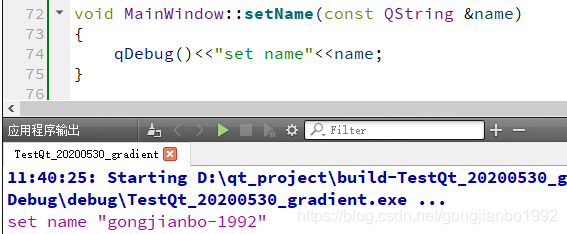
如果我们在属性的 set 函数中打印的话,是可以看到对应输出的:
一些常用的类型对应的 QSS 写法:
/* QIcon QImage 等 */
MyLabel { qproperty-pixmap: url(pixmap.png); }

/* QColor */
MyGroupBox { qproperty-titleColor: rgb(100, 200, 100); }

MyPushButton {
/* QSize */
qproperty-iconSize: 20px 20px;

/* QRect */
qproperty-myrect:rect(10 20 100 50);

/* QBrush 之渐变色 */
qproperty-mycolor:qlineargradient(spread:pad, x1:0, y1:0, x2:1, y2:0, stop:0 rgba(0, 0, 0, 255), stop:1 rgba(255, 255, 255, 255));
}
2.注意事项
如果该属性引用用 Q_ENUMS 声明的枚举,则应按名称(而不是其数值)引用其常量。
请谨慎使用 qproperty 语法,因为它会修改正在绘制的小部件。
qproperty 语法仅计算一次,即用样式修饰小部件时。这意味着在伪状态(例如 QPushButton:hover)中使用它们的任何尝试都将无效。但是我们可以给非伪状态重新设置属性值。
如果使用 QString 类型,不要和 QColor 之类的属性值冲突,并且中间不要有分隔。
对于渐变色,可以用 QBrush 类接收。
(2020-6-6补充)正数赋值直接写数字就行,负数测试发现需要加字符串引号。
3.样式表与枚举
(2020-6-6补充)对于自定义属性的枚举值,赋值操作使用字符串:
class MyLabel : public QLabel
{
    Q_OBJECT
    Q_ENUMS(MyColor)
    Q_PROPERTY(MyColor color READ getColor WRITE setColor)
public:
    enum MyColor{
        Green=1,
        Yellow=2,
        Red=3
    };
    //... ...
}
/*类选择器*/
.MyLabel{
/*这里有作用域是因为我枚举是声明在MyLabel类里的*/
qproperty-color:"MyLabel::Red";
}对于属性选择器中的枚举值,赋值使用枚举对应常量的字符串:
.MyLabel[color="1"]{
background:green;
}
.MyLabel[color="2"]{
background:yellow;
}
.MyLabel[color="3"]{
background:red;
}
经测试 Q_ENUMS 和 Q_ENUM 注册的枚举是一样的写法,虽然 QDebug 打印的时候前者是常量后者是枚举字符串。(Q_ENUMS 和 Q_ENUM 可以参见文档,以及相关资料:https://woboq.com/blog/q_enum.html)
4.相关源码片段
属性解析相关
//E:\Qt\qt-everywhere-src-5.15.0\qtbase\src\widgets\styles\qstylesheetstyle.cpp
(可以看到一些支持的基本类型)
void QStyleSheetStyle::setProperties(QWidget *w)
{
    // The final occurrence of each property is authoritative.
    // Set value for each property in the order of property final occurrence
    // since properties interact.

    const QVector<Declaration> decls = declarations(styleRules(w), QString());
    QVector<int> finals; // indices in reverse order of each property's final occurrence

    {
        // scan decls for final occurrence of each "qproperty"
        QSet<const QString> propertySet;
        for (int i = decls.count() - 1; i >= 0; --i) {
            const QString property = decls.at(i).d->property;
            if (!property.startsWith(QLatin1String("qproperty-"), Qt::CaseInsensitive))
                continue;
            if (!propertySet.contains(property)) {
                propertySet.insert(property);
                finals.append(i);
            }
        }
    }

    for (int i = finals.count() - 1; i >= 0; --i) {
        const Declaration &decl = decls.at(finals[i]);
        QString property = decl.d->property;
        property.remove(0, 10); // strip "qproperty-"

        const QMetaObject *metaObject = w->metaObject();
        int index = metaObject->indexOfProperty(property.toLatin1());
        if (Q_UNLIKELY(index == -1)) {
            qWarning() << w << " does not have a property named " << property;
            continue;
        }
        const QMetaProperty metaProperty = metaObject->property(index);
        if (Q_UNLIKELY(!metaProperty.isWritable() || !metaProperty.isDesignable())) {
            qWarning() << w << " cannot design property named " << property;
            continue;
        }

        QVariant v;
        const QVariant value = w->property(property.toLatin1());
        switch (value.userType()) {
        case QMetaType::QIcon: v = decl.iconValue(); break;
        case QMetaType::QImage: v = QImage(decl.uriValue()); break;
        case QMetaType::QPixmap: v = QPixmap(decl.uriValue()); break;
        case QMetaType::QRect: v = decl.rectValue(); break;
        case QMetaType::QSize: v = decl.sizeValue(); break;
        case QMetaType::QColor: v = decl.colorValue(); break;
        case QMetaType::QBrush: v = decl.brushValue(); break;
#ifndef QT_NO_SHORTCUT
        case QMetaType::QKeySequence: v = QKeySequence(decl.d->values.at(0).variant.toString()); break;
#endif
        default: v = decl.d->values.at(0).variant; break;
        }

        w->setProperty(property.toLatin1(), v);
    }
}
渐变色解析
//E:\Qt\qt-everywhere-src-5.15.0\qtbase\src\gui\text\qcssparser.cpp
static BrushData parseBrushValue(const QCss::Value &v, const QPalette &pal)
{
    ColorData c = parseColorValue(v);
    if (c.type == ColorData::Color) {
        return QBrush(c.color);
    } else if (c.type == ColorData::Role) {
        return c.role;
    }

    if (v.type != Value::Function)
        return BrushData();

    QStringList lst = v.variant.toStringList();
    if (lst.count() != 2)
        return BrushData();

    QStringList gradFuncs;
    gradFuncs << QLatin1String("qlineargradient") << QLatin1String("qradialgradient") << QLatin1String("qconicalgradient") << QLatin1String("qgradient");
    int gradType = -1;

    if ((gradType = gradFuncs.indexOf(lst.at(0).toLower())) == -1)
        return BrushData();

    QHash<QString, qreal> vars;
    QVector<QGradientStop> stops;

    int spread = -1;
    QStringList spreads;
    spreads << QLatin1String("pad") << QLatin1String("reflect") << QLatin1String("repeat");

    bool dependsOnThePalette = false;
    Parser parser(lst.at(1));
    while (parser.hasNext()) {
        parser.skipSpace();
        if (!parser.test(IDENT))
            return BrushData();
        QString attr = parser.lexem();
        parser.skipSpace();
        if (!parser.test(COLON))
            return BrushData();
        parser.skipSpace();
        if (attr.compare(QLatin1String("stop"), Qt::CaseInsensitive) == 0) {
            QCss::Value stop, color;
            parser.next();
            if (!parser.parseTerm(&stop)) return BrushData();
            parser.skipSpace();
            parser.next();
            if (!parser.parseTerm(&color)) return BrushData();
            ColorData cd = parseColorValue(color);
            if(cd.type == ColorData::Role)
                dependsOnThePalette = true;
            stops.append(QGradientStop(stop.variant.toReal(), colorFromData(cd, pal)));
        } else {
            parser.next();
            QCss::Value value;
            (void)parser.parseTerm(&value);
            if (attr.compare(QLatin1String("spread"), Qt::CaseInsensitive) == 0) {
                spread = spreads.indexOf(value.variant.toString());
            } else {
                vars[attr] = value.variant.toReal();
            }
        }
        parser.skipSpace();
        (void)parser.test(COMMA);
    }

    if (gradType == 0) {
        QLinearGradient lg(vars.value(QLatin1String("x1")), vars.value(QLatin1String("y1")),
                           vars.value(QLatin1String("x2")), vars.value(QLatin1String("y2")));
        lg.setCoordinateMode(QGradient::ObjectBoundingMode);
        lg.setStops(stops);
        if (spread != -1)
            lg.setSpread(QGradient::Spread(spread));
        BrushData bd = QBrush(lg);
        if (dependsOnThePalette)
            bd.type = BrushData::DependsOnThePalette;
        return bd;
    }

    if (gradType == 1) {
        QRadialGradient rg(vars.value(QLatin1String("cx")), vars.value(QLatin1String("cy")),
                           vars.value(QLatin1String("radius")), vars.value(QLatin1String("fx")),
                           vars.value(QLatin1String("fy")));
        rg.setCoordinateMode(QGradient::ObjectBoundingMode);
        rg.setStops(stops);
        if (spread != -1)
            rg.setSpread(QGradient::Spread(spread));
        BrushData bd = QBrush(rg);
        if (dependsOnThePalette)
            bd.type = BrushData::DependsOnThePalette;
        return bd;
    }

    if (gradType == 2) {
        QConicalGradient cg(vars.value(QLatin1String("cx")), vars.value(QLatin1String("cy")),
                            vars.value(QLatin1String("angle")));
        cg.setCoordinateMode(QGradient::ObjectBoundingMode);
        cg.setStops(stops);
        if (spread != -1)
            cg.setSpread(QGradient::Spread(spread));
        BrushData bd = QBrush(cg);
        if (dependsOnThePalette)
            bd.type = BrushData::DependsOnThePalette;
        return bd;
    }

    return BrushData();
}





 扫一扫
扫一扫


 1263
1263

 被折叠的 条评论
为什么被折叠?
被折叠的 条评论
为什么被折叠?
 到【灌水乐园】发言





