





概要
网页一般支持H264 H265的视频格式播放,所以需要对客户端上传的视频做转码处理,于是就用到了ffmpeg这个很强大的音视频编解码工具,一些较大的视频,想在页面看到实时转码进度,就要对转码进度实时获取。
整体架构流程
后端处理流程
- 通过ProcessBuilder启动FFmpeg子进程
- 实时解析FFmpeg的错误输出流获取时间戳进度
- 使用SSE(Server-Sent Events)技术推送进度到前端
前端监控方案
- 采用EventSource API建立持久连接
- 可视化进度条展示实时转码状态
- 支持上传中断后恢复机制
FFmpeg参数优化
- 使用libx264视频编码和aac音频编码保证兼容性
- 通过错误流(stderr)捕获进度信息而非标准输出
- 支持自定义转码参数配置
技术名词解释
ffmpeg 简介
ffmpeg 是一个开源的多媒体框架,用于处理音视频流。它包含一系列库和命令行工具,支持编码、解码、转码、流化、过滤和播放等多种功能。核心组件包括 libavcodec(编解码库)、libavformat(格式处理库)和 libavfilter(滤镜库)等。
关键名词解释
编解码器(Codec)
用于压缩(编码)或解压缩(解码)音视频数据的算法。例如:
- H.264:视频编码标准,广泛用于流媒体和存储。
- AAC:音频编码标准,常见于MP4文件。
容器格式(Container)
封装音视频流和元数据的文件格式,如 MP4、MKV、AVI。容器决定如何存储数据,但不涉及编码方式。
复用与解复用(Mux/Demux)
- 复用(Mux):将音视频流合并到容器中(如将H.264和AAC打包为MP4)。
- 解复用(Demux):从容器中提取音视频流。
滤镜(Filter)
处理音视频数据的工具链,例如缩放、裁剪、降噪。ffmpeg 通过 -vf(视频滤镜)和 -af(音频滤镜)参数调用:
ffmpeg -i input.mp4 -vf "scale=640:480" output.mp4
流(Stream)
容器中的独立数据通道,如视频流、音频流或字幕流。可通过 -map 选项选择特定流。
硬件加速
利用GPU或专用芯片加速编解码,如:
- NVENC:NVIDIA的硬件编码器。
- VAAPI:Intel/AMD的硬件加速接口。
常用参数
-i:指定输入文件。-c:设置编解码器(如-c:v libx264)。-preset:控制编码速度与压缩率(如fast、slow)。
典型应用场景
- 转码视频:
ffmpeg -i input.avi -c:v libx264 output.mp4 - 提取音频:
ffmpeg -i video.mp4 -q:a 0 -map a audio.mp3 - 截取片段:
ffmpeg -ss 00:01:30 -t 10 -i input.mp4 output.mp4
通过灵活组合参数,ffmpeg 可满足绝大多数音视频处理需求。
音视频编解码核心名词解释
容器格式(Container)
容器用于封装音视频流、字幕等数据,常见格式如MP4、MKV、AVI。容器不定义编码方式,仅规定数据组织方式。例如MP4支持H.264视频和AAC音频的混合存储。
编码器(Codec)
编码器实现原始数据到压缩格式的转换,分为硬件编码(如NVIDIA NVENC)和软件编码(如x264)。关键参数包括码率控制(-b:v)、帧率(-r)和GOP结构(-g)。
解码器(Decoder)
解码器执行压缩数据到原始格式的逆向过程,如H.264解码为YUV像素数据。FFmpeg自动匹配解码器,也可手动指定(如-c:v h264_cuvid调用NVIDIA硬解)。
复用(Muxing)
将编码后的音视频流合并到容器中的过程,通过-f指定输出格式。典型命令:ffmpeg -i video.h264 -i audio.aac -c copy output.mp4
解复用(Demuxing)
从容器中分离音视频流的过程,常用-map选项选择流。示例:ffmpeg -i input.mp4 -map 0:v:0 video.h264 -map 0:a:0 audio.aac
转码(Transcoding)
包含解码和重新编码的完整流程,典型场景为改变编码格式或分辨率。基本命令结构:
ffmpeg -i input.mp4 -c:v libx264 -preset slow -crf 22 -c:a aac -b:a 128k output.mp4
码率控制模式
- CBR(固定码率):
-b:v 1M -minrate 1M -maxrate 1M -bufsize 2M - VBR(可变码率):
-qscale:v 3(MPEG-2)或-crf 23(x264/x265) - ABR(平均码率):
-b:v 1M配合-maxrate和-bufsize
关键帧(I帧)
视频压缩中独立编码的帧,通过-g设置GOP长度。例如-g 60表示每60帧一个关键帧。关键帧间隔影响视频随机访问性能和压缩效率。
像素格式
定义原始视频数据的存储方式,通过-pix_fmt指定。常见格式包括:
- yuv420p(8-bit 4:2:0,最广泛兼容)
- yuv422p(8-bit 4:2:2)
- yuv444p(8-bit 4:4:4,无色彩抽样)
- yuv420p10le(10-bit 4:2:0,HDR内容)
时间基(Timebase)
表示时间戳增量的分数单位,影响帧精准定位。典型值如1/1000(毫秒级精度)或1/90000(TS流常用)。可通过-video_track_timescale修改MP4的时间基。
硬件加速
利用GPU加速编解码流程:
- NVENC:
-c:v h264_nvenc - QSV:
-c:v h264_qsv - VAAPI:
-hwaccel vaapi -hwaccel_output_format vaapi
滤镜系统(Filtergraph)
通过-vf/-af应用音视频处理滤镜,如缩放和降噪:
ffmpeg -i input.mp4 -vf "scale=1280:720,tonemap=hable" -c:a copy output.mp4
场景切换检测
通过select滤镜识别关键帧位置:
ffmpeg -i input.mp4 -vf "select='gt(scene,0.4)',showinfo" -f null -
技术细节
后端实现(SpringBoot)
pom.xml
<dependency>
    <groupId>net.bramp.ffmpeg</groupId>
    <artifactId>ffmpeg</artifactId>
    <version>0.7.0</version>
</dependency>
<dependency>
    <groupId>org.springframework.boot</groupId>
    <artifactId>spring-boot-starter-web</artifactId>
</dependency>
FFmpegService.java
@Service
public class FFmpegService {
    @Value("${ffmpeg.path}")
    private String ffmpegPath;

    public Process executeCommand(List<String> command) throws IOException {
        ProcessBuilder builder = new ProcessBuilder(command);
        return builder.start();
    }

    public double parseProgress(String line) {
        // 解析FFmpeg输出的时间进度
        Pattern pattern = Pattern.compile("time=(\\d+):(\\d+):(\\d+)\\.\\d+");
        Matcher matcher = pattern.matcher(line);
        if(matcher.find()) {
            int hours = Integer.parseInt(matcher.group(1));
            int minutes = Integer.parseInt(matcher.group(2));
            int seconds = Integer.parseInt(matcher.group(3));
            return hours * 3600 + minutes * 60 + seconds;
        }
        return 0;
    }
}
VideoController.java
@RestController
@RequestMapping("/api/video")
public class VideoController {
    @Autowired
    private FFmpegService ffmpegService;

    @PostMapping("/transcode")
    public SseEmitter transcode(@RequestParam String inputPath) {
        SseEmitter emitter = new SseEmitter();
        new Thread(() -> {
            try {
                List<String> command = Arrays.asList(
                    ffmpegService.getFfmpegPath(),
                    "-i", inputPath,
                    "-c:v", "libx264",
                    "-c:a", "aac",
                    "output.mp4"
                );
                Process process = ffmpegService.executeCommand(command);

                try(BufferedReader reader = new BufferedReader(
                    new InputStreamReader(process.getErrorStream()))) {
                    String line;
                    while((line = reader.readLine()) != null) {
                        double progress = ffmpegService.parseProgress(line);
                        emitter.send(SseEmitter.event()
                            .data(progress)
                            .name("progress"));
                    }
                }
                emitter.complete();
            } catch (Exception e) {
                emitter.completeWithError(e);
            }
        }).start();
        return emitter;
    }
}
前端实现(Vue+ElementUI)
src/views/transcode.vue
<template>
  <div>
    <el-upload action="/api/video/transcode" :on-success="handleSuccess">
      <el-button type="primary">上传视频</el-button>
    </el-upload>
    <el-progress
      :percentage="progress"
      :format="format"
      status="success"
      v-if="progress > 0"/>
  </div>
</template>

<script>
export default {
  data() {
    return { progress: 0, eventSource: null }
  },
  methods: {
    handleSuccess(response, file) {
      this.eventSource = new EventSource(`/api/video/transcode?inputPath=${file.url}`);
      this.eventSource.addEventListener('progress', (e) => {
        this.progress = parseFloat(e.data);
      });
    },
    format(percentage) {
      return `转码进度: ${percentage}%`;
    }
  }
}
</script>
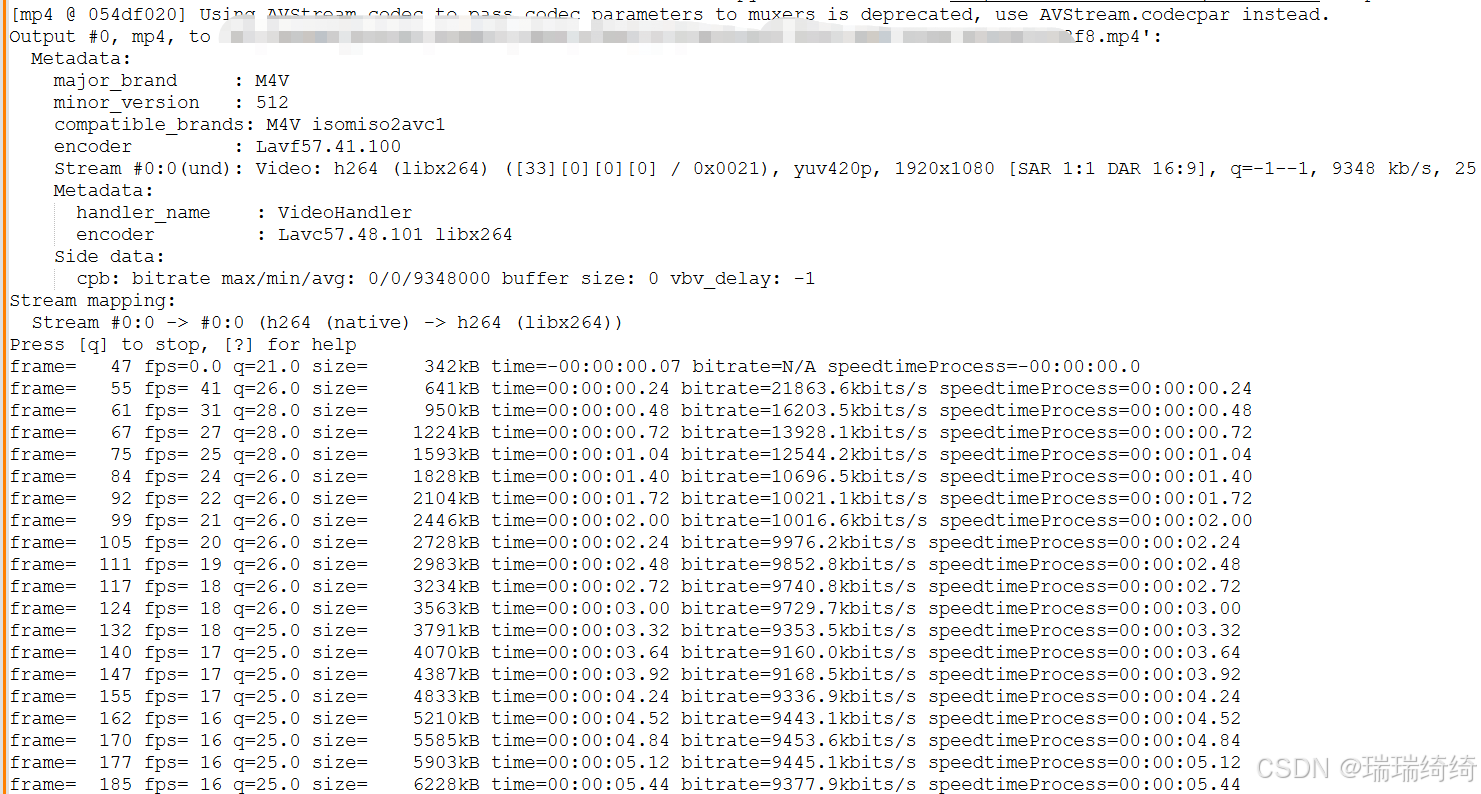
ffmpeg转码进度打印如下






 扫一扫
扫一扫


 2946
2946

 被折叠的 条评论
为什么被折叠?
被折叠的 条评论
为什么被折叠?
 到【灌水乐园】发言





