showDevicesOnMap(devices) {
// 存储当前设备列表,用于后续更新状态
this.currentDevices = devices;
// 清除旧图层和事件监听
this.removeExistingLayers();
// 创建GeoJSON数据源(确保每个特征有唯一ID)
const geojson = {
type: "FeatureCollection",
features: devices.map((device, index) => ({
type: "Feature",
id: device.channelId, // 确保id唯一
geometry: {
type: "Point",
coordinates: [device.longitude, device.latitude],
},
properties: {
...device,
index: index + 1,
// isSelected: this.selectedDeviceIds.has(device.channelId),
},
})),
};
// 添加数据源
this.mapObj.addSource("devices-source", {
type: "geojson",
data: geojson,
generateId: true, // 如果特征本身没有id,则生成一个
});
// 预加载图标
const loadPromises = [
this.loadImageSafe("jk_online", "/images/jk_online.png"),
this.loadImageSafe("jk_unline", "/images/jk_unline.png"),
];
// 加载图标并添加图层
Promise.all(loadPromises)
.then(() => {
// // 添加设备图标层
this.mapObj.addLayer({
id: "devices-layer",
type: "symbol",
source: "devices-source",
interactive: true, // 显式启用交互
layout: {
"icon-image": [
"case",
["==", ["get", "online"], true],
"jk_online",
"jk_unline",
],
"icon-size": [
"interpolate",
["linear"],
["zoom"],
10,
0.5, // 当缩放级别为10时,大小为0.5
22,
1.0, // 当缩放级别为22时,大小为1.0
],
"icon-anchor": "bottom",
"icon-allow-overlap": true, // 防止图标被隐藏
},
});
// 添加序号背景层(圆形)
this.mapObj.addLayer({
id: "label-backgrounds",
type: "circle",
source: "devices-source",
paint: {
"circle-radius": 10,
"circle-color": [
"case",
["==", ["feature-state", "isSelected"], true],
"#FF6666",
"#45CCDA",
],
"circle-stroke-color": "#fff",
"circle-translate": [0, -28], // 向上平移,与图标位置配合
},
});
// 添加序号文本层
this.mapObj.addLayer({
id: "device-labels",
type: "symbol",
source: "devices-source",
layout: {
"text-field": ["get", "index"],
"text-size": 12,
"text-offset": [0, -2.4], // 调整位置到背景圆中心
"text-anchor": "center",
"text-allow-overlap": true,
},
paint: {
"text-color": "#FFFFFF",
"text-halo-color": "rgba(0, 0, 0, 0.5)",
"text-halo-width": 1,
},
});
// // 设置初始特征状态
// devices.forEach((device) => {
// this.mapObj.setFeatureState(
// { source: "devices-source", id: device.channelId },
// { isSelected: this.selectedDeviceIds.has(device.channelId) }
// );
// const state = this.mapObj.getFeatureState({
// source: 'devices-source',
// id: device.channelId
// });
// console.log("Feature state:", state);
// });
// 确保在样式加载后更新状态
// 等待地图空闲(确保样式加载完成)
this.mapObj.once('idle', () => {
this.updateFeatureStates();
});
console.log(this.mapObj.getLayer('label-backgrounds').paint, 'label-backgrounds---000');
// 确认circle-color表达式正确
console.log(this.mapObj.getLayer('label-backgrounds').paint['circle-color'],'label-backgrounds---111');
// 点击事件处理
this.mapObj.off("click"); // 移除旧的监听器,避免重复绑定
this.mapObj.on("click", (e) => {
const features = this.mapObj.queryRenderedFeatures(e.point, {
layers: ["devices-layer"]
});
if (features.length > 0) {
console.log(features, '0000000000');
console.log("Clicked feature ID:", features[0].properties.channelId); // 确保与device.channelId一致
this.toggleDeviceSelection(features[0].properties.channelId);
}
});
})
.catch((error) => {
console.error("图层添加失败:", error);
});
},
// 选中
toggleDeviceSelection(deviceId) {
console.log(deviceId, 'deviceId-11111111111');
// 更新选中状态
const newSelectedId =
this.selectedDeviceId === deviceId ? null : deviceId;
this.selectedDeviceId = newSelectedId;
console.log(newSelectedId, 'newSelectedId-2222222');
// 更新所有特征的状态
// 使用Set实现多选切换
const newSelectedIds = new Set(this.selectedDeviceIds);
if (newSelectedIds.has(deviceId)) {
newSelectedIds.delete(deviceId); // 如果已选中,则取消
} else {
newSelectedIds.add(deviceId); // 否则选中
}
this.selectedDeviceIds = newSelectedIds;
// 更新地图上所有特征的状态
this.updateFeatureStates();
// 立即更新特征状态
this.mapObj.setFeatureState(
{ source: 'devices-source', id: deviceId },
{ isSelected: this.selectedDeviceIds.has(deviceId) }
);
// 通知父组件
this.$emit("device-selected", newSelectedId, deviceId);
},
// 更新所有特征状态
updateFeatureStates() {
console.log('5555555555');
const source = this.mapObj.getSource("devices-source");
if (!source) return;
// 使用设备列表而非遍历特征
this.currentDevices.forEach(device => {
const isSelected = this.selectedDeviceIds.has(device.channelId);
// 调试:检查特征状态
const currentState = this.mapObj.getFeatureState({
source: 'devices-source',
id: device.channelId
});
console.log(`Device ${device.channelId} state:`, currentState);
this.mapObj.setFeatureState(
{ source: "devices-source", id: device.channelId },
{ isSelected }
);
});
},初次渲染ui {_properties: fi, _values: {…}}_properties: fidefaultPossiblyEvaluatedValues: {circle-radius: si, circle-color: si, circle-blur: si, circle-opacity: si, circle-translate: Array(2), …}defaultPropertyValues: {circle-radius: ei, circle-color: ei, circle-blur: ei, circle-opacity: ei, circle-translate: ei, …}defaultTransitionablePropertyValues: {circle-radius: ri, circle-color: ri, circle-blur: ri, circle-opacity: ri, circle-translate: ri, …}defaultTransitioningPropertyValues: {circle-radius: ii, circle-color: ii, circle-blur: ii, circle-opacity: ii, circle-translate: ii, …}overridableProperties: []properties: circle-blur: pi {specification: {…}, overrides: undefined}circle-color: pi {specification: {…}, overrides: undefined}circle-opacity: pi {specification: {…}, overrides: undefined}circle-pitch-alignment: li {specification: {…}}circle-pitch-scale: li {specification: {…}}circle-radius: pi {specification: {…}, overrides: undefined}circle-stroke-color: pi {specification: {…}, overrides: undefined}circle-stroke-opacity: pi {specification: {…}, overrides: undefined}circle-stroke-width: pi {specification: {…}, overrides: undefined}circle-translate: li {specification: {…}}circle-translate-anchor: li {specification: {…}}[[Prototype]]: Object[[Prototype]]: Object_values: {}[[Prototype]]: Objectget: ƒ (t)constructor: ƒ (t)[[Prototype]]: Object 'label-backgrounds---000'
index.vue?./node_modules/babel-loader/lib/index.js!./node_modules/vue-loader/lib/index.js??vue-loader-options:671 undefined 'label-backgrounds---111'
minemap.js:31 5555555555
minemap.js:31 Device 64030213001310050836 state: {}
minemap.js:31 Device 64030213001310356419 state: {}
minemap.js:31 Device 64030213001310396864 state: {}
minemap.js:31 Device 64030213001310419525 state: {}
minemap.js:31 Device 64030213001310513717 state: {}
minemap.js:31 Device 64030213001310606506 state: {}
minemap.js:31 Device 64030213001310690712 state: {}
minemap.js:31 Device 64030213001310694513 state: {}
minemap.js:31 Device 64030213001310993501 state: {}
minemap.js:31 Device 64030214001320000824 state: {},点击其中一个[Sc]0: Sc {type: 'Feature', _vectorTileFeature: cs, properties: {…}, id: 9, layer: {…}, …}length: 1[[Prototype]]: Array(0) '0000000000'
minemap.js:31 Clicked feature ID: 64030214001320000824
minemap.js:31 64030214001320000824 deviceId-11111111111
minemap.js:31 64030214001320000824 newSelectedId-2222222
minemap.js:31 5555555555
minemap.js:31 Device 64030213001310050836 state: {isSelected: false}
minemap.js:31 Device 64030213001310356419 state: {isSelected: false}
minemap.js:31 Device 64030213001310396864 state: {isSelected: false}
minemap.js:31 Device 64030213001310419525 state: {isSelected: false}
minemap.js:31 Device 64030213001310513717 state: {isSelected: false}
minemap.js:31 Device 64030213001310606506 state: {isSelected: false}
minemap.js:31 Device 64030213001310690712 state: {isSelected: false}
minemap.js:31 Device 64030213001310694513 state: {isSelected: false}
minemap.js:31 Device 64030213001310993501 state: {isSelected: false}
minemap.js:31 Device 64030214001320000824 state: {isSelected: false}再次点击[Sc] '0000000000'
minemap.js:31 Clicked feature ID: 64030214001320000824
minemap.js:31 64030214001320000824 deviceId-11111111111
minemap.js:31 null 'newSelectedId-2222222'
minemap.js:31 5555555555
minemap.js:31 Device 64030213001310050836 state: {isSelected: false}
minemap.js:31 Device 64030213001310356419 state: {isSelected: false}
minemap.js:31 Device 64030213001310396864 state: {isSelected: false}
minemap.js:31 Device 64030213001310419525 state: {isSelected: false}
minemap.js:31 Device 64030213001310513717 state: {isSelected: false}
minemap.js:31 Device 64030213001310606506 state: {isSelected: false}
minemap.js:31 Device 64030213001310690712 state: {isSelected: false}
minemap.js:31 Device 64030213001310694513 state: {isSelected: false}
minemap.js:31 Device 64030213001310993501 state: {isSelected: false}
minemap.js:31 Device 64030214001320000824 state: {isSelected: true},但是页面还是没有变化,没有切换背景色





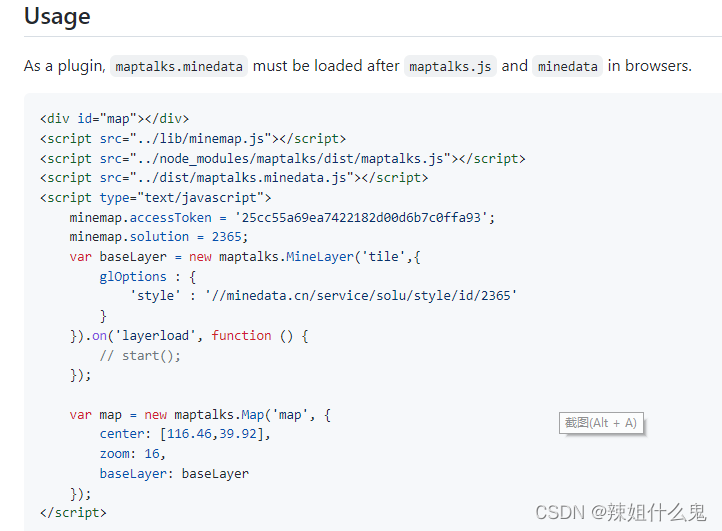
 在基于maptalks的合作项目中,遇到minemap地图资源的集成挑战。经过一天的尝试,成功引入maptalks.minedata插件。关键在于将minemap.js和minemap.css升级到2.1.0版本,遵循官方说明进行操作。
 672
672

 被折叠的 条评论
为什么被折叠?
被折叠的 条评论
为什么被折叠?
 到【灌水乐园】发言








 扫一扫
扫一扫


