


1.INotifyPropertyChanged
是实现视图模型(ViewModel)与视图(View)之间数据绑定和通信的重要组成部分。在数据绑定的应用程序中,当数据源对象的属性值发生变化时,界面上与之绑定的控件需要相应地更新显示。INotifyPropertyChanged 接口提供了一种标准化的方式来实现这种属性更改通知功能,使得当对象的属性值发生改变时,能够自动通知绑定到该属性的 UI 元素进行更新,从而保持数据和 UI 的同步。
2.ICommand
是 .NET 框架中 System.Windows.Input 命名空间下定义的一个接口,它在基于事件驱动和数据绑定的应用程序开发中扮演着至关重要的角色。作用是将命令的定义、执行和状态管理进行抽象和封装,实现视图(View)和视图模型(ViewModel)之间的解耦,使得 UI 元素(如按钮、菜单项等)能够以一种松耦合的方式触发特定的业务逻辑。
3.视图分析
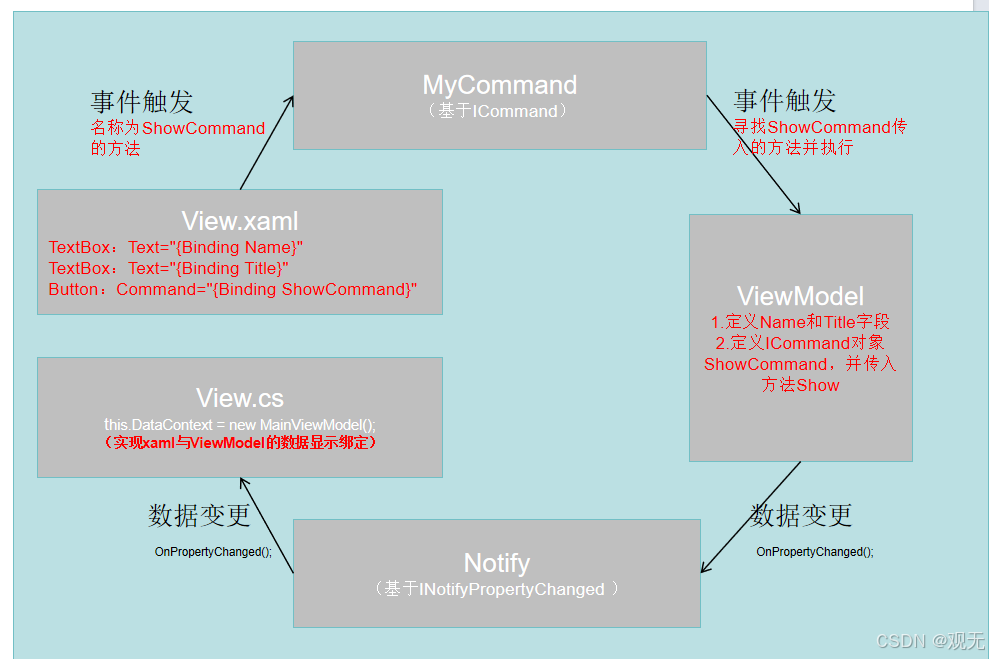
4.代码
Notify代码
using System;
using System.Collections.Generic;
using System.ComponentModel;
using System.Linq;
using System.Runtime.CompilerServices;
using System.Text;
using System.Threading.Tasks;

namespace MVVMTest
{
    public abstract class Notify : INotifyPropertyChanged
    {

        public event PropertyChangedEventHandler PropertyChanged;

        public void OnPropertyChanged([CallerMemberName] string name = null)
        {
            PropertyChanged?.Invoke(this, new PropertyChangedEventArgs(name));
        }

    }
}
MyCommand代码
using System;
using System.Collections.Generic;
using System.Linq;
using System.Text;
using System.Threading.Tasks;
using System.Windows.Input;

namespace MVVMTest
{
    public class MyCommand:ICommand
    {
        private readonly Action action;
        public event EventHandler CanExecuteChanged;


        public MyCommand(Action _action)
        {
            action = _action;
        }


        public bool CanExecute(object parameter)
        {
            return true;
        }

        public void Execute(object parameter)
        {
            action?.Invoke();
            CanExecuteChanged?.Invoke(this, EventArgs.Empty);
        }


    }
}
MainWindow的xaml
<Window x:Class="MVVMTest.MainWindow"
        xmlns="http://schemas.microsoft.com/winfx/2006/xaml/presentation"
        xmlns:x="http://schemas.microsoft.com/winfx/2006/xaml"
        xmlns:d="http://schemas.microsoft.com/expression/blend/2008"
        xmlns:mc="http://schemas.openxmlformats.org/markup-compatibility/2006"
        xmlns:local="clr-namespace:MVVMTest"
        mc:Ignorable="d"
        Title="MainWindow" Height="350" Width="525">
    <Grid>
        <Label x:Name="label1" Content="Name" HorizontalAlignment="Left" Margin="41,39,0,0" VerticalAlignment="Top"/>
        <Label x:Name="label2" Content="Title" HorizontalAlignment="Left" Margin="46,94,0,0" VerticalAlignment="Top"/>

        <TextBox Text="{Binding Name}" Margin="86,30,284,246"/>
        <TextBox Text="{Binding Title}" Margin="86,85,284,191"></TextBox>
        <Button x:Name="button" Content="Button" HorizontalAlignment="Left" Margin="86,156,0,0" VerticalAlignment="Top" Width="75" Command="{Binding ShowCommand}"/>
    </Grid>
</Window>
MainWindow的cs
using System;
using System.Collections.Generic;
using System.Linq;
using System.Text;
using System.Threading.Tasks;
using System.Windows;
using System.Windows.Controls;
using System.Windows.Data;
using System.Windows.Documents;
using System.Windows.Input;
using System.Windows.Media;
using System.Windows.Media.Imaging;
using System.Windows.Navigation;
using System.Windows.Shapes;

namespace WpfApplication22
{
    /// <summary>
    /// MainWindow.xaml 的交互逻辑
    /// </summary>
    public partial class MainWindow : Window
    {
        public MainWindow()
        {
            InitializeComponent();
            this.DataContext = new MainViewModel();
        }


    }
}
MainViewModel代码
using System;
using System.Collections.Generic;
using System.Linq;
using System.Text;
using System.Threading.Tasks;

namespace MVVMTest
{
    public class MainViewModel : Notify
    {

        public MyCommand ShowCommand { set; get; }


        public MainViewModel()
        {
            ShowCommand = new MyCommand(Show);
            Name = "初始值";
            Title = "初始值";
        }


        public string name { set; get; }
        public string Name
        {
            get { return name; }
            set
            {
                name = value;
                OnPropertyChanged();
            }
        }


        public string title { set; get; }
        public string Title
        {
            get { return title; }
            set
            {
                title = value;
                OnPropertyChanged();
            }
        }


        public void Show()
        {
            Name = "点击按钮";
            Title = "我是标题";
        }


    }
}
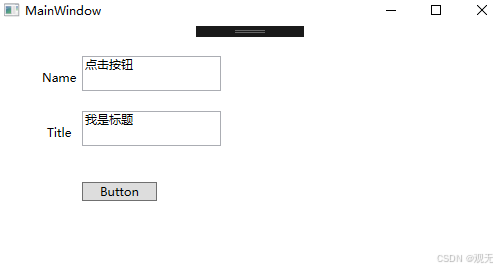
5.界面效果





 扫一扫
扫一扫


 1521
1521

 被折叠的 条评论
为什么被折叠?
被折叠的 条评论
为什么被折叠?
 到【灌水乐园】发言





