


完成以下两个实验,
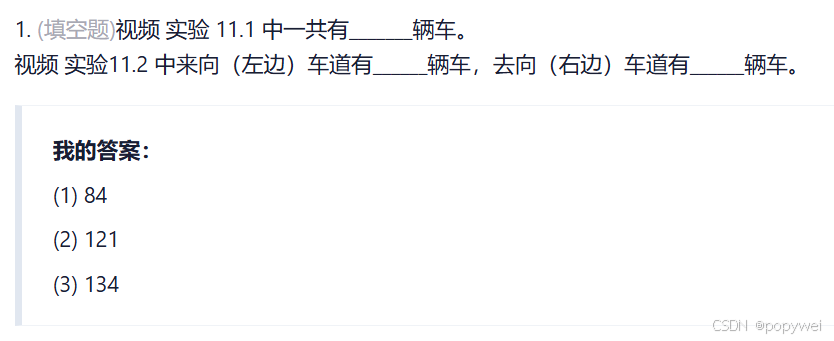
实验1,完成数出“实验11.1.mp4”视频中有多少辆车。不用提交视频,只提交代码和汽车数量。
实验2,和下文样例视频一样效果。处理“实验11.2.mkv”视频,按照离去车道(右)和进入车道(左)分别统计汽车数量。
import cv2
import numpy as np

# 车辆宽高范围
min_w, min_h = 40, 40
max_w, max_h = 150, 150

# 检测线的位置
line_high = 200
offset = 5  # 偏移量
car_count = 0
cars = []  # 存放车辆中心点

def center(x, y, w, h):
    """计算矩形的中心点"""
    cx = int(x + w / 2)
    cy = int(y + h / 2)
    return cx, cy

# 加载视频
cap = cv2.VideoCapture("实验11.1.mp4")
if not cap.isOpened():
    print("Error: Cannot open video.")
    exit()

# 创建背景减除器
bgsubmog = cv2.bgsegm.createBackgroundSubtractorMOG()

# 定义形态学操作的 kernel
kernel = cv2.getStructuringElement(cv2.MORPH_RECT, (5, 5))

while cap.isOpened():
    ret, frame = cap.read()
    if not ret:
        break

    # 转灰度并模糊去噪
    gray = cv2.cvtColor(frame, cv2.COLOR_BGR2GRAY)
    blur = cv2.GaussianBlur(gray, (5, 5), 5)

    # 背景减除
    mask = bgsubmog.apply(blur)
    processed = cv2.morphologyEx(mask, cv2.MORPH_CLOSE, kernel, iterations=2)

    # 轮廓检测
    contours, _ = cv2.findContours(processed, cv2.RETR_TREE, cv2.CHAIN_APPROX_SIMPLE)

    # 绘制检测线
    cv2.line(frame, (0, line_high), (frame.shape[1], line_high), (0, 255, 255), 2)

    # 遍历轮廓
    for contour in contours:
        x, y, w, h = cv2.boundingRect(contour)

        # 判断是否为有效车辆
        if min_w <= w <= max_w and min_h <= h <= max_h:
            # 画出车辆边界框
            cv2.rectangle(frame, (x, y), (x + w, y + h), (0, 0, 255), 2)

            # 获取车辆中心点
            cpoint = center(x, y, w, h)
            cars.append(cpoint)

            # 判断车辆是否经过检测线
            for cx, cy in cars:
                if line_high - offset < cy < line_high + offset:
                    car_count += 1
                    cars.remove((cx, cy))  # 避免重复计数
                    print(f"车辆计数:{car_count}")

    # 显示车辆计数
    cv2.putText(frame, f"Car Count: {car_count}", (50, 50), cv2.FONT_HERSHEY_SIMPLEX, 1, (255, 0, 0), 3)

    # 显示视频帧
    cv2.imshow("Original Video", frame)
    cv2.imshow("Processed Mask", processed)

    # 按下 ESC 键退出
    if cv2.waitKey(1) & 0xFF == 27:
        break

cap.release()
cv2.destroyAllWindows()
import cv2
import numpy as np

min_w, min_h = 30, 30
max_w, max_h = 200, 200

# 检测线的高度
left_line_high = 600
right_line_high = 600
# 线的偏移
offset = 5
# 统计车的数量
left_carno, right_carno = 0, 0
# 存放有效车辆的数组
cars = []

def center(x, y, w,h):
    x1 = int(w/2)
    y1 = int(h/2)
    cx = x + x1
    cy = y + y1
    return cx, cy


cap = cv2.VideoCapture('实验11.2.mkv')
bgsubmog = cv2.bgsegm.createBackgroundSubtractorMOG()

# 形态学kernel
kernel = cv2.getStructuringElement(cv2.MORPH_RECT,(5,5))

while True:
    ret, frame = cap.read()
    if (ret == True):
        # 灰度
        cv2.cvtColor(frame, cv2.COLOR_BGR2GRAY)
        # 去噪(高斯)
        blur = cv2.GaussianBlur(frame, (3, 3), 5)
        # 去背影
        mask = bgsubmog.apply(blur)
        # 腐蚀
        erode = cv2.erode(mask, kernel)
        # 膨胀,还原放大
        dilate = cv2.dilate(erode, kernel, iterations=3)
        # 闭操作,去掉物体内部的小块
        close = cv2.morphologyEx(dilate, cv2.MORPH_CLOSE, kernel)
        close = cv2.morphologyEx(close, cv2.MORPH_CLOSE, kernel)

        cnts, h = cv2.findContours(close, cv2.RETR_TREE, cv2.CHAIN_APPROX_SIMPLE)
        # 画一条左车道检测线
        cv2.line(frame, (0, left_line_high), (400, left_line_high), (255,255,0), 1)
        # 画一条右车道检测线
        cv2.line(frame, (450, right_line_high), (750, right_line_high), (255, 0, 0), 1)
        for (i, c) in enumerate(cnts):
            x, y, w, h = cv2.boundingRect(c)

            # 对车辆的宽高进行判断
            # #以验证是否是有效的车辆
            isValid = (min_w <= w <= max_w) and (min_h <= h <= max_h)
            if (not isValid):
                continue

            # 到这里都是有效的车
            cv2.rectangle(frame, (x, y), (x + w, y + h), (0, 0, 255), 2)
            cpoint = center(x, y, w, h)
            cars.append(cpoint)

            # 检查左线
            for (x, y) in cars:
                if ((y > left_line_high - offset) and (y < left_line_high + offset)) and (x < 400):
                    left_carno += 1
                    cars.remove((x, y))
                    print(left_carno)

            # 检查右线
            for (x, y) in cars:
                if ((y > right_line_high - offset) and (y < right_line_high + offset)) and (x > 450):
                    right_carno += 1
                    cars.remove((x, y))
                    print(right_carno)

        cv2.putText(frame, "left Cars Count:" + str(left_carno), (100,150), cv2.FONT_HERSHEY_SIMPLEX, 1, (255,255,0),3)
        cv2.putText(frame, str(right_carno) + ":right Cars Count", (600, 150), cv2.FONT_HERSHEY_SIMPLEX, 1, (255, 0, 0), 3)
        cv2.imshow('video', frame)
        #cv2.imshow('video', close)

    key = cv2.waitKey(1)
    if (key == 27):
        break

cap. release()
cv2.destroyAllwindows()





 扫一扫
扫一扫


 被折叠的 条评论
为什么被折叠?
被折叠的 条评论
为什么被折叠?
 到【灌水乐园】发言





