


目录
前言
之前在复习this指向时,提到过call()、apply()、bind()都可以用来改变函数的this指向,但在使用方法上有一些不同,所以本文主要简单论述一下三者的使用方法以及如何手写实现这三个方法。
call()的使用方法以及实现
1.call()使用方法
call方法在使用时,会直接执行调用的函数,传入的参数第一个为this指向的对象(若为空则指向window,严格模式下指向undefined),剩余参数(以参数列表的形式传入)都会作为当前调用函数的参数使用。具体使用方式如下:
fn.call(thisArg,args1,args2,args3,...)相当于thisArg.fn(arg1,arg2,arg3,...)
具体例子:
let obj={
            name:"张三"
        }
        function say(age){
            console.log("我的名字是"+this.name+"年龄"+age);
        }
        say.call(obj,13)//this指向obj,13作为参数传入函数say()中

var name="李四"
        let obj={
            name:"张三"
        }
        console.log(window);
        function say(age){
            console.log("我的名字是"+this.name+"年龄"+age);
        }
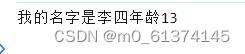
        say.call(null,13)//this指向window,13作为参数传入函数say()中
输出结果

2.call()手写实现
call()方法绑定在Function的prototype上,手写实现根据以下几点:
1.判断调用方法者是否为函数,如果不是则不可
2.接收的参数第一个为this指向的对象,其余为参数
3.第一个参数为空默认指向window,其余参数为空默认传空数组
4.使用时,会直接执行调用的函数将参数传入,调用完直接删除防止污染
5.函数要有返回值
具体实现:
Function.prototype.myCall = function (thisArg, ...args) {
	if (typeof this !== 'function') { //this指的是调用call()的原函数
    	throw new Error(`${this} must be a function`)
    }
    const fn = this;//定义一个属性保存原函数
    thisArg = thisArg == null ? window : Object(thisArg);//判断this新指向的对象是否为空
    args = args || [];//判断剩余参数,若为空默认为空数组
    thisArg.fn = fn;//将原函数保存为新对象的一个属性
    const result = thisArg.fn(...args);//利用解构语法调用这个函数,并将传入的参数传递给它
    delete thisArg.fn;//最后删除 thisArg 对象上的 fn 属性,防止污染
    return result;//返回结果
}
apply()的使用方法以及实现
1.apply()使用方法
apply方法在使用时,会直接执行调用的函数,传入的参数第一个为this指向的对象(若为空则指向window,严格模式下指向undefined),剩余参数(以数组的形式传入)都会作为当前调用函数的参数使用。具体使用方式如下:
fn.apply(thisArg,[args1,args2,args3,...])相当于thisArg.fn([arg1,arg2,arg3,...])
具体例子
 let obj={
            name:"张三"
        }
        function say(age,a){
            console.log("我的名字是"+this.name+"年龄"+age+a);
        }
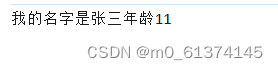
        say.apply(obj,[1,1])//this指向obj,数组[1,1]作为参数传入,被参数age、a接收
输出结果:
2.apply()手写实现
apply()实现方法与call()相同,都是绑定在Function的prototype上,只是传入的参数方式不同,apply()要以数组方式传入,手写实现根据以下几点:
1.判断调用方法者是否为函数,如果不是则不可
2.接收的参数第一个为this指向的对象,其余为参数,并且要判断传入的是否为数组
3.第一个参数为空默认指向window,其余参数为空默认传空数组
4.使用时,会直接执行调用的函数将参数传入,调用完直接删除防止污染
5.函数要有返回值
具体实现:
Function.prototype.myApply = function (thisArg, args) {
	if (typeof this !== 'function') {
    	throw new Error(`${this} must be a function`)
    }
	var fn = this;
    thisArg = thisArg == null ? window : Object(thisArg);
    args = Array.isArray(args) ? args : [];//判断传入的参数是否为数组类型
    thisArg.fn = fn;
    const result = thisArg.fn(...args);
    delete thisArg.fn;
    return result;
}
bind()的使用方法以及实现
1.bind()的使用方法
bind方法在使用时,会生成新的函数,传入的参数第一个作为新函数为this指向的对象(若为空则指向window,严格模式下指向undefined),剩余参数(以参数列表的形式传入,但是这个参数列表可以分多次传入)都会作为新函数的参数使用。具体使用方式如下:
let newFn=fn.bind(thisArg,args1,args2,args3,...)相当于thisArg.fn(arg1,arg2,arg3,...)
newFn(args4)调用新的函数时传入的参数会在输出时与在使用bind时传入的参数一起传给新函数并输出结果
具体例子:
let obj={
            name:"张三"
        }
        function say(a,b,c,d){
            console.log("我的名字是"+this.name+"出生年份"+a+b+c+d);
        }
        let say1=say.bind(obj,2,0,0)//创建新函数,this指向obj
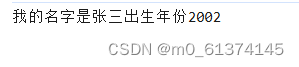
        say1(2)//新函数传入参数2
输出结果:
2.bind()的手写实现
bind()方法绑定在Function的prototype上,手写实现根据以下几点:
1.判断调用方法者是否为函数,如果不是则不可
2.调用bind会返回一个新函数,这个新函数可以被调用,也可以被当作构造函数,使用new操作符,要做区分
3.注意新旧函数参数的合并
4.函数要有返回值
具体实现:
Function.prototype.bind = function (thisArg, ...args) {
	if (typeof this !== 'function') {
    	throw new Error(`${this} must be a function`)
    }
  context = thisArg || window
  let fn = this
  return function newFn (...fnArgs) {//返回闭包,在里面判断原函数是作为构造函数还是普通函数使用
    let res
    // 要考虑新函数是不是会当作构造函数
    if (this instanceof newFn) {
      // 如果是构造函数则调用new 并且合并参数args,fnArgs
      res = new fn(...args, ...fnArgs)
    } else {
      // 当作普通函数调用,通过 call 方法将原函数fn指向thisArg,并合并参数 args 和 fnArgs。
      res = fn.call(thisArg, ...args, ...fnArgs)
    }
    return res
  }
}
参考文档:【【详解】如何手写实现call、apply、bind - CSDN App】http://t.csdnimg.cn/Zvoru





 扫一扫
扫一扫


 3024
3024

 被折叠的 条评论
为什么被折叠?
被折叠的 条评论
为什么被折叠?
 到【灌水乐园】发言





