 SVG动画实践



SVG 变形动画
在做形状转换的时候,转换前形状的控制点和转换后的控制点数最好相同,这样效果能好些
MorphSVGPlugin
GreenSock 中使用MorphSVGPlugin进行动画的绘制
<!DOCTYPE html>
<html lang="en">
<head>
<meta charset="UTF-8">
<title>Title</title>
</head>
<body>
<svg version="1.1" id="图层_1" xmlns="http://www.w3.org/2000/svg" xmlns:xlink="http://www.w3.org/1999/xlink" x="0px"
y="0px" viewBox="0 0 1920 1080" style="enable-background:new 0 0 1920 1080;" xml:space="preserve">
<!-- 五角星-->
<path d="M185,1.12977573 L128.163889,116.292316 L1.07448057,134.759488 L93.0372403,224.401023 L71.3277776,350.976903 L185,291.215879 L298.672222,350.976903 L276.96276,224.401023 L368.925519,134.759488 L241.836111,116.292316 L185,1.12977573 Z" id="star" fill="#4af"></path>
<!--十边形-->
<path d="M160,0 L258.885438,32 L320,110.557281 L320,210.424346 L258.885438,289.442719 C217.122754,309.81424 184.160941,320 160,320 C135.839059,320 102.877246,309.81424 61.1145618,289.442719 L0,210.424346 L0,110.557281 L61.1145618,32 L160,0 Z" id="decagon" fill="transparent"></path>
</svg>
</body>
<script src="https://cdnjs.cloudflare.com/ajax/libs/gsap/3.11.1/gsap.min.js"></script>
<script src="https://s3-us-west-2.amazonaws.com/s.cdpn.io/16327/MorphSVGPlugin3.min.js"></script>
<script>
let tl=gsap.timeline({
repeat: -1,
yoyo: true,
repeatDelay: 0.3,
defaults:{
duration: 3
}
})
tl.to("#star",{morphSVG: "#decagon"})
.timeScale(3)
</script>
</html>

多个变换
多个图形之间的变换只需通过 GSAP 中到 timeline 实例追加变换规则就可以实现:
<!DOCTYPE html>
<html lang="en">
<head>
<meta charset="UTF-8">
<title>Title</title>
</head>
<body>
<svg version="1.1" id="图层_1" xmlns="http://www.w3.org/2000/svg" xmlns:xlink="http://www.w3.org/1999/xlink" x="0px"
y="0px" viewBox="0 0 1920 1080" style="enable-background:new 0 0 1920 1080;" xml:space="preserve">
<!-- 五角星-->
<path d="M185,1.12977573 L128.163889,116.292316 L1.07448057,134.759488 L93.0372403,224.401023 L71.3277776,350.976903 L185,291.215879 L298.672222,350.976903 L276.96276,224.401023 L368.925519,134.759488 L241.836111,116.292316 L185,1.12977573 Z" id="star" fill="#4af"></path>
<!--十边形-->
<path d="M160,0 L258.885438,32 L320,110.557281 L320,210.424346 L258.885438,289.442719 C217.122754,309.81424 184.160941,320 160,320 C135.839059,320 102.877246,309.81424 61.1145618,289.442719 L0,210.424346 L0,110.557281 L61.1145618,32 L160,0 Z" id="decagon" fill="transparent"></path>
<!-- 矩形-->
<rect id="rect" width="319" x="0.5" y="0.5" fill="none" height="319"></rect>
</svg>
</body>
<script src="https://cdnjs.cloudflare.com/ajax/libs/gsap/3.11.1/gsap.min.js"></script>
<script src="https://s3-us-west-2.amazonaws.com/s.cdpn.io/16327/MorphSVGPlugin3.min.js"></script>
<script>
var tl=gsap.timeline({
repeat: -1,
repeatDelay: 0.3,
yoyo: true,
defaults:{
duration: 0.6
}
})
tl.to("#star",{morphSVG: "#decagon"},"+=1").to("#star",{morphSVG:"#rect"},"+=1")
</script>
</html>

蒙版动画
结合 SVG 中的 clipPath 可以轻松实现一个带有蒙版效果的动画
DOCTYPE html>
<html lang="en">
<head>
<meta charset="UTF-8">
<title>Title</title>
<style>
#stars {
visibility: hidden;
}
</style>
</head>
<body>
<svg version="1.1" id="图层_1" xmlns="http://www.w3.org/2000/svg" xmlns:xlink="http://www.w3.org/1999/xlink" x="0px"
y="0px" viewBox="0 0 1920 1080" style="enable-background:new 0 0 1920 1080;" xml:space="preserve">
<!--十边形-->
<path d="M160,0 L258.885438,32 L320,110.557281 L320,210.424346 L258.885438,289.442719 C217.122754,309.81424 184.160941,320 160,320 C135.839059,320 102.877246,309.81424 61.1145618,289.442719 L0,210.424346 L0,110.557281 L61.1145618,32 L160,0 Z" id="decagon" fill="transparent"></path>
<!-- 矩形-->
<rect id="rect" width="319" x="0.5" y="0.5" fill="none" height="319"></rect>
<defs>
<clipPath id="mask">
<!-- 五角星-->
<path d="M185,1.12977573 L128.163889,116.292316 L1.07448057,134.759488 L93.0372403,224.401023 L71.3277776,350.976903 L185,291.215879 L298.672222,350.976903 L276.96276,224.401023 L368.925519,134.759488 L241.836111,116.292316 L185,1.12977573 Z" id="star" fill="none"></path>
</clipPath>
</defs>
<image width="500" height="500" xlink:href="https://picsum.photos/500" clip-path="url(#mask)">
</image>
</svg>
</body>
<script src="https://cdnjs.cloudflare.com/ajax/libs/gsap/3.11.1/gsap.min.js"></script>
<script src="https://s3-us-west-2.amazonaws.com/s.cdpn.io/16327/MorphSVGPlugin3.min.js"></script>
<script>
MorphSVGPlugin.convertToPath("circle");
let tl = gsap.timeline({
repeat: -1,
yoyo: true,
repeatDelay: 0.3,
defaults: {
duration: 3
}
})
tl
.to("#star", { morphSVG: "#decagon" }).to("#star",{morphSVG:"#rect"})
.timeScale(3);
</script>
</html>

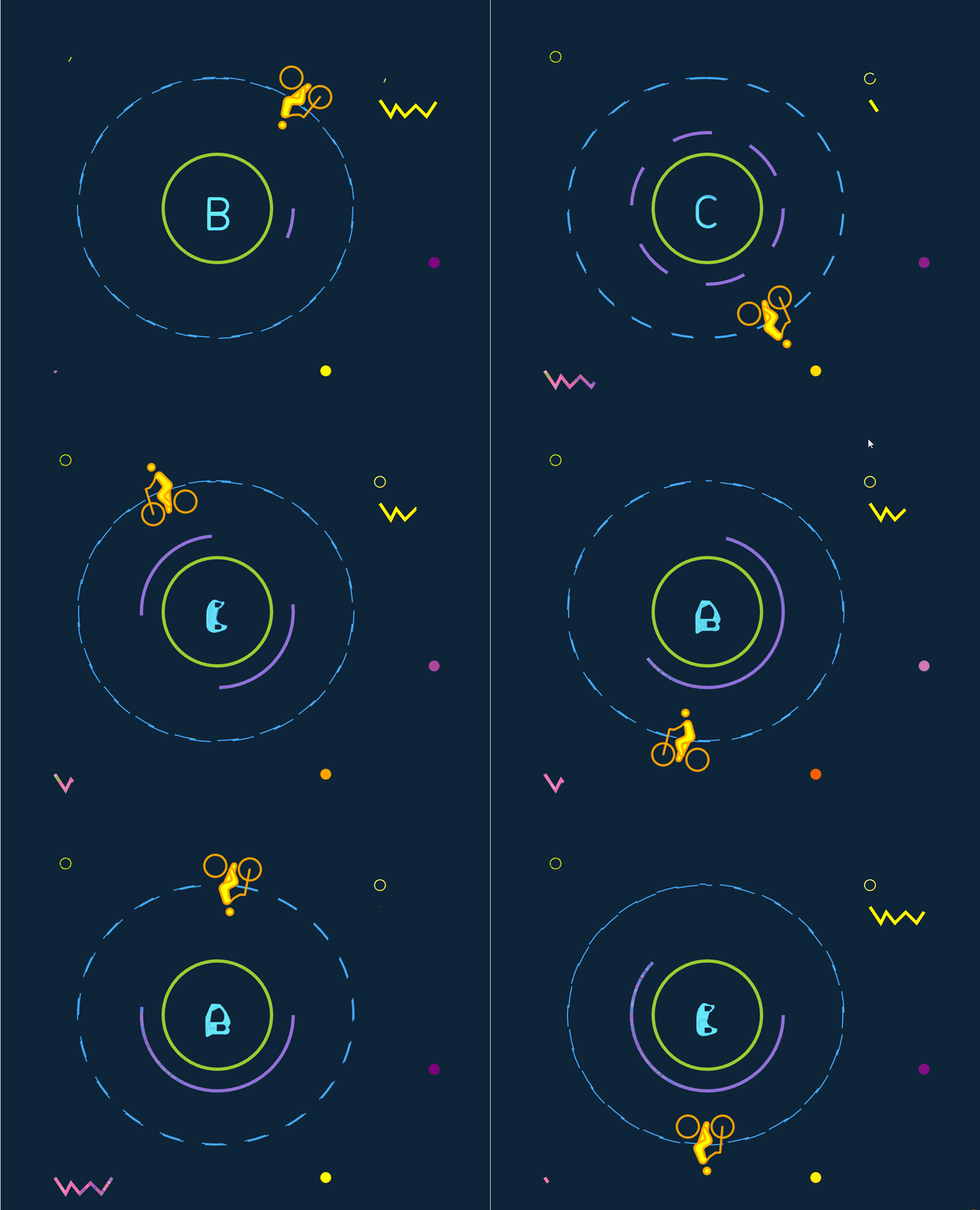
阶段性学习成果
路径动画、描边动画和变形动画的整个demo演示
<!DOCTYPE html>
<html lang="en">
<head>
    <meta charset="UTF-8">
    <title>Title</title>
    <style>
        #road{
            stroke-dasharray: 600;
            stroke-dashoffset: 600;
            animation: offset 20s linear infinite;
        }
        @keyframes offset {
            to{
                stroke-dashoffset: 0;

            }
        }
    </style>
</head>
<body>
<svg width="960" height="500" viewBox="0 0 960 500" style="background-color: #0E2439">
     <g id="first" >
         <!--A-->
         <path id="A"  stroke="#63ebfa" fill="#63ebfa" d="M200.9189,190.6057c-.1572-.3677-.519-.606-.9189-.606s-.7617,.2383-.9189,.606l-12,28c-.2178,.5078,.0176,1.0957,.5249,1.313,.5083,.2188,1.0962-.0176,1.313-.5249l2.6202-6.1138h16.9216l2.6202,6.1138c.1621,.3789,.5312,.6064,.9194,.6064,.1313,0,.2651-.0264,.3936-.0815,.5073-.2173,.7427-.8052,.5249-1.313l-12-28Zm-8.5226,20.6743l7.6037-17.7417,7.6037,17.7417h-15.2074Z"/>
<!--         <path id="A" fill="transparent" stroke="#00a4ff" d="m38.7,6.3C38.3,5.5,37.6,5,36.8,5s-1.6,0.5-1.9,1.3L10.2,65.7c-0.4,1.1,0,2.3,1.1,2.8c1,0.5,2.3,0,2.7-1.1l5.4-13h34.9-->
<!--               l5.4,13c0.3,0.8,1.1,1.3,1.9,1.3c0.3,0,0.5-0.1,0.8-0.2c1-0.5,1.5-1.7,1.1-2.8C63.4,65.7,38.7,6.3,38.7,6.3z M21.1,50.2l15.7-37.6-->
<!--               l15.7,37.6C52.4,50.2,21.1,50.2,21.1,50.2z"/>-->

         <!--B-->
         <path id="B" stroke="#00a4ff"  style="display: none"
               d="M210.8259,198.022c0-4.3979-3.5781-7.9761-7.9761-7.9761h-10.6758c-.5522,0-1,.4478-1,1v27.9082c0,.5522,.4478,1,1,1h10.6758c4.3979,0,7.9761-3.5781,7.9761-7.9761,0-2.9995-1.666-5.6177-4.1216-6.978,2.4556-1.3604,4.1216-3.9785,4.1216-6.978Zm-2,13.9561c0,3.2954-2.6807,5.9761-5.9761,5.9761h-9.6758v-11.9482h9.6758c3.2954,0,5.9761,2.6792,5.9761,5.9722Zm-5.9761-7.9839c-.0206,0-.0378,.0105-.058,.0117h-9.6177v-11.96h9.6758c3.2954,0,5.9761,2.6807,5.9761,5.9761,0,3.293-2.6807,5.9722-5.9761,5.9722Z" fill="none"/>
         <!--style="display: none"-->

         <!--C-->
         <path id="C" stroke="#00a4ff"  fill="none" style="display: none"   d="M200.6819,190c2.2046,0,4.3257,.8042,5.9727,2.2642,.4131,.3672,1.0464,.3281,1.4116-.0845,.3667-.4136,.3286-1.0454-.0845-1.4121-2.0137-1.7847-4.606-2.7676-7.2998-2.7676-6.0654,0-11,4.9346-11,11v8c0,6.0654,4.9346,11,11,11,2.6943,0,5.2866-.9829,7.2998-2.7676,.4131-.3662,.4512-.998,.0845-1.4116-.3662-.4126-.999-.4521-1.4116-.0845-1.6465,1.4595-3.7676,2.2637-5.9727,2.2637-4.9624,0-9-4.0376-9-9v-8c0-4.9624,4.0376-9,9-9Z"/>


         <circle id="circle" cx="200" cy="200" r="70" style="fill: none;stroke-width: 3;stroke: mediumpurple;"></circle>
         <circle id="circle1" cx="200" cy="200" r="50" style="fill: none;stroke-width: 3;stroke: yellowgreen;"></circle>

<!--         <circle  cx="200" cy="200" r="120" style="fill: none;stroke-dasharray: 20;stroke: #44aaff;"></circle>-->

         <path id="road" style="fill: none;stroke-dasharray: 20;stroke: #44aaff;"   d="M198.5,80c33.8,0,65.574,12.437,89.469,35.02C311.849,137.589,325,167.591,325,199.5s-13.151,61.911-37.031,84.48
		C264.074,306.563,232.3,319,198.5,319s-65.574-12.437-89.469-35.02C85.151,261.411,72,231.409,72,199.5s13.151-61.911,37.031-84.48
		C132.926,92.437,164.7,80,198.5,80 M198.5,79C128.084,79,71,132.95,71,199.5S128.084,320,198.5,320S326,266.05,326,199.5
		S268.916,79,198.5,79L198.5,79z"/>

<!--         <path id="biking-road" style="fill:none;stroke:#000000;stroke-miterlimit:10;stroke-dashoffset: 10;stroke-dasharray: 10;stroke:#4af;" d="M71.5,154.5c19.944,33.545,51.705,52.349,79,47-->
<!--	c16.142-3.163,27-14,27-14c22.186-22.141,13.674-57.487,21-59c10.209-2.108,22.412,67.432,43,69c30.372,2.313,53.208-145.267,82-144-->
<!--	c30.598,1.347,29.726,169.119,70,176c21.385,3.654,55.033-37.943,110-183"/>-->
     </g>
    <g id="zhuangShi">
        <path id="xiu" style="fill:none;stroke: hotpink;stroke-width: 3;" d="m50,350 10,15 5,-10 8,10 10,-10 10,10 10,-15"></path>
        <path id="xiu1" style="fill:none;stroke: yellow;stroke-width: 3;" d="m350,100 10,15 5,-10 8,10 10,-10 10,10 10,-15"></path>
        <circle id="circle" cx="60" cy="60" style="fill: none;stroke: lawngreen;" r="5"></circle>
        <circle id="circle" cx="350" cy="80" style="fill: none;stroke: rgb(255,250,145);" r="5"></circle>
        <circle id="circle" cx="60" cy="60" style="fill: none;stroke: lawngreen;" r="5"></circle>
        <circle id="shi" cx="300" cy="350" style="fill: rgb(253,82,82);" r="5"></circle>
        <circle id="li" cx="400" cy="250" style="fill: pink;" r="5"></circle>
    </g>


</svg>
<svg id="person-biking" x="0" y="0" viewBox="0 0 72 72" version="1.1" width="72" height="72" xmlns="http://www.w3.org/2000/svg">
    <g>
        <g id="color"/>
        <g id="hair"/>
        <g id="skin">
            <circle cx="34.3857" cy="11.0625" r="2.9687" fill="yellow" stroke="none"/>
            <polyline fill="yellow" stroke="none" points="34.3857,20.9248 36.417,18 40.25,18.084 46.457,32.2344 44.417,36 41.8896,38.5137 38.7705,49.668 35.3643,56.418 32.96,54.3809 33.8789,47.3027 30.1084,40.3262 30.2051,37 38.25,32 35.3643,24.5"/>
        </g>
        <g id="skin-shadow"/>
        <g id="line">
            <circle cx="34.3857" cy="11.0625" r="2.9687" fill="none" stroke="orange" stroke-miterlimit="10" stroke-width="2"/>
            <path fill="none" stroke="orange" stroke-linecap="round" stroke-linejoin="round" stroke-miterlimit="10" stroke-width="2" d="M26.333,28.083l4.2705-2.9473c0.9053-0.6245,2.1602-1.875,2.7871-2.7783l1.8858-2.7148c0.6269-0.9033,2.0029-1.6236,3.0576-1.6006 c1.0537,0.0229,2.2773,0.8662,2.7197,1.8735l4.5996,10.4868c0.4424,1.0079,0.375,2.6231-0.1494,3.5909l-0.1338,0.248 c-0.5244,0.9678-1.7803,2.1143-2.79,2.5498l-5.4922,2.3633c-1.0098,0.4355-1.4922,1.6221-1.0713,2.6387l2.6348,6.3593 c0.4209,1.0166,0.0908,2.2979-0.7344,2.8477c-0.8252,0.5498-1.9277,0.208-2.4512-0.7598l-4.4062-8.1543 c-0.5235-0.9677-0.9297-2.5078-0.9033-3.4228c0.0273-0.9151,0.8134-2.1377,1.747-2.7188l4.6485-2.8886 c0.9336-0.5811,1.4795-1.9287,1.2128-2.9961L36.25,24"/>
            <circle cx="20.084" cy="52" r="10.166" fill="none" stroke="orange" stroke-miterlimit="10" stroke-width="2"/>
            <circle cx="52.084" cy="52" r="10.166" fill="none" stroke="orange" stroke-miterlimit="10" stroke-width="2"/>
            <polyline fill="none" stroke="orange" stroke-linecap="round" stroke-linejoin="round" stroke-miterlimit="10" stroke-width="2" points="20.25,52 22.25,28 26,28"/>
            <path fill="none" stroke="orange" stroke-miterlimit="10" stroke-width="2" d="M37.9785,50.959l-0.9844,3.1328 C36.6641,55.1416,35.5742,56,34.5723,56c-1.002,0-1.7071-0.8926-1.5655-1.9834l0.8692-6.7178"/>
            <line x1="42.4072" x2="38.7705" y1="36.8652" y2="48.4395" fill="none" stroke="orange" stroke-miterlimit="10" stroke-width="2"/>
        </g>
    </g>
</svg>


</body>
<script src="https://cdnjs.cloudflare.com/ajax/libs/gsap/3.11.1/gsap.min.js"></script>
<script src="https://s3-us-west-2.amazonaws.com/s.cdpn.io/16327/DrawSVGPlugin3.min.js"></script>
<script src="https://s3-us-west-2.amazonaws.com/s.cdpn.io/16327/MorphSVGPlugin3.min.js"></script>
<script src="https://cdnjs.cloudflare.com/ajax/libs/gsap/3.2.6/MotionPathPlugin.min.js"></script>
<script>

     let tl=gsap.timeline({repeat: -1})

     let bian=gsap.timeline({repeat: -1})
     let bian1=gsap.timeline({repeat: -1})
     let yuan=gsap.timeline({repeat: -1})
     let dian=gsap.timeline({repeat: -1})


     let zimu = gsap.timeline({
         repeat: -1,
         yoyo: true,
         repeatDelay: 1,
         defaults: {
             duration: 5
         }
     })
    tl.fromTo(
        "#circle",
        {drawSVG :"0%"},
        {duration:2,drawSVG: "100%",stagger:0.1}
    ).fromTo(
        "#circle",
        {drawSVG: "100%"},
        {duration: 2,drawSVG:"0%",stagger: 0.1}
    ).fromTo(
        "#circle",
        {strokeDashoffset :"0%",strokeDasharray:"0%"},
        {duration:15,strokeDashoffset: "100%",stagger:0.1,strokeDasharray:"50%"}
    )

     bian.fromTo("#xiu",
         {drawSVG: "0%"},
         {duration: 2,drawSVG:"100%",stagger: 0.1})
         .fromTo("#xiu",{drawSVG: "100%"},
         {duration: 2,drawSVG:"0%",stagger: 0.1})

     bian1.fromTo("#xiu1",
         {drawSVG: "100%"},
         {duration: 2,drawSVG:"0%",stagger: 0.1})
         .fromTo("#xiu1",
             {drawSVG: "0%"},
             {duration: 2,drawSVG:"100%",stagger: 0.1})


     yuan.fromTo("#shi",
         {fill: "red"},
         {duration: 2,fill:"yellow",stagger: 0.1})

     dian.fromTo("#li",
         {fill: "pink"},
         {duration: 2,fill:"purple",stagger: 0.1})


    zimu.to("#A", { morphSVG: "#B" }).to("#A",{morphSVG: "#C"})
    .timeScale(3);


     gsap.registerPlugin(MotionPathPlugin);
     gsap.to("#person-biking",{
         duration: 6,
         repeat: -1,
         ease: Linear.easeNone,
         motionPath:{
             path: "#road",
             align: "#road",
             autoRotate: true,
             alignOrigin: [0.5, 0.5]
         }
     })
</script>
</html>





 扫一扫
扫一扫


 1万+
1万+

 被折叠的 条评论
为什么被折叠?
被折叠的 条评论
为什么被折叠?
 到【灌水乐园】发言





