



 本文深入解析Maven构建过程,涵盖POM、Lifecycle、插件、依赖管理等核心概念,阐述Maven如何通过约定优于配置的原则简化项目构建。
一、背景介绍
maven是Java编程语言构建的事实标准,大部分项目还在使用maven来进行构建,因此了解maven内部运行的原理对定位和分析问题还是很有裨益的。
二、maven关键概念
maven的一些基本概念,这些概念十分重要。基本概念主要有:POM,Lifecycle。这两个概念又会包含一些小的概念,下文会逐步讲解。
POM:这里的POM不是maven中构建过程使用的配置文件pom.xml,但他们之间还是有联系的。POM的全称是Project Object Model,用通俗点的话说就是对要构建的项目进行建模,将要构建的项目看成是一个对象(Object)。既然是一个对象,那么PO有哪些属性呢?在maven中一个项目都是用一个唯一的坐标(coordinate)来表示,坐标由groupId, artifactId, version, classifier, type这五部分组成。这样来说PO应该也要具备坐标属性。另外一方面,一个项目肯定不是孤立存在的,可能依赖于其他的一些项目,那么也就是说PO应该具备dependencies这个属性,用来表示其所依赖的外部项目。
构建过程对应的是PO对象的build属性,那么你应该马上想到,在pom.xml中就是<build>元素中的内容。这里就有引入maven中第二个核心概念:Lifecycle。Lifecycle直译过来就是生命周期。我们平常会接触到哪些周期呢?一年中春夏秋冬就是一个周期。一个周期中可能分为多个阶段,比如这里的春夏秋冬。在maven中一个构建过程就对应一个Lifecycle,这个Lifecycle也分为多个阶段,每个阶段叫做phase。你可能会问,那这个Lifecycle中包含多少个phase呢?一个标准的构建Lifecycle包含了如下的phase:
validate: 用于验证项目的有效性和其项目所需要的内容是否具备
initialize:初始化操作,比如创建一些构建所需要的目录等。
generate-sources:用于生成一些源代码,这些源代码在compile phase中需要使用到
process-sources:对源代码进行一些操作,例如过滤一些源代码
generate-resources:生成资源文件(这些文件将被包含在最后的输入文件中)
process-resources:对资源文件进行处理
compile:对源代码进行编译
process-classes:对编译生成的文件进行处理
generate-test-sources:生成测试用的源代码
process-test-sources:对生成的测试源代码进行处理
generate-test-resources:生成测试用的资源文件
process-test-resources:对测试用的资源文件进行处理
test-compile:对测试用的源代码进行编译
process-test-classes:对测试源代码编译后的文件进行处理
test:进行单元测试
prepare-package:打包前置操作
package:打包
pre-integration-test:集成测试前置操作
integration-test:集成测试
post-integration-test:集成测试后置操作
install:将打包产物安装到本地maven仓库
deploy:将打包产物安装到远程仓库
在maven中,你执行任何一个phase时,maven会将其之前的phase都执行。例如 mvn install,那么maven会将deploy之外的所有phase按照他们出现的顺序一次执行。
Lifecycle还牵涉到另外一个非常重要的概念:goal。注意上面Lifecycle的定义,也就是说maven为程序的构建定义了一套规范流程:第一步需要validate,第二步需要initialize... ... compile,test,package,... ... install,deploy,但是并没有定义每一个phase具体应该如何操作。这里的phase的作用有点类似于Java语言中的接口,只协商了一个契约,但并没有定义具体的动作。比如说compile这个phase定义了在构建流程中需要经过编译这个阶段,但没有定义应该怎么编译(编译的输入是什么?用什么编译javac/gcc?)。这里具体的动作就是由goal来定义,一个goal在maven中就是一个Mojo(Maven old java object)。Mojo抽象类中定义了一个execute()方法,一个goal的具体动作就是在execute()方法中实现。实现的Mojo类应该放在哪里呢?答案是maven plugin里,所谓的plugin其实也就是一个maven项目,只不过这个项目会引用maven的一些API,plugin项目也具备maven坐标。
在执行具体的构建时,我们需要为lifecycle的每个phase都绑定一个goal,这样才能够在每个步骤执行一些具体的动作。比如在lifecycle中有个compile phase规定了构建的流程需要经过编译这个步骤,而maven-compile-plugin这个plugin有个compile goal就是用javac来将源文件编译为class文件的,我们需要做的就是将compile这个phase和maven-compile-plugin中的compile这个goal进行绑定,这样就可以实现Java源代码的编译了。有点绕,多看几遍。那么有人就会问,在哪里绑定呢?答案是在pom.xml<build>元素中配置即可。例如:
<build>
<plugins>
  <plugin>
    <artifactId>maven-myquery-plugin</artifactId>
    <version>1.0</version>
    <executions>
      <execution>
        <id>execution1</id>
        <phase>test</phase>
        <configuration>
          <url>http://www.foo.com/query</url>
          <timeout>10</timeout>
          <options>
            <option>one</option>
            <option>two</option>
            <option>three</option>
          </options>
        </configuration>
        <goals>
          <goal>query</goal>
        </goals>
      </execution>
    </executions>
  </plugin>
</plugins>
</build>
就将maven-myquery-plugin中的query这个goal绑定到了test这个phase,后续在maven执行到test phase时就会执行query goal。还有有人可能会问,我都没有指定Java源文件的位置,编译啥?这就引出了maven的design principle。在maven中,有一个非常著名的principle就是convention over configuration(约定优于配置)。这一点和ant有非常大的区别,例如使用ant来进行编译时,我们需要指定源文件的位置,输出文件的位置,javac的位置,classpath... ...在maven中这些都是不需要,若没有手动配置,maven默认从<项目根目录>/src/main/java这个目录去查找Java源文件,编译后的class文件会保存在<项目根目录>/target/classes目录。在maven中,所有的PO都有一个根对象,就是Super POM。Super POM中定义了所有的默认的配置项。Super POM对应的pom.xml文件可以在maven安装目录下lib/maven-model-builder-3.0.3.jar:org/apache/maven/model/pom-4.0.0.xml中找到。
三、maven的主体模块
- 坐标与依赖、
- 仓库、
- 生命周期与插件、
- 模块聚合、
- 模块继承
1、坐标与依赖
Maven 坐标为Java构件引入了秩序, 任何一个构件都必须明确定义自己的坐标, 坐标元素包括groupId、artifactId、version、packaging、classfier:
<groupId>org.apache.commons</groupId>
<artifactId>commons-lang3</artifactId>
<version>3.4</version>
<packaging>jar</packaging>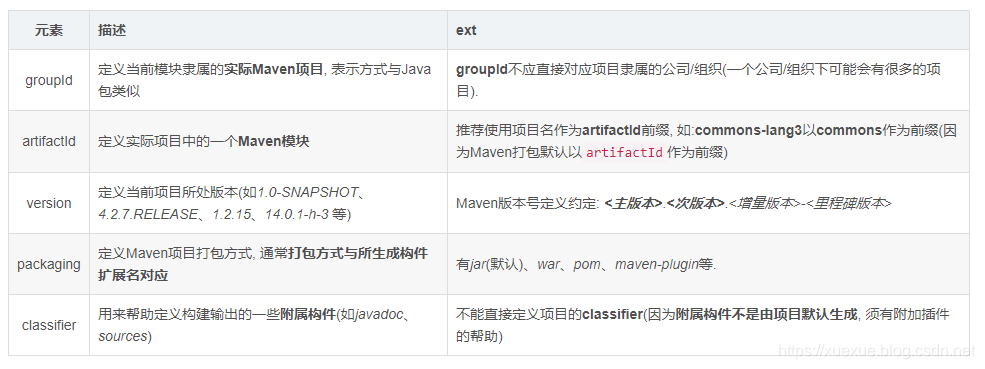
依赖
Maven最著名的(也是几乎每个人最先接触到的)就是Maven的依赖管理, 它使得我们不必再到开源项目的官网一个个下载开源组件, 然后再一个个放入classpath. 一个依赖声明可以包含如下元素:
<dependency>
    <groupId>org.springframework</groupId>
    <artifactId>spring-web</artifactId>
    <version>4.2.7.RELEASE</version>

    <type>jar</type>
    <scope>compile</scope>
    <optional>false</optional>
    <exclusions>
        <exclusion>
            <groupId>log4j</groupId>
            <artifactId>log4j</artifactId>
        </exclusion>
    </exclusions>
</dependency>
依赖传递
Maven依赖传递机制会自动加载我们引入的依赖包的依赖, 而不必去手动指定(好拗口(⊙﹏⊙)b : This allows you to avoid needing to discover and specify the libraries that your own dependencies require, and including them automatically).
如: 我们的项目依赖了spring-core, 而spring-core又依赖了commons-logging:
有了依赖传递机制, 在项目中添加了spring-core依赖时就不用再去考虑它依赖了什么, 也不用担心引入多余的依赖. Maven会解析各个直接依赖的POM, 将必要的间接依赖以传递性依赖的形式引入到当前目录中(inherits from its parents, or from its dependencies, and so on).
(依赖调节原则: 1. 路径最近者优先; 2. 第一声明者优先.)
更多传递依赖信息可参考: Dependency Mechanism-Transitive Dependencies.
声明一个或者多个项目依赖, 可以包含的元素有: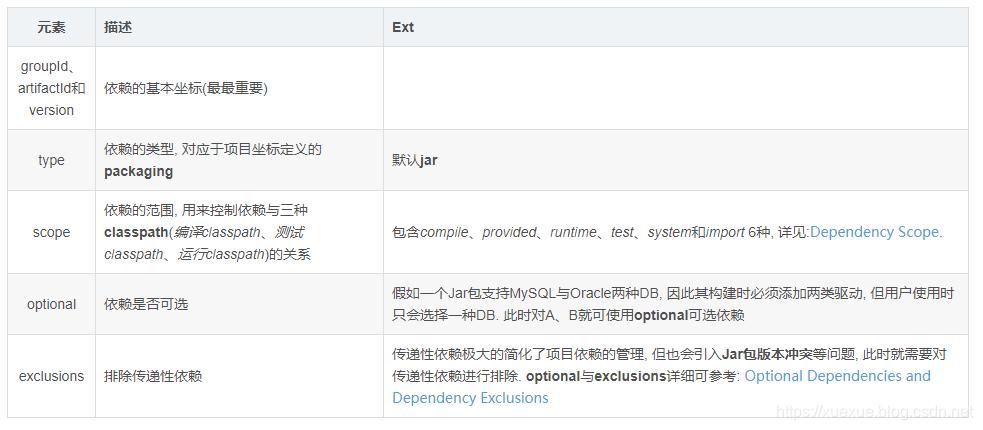
- 依赖管理
Maven提供了dependency插件可以对Maven项目依赖查看以及优化, 如$ mvn dependency:tree可以查看当前项目的依赖树, 详见$ mvn dependency:help.
私服
私服是一种特殊的远程仓库, 它设在局域网内, 通过代理广域网上的远程仓库, 供局域网内的Maven用户使用.
当需要下载构件时, Maven客户端先向私服请求, 如果私服不存在该构件, 则从外部的远程仓库下载, 并缓存在私服上, 再为客户提供下载服务. 此外, 一些无法从外部仓库下载到的构建也能从本地上传到私服供大家使用(如公司内部二方包、Oracle的JDBC启动等). 为了节省带宽和时间, 一般在公司内部都会架设一台Maven私服, 但将公司内部项目部署到私服还需要对POM做如下配置:
<project >
    ...
    <distributionManagement>
        <repository>
            <id>releases</id>
            <url>http://mvn.server.com/nexus/content/repositories/releases/</url>
        </repository>
        <snapshotRepository>
            <id>snapshots</id>
            <url>http://mvn.server.com/nexus/content/repositories/snapshots/</url>
        </snapshotRepository>
    </distributionManagement>

</project>
repository表示发布版本构件的仓库, snapshotRepository代表快照版本的仓库.
id为该远程仓库唯一标识, url表示该仓库地址.
配置正确后, 执行$ mvn clean deploy则可以将项目构建输出的构件部署到对应配置的远程仓库.
注: 往远程仓库部署构件时, 往往需要认证: 需要在settings.xml中创建servers元素, 其id与仓库的id匹配, 详见: Password Encryption.
仓库搜索
推荐几个可用的Maven仓库搜索服务:
- MVNrepository: http://mvnrepository.com/
- Sonatype Nexus: https://repository.sonatype.org/
生命周期
Maven 拥有三套相互独立的生命周期: clean、default 和 site, 而每个生命周期包含一些phase阶段, 阶段是有顺序的, 并且后面的阶段依赖于前面的阶段. 而三套生命周期相互之间却并没有前后依赖关系, 即调用site周期内的某个phase阶段并不会对clean产生任何影响.
clean
clean生命周期的目的是清理项目:
执行如$ mvn clean;
default
default生命周期定义了真正构建时所需要执行的所有步骤:
执行如$ mvn clean install;
site
site生命周期的目的是建立和发布项目站点: Maven能够基于POM所包含的信息,自动生成一个友好的站点,方便团队交流和发布项目信息
执行命令如$ mvn clean deploy site-deploy;
更多 Maven 生命周期介绍可以参考: Introduction to the Build Lifecycle、Lifecycles Reference.
插件
生命周期的阶段phase与插件的目标goal相互绑定, 用以完成实际的构建任务. 而对于插件本身, 为了能够复用代码,它往往能够完成多个任务, 这些功能聚集在一个插件里,每个功能就是一个目标.
如:$ mvn compiler:compile: 冒号前是插件前缀, 后面是该插件目标(即: maven-compiler-plugin的compile目标).
而该目标绑定了default生命周期的compile阶段:
因此, 他们的绑定能够实现项目编译的目的.
内置绑定
为了能让用户几乎不用任何配置就能使用Maven构建项目, Maven 默认为一些核心的生命周期绑定了插件目标, 当用户通过命令调用生命周期阶段时, 对应的插件目标就会执行相应的逻辑.
clean生命周期阶段绑定
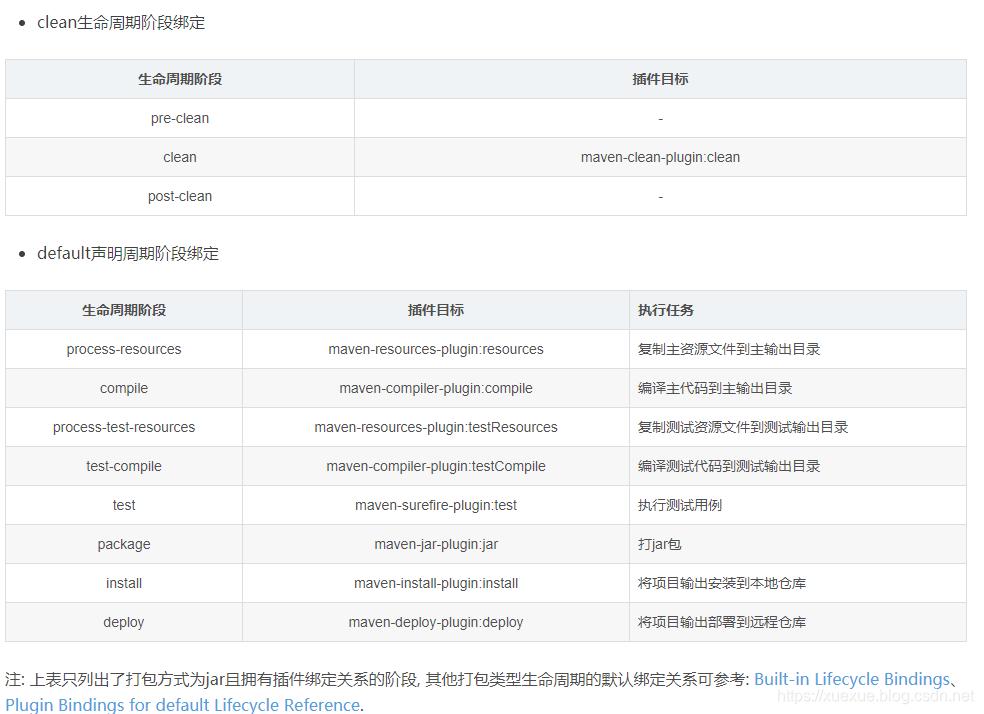
注: 上表只列出了打包方式为jar且拥有插件绑定关系的阶段, 其他打包类型生命周期的默认绑定关系可参考: Built-in Lifecycle Bindings、Plugin Bindings for default Lifecycle Reference.
site生命周期阶段绑定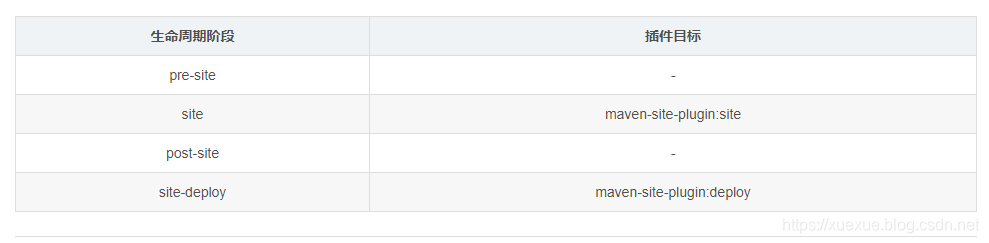
自定义绑定
除了内置绑定以外, 用户还能够自定义将某个插件目标绑定到生命周期的某个阶段上. 如创建项目的源码包, maven-source-plugin插件的jar-no-fork目标能够将项目的主代码打包成jar文件, 可以将其绑定到verify阶段上:
<build>
    <plugins>
        <plugin>
            <groupId>org.apache.maven.plugins</groupId>
            <artifactId>maven-source-plugin</artifactId>
            <version>3.0.0</version>
            <executions>
                <execution>
                    <id>attach-sources</id>
                    <phase>verify</phase>
                    <goals>
                        <goal>jar-no-fork</goal>
                    </goals>
                </execution>
            </executions>
        </plugin>
    </plugins>
</build>
插件查询
在线
Maven 官方插件
https://maven.apache.org/plugins/index.html
CodeHaus 插件
http://www.mojohaus.org/plugins.html
maven-help-plugin
mvn help:describe -Dplugin=org.apache.maven.plugins:maven-source-plugin[:3.0.0] [-Ddetail] [-Dgoal=jar-no-fork]
聚合与继承
Maven的聚合特性(aggregation)能够使项目的多个模块聚合在一起构建, 而继承特性(inheritance)能够帮助抽取各模块相同的依赖、插件等配置,在简化模块配置的同时, 保持各模块一致.
模块聚合
随着项目越来越复杂(需要解决的问题越来越多、功能越来越重), 我们更倾向于将一个项目划分几个模块并行开发, 如: 将feedcenter-push项目划分为client、core和web三个模块, 而我们又想一次构建所有模块, 而不是针对各模块分别执行$ mvn命令. 于是就有了Maven的模块聚合 -> 将feedcenter-push作为聚合模块将其他模块聚集到一起构建:
聚合POM
聚合模块POM仅仅是帮助聚合其他模块构建的工具, 本身并无实质内容:
<project xmlns="http://maven.apache.org/POM/4.0.0"
         xmlns:xsi="http://www.w3.org/2001/XMLSchema-instance"
         xsi:schemaLocation="http://maven.apache.org/POM/4.0.0
         http://maven.apache.org/xsd/maven-4.0.0.xsd">

    <modelVersion>4.0.0</modelVersion>

    <groupId>com.vdian.feedcenter</groupId>
    <artifactId>feedcenter-push</artifactId>
    <packaging>pom</packaging>
    <version>1.0.0.SNAPSHOT</version>

    <modules>
        <module>feedcenter-push-client</module>
        <module>feedcenter-push-core</module>
        <module>feedcenter-push-web</module>
    </modules>

</project>
通过在一个打包方式为pom的Maven项目中声明任意数量的module以实现模块聚合:
packaging: pom, 否则无法聚合构建.
modules: 实现聚合的核心,module值为被聚合模块相对于聚合POM的相对路径, 每个被聚合模块下还各自包含有pom.xml、src/main/java、src/test/java等内容, 离开聚合POM也能够独立构建(注: 模块所处目录最好与其artifactId一致).
Tips: 推荐将聚合POM放在项目目录的最顶层, 其他模块作为聚合模块的子目录.
其他关于聚合与反应堆介绍可参考: Guide to Working with Multiple Modules.
模块继承
在面向对象中, 可以通过类继承实现复用. 在Maven中同样也可以创建POM的父子结构, 通过在父POM中声明一些配置供子POM继承来实现复用与消除重复:
1. 父POM
与聚合类似, 父POM的打包方式也是pom, 因此可以继续复用聚合模块的POM(这也是在开发中常用的方式):
<project xmlns="http://maven.apache.org/POM/4.0.0"
         xmlns:xsi="http://www.w3.org/2001/XMLSchema-instance"
         xsi:schemaLocation="http://maven.apache.org/POM/4.0.0
         http://maven.apache.org/xsd/maven-4.0.0.xsd">

    <modelVersion>4.0.0</modelVersion>

    <groupId>com.vdian.feedcenter</groupId>
    <artifactId>feedcenter-push</artifactId>
    <packaging>pom</packaging>
    <version>1.0.0.SNAPSHOT</version>

    <modules>
        <module>feedcenter-push-client</module>
        <module>feedcenter-push-core</module>
        <module>feedcenter-push-web</module>
    </modules>

    <properties>
        <finalName>feedcenter-push</finalName>
        <warName>${finalName}.war</warName>
        <spring.version>4.0.6.RELEASE</spring.version>
        <junit.version>4.12</junit.version>
        <project.build.sourceEncoding>UTF-8</project.build.sourceEncoding>
        <warExplodedDirectory>exploded/${warName}</warExplodedDirectory>
    </properties>

    <dependencyManagement>
        <dependencies>
            <dependency>
                <groupId>org.springframework</groupId>
                <artifactId>spring-core</artifactId>
                <version>${spring.version}</version>
            </dependency>
            <dependency>
                <groupId>org.springframework</groupId>
                <artifactId>spring-beans</artifactId>
                <version>${spring.version}</version>
            </dependency>
            <dependency>
                <groupId>org.springframework</groupId>
                <artifactId>spring-context</artifactId>
                <version>${spring.version}</version>
            </dependency>

           <dependency>
                <groupId>junit</groupId>
                <artifactId>junit</artifactId>
                <version>${junit.version}</version>
                <scope>test</scope>
            </dependency>
        </dependencies>
    </dependencyManagement>

    <build>
        <pluginManagement>
            <plugins>
                <plugin>
                    <groupId>org.apache.maven.plugins</groupId>
                    <artifactId>maven-source-plugin</artifactId>
                    <version>3.0.0</version>
                    <executions>
                        <execution>
                            <id>attach-sources</id>
                            <phase>verify</phase>
                            <goals>
                                <goal>jar-no-fork</goal>
                            </goals>
                        </execution>
                    </executions>
                </plugin>
            </plugins>
        </pluginManagement>
    </build>
</project>
dependencyManagement: 能让子POM继承父POM的配置的同时, 又能够保证子模块的灵活性: 在父POMdependencyManagement元素配置的依赖声明不会实际引入子模块中, 但能够约束子模块dependencies下的依赖的使用(子模块只需配置groupId与artifactId, 见下).
pluginManagement: 与dependencyManagement类似, 配置的插件不会造成实际插件的调用行为, 只有当子POM中配置了相关plugin元素, 才会影响实际的插件行为.
2. 子POM
<?xml version="1.0" encoding="UTF-8"?>
<project xmlns="http://maven.apache.org/POM/4.0.0"
         xmlns:xsi="http://www.w3.org/2001/XMLSchema-instance"
         xsi:schemaLocation="http://maven.apache.org/POM/4.0.0
         http://maven.apache.org/xsd/maven-4.0.0.xsd">

    <parent>
        <groupId>com.vdian.feedcenter</groupId>
        <artifactId>feedcenter-push</artifactId>
        <version>1.0.0.SNAPSHOT</version>
    </parent>
    <modelVersion>4.0.0</modelVersion>

    <artifactId>feedcenter-push-client</artifactId>

    <dependencies>
        <dependency>
            <groupId>org.springframework</groupId>
            <artifactId>spring-core</artifactId>
        </dependency>
        <dependency>
            <groupId>org.springframework</groupId>
            <artifactId>spring-context</artifactId>
        </dependency>
        <dependency>
            <groupId>org.springframework</groupId>
            <artifactId>spring-beans</artifactId>
        </dependency>

        <dependency>
            <groupId>junit</groupId>
            <artifactId>junit</artifactId>
        </dependency>
    </dependencies>

    <build>
        <plugins>
            <plugin>
                <groupId>org.apache.maven.plugins</groupId>
                <artifactId>maven-source-plugin</artifactId>
            </plugin>
            <plugin>
                <groupId>org.apache.maven.plugins</groupId>
                <artifactId>maven-compiler-plugin</artifactId>
            </plugin>
        </plugins>
    </build>

</project>
元素继承
可以看到, 子POM中并未定义模块groupId与version, 这是因为子POM默认会从父POM继承了如下元素:
groupId、version
dependencies
developers and contributors
plugin lists (including reports)
plugin executions with matching ids
plugin configuration
resources
因此所有的springframework都省去了version、junit还省去了scope, 而且插件还省去了executions与configuration配置, 因为完整的声明已经包含在父POM中.
优势: 当依赖、插件的版本、配置等信息在父POM中声明之后, 子模块在使用时就无须声明这些信息, 也就不会出现多个子模块使用的依赖版本不一致的情况, 也就降低了依赖冲突的几率. 另外如果子模块不显式声明依赖与插件的使用, 即使已经在父POM的dependencyManagement、pluginManagement中配置了, 也不会产生实际的效果.
推荐: 模块继承与模块聚合同时进行,这意味着, 你可以为你的所有模块指定一个父工程, 同时父工程中可以指定其余的Maven模块作为它的聚合模块. 但需要遵循以下三条规则:
在所有子POM中指定它们的父POM;
将父POM的packaging值设为pom;
在父POM中指定子模块/子POM的目录.
注: parent元素内还包含一个relativePath元素, 用于指定父POM的相对路径, 默认../pom.xml.
超级pom-约定优先于配置
任何一个Maven项目都隐式地继承自超级POM, 因此超级POM的大量配置都会被所有的Maven项目继承, 这些配置也成为了Maven所提倡的约定.
<!-- START SNIPPET: superpom -->
<project>
  <modelVersion>4.0.0</modelVersion>

  <!-- 定义了中央仓库以及插件仓库, 均为:https://repo.maven.apache.org/maven2 -->
  <repositories>
    <repository>
      <id>central</id>
      <name>Central Repository</name>
      <url>https://repo.maven.apache.org/maven2</url>
      <layout>default</layout>
      <snapshots>
        <enabled>false</enabled>
      </snapshots>
    </repository>
  </repositories>

  <pluginRepositories>
    <pluginRepository>
      <id>central</id>
      <name>Central Repository</name>
      <url>https://repo.maven.apache.org/maven2</url>
      <layout>default</layout>
      <snapshots>
        <enabled>false</enabled>
      </snapshots>
      <releases>
        <updatePolicy>never</updatePolicy>
      </releases>
    </pluginRepository>
  </pluginRepositories>

  <!-- 依次定义了各类代码、资源、输出目录及最终构件名称格式, 这就是Maven项目结构的约定 -->
  <build>
    <directory>${project.basedir}/target</directory>
    <outputDirectory>${project.build.directory}/classes</outputDirectory>
    <finalName>${project.artifactId}-${project.version}</finalName>
    <testOutputDirectory>${project.build.directory}/test-classes</testOutputDirectory>
    <sourceDirectory>${project.basedir}/src/main/java</sourceDirectory>
    <scriptSourceDirectory>${project.basedir}/src/main/scripts</scriptSourceDirectory>
    <testSourceDirectory>${project.basedir}/src/test/java</testSourceDirectory>
    <resources>
      <resource>
        <directory>${project.basedir}/src/main/resources</directory>
      </resource>
    </resources>
    <testResources>
      <testResource>
        <directory>${project.basedir}/src/test/resources</directory>
      </testResource>
    </testResources>

    <!-- 为核心插件设定版本 -->
    <pluginManagement>
      <!-- NOTE: These plugins will be removed from future versions of the super POM -->
      <!-- They are kept for the moment as they are very unlikely to conflict with lifecycle mappings (MNG-4453) -->
      <plugins>
        <plugin>
          <artifactId>maven-antrun-plugin</artifactId>
          <version>1.3</version>
        </plugin>
        <plugin>
          <artifactId>maven-assembly-plugin</artifactId>
          <version>2.2-beta-5</version>
        </plugin>
        <plugin>
          <artifactId>maven-dependency-plugin</artifactId>
          <version>2.8</version>
        </plugin>
        <plugin>
          <artifactId>maven-release-plugin</artifactId>
          <version>2.3.2</version>
        </plugin>
      </plugins>
    </pluginManagement>
  </build>

  <!-- 定义项目报告输出路径 -->
  <reporting>
    <outputDirectory>${project.build.directory}/site</outputDirectory>
  </reporting>

  <!-- 定义release-profile, 为构件附上源码与文档 -->
  <profiles>
    <!-- NOTE: The release profile will be removed from future versions of the super POM -->
    <profile>
      <id>release-profile</id>

      <activation>
        <property>
          <name>performRelease</name>
          <value>true</value>
        </property>
      </activation>

      <build>
        <plugins>
          <plugin>
            <inherited>true</inherited>
            <artifactId>maven-source-plugin</artifactId>
            <executions>
              <execution>
                <id>attach-sources</id>
                <goals>
                  <goal>jar</goal>
                </goals>
              </execution>
            </executions>
          </plugin>
          <plugin>
            <inherited>true</inherited>
            <artifactId>maven-javadoc-plugin</artifactId>
            <executions>
              <execution>
                <id>attach-javadocs</id>
                <goals>
                  <goal>jar</goal>
                </goals>
              </execution>
            </executions>
          </plugin>
          <plugin>
            <inherited>true</inherited>
            <artifactId>maven-deploy-plugin</artifactId>
            <configuration>
              <updateReleaseInfo>true</updateReleaseInfo>
            </configuration>
          </plugin>
        </plugins>
      </build>
    </profile>
  </profiles>

</project>
<!-- END SNIPPET: superpom -->





 扫一扫
扫一扫


 2994
2994

 被折叠的 条评论
为什么被折叠?
被折叠的 条评论
为什么被折叠?
 到【灌水乐园】发言





