 Flume数据流配置实战



 本文详细介绍Flume的单例和多例配置方法,包括如何通过netcat接收数据,使用avro进行远程通信,监控日志文件和文件夹,以及如何将数据写入HDFS。此外,还提供了具体配置实例,帮助读者快速掌握Flume的使用。
官网V1.9 UserGuide地址
http://flume.apache.org/releases/content/1.9.0/FlumeUserGuide.html
1、单例Flume配置
# example.conf: A single-node Flume configuration

# Name the components on this agent
a1.sources = r1
a1.sinks = k1
a1.channels = c1

# Describe/configure the source
a1.sources.r1.type = netcat
a1.sources.r1.bind = node02
a1.sources.r1.port = 44444

# Describe the sink
a1.sinks.k1.type = logger

# Use a channel which buffers events in memory
a1.channels.c1.type = memory
a1.channels.c1.capacity = 1000
a1.channels.c1.transactionCapacity = 100

# Bind the source and sink to the channel
a1.sources.r1.channels = c1
a1.sinks.k1.channel = c1
解析
source:netcat(监听netcat)
channel:memory(内存)
sink:logger(输出到logger)
#执行命令
flume-ng agent --conf-file option --name a1 -Dflume.root.logger=INFO,console
这是一个入门的测试案例
telnet node02节点 的44444端口 发送信息
在flume启动的logger控制台看到有消息流入
telnet node22 44444

tailf /var/log/flume/flume-a1.log

2、多例Flume配置
案例背景
node2:44444-----(avro,一种RPC通信协议)------>node03的logger
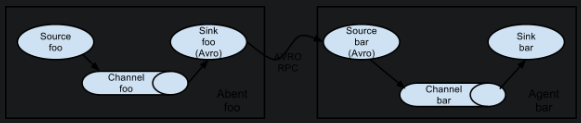
node02配置如下
# node02

# Name the components on this agent
a1.sources = r1
a1.sinks = k1
a1.channels = c1

# Describe/configure the source
a1.sources.r1.type = netcat
a1.sources.r1.bind = node02
a1.sources.r1.port = 44444

# Describe the sink
a1.sinks.k1.type = avro
a1.sinks.k1.hostname = node03
a1.sinks.k1.port = 10086

# Use a channel which buffers events in memory
a1.channels.c1.type = memory
a1.channels.c1.capacity = 1000
a1.channels.c1.transactionCapacity = 100

# Bind the source and sink to the channel
a1.sources.r1.channels = c1
a1.sinks.k1.channel = c1
#node2#执行命令
flume-ng agent --conf-file option2 --name a1 -Dflume.root.logger=INFO,console
node03配置如下
# node03

# Name the components on this agent
a1.sources = r1
a1.sinks = k1
a1.channels = c1

# Describe/configure the source
a1.sources.r1.type = avro
a1.sources.r1.bind = node03
a1.sources.r1.port = 10086

# Describe the sink
a1.sinks.k1.type = logger

# Use a channel which buffers events in memory
a1.channels.c1.type = memory
a1.channels.c1.capacity = 1000
a1.channels.c1.transactionCapacity = 100

# Bind the source and sink to the channel
a1.sources.r1.channels = c1
a1.sinks.k1.channel = c1
#node3#执行命令
flume-ng agent --conf-file option3 --name a1 -Dflume.root.logger=INFO,console
3、监控日志文件
案例背景
tail -F /root/log------->memory-------->logger
# Name the components on this agent
a1.sources = r1
a1.sinks = k1
a1.channels = c1

# Describe/configure the source
a1.sources.r1.type = exec
a1.sources.r1.command = tail -F /root/log

# Describe the sink
a1.sinks.k1.type = logger

# Use a channel which buffers events in memory
a1.channels.c1.type = memory
a1.channels.c1.capacity = 1000
a1.channels.c1.transactionCapacity = 100

# Bind the source and sink to the channel
a1.sources.r1.channels = c1
a1.sinks.k1.channel = c1
4、监控文件夹
案例背景
文件夹下所有的文件内容有新增,则输出到logger
# Name the components on this agent
a1.sources = r1
a1.sinks = k1
a1.channels = c1

# Describe/configure the source
a1.sources.r1.type = spooldir
a1.sources.r1.spoolDir = /root/data/
a1.sources.r1.fileSuffix=.ocdp
a1.sources.r1.fileHeader = true

# Describe the sink
a1.sinks.k1.type = logger

# Use a channel which buffers events in memory
a1.channels.c1.type = memory
a1.channels.c1.capacity = 1000
a1.channels.c1.transactionCapacity = 100

# Bind the source and sink to the channel
a1.sources.r1.channels = c1
a1.sinks.k1.channel = c1
参数解析
a1.sources.r1.fileSuffix=.ocdp
# 如果文件夹下的文件是以ocdp结尾的,则只读取这些文件新追加的数据
# 如果文件夹下的文件不是ocdp结尾,则第一次读取时读取的是整个文件的内容
# 并且最终将文件名称修改为ocdp结尾的文件,继续读取新追加的内容
a1.sources.r1.fileHeader = true
# Whether to add a header storing the absolute path filename.
# 是否要添加一个标题存储绝对路径的文件名。
5、netcat写入hdfs
案例背景
netcat-------->memory-------->hdfs
# Name the components on this agent
a1.sources = r1
a1.sinks = k1
a1.channels = c1

# Describe/configure the source
a1.sources.r1.type = netcat
a1.sources.r1.bind = node02
a1.sources.r1.port = 44444

# Describe the sink
a1.sinks.k1.type = hdfs
a1.sinks.k1.hdfs.path = /flume/events/%y-%m-%d/%H%M/%S
#filePrefix 默认值:FlumeData 写入hdfs的文件名前缀,可以使用flume提供的日期及%{host}表达式
a1.sinks.k1.hdfs.filePrefix = events-
#round 默认值:false  是否启用时间上的”舍弃”,这里的”舍弃”,类似于”四舍五入”
a1.sinks.k1.hdfs.round = true
#roundValue 默认值:1   时间上进行“舍弃”的值
a1.sinks.k1.hdfs.roundValue = 10
#seconds 时间上进行”舍弃”的单位,包含:second,minute,hour
#代表每10秒中生成一个文件
a1.sinks.k1.hdfs.roundUnit = second

#useLocalTimeStamp 默认值:flase  是否使用当地时间。
a1.sinks.k1.hdfs.useLocalTimeStamp = true

# Use a channel which buffers events in memory
a1.channels.c1.type = memory
a1.channels.c1.capacity = 1000
a1.channels.c1.transactionCapacity = 100

# Bind the source and sink to the channel
a1.sources.r1.channels = c1
a1.sinks.k1.channel = c1
整合kafka后续补充





 扫一扫
扫一扫


 2174
2174

 被折叠的 条评论
为什么被折叠?
被折叠的 条评论
为什么被折叠?
 到【灌水乐园】发言





