


码字不易,希望大家点赞支持一下
使用方法:磨刀不误砍柴工,建议大家花上两个小时把这些例子跟着敲一遍,熟悉一下python的基本操作,这里出现的都是我之前刷蓝桥杯题目的时候常出现的能用到的python语法
1.输入方式(每道题目都要用到)
涉及到的函数:
input()函数
map()函数
split()函数
1.1 接受单个输入数据
如果直接用input()输入数据,可以看到数据的类型是字符串类型,
所以这里需要注意的是某些题目需要整数类型的数据时,要将其转化成为整数类型。
a = input()   #输入整数 520
print(type(a))
a = int(a)
print(type(a))

a=input("input:") #输人字符串 Hello
print(type(a))
输出结果:

·
·
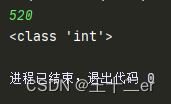
比如说题目要求整数的类型,就可以这样写(用print看一下是什么类型):
n = int(input())   #输入整数520

print(type(n))
.
.
1.2 同一行输入多个数据(以空格隔开)
比如说这道题目的要求:
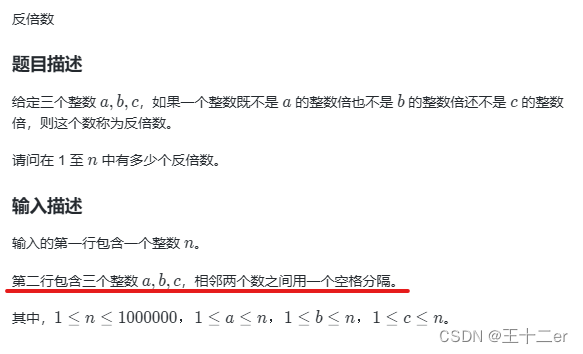
用这种写法:
n = int(input()) # 输入一个整数n
a, b, c = map(int, input().split()) # 输入三个整数,用空格分隔
·
·
1.3 接下来n行每行输入一个数据
- 像这种需要 n 行的输入,可以使用 for 循环用上述的方法读入:
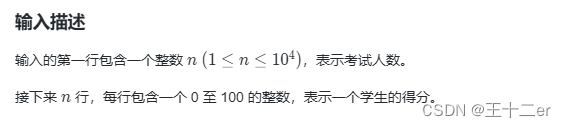
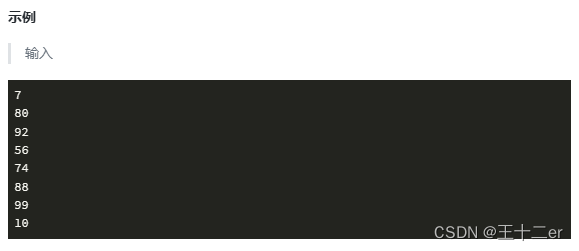
- 建立一个列表,然后用 append( ) 函数存入这个列表即可。
n = int(input())
score = []
for i in range(n):
  score.append(int(input()))
1.4 接下来n行每行输入多个数据
- 以此类推,接下来n行每行输入多个数据就可以这么写:
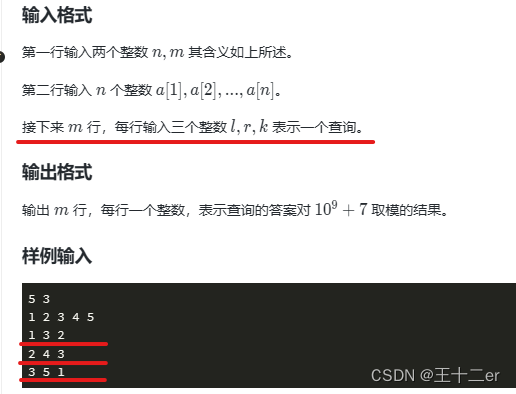
for _ in range(m):
   l, r, k = map(int, input().split())
- 上面这个是根据题意建立了一个列表来存放,这道题是在 for 循环里直接就把输入进来的参数进行运算了,所以没有进行处理。其他题目可能会需要向上面一样利用列表来存放数据,如果我遇到类似的题目再更新进来。
1.5 小结
# 1、接受单个输入数据
a = input()         #字符串
a = int(input())    #整数

# 2、同一行输入多个数据(以空格隔开)
a, b, c = map(int, input().split()) # 输入三个整数,用空格分隔

# 3、接下来n行每行输入一个数据
score = []
for i in range(n):
  score.append(int(input()))

# 4、接下来m行每行输入多个数据
for _ in range(m):
   l, r, k = map(int, input().split())
2. 字符串相关操作
2.1 字符串简介
- 访问字符串中的元素:使用 方括号 + 下标
- 切片: s [ start : end : step],字符串s下标为 [start , end] 中, 步长为 step
- len(s):求字符串的长度
- 连接字符串: a + b
- 存在,不存在: in 、 not in
- str(x): 把x强制转换成字符串
a = "Hello World!"
b = "WORLD!!"
# 1、访问下标
print("下标0= ",a[0])
print("下标3= ",a[3])

# 2、切片
print("a[4:8]= ",a[4:8])

# 3、len(a)
print("len(a) = ", len(a))

# 4、连接字符串
print("a + b = ", a + b)

# 5、存在/不存在
if 'Hello' in a:
    print("Yes")

# 6、强制转换字符串
c = 5
print(str(c))
- 输出结果:
下标0=  H
下标3=  l
a[4:8]=  o Wo
len(a) =  12
a + b =  Hello World!WORLD!!
Yes
5
2.2 字符串常用方法
判断篇:
- s.isalnum() 检查字符串中的字符是否都是字母或数
- s.isalpha() 检查字符串中的所有字符是否都是字母
- s.isdigit() 检查字符串是否只包含数字
- s.isupper() 判断字符串是否全为大写
- s.islower() 判断字符串是否全为小写
- s.isspace() 检查字符串中是否只包含空白
- s.isnumeric() 检查字符串中的所有字符是否都是数字字符
# 标题化判断
print("Hello World".istitle())
print("Hello world".istitle())
print('-'*10)

# 大小写判断
print("HELLO".isupper())
print("HELLO".islower())
print('-'*10)

# 数字字母判断
print("Hello5201314".isalpha())
print("Hello5201314".isalnum())
print("Hello".isalpha())
print('-'*10)

# 空白判断
print("    ".isspace())
print("\t\n\t".isspace())
print("".isspace())
输出结果:
True
False
----------
True
False
----------
False
True
True
----------
True
True
False

进程已结束,退出代码 0
转换篇(加粗的为重点掌握):
- title() : “标题化”字符串
- lower(): 转换成小写
- upper(): 转换成大写
- swapcase():字符串中大写转换为小写,小写转换为大写
- strip([chars]):截掉字符串左边的空格或指定字符chars
- rstrip([chars]):截掉字符串右边的空格或指定字符chars
- strip([chars]):调用lstrip([chars])和 rstrip([chars])
- replace(old, new[,max]):将字符串中的 old 替换成 new ,如果 max 指定,则替换不超过 max 次
# 标题化
s = "hello world"
t = s.title()
print("s = ", s)
print("t = ", t)
print("-"*10)
# 转换成小写
s = "HELLO WORLD!"
t = s.upper()
print("s = ", s)
print("t = ", t)
print("-"*10)
# 转换成大写
s = "hello world!"
t = s.lower()
print("s = ", s)
print("t = ", t)
print("-"*10)
# 大小写互换
s = "hello world!"
t = s.title().swapcase()
print("s = ", s)
print("t = ", t)
print("-"*10)
# 删除字符串左边的空格
s = " hello world!"
t = s.lstrip()
print( 最低0.47元/天 解锁文章






 扫一扫
扫一扫


 被折叠的 条评论
为什么被折叠?
被折叠的 条评论
为什么被折叠?
 到【灌水乐园】发言





