


数据解析效果图如下:

代码如下:
getAnswer() {
      // 获取token
      commonRequest('aiflow.getChatToken', {}, { type: 'get' })
        .then((getChatToken) => {
          if (getChatToken.data) {
            let token = getChatToken.data.token_type + ' ' + getChatToken.data.access_token
            // 获取sessionId
            fetch('http://xx.xx.xx.xx:xxxx/xx/xx/xx/add', {
              method: 'POST',
              headers: {
                'Content-Type': 'application/json',
                Authorization: token
              },
              body: JSON.stringify({ phone: getChatToken.data.phone })
            })
            .then(addRec => {
              if (!addRec.ok) throw new Error('Network response was not ok')
              return addRec.json()
            })
            .then(actualData => {
              // 流式接口
              fetch('http://xx.xx.xx.xx:xxxx/xx/xx/xx/askFluxNewAction', {
                method: 'POST',
                headers: {
                  Accept: 'text/event-stream',
                  'Content-Type': 'application/json',
                  Authorization: token
                },
                body: JSON.stringify({
                  phone: getChatToken.data.phone,
                  sessionId: actualData.data,
                  appId: getChatToken.data.appId,
                  qaQuestionTitle: JSON.stringify(this.chatList)
                })
              })
            .then(askRec => {
              // 流式接口解析
              if (!askRec.ok) throw new Error(`Network response was not ok: ${askRec.statusText}`);

              // 获取响应体的 reader
              const reader = askRec.body.getReader();
              const decoder = new TextDecoder('utf-8');
              let buffer = ''; // 用于存储未处理完的部分数据

              // 清理JSON字符串中的换行和多余空格
              const cleanJsonString = (str) => {
                // 移除行首的 "data: " 前缀和所有换行符、多余空格
                return str.replace(/^data:\s*/gm, '')
                          .replace(/\n\s*/g, '')
                          .trim();
              };

              // 分割多个JSON对象
              const splitJsonObjects = (str) => {
                const jsonObjects = [];
                let braceCount = 0;
                let startIndex = 0;

                for (let i = 0; i < str.length; i++) {
                  if (str[i] === '{') {
                    braceCount++;
                  } else if (str[i] === '}') {
                    braceCount--;

                    // 当括号匹配完成时,提取一个完整的JSON对象
                    if (braceCount === 0) {
                      const jsonStr = str.substring(startIndex, i + 1);
                      if (jsonStr.trim()) {
                        jsonObjects.push(jsonStr);
                      }
                      startIndex = i + 1;
                    }
                  }
                }

                return jsonObjects;
              };

              // 递归读取流数据
              function readStream() {
                return reader.read().then(({ done, value }) => {
                  if (done) {
                    console.log('流读取完成');
                    // 处理缓冲区中剩余的数据
                    let cleanedStr = vm.arr.replace(/<\/?think>\s*|\n\s*\n/g, '').trim();
                    console.log(cleanedStr, 'cleanedStr')
                    if (!cleanedStr.startsWith('"flow')) {
                        // 查找第一个 "flow" 出现的位置
                        const flowIndex = cleanedStr.indexOf('"flow');
                        if (flowIndex !== -1) {
                            // 保留从 "flow" 开始到末尾的部分
                            cleanedStr = cleanedStr.substring(flowIndex);
                        }
                        // 如果没有找到 "flow",保持原样
                    }

                    // 第二步:处理 。" 结尾
                    // 检查是否以 。" 结尾(注意是中文句号+双引号)
                    if (!cleanedStr.endsWith('"')) {
                        // 查找最后一个 。" 出现的位置
                        const quoteIndex = cleanedStr.lastIndexOf('"');

                        if (quoteIndex !== -1) {
                            // 保留到 。" 之前的部分(不包括 。")
                            cleanedStr = cleanedStr.substring(0, quoteIndex) + '"'
                        }
                        // 如果没有找到 。",保持原样
                    }
                    let jsonString = '{' + cleanedStr + '}'
                    try {
                      let resultObject = JSON.parse(jsonString);
                      console.log("解析成功:", resultObject);
                    } catch (error) {
                      vm.$message.error('解析失败,请重新生成')
                    }
                    if (buffer.trim()) {
                      processData(buffer);
                    }
                    return;
                  }

                  // 解码新收到的数据并添加到缓冲区
                  buffer += decoder.decode(value, { stream: true });

                  // 按行分割数据(SSE通常用\n\n分隔消息)
                  const messages = buffer.split(/\n\n/);
                  // 最后一项可能不完整,放回缓冲区
                  buffer = messages.pop() || '';

                  // 处理每条消息
                  messages.forEach(message => {
                    if (message.trim() === '' || message === 'data: [DONE]') {
                      return;
                    }
                    processData(message);
                  });

                  // 继续读取下一块数据
                  return readStream();
                });
              }

              // 处理单条数据
              function processData(data) {
                try {
                  // 清理数据格式
                  const cleanedData = cleanJsonString(data);
                  if (!cleanedData) return;

                  // 分割可能存在的多个JSON对象
                  const jsonObjects = splitJsonObjects(cleanedData);

                  jsonObjects.forEach(jsonStr => {
                    try {
                      const _res = JSON.parse(jsonStr);

                      if (_res.code == 200 && _res.data && Array.isArray(_res.data)) {
                        console.log(_res.data, '5555')
                        _res.data.forEach((item) => {
                          if (item.answer) {
                            console.log(item, 'item')
                            // 过滤掉不需要的标记
                            const cleanAnswer = item.answer
                              .replace(/<\/?think>/g, '')
                              .replace(/\\n/g, '\n')
                              .replace(/\n------\n/g, '\n\n------\n\n');
                              console.log(cleanAnswer, 'cleanAnswer')

                            vm.arr += item.answer
                            console.log(vm.arr, 'this.arr')
                          }
                        });
                      }
                    } catch (jsonError) {
                      console.warn('JSON解析失败,跳过该数据:', jsonError.message, '数据:', jsonStr);
                    }
                  });
                } catch (error) {
                  console.error('处理数据时出错:', error);
                }
              }
              // 开始读取流
              return readStream();
            })
            .catch(error => {
              console.error('请求或处理流时出错:', error);
            });
            })
            .catch(error => {
              console.error('Error:', error)
            })
          }
        })
    }
askFluxNewAction接口返回的数据示例: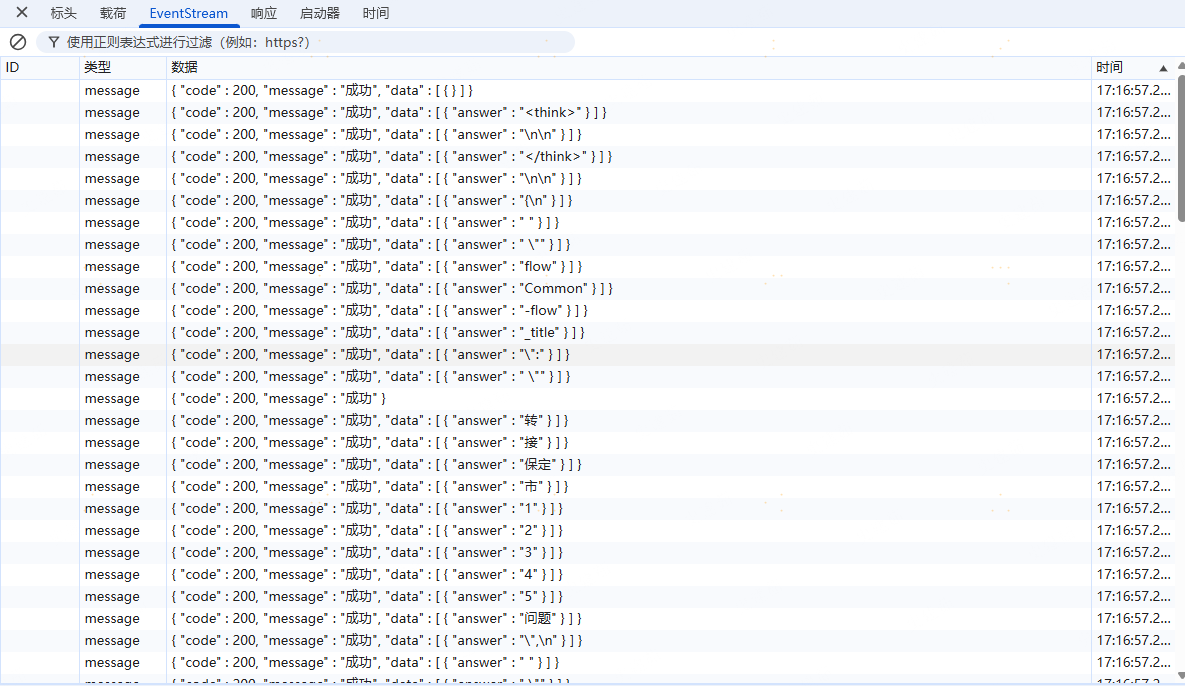





 扫一扫
扫一扫


 1144
1144

 被折叠的 条评论
为什么被折叠?
被折叠的 条评论
为什么被折叠?
 到【灌水乐园】发言





