



 本文介绍了如何在Matlab中处理矩阵运算,包括变元素和变列向量的操作,以及使用surf函数创建3D表面图。同时展示了如何通过table结构来组织和比较迭代次数和函数计数的数据。
矩阵变元素,变列向量
W1(Z1 < Z2) = nan; % Z1,Z2 all matrix,Only plot points where Z1 > Z2;Z1 < Z2位置值填为NaN
x = x(:); % Now x is a 30-by-1 vector; matrix变列vector技巧
3D表面图
hand = figure; % Handle to the figure, for more plotting later
set(gcf,'Color','w') % White background
surf(X,Y,W1,'LineStyle','none'); %surf:3-D three-dimensional surface plot, which is a three-dimensional surface that has solid edge colors and solid face colors.
hold on
surf(X,Y,W2,'LineStyle','none');
view(-44,18) %方位角 仰角
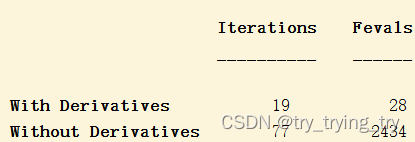
table行列设置
tbl = table([output.iterations;output2.iterations],[output.funcCount;output2.funcCount],...
    'RowNames',{'With Derivatives','Without Derivatives'},'VariableNames',{'Iterations','Fevals'})





 扫一扫
扫一扫


 被折叠的 条评论
为什么被折叠?
被折叠的 条评论
为什么被折叠?
 到【灌水乐园】发言





