



随着鸿蒙(Harmony OS)的演进发展,先后提供了两种应用模型,FA模型和Stage模型。
Stage模型
Stage模型是鸿蒙(Harmony OS)中的一个抽象概念,用于表示应用程序的整体结构和行为。它包含了应用的各个模块、组件以及它们之间的关系,为开发者提供了一个统一的框架来管理和协调应用程序的各个方面,确保开发过程的高效和应用程序的高质量。
特点
- 抽象性:Stage模型提供了一个高层次的视角来描述应用程序的结构,强调各个模块之间的依赖关系和交互方式
- 动态性:Stage模型可以随着应用程序的开发过程不断变化和演进,反映应用程序在不同阶段的状态和需求
- 统一性:Stage模型统一了应用程序的设计、开发和测试过程,确保各个阶段的工作都能有机地结合在一起
应用
- 应用结构定义:通过Stage模型,开发者可以清晰地定义应用程序的各个模块及其相互关系
- 开发过程管理:Stage模型帮助开发者在不同的开发阶段(如需求分析、设计、编码、测试等)进行有效的管理和协调
- 问题排查:通过对Stage模型的分析,开发者可以更好地理解应用程序的运行机制,从而更有效地排查和解决问题
FA模型
FA模型(Feature Ability模型)是鸿蒙(HarmonyOS)中的一种应用开发模型,主要用于构建应用的功能模块。
- PageAbility:用于管理应用的页面和用户界面。开发者可以通过PageAbility创建和管理应用的各个页面。
- ServiceAbility:用于处理后台任务和服务。开发者可以通过ServiceAbility实现应用的后台逻辑,如数据同步、网络请求等。
- DataAbility:用于管理应用的数据。开发者可以通过DataAbility存储和操作应用的数据,如本地数据库、文件等。
- 服务卡片:用于在桌面上展示应用的快捷信息。开发者可以通过服务卡片展示应用的关键信息,方便用户快速访问。
模块、接口支持情况说明
- 如果某个模块的接口仅支持其中一种模型,会在文档开头说明:本模块接口仅可在FA模型/Stage模型下使用。
- 如果某个接口仅支持其中一种模型,会在具体的接口描述中说明:此接口仅可在FA模型/Stage模型下使用。
- 如两种框架模型均支持,则不做特殊说明。
启用中文插件
DevEco Studio 的右上角有一个 小齿轮 选择 Plugins,选择 Installed 在搜索框中输入 chinese ,点击 Enable 后点击 Apply 后,点击 OK 重启, DevEco Studio,就可以切换成中文模式。
构建第一个应用页面
点击 entry > src > main > ets > pages ,打开 Index.ets 文件,进行页面的编写。
基础页面
// Index.ets
@Entry
@Component
struct Index {
  @State message: string = 'Hello World'

  build() {
    Row() {
      Column() {
        Text(this.message)
          .fontSize(50)
          .fontWeight(FontWeight.Bold)
      }
      .width('100%')
    }
    .height('100%')
  }
}
添加按钮
// Index.ets
@Entry
@Component
struct Index {
  @State message: string = 'Hello World'

  build() {
    Row() {
      Column() {
        Text(this.message)
          .fontSize(50)
          .fontWeight(FontWeight.Bold)
        // 添加按钮,以响应用户点击
        Button() {
          Text('Next')
            .fontSize(30)
            .fontWeight(FontWeight.Bold)
        }
        .type(ButtonType.Capsule)
        .margin({
          top: 20
        })
        .backgroundColor('#0D9FFB')
        .width('40%')
        .height('5%')
      }
      .width('100%')
    }
    .height('100%')
  }
}
点击Previewer(预览器)进行预览
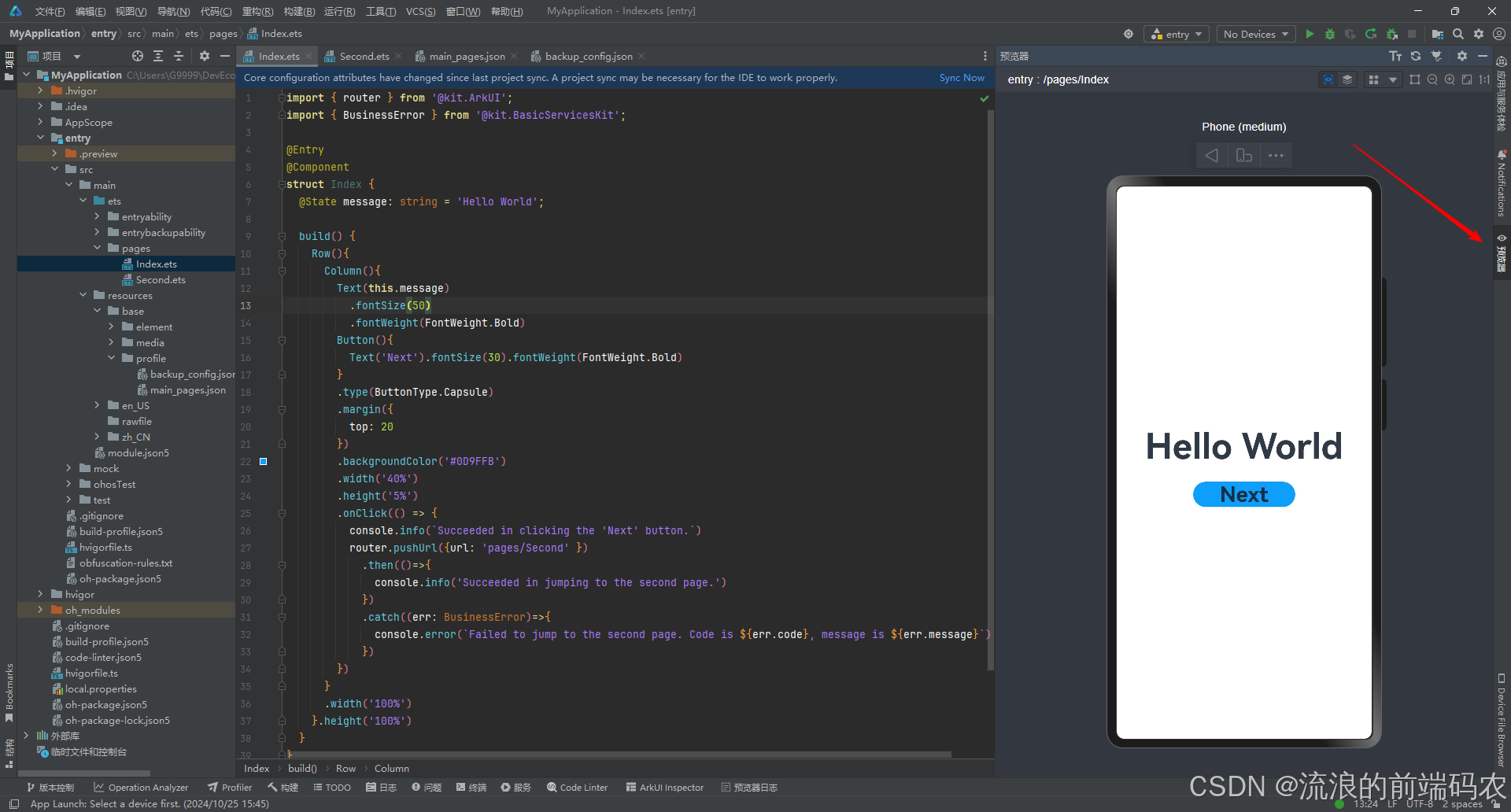
构建第二个应用页面
打开 entry > src > main > ets,右键点击 pages 文件夹,选择 New > ArkTS File,命名为Second,点击回车键。
ps:开发者也可以在右键点击 pages 文件夹时,选择 New > Page > Empty Page,命名为 Second,点击 Finish 完成第二个页面的创建。使用此种方式则无需再进行下文中第二个页面路由的手动配置。
配置路由
打开 entry > src > main > resources > base > profile,在main_pages.json文件中的 src 下配置第二个页面的路由pages/Second。
{
  "src": [
    "pages/Index",
    "pages/Second"
  ]
}
添加文本及按钮
参照第一个页面,在第二个页面添加Text组件、Button组件等,并设置其样式。
// Second.ets
@Entry
@Component
struct Second {
  @State message: string = 'Hi there'

  build() {
    Row() {
      Column() {
        Text(this.message)
          .fontSize(50)
          .fontWeight(FontWeight.Bold)
        Button() {
          Text('Back')
            .fontSize(25)
            .fontWeight(FontWeight.Bold)
        }
        .type(ButtonType.Capsule)
        .margin({
          top: 20
        })
        .backgroundColor('#0D9FFB')
        .width('40%')
        .height('5%')
      }
      .width('100%')
    }
    .height('100%')
  }
}
实现页面间的跳转
页面间的导航可以通过页面路由 router 来实现。页面路由 router 根据页面 url 找到目标页面,从而实现跳转。使用页面路由请导入 router 模块。
如果需要实现更好的转场动效,推荐使用 Navigation。
绑定点击事件
第一个页面添加事件
// Index.ets
// 导入页面路由模块
import { router } from '@kit.ArkUI';
import { BusinessError } from '@kit.BasicServicesKit';

@Entry
@Component
struct Index {
  @State message: string = 'Hello World'

  build() {
    Row() {
      Column() {
        Text(this.message)
          .fontSize(50)
          .fontWeight(FontWeight.Bold)
        // 添加按钮,以响应用户点击
        Button() {
          Text('Next')
            .fontSize(30)
            .fontWeight(FontWeight.Bold)
        }
        .type(ButtonType.Capsule)
        .margin({
          top: 20
        })
        .backgroundColor('#0D9FFB')
        .width('40%')
        .height('5%')
        // 跳转按钮绑定onClick事件,点击时跳转到第二页
        .onClick(() => {
          console.info(`Succeeded in clicking the 'Next' button.`)
          // 跳转到第二页
          router.pushUrl({ url: 'pages/Second' }).then(() => {
            console.info('Succeeded in jumping to the second page.')
          }).catch((err: BusinessError) => {
            console.error(`Failed to jump to the second page. Code is ${err.code}, message is ${err.message}`)
          })
        })
      }
      .width('100%')
    }
    .height('100%')
  }
}
第二个页面添加事件
// Second.ets
// 导入页面路由模块
import { router } from '@kit.ArkUI';
import { BusinessError } from '@kit.BasicServicesKit';

@Entry
@Component
struct Second {
  @State message: string = 'Hi there'

  build() {
    Row() {
      Column() {
        Text(this.message)
          .fontSize(50)
          .fontWeight(FontWeight.Bold)
        Button() {
          Text('Back')
            .fontSize(25)
            .fontWeight(FontWeight.Bold)
        }
        .type(ButtonType.Capsule)
        .margin({
          top: 20
        })
        .backgroundColor('#0D9FFB')
        .width('40%')
        .height('5%')
        // 返回按钮绑定onClick事件,点击按钮时返回到第一页
        .onClick(() => {
          console.info(`Succeeded in clicking the 'Back' button.`)
          try {
            // 返回第一页
            router.back()
            console.info('Succeeded in returning to the first page.')
          } catch (err) {
            let code = (err as BusinessError).code;
            let message = (err as BusinessError).message;
            console.error(`Failed to return to the first page. Code is ${code}, message is ${message}`)
          }
        })
      }
      .width('100%')
    }
    .height('100%')
  }
}
到这为止,就已经构建了一个基于 Stage模型 的 ArkTS 应用。





 扫一扫
扫一扫


 306
306

 被折叠的 条评论
为什么被折叠?
被折叠的 条评论
为什么被折叠?
 到【灌水乐园】发言





