


 本文介绍了SwipeLayout组件的功能及使用方法,包括如何在项目中引入组件、修改布局文件以添加SwipeLayout,以及如何初始化并实现拖拽操作。适用于希望在应用中实现侧滑删除功能的开发者。

1. SwipeLayout组件功能介绍
1.1.功能介绍:
SwipeLayout组件是一个侧滑删除组件。
1.2. 模拟器上运行效果:
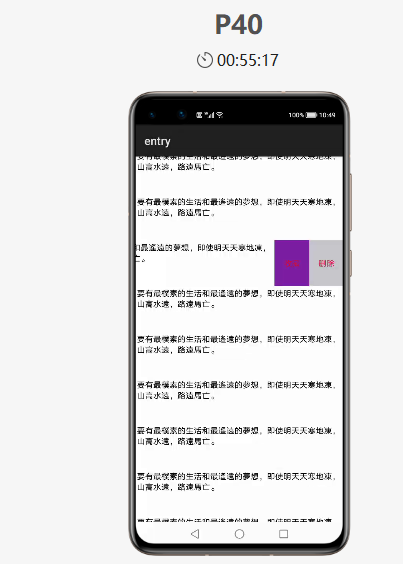
2. SwipeLayout使用方法
2.1. 新建工程,增加组件Har包依赖
在应用模块中添加HAR,只需要将SwipeLayout.har复制到entry\libs目录下即可(由于build.gradle中已经依赖的libs目录下的*.har,因此不需要再做修改)。
2.2. 修改主页面的布局文件
修改主页面的布局文件ability_main.xml,将自定义的SwipeLayout添加到xml中,将初始状态下展示的视图添加到SwipeLayout作为index为0的子视图:
xmlns:ohos="http://schemas.huawei.com/res/ohos"
ohos:id="$+id:total1"
ohos:height="match_parent"
ohos:width="match_parent"
ohos:background_element="gray"
ohos:orientation="vertical">
ohos:id="$+id:sample2"
ohos:height="80vp"
ohos:width="match_parent"
ohos:orientation="horizontal">
ohos:id="$+id:bottom_layout1"
ohos:height="match_parent"
ohos:width="match_parent"
ohos:background_element="white"
ohos:multiple_lines="true"
ohos:padding="10"
ohos:text="要有最樸素的生活和最遙遠的夢想,即使明天天寒地凍,山高水遠,路遠馬亡。"
ohos:text_alignment="left"
ohos:text_size="14fp"
ohos:visibility="visible">
ohos:id="$+id:bottom_wrapper1"
ohos:height="match_parent"
ohos:width="360px"
ohos:background_element="#ddff00"
ohos:orientation="horizontal"
ohos:visibility="visible">
ohos:id="$+id:Texts1"
ohos:height="match_parent"
ohos:width="180px"
ohos:background_element="#7B1FA2"
ohos:left_padding="25"
ohos:right_padding="25"
ohos:text="收藏"
ohos:text_alignment="center"
ohos:text_color="#DC143C"
ohos:text_size="14fp"
ohos:visibility="visible"
/>
ohos:id="$+id:texts2"
ohos:height="match_parent"
ohos:width="180px"
ohos:background_element="#C7C7CC"
ohos:left_padding="25"
ohos:right_padding="25"
ohos:text="删除"
ohos:text_alignment="center"
ohos:text_color="#DC143C"
ohos:text_size="14fp"
ohos:visibility="visible"
/>
ohos:id="$+id:images3"
ohos:height="match_parent"
ohos:width="match_parent"
ohos:background_element="gray"
ohos:image_src="$media:star"
/>
ohos:id="$+id:bottom_fronts"
ohos:height="match_parent"
ohos:width="match_content"
ohos:background_element="#ddff00"
ohos:orientation="horizontal"
ohos:visibility="visible">
ohos:id="$+id:images1"
ohos:height="match_parent"
ohos:width="180px"
ohos:background_element="green"
ohos:image_src="$media:star"/>
ohos:id="$+id:images2"
ohos:height="match_parent"
ohos:width="180px"
ohos:background_element="red"
ohos:image_src="$media:trash"/>
ohos:id="$+id:images"
ohos:height="match_content"
ohos:width="match_content"
ohos:background_element="green"
ohos:image_src="$media:star"
ohos:layout_alignment="horizontal_center"
ohos:top_margin="100vp"/>
2.3. 初始化SwipeLayout
在MainAbilitySlince类的onStart函数中,增加如下代码。
SwipeLayout swipeLayout = (SwipeLayout) findComponentById(ResourceTable.Id_sample1);
DirectionalLayout right= (DirectionalLayout) findComponentById(ResourceTable.Id_bottom_wrapper);
//初始化
swipeLayout.initializeSwipe();
DirectionalLayout left= (DirectionalLayout) findComponentById(ResourceTable.Id_bottom_front);
Image image3 = (Image) findComponentById(ResourceTable.Id_image3);
//将各个方向拖拽时对应展示的视图添加到swipeLayout
swipeLayout.addDrag(SwipeLayout.DragEdge.Left,right);
swipeLayout.addDrag(SwipeLayout.DragEdge.Right,left);
swipeLayout.addDrag(SwipeLayout.DragEdge.Bottom, image3);
3. SwipeLayout开发实现
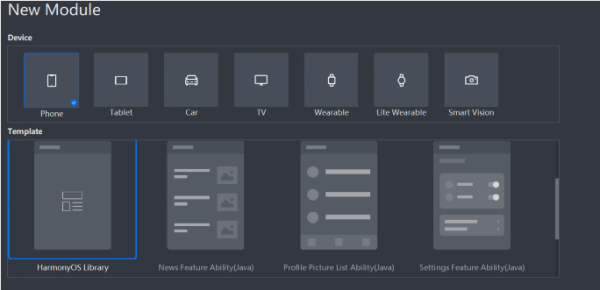
3.1. 新建一个Module
新建一个Module,类型选择HarmonyOS Library,模块名为SwipeLayout,如图
3.2. 新建一个SwipeLayout类
新建一个SwipeLayout类,继承自PositionLayout类
SwipeLayout的主要流程:
1. 首先通过xml的构造方法,为SwipeLayout添加拖拽监听;
2. 将LinkedHashMap
3. 通过public void addDrag(DragEdge dragEdge, Component child) 方法将可拖拽的方向和对应展示的视图添加到mDragEdges,并设置其初始的ContentPosition;
publicvoid addDrag(DragEdge dragEdge, Component child) {
mDragEdges.put(dragEdge, child);
switch (dragEdge) {
caseLeft:
child.setContentPosition(getWidth(), 0);
break;
caseRight:
HiLog.info(label, "Log_addDrag"+ child.getHeight());
child.setContentPosition(-child.getWidth(), 0);
break;
caseTop:
child.setContentPosition(0, getHeight());
break;
caseBottom:
child.setContentPosition(0, -child.getHeight());
break;
}
child.setVisibility(INVISIBLE);
addComponent(child, 0);
}
4.在拖拽动作的监听回调方法中完成对视图的更新
A.在update回调中设置打开和关闭的边界以及边界内的位置刷新
if (getSurfaceView().getContentPositionY() + dragInfo.yOffset <= 0) {
close();
} elseif (getSurfaceView().getContentPositionY() + dragInfo.yOffset >= getHeight()) {
open();
} else{
getSurfaceView().setContentPositionY(getSurfaceView().getContentPositionY() + (float) dragInfo.yOffset);
getCurrentBottomView().setContentPositionY(getCurrentBottomView().getContentPositionY() + (float) dragInfo.yOffset);
}
B.在end中判断滑动的距离,如果大于设定的滑动距离则直接将控件展开或者关闭
if (isCloseBeforeDrag && mDragDistanceY
if (Math.abs(mDragDistanceY) >= mWillOpenPercentAfterClose * getBottomViewHeight()) {
open();
} else{
close();
}
}
if (!isCloseBeforeDrag && mDragDistanceY > 0) {
if (Math.abs(mDragDistanceY) >= mWillOpenPercentAfterClose * getBottomViewHeight()) {
close();
} else{
open();
}
}
3.3. 编译HAR包
利用Gradle可以将HarmonyOS Library库模块构建为HAR包,构建HAR包的方法如下:
在Gradle构建任务中,双击PackageDebugHar或PackageReleaseHar任务,构建Debug类型或Release类型的HAR。
待构建任务完成后,可以loadingview> bulid > outputs > har目录中,获取生成的HAR包。
项目源代码地址:https://github.com/isoftstone-dev/SwipeBackLayout
欢迎交流:HWIS-HOS@isoftstone.com
【编辑推荐】
【责任编辑:jianghua TEL:(010)68476606】
点赞 0





 扫一扫
扫一扫


 被折叠的 条评论
为什么被折叠?
被折叠的 条评论
为什么被折叠?
 到【灌水乐园】发言





