


引言:经典游戏的现代化实现
数独作为一种全球流行的数字逻辑游戏,长久以来以其简单的规则和深厚的逻辑挑战性吸引了无数玩家。本文将详细分析一个基于Python Tkinter开发的完整数独游戏实现,探讨其功能特性、技术架构和实现细节。
一、功能概述:从基础到高级的完整游戏体验
1.1 核心游戏功能
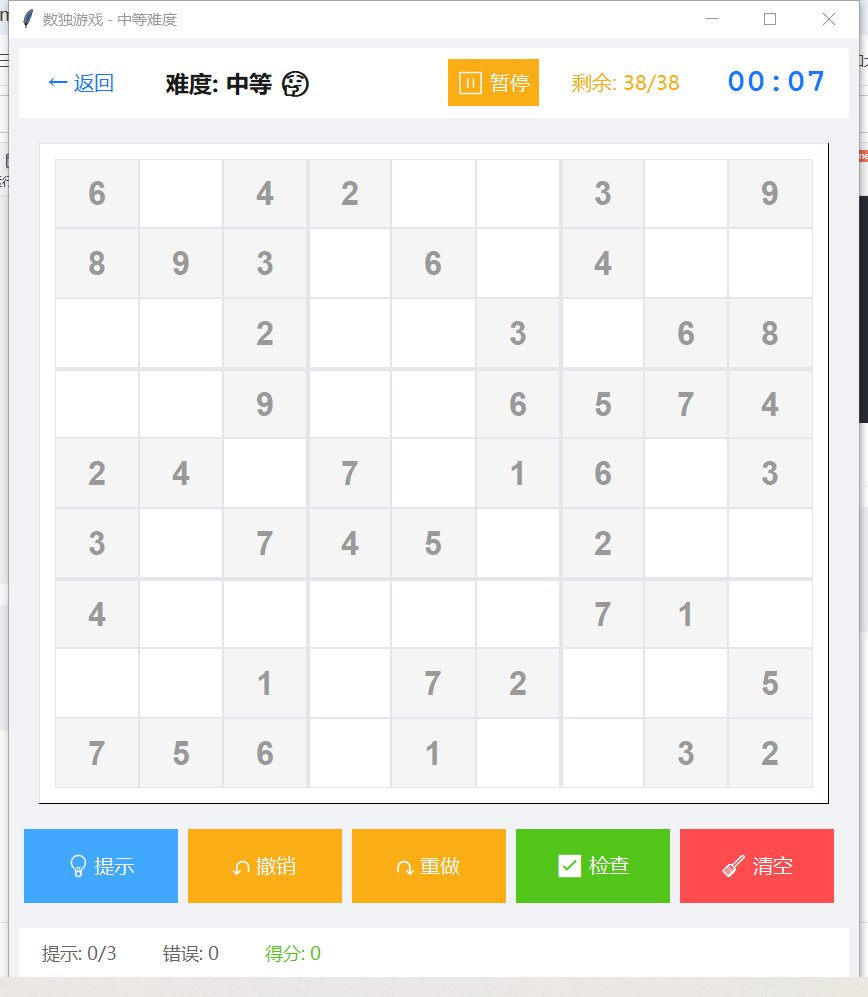
- 完整的数独逻辑:支持9×9标准数独,包含数独生成、验证和求解功能
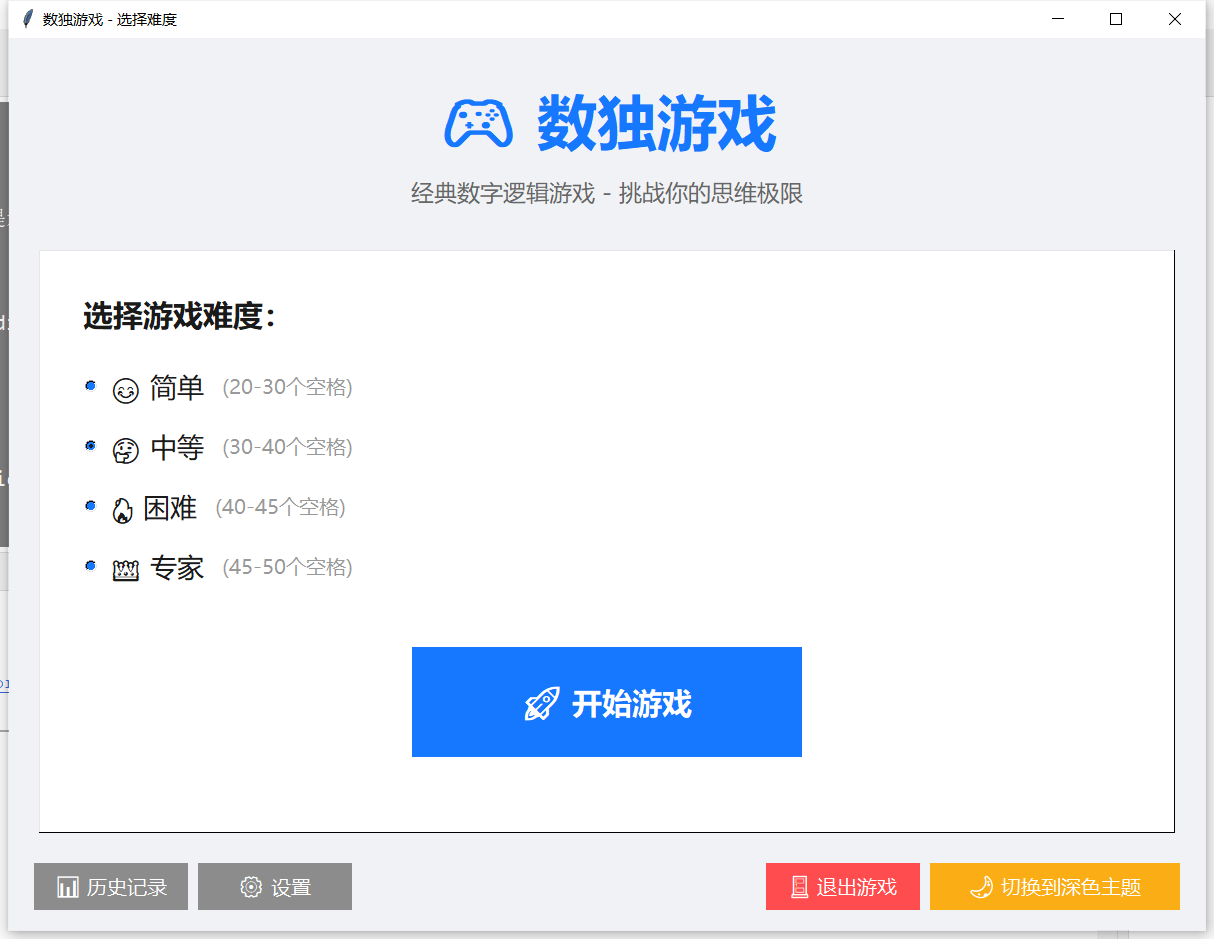
- 多难度级别:提供简单(20-30空格)、中等(30-40空格)、困难(40-45空格)、专家(45-50空格)四种难度
- 实时验证:用户输入时自动检查数字有效性,高亮显示错误
- 提示系统:在玩家卡住时提供正确数字提示,有使用次数限制
1.2 用户体验增强功能
- 撤销/重做系统:支持无限步数撤销和重做操作
- 自动保存:游戏进度自动保存,意外退出后可恢复
- 历史记录:记录每次游戏的详细信息,包括用时、得分、难度等
- 统计系统:分析玩家游戏数据,提供个人最佳记录和平均表现
1.3 界面与自定义功能
- 双主题系统:浅色和深色主题,支持一键切换
- 响应式布局:适应不同窗口大小,保持界面美观
- 快捷键支持:全键盘操作支持,提高游戏效率
- 动画效果:输入反馈、正确/错误提示等动画效果
二、技术架构:现代化Python应用的设计模式
2.1 主要技术栈
- GUI框架:Python Tkinter,提供跨平台的图形界面支持
- 数据持久化:JSON格式存储配置、游戏状态和历史记录
- 算法实现:自定义的数独生成和求解算法,使用位运算优化性能
- 设计模式:观察者模式、单例模式、MVC架构的应用
2.2 核心设计模式分析
2.2.1 观察者模式
游戏控制器(GameController)作为被观察者,UI组件作为观察者,通过事件通知机制实现解耦:
class GameController:
    def register_observer(self, observer):
        self.observers.append(observer)

    def notify_observers(self, event: str, data: Any = None):
        for observer in self.observers:
            if hasattr(observer, 'on_game_event'):
                observer.on_game_event(event, data)
2.2.2 MVC架构
- 模型(Model):
SudokuGenerator,GameController,HistoryManager - 视图(View):
SudokuWelcomePage,SudokuGamePage, 各种对话框 - 控制器(Controller):游戏控制器协调模型和视图的交互
2.3 配置文件管理
class ConfigManager:
    """配置管理器,单例模式实现"""
    def __init__(self):
        self.config_file = "sudoku_config.json"
        self.default_config = {...}
        self.config = self.load_config()
三、核心算法:高效的数独生成与求解
3.1 位运算优化的数独算法
传统的数独验证需要检查行、列、宫,时间复杂度为O(n)。本实现使用位运算将验证复杂度降低到O(1):
class SudokuGenerator:
    def _set_bit(self, row: int, col: int, num: int, set_flag: bool = True):
        """使用位运算标记数字出现"""
        bit = 1 << (num - 1)
        box_r, box_c = row // 3, col // 3

        if set_flag:
            self.row_bits[row] |= bit
            self.col_bits[col] |= bit
            self.box_bits[box_r][box_c] |= bit
        else:
            self.row_bits[row] &= ~bit
            # ... 清除其他位

    def is_valid(self, num: int, row: int, col: int) -> bool:
        """O(1)复杂度验证"""
        bit = 1 << (num - 1)
        box_r, box_c = row // 3, col // 3

        return not (
            self.row_bits[row] & bit or
            self.col_bits[col] & bit or
            self.box_bits[box_r][box_c] & bit
        )
3.2 智能数独生成算法
3.2.1 完整数独生成
- 预填充11个随机位置的随机数字
- 使用递归回溯法填充剩余位置
- 随机化数字选择顺序,确保生成的多样性
3.2.2 谜题生成(挖洞算法)
def generate_puzzle(self, difficulty: Difficulty):
    """生成指定难度的数独谜题"""
    empty_cells = random.randint(difficulty.min_empty, difficulty.max_empty)
    positions = [(i, j) for i in range(9) for j in range(9)]
    random.shuffle(positions)

    removed = 0
    for row, col in positions:
        if removed >= empty_cells:
            break

        if puzzle[row][col] != 0:
            temp = puzzle[row][col]
            puzzle[row][col] = 0

            # 关键:移除后必须保证唯一解
            if self._has_unique_solution([r[:] for r in puzzle]):
                removed += 1
            else:
                puzzle[row][col] = temp
3.3 唯一解验证算法
使用递归回溯计算解法数量,确保生成的谜题有且仅有一个解。
四、用户界面:现代化GUI的实现细节
4.1 响应式布局系统
使用Tkinter的grid和pack布局管理器,结合权重配置实现响应式设计:
# 使网格等宽等高
for i in range(9):
    inner_frame.grid_columnconfigure(i, weight=1, uniform="cell")
    inner_frame.grid_rowconfigure(i, weight=1, uniform="cell")
4.2 主题系统实现
通过枚举类定义主题配置,支持运行时动态切换:
class Theme(Enum):
    """主题配置枚举"""
    LIGHT = {
        "name": "浅色主题",
        "bg_main": "#f0f2f5",
        "bg_card": "#ffffff",
        # ... 更多颜色定义
    }
    DARK = {
        "name": "深色主题",
        "bg_main": "#141414",
        "bg_card": "#1f1f1f",
        # ... 更多颜色定义
    }
4.3 动画效果实现
使用Tkinter的after方法实现帧动画:
def animate_cell(self, row: int, col: int, correct: bool):
    """单元格动画效果"""
    def animate(step=10):
        if step < 0:
            return

        # 计算当前颜色
        ratio = step / 10
        current_color = self.blend_colors(color, original_bg, ratio)

        cell['widget'].config(bg=current_color)

        # 安排下一步动画
        timer = self.root.after(50, lambda: animate(step - 1))
        self.animation_timers.append(timer)

    animate()
五、数据持久化与状态管理
5.1 配置管理系统
class ConfigManager:
    def save_config(self):
        """保存配置到JSON文件"""
        with open(self.config_file, 'w', encoding='utf-8') as f:
            json.dump(self.config, f, ensure_ascii=False, indent=2)

    def load_config(self):
        """从JSON文件加载配置,合并默认值"""
        if os.path.exists(self.config_file):
            config = self.default_config.copy()
            config.update(loaded)
            return config
        return self.default_config.copy()
5.2 历史记录管理
记录每次游戏的详细信息,支持统计分析和导出:
class HistoryManager:
    def add_record(self, record: Dict):
        """添加游戏记录"""
        self.history.append(record)

        # 只保留最近的100条记录
        if len(self.history) > 100:
            self.history = self.history[-100:]

        self.save_history()

    def get_statistics(self) -> Dict[str, Any]:
        """计算统计信息:平均用时、最高分等"""
六、性能优化与最佳实践
6.1 算法性能优化
- 位运算加速:将数独验证从O(n)优化到O(1)
- 递归剪枝:在生成和求解时使用启发式策略减少搜索空间
- 缓存机制:常用计算结果缓存,避免重复计算
6.2 内存管理
- 懒加载:界面元素按需创建
- 事件清理:及时取消定时器,防止内存泄漏
- 数据分页:历史记录只保留最近100条
6.3 代码质量保证
- 类型注解:全面使用Python类型提示
- 异常处理:关键操作都有try-except保护
- 模块化设计:高内聚低耦合的模块划分
七、完整代码
"""
数独游戏完整优化版
版本:2.0
日期:2025年
功能:完整的数独游戏,包含欢迎界面、游戏界面、提示功能、撤销/重做、主题切换、历史记录等
"""
import tkinter as tk
from tkinter import messagebox, ttk, simpledialog
import random
import json
import os
import time
from datetime import datetime
from typing import List, Tuple, Optional, Dict, Any, Callable
import threading
from enum import Enum
import math
# ==================== 配置和常量 ====================
class Theme(Enum):
"""主题配置"""
LIGHT = {
"name": "浅色主题",
"bg_main": "#f0f2f5",
"bg_card": "#ffffff",
"text_title": "#1a1a1a",
"text_normal": "#666666",
"text_light": "#999999",
"primary": "#1677ff",
"primary_hover": "#4096ff",
"primary_press": "#0e66d9",
"secondary": "#8c8c8c",
"success": "#52c41a",
"success_hover": "#73d13d",
"success_press": "#389e0d",
"warning": "#faad14",
"warning_hover": "#ffc53d",
"warning_press": "#d48806",
"danger": "#ff4d4f",
"danger_hover": "#ff7875",
"danger_press": "#d9363e",
"info": "#40a9ff",
"info_hover": "#69c0ff",
"info_press": "#3399ff",
"border": "#e5e6eb",
"cell_default": "#ffffff",
"cell_selected": "#e8f3ff",
"cell_given": "#f5f5f5",
"cell_correct": "#f6ffed",
"cell_wrong": "#fff2f0",
"cell_hint": "#e6f7ff",
"shadow": "gray15",
}
DARK = {
"name": "深色主题",
"bg_main": "#141414",
"bg_card": "#1f1f1f",
"text_title": "#ffffff",
"text_normal": "#8c8c8c",
"text_light": "#666666",
"primary": "#177ddc",
"primary_hover": "#3c9ae8",
"primary_press": "#0e66d9",
"secondary": "#8c8c8c",
"success": "#49aa19",
"success_hover": "#6abe39",
"success_press": "#389e0d",
"warning": "#d89614",
"warning_hover": "#e8b339",
"warning_press": "#d48806",
"danger": "#a61d24",
"danger_hover": "#c03a2f",
"danger_press": "#d9363e",
"info": "#1668dc",
"info_hover": "#3c9ae8",
"info_press": "#3399ff",
"border": "#434343",
"cell_default": "#1f1f1f",
"cell_selected": "#111d2c",
"cell_given": "#262626",
"cell_correct": "#162312",
"cell_wrong": "#2a1215",
"cell_hint": "#111d2c",
"shadow": "black",
}
class Difficulty(Enum):
"""难度级别配置"""
EASY = ("简单", 20, 30, "😊")
MEDIUM = ("中等", 30, 40, "🤔")
HARD = ("困难", 40, 45, "🔥")
EXPERT = ("专家", 45, 50, "👑")
def __init__(self, display_name, min_empty, max_empty, emoji):
self.display_name = display_name
self.min_empty = min_empty
self.max_empty = max_empty
self.emoji = emoji
class GameState(Enum):
"""游戏状态"""
MENU = "menu"
PLAYING = "playing"
PAUSED = "paused"
COMPLETED = "completed"
class ConfigManager:
"""配置管理器"""
def __init__(self):
self.config_file = "sudoku_config.json"
self.default_config = {
"theme": "LIGHT",
"language": "zh-CN",
"sound_enabled": True,
"animation_enabled": True,
"auto_save": True,
"hint_limit": 3,
"undo_limit": 50,
"auto_check": False,
"show_timer": True,
"difficulty": "MEDIUM",
"last_game": None
}
self.config = self.load_config()
def load_config(self):
"""加载配置"""
if os.path.exists(self.config_file):
try:
with open(self.config_file, 'r', encoding='utf-8') as f:
loaded = json.load(f)
# 合并配置,确保新版本有默认值
config = self.default_config.copy()
config.update(loaded)
return config
except:
return self.default_config.copy()
return self.default_config.copy()
def save_config(self):
"""保存配置"""
with open(self.config_file, 'w', encoding='utf-8') as f:
json.dump(self.config, f, ensure_ascii=False, indent=2)
def get_theme(self):
"""获取当前主题"""
try:
return Theme[self.config["theme"]].value
except:
return Theme.LIGHT.value
def toggle_theme(self):
"""切换主题"""
self.config["theme"] = "DARK" if self.config["theme"] == "LIGHT" else "LIGHT"
self.save_config()
return self.get_theme()
# ==================== 数独核心算法 ====================
class SudokuGenerator:
"""优化版数独生成器(使用位运算加速)"""
def __init__(self):
self.board = [[0] * 9 for _ in range(9)]
self.row_bits = [0] * 9
self.col_bits = [0] * 9
self.box_bits = [[0] * 3 for _ in range(3)]
self.solution = None
self.generate_full_board()
def _set_bit(self, row: int, col: int, num: int, set_flag: bool = True):
"""设置或清除位标记"""
bit = 1 << (num - 1)
box_r, box_c = row // 3, col // 3
if set_flag:
self.row_bits[row] |= bit
self.col_bits[col] |= bit
self.box_bits[box_r][box_c] |= bit
self.board[row][col] = num
else:
self.row_bits[row] &= ~bit
self.col_bits[col] &= ~bit
self.box_bits[box_r][box_c] &= ~bit
self.board[row][col] = 0
def is_valid(self, num: int, row: int, col: int) -> bool:
"""使用位运算检查数字是否合法(O(1)时间复杂度)"""
bit = 1 << (num - 1)
box_r, box_c = row // 3, col // 3
return not (
self.row_bits[row] & bit or
self.col_bits[col] & bit or
self.box_bits[box_r][box_c] & bit
)
def generate_full_board(self):
"""生成完整数独"""
self.board = [[0] * 9 for _ in range(9)]
self.row_bits = [0] * 9
self.col_bits = [0] * 9
self.box_bits = [[0] * 3 for _ in range(3)]
# 预填充一些数字加速生成
positions = [(i, j) for i in range(9) for j in range(9)]
random.shuffle(positions)
for i in range(11):
row, col = positions[i]
num = random.randint(1, 9)
while not self.is_valid(num, row, col):
num = random.randint(1, 9)
self._set_bit(row, col, num, True)
# 递归填充剩余
self._solve_board()
self.solution = [row[:] for row in self.board]
def _solve_board(self) -> bool:
"""递归求解数独"""
empty = self._find_empty_cell()
if not empty:
return True
row, col = empty
numbers = random.sample(range(1, 10), 9)
for num in numbers:
if self.is_valid(num, row, col):
self._set_bit(row, col, num, True)
if self._solve_board():
return True
self._set_bit(row, col, num, False)
return False
def _find_empty_cell(self):
"""找到第一个空单元格"""
for row in range(9):
for col in range(9):
if self.board[row][col] == 0:
return (row, col)
return None
def generate_puzzle(self, difficulty: Difficulty):
"""生成指定难度的数独谜题"""
empty_cells = random.randint(difficulty.min_empty, difficulty.max_empty)
puzzle = [row[:] for row in self.board]
positions = [(i, j) for i in range(9) for j in range(9)]
random.shuffle(positions)
removed = 0
for row, col in positions:
if removed >= empty_cells:
break
if puzzle[row][col] != 0:
temp = puzzle[row][col]
puzzle[row][col] = 0
if self._has_unique_solution([r[:] for r in puzzle]):
removed += 1
else:
puzzle[row][col] = temp
return puzzle, self.solution, empty_cells
def _has_unique_solution(self, board: List[List[int]]) -> bool:
"""检查数独是否有唯一解"""
solutions = 0
def solve(board_copy: List[List[int]]) -> bool:
nonlocal solutions
empty = self._find_empty_cell_in_board(board_copy)
if not empty:
solutions += 1
return solutions <= 1
row, col = empty
for num in range(1, 10):
if self._is_valid_for_board(num, row, col, board_copy):
board_copy[row][col] = num
if not solve(board_copy):
return False
board_copy[row][col] = 0
if solutions > 1:
return False
return True
solve([r[:] for r in board])
return solutions == 1
def _find_empty_cell_in_board(self, board: List[List[int]]):
"""在指定棋盘中找到空单元格"""
for row in range(9):
for col in range(9):
if board[row][col] == 0:
return (row, col)
return None
def _is_valid_for_board(self, num: int, row: int, col: int, board: List[List[int]]) -> bool:
"""检查数字在指定棋盘是否合法"""
# 检查行
for c in range(9):
if board[row][c] == num and c != col:
return False
# 检查列
for r in range(9):
if board[r][col] == num and r != row:
return False
# 检查宫
start_row, start_col = (row // 3) * 3, (col // 3) * 3
for r in range(3):
for c in range(3):
if board[start_row + r][start_col + c] == num:
return False
return True
# ==================== 游戏控制器 ====================
class GameController:
"""游戏控制器 - 管理游戏逻辑和状态"""
def __init__(self, config: ConfigManager):
self.config = config
self.generator = SudokuGenerator()
self.state = GameState.MENU
self.difficulty = None
self.puzzle = None
self.solution = None
self.user_board = None
self.empty_cells = 0
# 游戏统计
self.start_time = 0
self.elapsed_time = 0
self.hints_used = 0
self.mistakes = 0
self.score = 0
# 撤销/重做栈
self.undo_stack = []
self.redo_stack = []
self.move_history = []
# 观察者模式
self.observers = []
def register_observer(self, observer):
"""注册观察者"""
self.observers.append(observer)
def notify_observers(self, event: str, data: Any = None):
"""通知观察者"""
for observer in self.observers:
if hasattr(observer, 'on_game_event'):
observer.on_game_event(event, data)
def new_game(self, difficulty: Difficulty):
"""开始新游戏"""
self.difficulty = difficulty
self.puzzle, self.solution, self.empty_cells = self.generator.generate_puzzle(difficulty)
self.user_board = [row[:] for row in self.puzzle]
self.state = GameState.PLAYING
self.start_time = time.time()
self.elapsed_time = 0
self.hints_used = 0
self.mistakes = 0
self.score = 0
self.undo_stack.clear()
self.redo_stack.clear()
self.move_history.clear()
self.notify_observers("game_started", {
"difficulty": difficulty.display_name,
"empty_cells": self.empty_cells
})
def make_move(self, row: int, col: int, value: int, from_hint: bool = False) -> bool:
"""玩家移动"""
if self.state != GameState.PLAYING:
return False
if self.puzzle[row][col] != 0:
return False # 不能修改给定数字
# 保存状态到撤销栈
old_value = self.user_board[row][col]
if old_value == value:
return False
move = {
'row': row,
'col': col,
'old_value': old_value,
'new_value': value,
'from_hint': from_hint,
'timestamp': time.time()
}
self.undo_stack.append(move)
self.move_history.append(move)
self.redo_stack.clear()
# 更新棋盘
self.user_board[row][col] = value
# 检查是否正确
is_correct = value == 0 or value == self.solution[row][col]
if value != 0 and not is_correct:
self.mistakes += 1
# 检查是否完成
if self.check_completion():
self.state = GameState.COMPLETED
self.elapsed_time = time.time() - self.start_time
self.score = self.calculate_score()
self.notify_observers("game_completed", {
'difficulty': self.difficulty.display_name,
'time': self.format_time(self.elapsed_time),
'hints_used': self.hints_used,
'mistakes': self.mistakes,
'score': self.score,
'date': datetime.now().strftime("%Y-%m-%d %H:%M:%S")
})
self.notify_observers("move_made", {
'row': row,
'col': col,
'value': value,
'correct': is_correct,
'from_hint': from_hint
})
return True
def get_hint(self):
"""获取提示"""
if self.hints_used >= self.config.config.get('hint_limit', 3):
return None
# 找到第一个错误或空白的单元格
for row in range(9):
for col in range(9):
if self.puzzle[row][col] == 0 and self.user_board[row][col] != self.solution[row][col]:
self.hints_used += 1
return (row, col, self.solution[row][col])
return None
def undo(self) -> bool:
"""撤销"""
if not self.undo_stack or self.state != GameState.PLAYING:
return False
move = self.undo_stack.pop()
self.redo_stack.append(move)
row, col = move['row'], move['col']
old_value = move['old_value']
self.user_board[row][col] = old_value
self.notify_observers("move_undone", {
'row': row,
'col': col,
'old_value': move['new_value'],
'new_value': old_value
})
return True
def redo(self) -> bool:
"""重做"""
if not self.redo_stack or self.state != GameState.PLAYING:
return False
move = self.redo_stack.pop()
self.undo_stack.append(move)
row, col = move['row'], move['col']
new_value = move['new_value']
self.user_board[row][col] = new_value
self.notify_observers("move_redone", {
'row': row,
'col': col,
'old_value': move['old_value'],
'new_value': new_value
})
return True
def check_completion(self) -> bool:
"""检查是否完成"""
for row in range(9):
for col in range(9):
if self.user_board[row][col] != self.solution[row][col]:
return False
return True
def calculate_score(self) -> int:
"""计算得分"""
base_score = 1000
# 时间惩罚(每分钟扣10分)
minutes = self.elapsed_time / 60
time_penalty = int(minutes * 10)
# 提示惩罚(每次扣30分)
hint_penalty = self.hints_used * 30
# 错误惩罚(每次扣20分)
mistake_penalty = self.mistakes * 20
# 难度加成
difficulty_bonus = {
"简单": 0,
"中等": 100,
"困难": 200,
"专家": 300
}.get(self.difficulty.display_name, 0)
score = base_score - time_penalty - hint_penalty - mistake_penalty + difficulty_bonus
return max(0, min(1000, score))
def get_cell_status(self, row: int, col: int) -> Dict[str, Any]:
"""获取单元格状态"""
if self.puzzle[row][col] != 0:
return {
'value': self.puzzle[row][col],
'editable': False,
'correct': True,
'type': 'given'
}
user_value = self.user_board[row][col]
if user_value == 0:
return {
'value': 0,
'editable': True,
'correct': None,
'type': 'empty'
}
is_correct = user_value == self.solution[row][col]
return {
'value': user_value,
'editable': True,
'correct': is_correct,
'type': 'user'
}
def get_game_stats(self) -> Dict[str, Any]:
"""获取游戏统计"""
if self.state == GameState.PLAYING:
self.elapsed_time = time.time() - self.start_time
remaining = sum(
1 for row in range(9) for col in range(9)
if self.puzzle[row][col] == 0 and self.user_board[row][col] == 0
)
return {
'state': self.state.value,
'elapsed_time': self.elapsed_time,
'formatted_time': self.format_time(self.elapsed_time),
'remaining_cells': remaining,
'total_empty': self.empty_cells,
'hints_used': self.hints_used,
'mistakes': self.mistakes,
'score': self.score,
'difficulty': self.difficulty.display_name if self.difficulty else "未选择"
}
@staticmethod
def format_time(seconds: float) -> str:
"""格式化时间"""
minutes = int(seconds // 60)
seconds_remain = int(seconds % 60)
return f"{minutes:02d}:{seconds_remain:02d}"
def pause_game(self):
"""暂停游戏"""
if self.state == GameState.PLAYING:
self.state = GameState.PAUSED
self.elapsed_time = time.time() - self.start_time
self.notify_observers("game_paused")
def resume_game(self):
"""继续游戏"""
if self.state == GameState.PAUSED:
self.state = GameState.PLAYING
self.start_time = time.time() - self.elapsed_time
self.notify_observers("game_resumed")
def auto_solve(self):
"""自动求解"""
for row in range(9):
for col in range(9):
if self.puzzle[row][col] == 0:
self.make_move(row, col, self.solution[row][col], from_hint=True)
# ==================== 历史记录管理器 ====================
class HistoryManager:
"""历史记录管理器"""
def __init__(self):
self.history_file = "sudoku_history.json"
self.history = self.load_history()
def load_history(self) -> List[Dict]:
"""加载历史记录"""
if os.path.exists(self.history_file):
try:
with open(self.history_file, 'r', encoding='utf-8') as f:
return json.load(f)
except:
return []
return []
def save_history(self):
"""保存历史记录"""
with open(self.history_file, 'w', encoding='utf-8') as f:
json.dump(self.history, f, ensure_ascii=False, indent=2)
def add_record(self, record: Dict):
"""添加记录"""
self.history.append(record)
# 只保留最近的100条记录
if len(self.history) > 100:
self.history = self.history[-100:]
self.save_history()
def get_records(self, limit: int = 50) -> List[Dict]:
"""获取记录"""
return self.history[-limit:] if limit else self.history
def clear_history(self):
"""清空历史记录"""
self.history = []
self.save_history()
def get_statistics(self) -> Dict[str, Any]:
"""获取统计信息"""
if not self.history:
return {}
total_games = len(self.history)
total_time = sum(self._parse_time(record['time']) for record in self.history)
avg_time = total_time / total_games
difficulties = {}
for record in self.history:
diff = record.get('difficulty', '未知')
difficulties[diff] = difficulties.get(diff, 0) + 1
best_score = max((record.get('score', 0) for record in self.history), default=0)
worst_score = min((record.get('score', 0) for record in self.history), default=0)
avg_score = sum(record.get('score', 0) for record in self.history) / total_games
return {
'total_games': total_games,
'total_time': self.format_time(total_time),
'avg_time': self.format_time(avg_time),
'difficulties': difficulties,
'best_score': int(best_score),
'worst_score': int(worst_score),
'avg_score': int(avg_score)
}
@staticmethod
def _parse_time(time_str: str) -> int:
"""解析时间字符串为秒数"""
try:
parts = time_str.split(':')
if len(parts) == 2:
return int(parts[0]) * 60 + int(parts[1])
return 0
except:
return 0
@staticmethod
def format_time(seconds: float) -> str:
"""格式化时间"""
minutes = int(seconds // 60)
seconds_remain = int(seconds % 60)
return f"{minutes:02d}:{seconds_remain:02d}"
# ==================== 欢迎页面 ====================
class SudokuWelcomePage:
"""欢迎页面"""
def __init__(self, root, start_game_callback):
self.root = root
self.start_game = start_game_callback
self.config = ConfigManager()
self.colors = self.config.get_theme()
self.history_manager = HistoryManager()
self.selected_difficulty = tk.StringVar(value="中等")
self.setup_window()
self.create_widgets()
def setup_window(self):
"""设置窗口"""
self.root.title("数独游戏 - 选择难度")
self.root.geometry("700x750")
self.root.configure(bg=self.colors["bg_main"])
self.root.minsize(600, 650)
# 居中显示
self.root.update_idletasks()
screen_width = self.root.winfo_screenwidth()
screen_height = self.root.winfo_screenheight()
x = (screen_width - 700) // 2
y = (screen_height - 750) // 2
self.root.geometry(f"700x750+{x}+{y}")
def create_widgets(self):
"""创建控件"""
# 主容器
main_frame = tk.Frame(self.root, bg=self.colors["bg_main"])
main_frame.pack(fill=tk.BOTH, expand=True, padx=20, pady=20)
# 标题
title_frame = tk.Frame(main_frame, bg=self.colors["bg_main"])
title_frame.pack(pady=(20, 30))
tk.Label(
title_frame,
text="🎮 数独游戏",
font=("微软雅黑", 36, "bold"),
bg=self.colors["bg_main"],
fg=self.colors["primary"]
).pack()
tk.Label(
title_frame,
text="经典数字逻辑游戏 - 挑战你的思维极限",
font=("微软雅黑", 14),
bg=self.colors["bg_main"],
fg=self.colors["text_normal"]
).pack(pady=(10, 0))
# 卡片容器
card = tk.Frame(
main_frame,
bg=self.colors["bg_card"],
relief=tk.RAISED,
bd=1
)
card.pack(fill=tk.BOTH, expand=True, padx=10, pady=10)
# 难度选择
difficulty_frame = tk.Frame(card, bg=self.colors["bg_card"])
difficulty_frame.pack(pady=(40, 20), padx=40, fill=tk.X)
tk.Label(
difficulty_frame,
text="选择游戏难度:",
font=("微软雅黑", 18, "bold"),
bg=self.colors["bg_card"],
fg=self.colors["text_title"]
).pack(anchor="w", pady=(0, 20))
# 难度选项
for difficulty in Difficulty:
frame = tk.Frame(difficulty_frame, bg=self.colors["bg_card"])
frame.pack(fill=tk.X, pady=5)
rb = tk.Radiobutton(
frame,
text=f"{difficulty.emoji} {difficulty.display_name}",
variable=self.selected_difficulty,
value=difficulty.display_name,
font=("微软雅黑", 16),
bg=self.colors["bg_card"],
fg=self.colors["text_title"],
selectcolor=self.colors["primary"],
indicatoron=1,
command=self.on_difficulty_selected
)
rb.pack(side=tk.LEFT)
tk.Label(
frame,
text=f"({difficulty.min_empty}-{difficulty.max_empty}个空格)",
font=("微软雅黑", 12),
bg=self.colors["bg_card"],
fg=self.colors["text_light"]
).pack(side=tk.LEFT, padx=(10, 0))
# 开始按钮
button_frame = tk.Frame(card, bg=self.colors["bg_card"])
button_frame.pack(pady=(30, 40))
start_btn = tk.Button(
button_frame,
text="🚀 开始游戏",
font=("微软雅黑", 18, "bold"),
bg=self.colors["primary"],
fg="white",
width=20,
height=2,
relief=tk.FLAT,
command=self.on_start_click
)
start_btn.pack()
# 按钮悬停效果
start_btn.bind("<Enter>", lambda e: start_btn.config(bg=self.colors["primary_hover"]))
start_btn.bind("<Leave>", lambda e: start_btn.config(bg=self.colors["primary"]))
start_btn.bind("<ButtonPress-1>", lambda e: start_btn.config(bg=self.colors["primary_press"]))
start_btn.bind("<ButtonRelease-1>", lambda e: start_btn.config(bg=self.colors["primary_hover"]))
# 底部按钮
bottom_frame = tk.Frame(main_frame, bg=self.colors["bg_main"])
bottom_frame.pack(fill=tk.X, pady=(20, 0))
# 历史记录按钮
history_btn = tk.Button(
bottom_frame,
text="📊 历史记录",
font=("微软雅黑", 12),
bg=self.colors["secondary"],
fg="white",
width=12,
relief=tk.FLAT,
command=self.show_history
)
history_btn.pack(side=tk.LEFT, padx=5)
# 设置按钮
settings_btn = tk.Button(
bottom_frame,
text="⚙️ 设置",
font=("微软雅黑", 12),
bg=self.colors["secondary"],
fg="white",
width=12,
relief=tk.FLAT,
command=self.show_settings
)
settings_btn.pack(side=tk.LEFT, padx=5)
# 主题切换按钮
theme_btn = tk.Button(
bottom_frame,
text=f"🌙 切换到{self.get_opposite_theme()}主题",
font=("微软雅黑", 12),
bg=self.colors["warning"],
fg="white",
width=20,
relief=tk.FLAT,
command=self.toggle_theme
)
theme_btn.pack(side=tk.RIGHT, padx=5)
# 退出按钮
exit_btn = tk.Button(
bottom_frame,
text="🚪 退出游戏",
font=("微软雅黑", 12),
bg=self.colors["danger"],
fg="white",
width=12,
relief=tk.FLAT,
command=self.root.quit
)
exit_btn.pack(side=tk.RIGHT, padx=5)
# 统计信息
stats = self.history_manager.get_statistics()
if stats:
stats_frame = tk.Frame(main_frame, bg=self.colors["bg_main"])
stats_frame.pack(fill=tk.X, pady=(20, 0))
stats_text = f"总游戏数: {stats['total_games']} | 平均用时: {stats['avg_time']} | 最高得分: {stats['best_score']}"
tk.Label(
stats_frame,
text=stats_text,
font=("微软雅黑", 10),
bg=self.colors["bg_main"],
fg=self.colors["text_light"]
).pack()
def on_difficulty_selected(self):
"""难度选择事件"""
difficulty_name = self.selected_difficulty.get()
for difficulty in Difficulty:
if difficulty.display_name == difficulty_name:
self.config.config["difficulty"] = difficulty.name
self.config.save_config()
break
def on_start_click(self):
"""开始游戏点击事件"""
difficulty_name = self.selected_difficulty.get()
# 找到对应的难度枚举
for difficulty in Difficulty:
if difficulty.display_name == difficulty_name:
self.start_game(difficulty)
break
def get_opposite_theme(self):
"""获取相反主题名称"""
current = self.config.config["theme"]
return "浅色" if current == "DARK" else "深色"
def toggle_theme(self):
"""切换主题"""
self.colors = self.config.toggle_theme()
# 重新加载页面
for widget in self.root.winfo_children():
widget.destroy()
self.__init__(self.root, self.start_game)
def show_history(self):
"""显示历史记录"""
HistoryDialog(self.root, self.history_manager, self.colors)
def show_settings(self):
"""显示设置"""
SettingsDialog(self.root, self.config, self.colors)
# ==================== 游戏页面 ====================
class SudokuGamePage:
"""游戏主页面"""
def __init__(self, root, difficulty: Difficulty):
self.root = root
self.difficulty = difficulty
self.config = ConfigManager()
self.colors = self.config.get_theme()
self.controller = GameController(self.config)
self.history_manager = HistoryManager()
# UI状态
self.selected_cell = None
self.cells = [[None for _ in range(9)] for _ in range(9)]
self.animation_timers = []
self.is_paused = False
# 初始化
self.controller.register_observer(self)
self.setup_window()
self.create_widgets()
self.bind_shortcuts()
# 开始游戏
self.controller.new_game(difficulty)
def setup_window(self):
"""设置窗口"""
self.root.title(f"数独游戏 - {self.difficulty.display_name}难度")
self.root.geometry("850x950")
self.root.configure(bg=self.colors["bg_main"])
self.root.minsize(800, 850)
# 居中显示
self.root.update_idletasks()
screen_width = self.root.winfo_screenwidth()
screen_height = self.root.winfo_screenheight()
x = (screen_width - 850) // 2
y = (screen_height - 950) // 2
self.root.geometry(f"850x950+{x}+{y}")
def create_widgets(self):
"""创建控件"""
# 主容器
main_frame = tk.Frame(self.root, bg=self.colors["bg_main"])
main_frame.pack(fill=tk.BOTH, expand=True, padx=10, pady=10)
# 顶部工具栏
self.create_toolbar(main_frame)
# 游戏区域
self.create_game_area(main_frame)
# 控制按钮
self.create_control_buttons(main_frame)
# 状态栏
self.create_status_bar(main_frame)
def create_toolbar(self, parent):
"""创建工具栏"""
toolbar = tk.Frame(parent, bg=self.colors["bg_card"], height=70)
toolbar.pack(fill=tk.X, pady=(0, 15))
toolbar.pack_propagate(False)
# 返回按钮
back_btn = tk.Button(
toolbar,
text="← 返回",
font=("微软雅黑", 12),
bg=self.colors["bg_card"],
fg=self.colors["primary"],
relief=tk.FLAT,
command=self.back_to_welcome
)
back_btn.pack(side=tk.LEFT, padx=20, pady=10)
# 难度显示
tk.Label(
toolbar,
text=f"难度: {self.difficulty.display_name} {self.difficulty.emoji}",
font=("微软雅黑", 14, "bold"),
bg=self.colors["bg_card"],
fg=self.colors["text_title"]
).pack(side=tk.LEFT, padx=20)
# 计时器
self.timer_label = tk.Label(
toolbar,
text="00:00",
font=("Courier New", 20, "bold"),
bg=self.colors["bg_card"],
fg=self.colors["primary"]
)
self.timer_label.pack(side=tk.RIGHT, padx=20)
# 剩余空格
self.remaining_label = tk.Label(
toolbar,
text="剩余: 0/0",
font=("微软雅黑", 12),
bg=self.colors["bg_card"],
fg=self.colors["warning"]
)
self.remaining_label.pack(side=tk.RIGHT, padx=20)
# 暂停/继续按钮
self.pause_btn = tk.Button(
toolbar,
text="⏸️ 暂停",
font=("微软雅黑", 12),
bg=self.colors["warning"],
fg="white",
relief=tk.FLAT,
command=self.toggle_pause
)
self.pause_btn.pack(side=tk.RIGHT, padx=10)
def create_game_area(self, parent):
"""创建游戏区域"""
# 数独网格容器
grid_frame = tk.Frame(
parent,
bg=self.colors["bg_card"],
relief=tk.RAISED,
bd=1
)
grid_frame.pack(fill=tk.BOTH, expand=True, padx=20, pady=10)
# 内部容器
inner_frame = tk.Frame(grid_frame, bg=self.colors["border"])
inner_frame.pack(padx=15, pady=15, fill=tk.BOTH, expand=True)
# 创建9x9网格
for row in range(9):
for col in range(9):
# 确定边框粗细(宫格边界加粗)
padx = (2, 0) if col % 3 == 0 and col != 0 else (0, 0)
pady = (2, 0) if row % 3 == 0 and row != 0 else (0, 0)
# 单元格框架
cell_frame = tk.Frame(
inner_frame,
bg=self.colors["cell_default"],
highlightbackground=self.colors["border"],
highlightthickness=1
)
cell_frame.grid(row=row, column=col, padx=padx, pady=pady, sticky="nsew")
# 输入框
entry_var = tk.StringVar()
entry = tk.Entry(
cell_frame,
textvariable=entry_var,
width=3,
font=("Arial", 20, "bold"),
justify=tk.CENTER,
relief=tk.FLAT,
bd=0,
bg=self.colors["cell_default"],
fg=self.colors["text_title"],
insertbackground=self.colors["primary"],
cursor="hand2"
)
entry.pack(padx=5, pady=5, fill=tk.BOTH, expand=True)
# 绑定事件
entry.bind("<Button-1>", lambda e, r=row, c=col: self.select_cell(r, c))
entry.bind("<FocusIn>", lambda e, r=row, c=col: self.select_cell(r, c))
entry.bind("<Key>", lambda e, r=row, c=col: self.on_key_press(r, c, e))
self.cells[row][col] = {
'widget': entry,
'var': entry_var,
'frame': cell_frame
}
# 使网格等宽等高
for i in range(9):
inner_frame.grid_columnconfigure(i, weight=1, uniform="cell")
inner_frame.grid_rowconfigure(i, weight=1, uniform="cell")
def create_control_buttons(self, parent):
"""创建控制按钮"""
control_frame = tk.Frame(parent, bg=self.colors["bg_main"])
control_frame.pack(fill=tk.X, pady=15)
# 按钮定义
buttons = [
("💡 提示", self.get_hint, self.colors["info"]),
("↶ 撤销", self.undo_move, self.colors["warning"]),
("↷ 重做", self.redo_move, self.colors["warning"]),
("✅ 检查", self.check_board, self.colors["success"]),
("🧹 清空", self.clear_cell, self.colors["danger"]),
("✨ 一键完成", self.auto_complete, self.colors["primary"])
]
for text, command, color in buttons:
btn = tk.Button(
control_frame,
text=text,
font=("微软雅黑", 12),
bg=color,
fg="white",
relief=tk.FLAT,
width=12,
height=2,
command=command
)
btn.pack(side=tk.LEFT, padx=5)
# 悬停效果
btn.bind("<Enter>", lambda e, b=btn: b.config(bg=self.lighten_color(b.cget("bg"))))
btn.bind("<Leave>", lambda e, b=btn, c=color: b.config(bg=c))
def create_status_bar(self, parent):
"""创建状态栏"""
status_frame = tk.Frame(parent, bg=self.colors["bg_card"], height=50)
status_frame.pack(fill=tk.X, pady=(10, 0))
status_frame.pack_propagate(False)
# 提示次数
self.hint_label = tk.Label(
status_frame,
text="提示: 0/3",
font=("微软雅黑", 11),
bg=self.colors["bg_card"],
fg=self.colors["text_normal"]
)
self.hint_label.pack(side=tk.LEFT, padx=20, pady=10)
# 错误次数
self.mistake_label = tk.Label(
status_frame,
text="错误: 0",
font=("微软雅黑", 11),
bg=self.colors["bg_card"],
fg=self.colors["text_normal"]
)
self.mistake_label.pack(side=tk.LEFT, padx=20)
# 当前得分
self.score_label = tk.Label(
status_frame,
text="得分: 0",
font=("微软雅黑", 11),
bg=self.colors["bg_card"],
fg=self.colors["success"]
)
self.score_label.pack(side=tk.LEFT, padx=20)
# 数字状态提示
self.number_hint_label = tk.Label(
status_frame,
text="",
font=("微软雅黑", 11),
bg=self.colors["bg_card"],
fg=self.colors["info"]
)
self.number_hint_label.pack(side=tk.RIGHT, padx=20)
def bind_shortcuts(self):
"""绑定快捷键"""
self.root.bind('<Control-h>', lambda e: self.get_hint())
self.root.bind('<Control-z>', lambda e: self.undo_move())
self.root.bind('<Control-y>', lambda e: self.redo_move())
self.root.bind('<Control-c>', lambda e: self.check_board())
self.root.bind('<Control-space>', lambda e: self.auto_complete())
self.root.bind('<Delete>', lambda e: self.clear_cell())
self.root.bind('<Escape>', lambda e: self.back_to_welcome())
# 方向键移动选择
self.root.bind('<Left>', lambda e: self.move_selection('left'))
self.root.bind('<Right>', lambda e: self.move_selection('right'))
self.root.bind('<Up>', lambda e: self.move_selection('up'))
self.root.bind('<Down>', lambda e: self.move_selection('down'))
# 数字键输入
for i in range(1, 10):
self.root.bind(f'<Key-{i}>', lambda e, num=i: self.input_number(num))
self.root.bind(f'<Key-KP_{i}>', lambda e, num=i: self.input_number(num))
def on_game_event(self, event: str, data: Any):
"""处理游戏事件"""
if event == "game_started":
self.update_display()
self.start_timer()
elif event == "move_made":
self.update_cell_display(data['row'], data['col'])
self.update_stats()
if data['value'] != 0:
self.animate_cell(data['row'], data['col'], data['correct'])
elif event == "move_undone":
self.update_cell_display(data['row'], data['col'])
self.update_stats()
elif event == "move_redone":
self.update_cell_display(data['row'], data['col'])
self.update_stats()
elif event == "game_completed":
self.stop_timer()
self.show_completion_dialog(data)
elif event == "game_paused":
self.is_paused = True
self.pause_btn.config(text="▶️ 继续")
elif event == "game_resumed":
self.is_paused = False
self.pause_btn.config(text="⏸️ 暂停")
def update_display(self):
"""更新整个显示"""
for row in range(9):
for col in range(9):
self.update_cell_display(row, col)
self.update_stats()
def update_cell_display(self, row: int, col: int):
"""更新单元格显示"""
status = self.controller.get_cell_status(row, col)
cell = self.cells[row][col]
# 更新值
cell['var'].set(str(status['value']) if status['value'] != 0 else "")
# 设置颜色和状态
if status['type'] == 'given':
cell['widget'].config(
state='disabled',
disabledbackground=self.colors["cell_given"],
disabledforeground=self.colors["text_light"],
cursor="arrow"
)
cell['frame'].config(bg=self.colors["cell_given"])
else:
cell['widget'].config(
state='normal',
cursor="hand2"
)
# 根据正确性设置颜色
if status['correct'] is False:
bg_color = self.colors["cell_wrong"]
fg_color = self.colors["danger"]
elif status['correct'] is True:
bg_color = self.colors["cell_correct"]
fg_color = self.colors["success"]
else:
bg_color = self.colors["cell_default"]
fg_color = self.colors["text_title"]
cell['widget'].config(bg=bg_color, fg=fg_color)
cell['frame'].config(bg=bg_color)
# 如果是选中的单元格
if self.selected_cell == (row, col):
cell['widget'].config(bg=self.colors["cell_selected"])
cell['frame'].config(bg=self.colors["cell_selected"])
def update_stats(self):
"""更新统计信息"""
stats = self.controller.get_game_stats()
# 更新计时器
self.timer_label.config(text=stats['formatted_time'])
# 更新剩余空格
self.remaining_label.config(
text=f"剩余: {stats['remaining_cells']}/{stats['total_empty']}"
)
# 更新提示和错误
self.hint_label.config(text=f"提示: {stats['hints_used']}/3")
self.mistake_label.config(text=f"错误: {stats['mistakes']}")
# 更新得分
self.score_label.config(text=f"得分: {stats['score']}")
# 更新数字提示
if self.selected_cell:
self.update_number_hint(*self.selected_cell)
def select_cell(self, row: int, col: int):
"""选中单元格"""
# 取消之前的选择
if self.selected_cell:
old_row, old_col = self.selected_cell
self.update_cell_display(old_row, old_col)
# 选中新单元格
self.selected_cell = (row, col)
self.update_cell_display(row, col)
self.cells[row][col]['widget'].focus_set()
# 更新数字提示
self.update_number_hint(row, col)
def update_number_hint(self, row: int, col: int):
"""更新数字提示"""
if self.controller.puzzle[row][col] != 0:
self.number_hint_label.config(text="这是给定数字,无法修改")
return
# 计算可用数字
used = set()
# 检查行
for c in range(9):
val = self.controller.user_board[row][c]
if val != 0:
used.add(val)
# 检查列
for r in range(9):
val = self.controller.user_board[r][col]
if val != 0:
used.add(val)
# 检查宫
start_row, start_col = (row // 3) * 3, (col // 3) * 3
for r in range(3):
for c in range(3):
val = self.controller.user_board[start_row + r][start_col + c]
if val != 0:
used.add(val)
# 显示可用数字
available = [str(i) for i in range(1, 10) if i not in used]
if len(available) == 0:
hint = "❌ 无可用数字"
elif len(available) == 1:
hint = f"✅ 唯一可能: {available[0]}"
elif len(available) <= 3:
hint = f"可用: {', '.join(available)}"
else:
hint = f"可用数字: {len(available)}个"
self.number_hint_label.config(text=hint)
def on_key_press(self, row: int, col: int, event):
"""键盘按下事件"""
if self.controller.puzzle[row][col] != 0:
return "break"
key = event.keysym
if key in ['BackSpace', 'Delete', '0']:
self.clear_cell()
return "break"
elif key.isdigit() and key != '0':
self.input_number(int(key))
return "break"
def input_number(self, number: int):
"""输入数字"""
if not self.selected_cell:
messagebox.showinfo("提示", "请先选择一个单元格")
return
row, col = self.selected_cell
self.controller.make_move(row, col, number)
def clear_cell(self):
"""清空单元格"""
if not self.selected_cell:
return
row, col = self.selected_cell
self.controller.make_move(row, col, 0)
def move_selection(self, direction: str):
"""移动选择"""
if not self.selected_cell:
return
row, col = self.selected_cell
if direction == 'left' and col > 0:
col -= 1
elif direction == 'right' and col < 8:
col += 1
elif direction == 'up' and row > 0:
row -= 1
elif direction == 'down' and row < 8:
row += 1
else:
return
self.select_cell(row, col)
def animate_cell(self, row: int, col: int, correct: bool):
"""单元格动画效果"""
if not self.config.config.get("animation_enabled", True):
return
cell = self.cells[row][col]
original_bg = cell['widget'].cget("bg")
color = self.colors["success"] if correct else self.colors["danger"]
def animate(step=10):
if step < 0:
cell['widget'].config(bg=original_bg)
cell['frame'].config(bg=original_bg)
return
# 计算当前颜色
ratio = step / 10
current_color = self.blend_colors(color, original_bg, ratio)
cell['widget'].config(bg=current_color)
cell['frame'].config(bg=current_color)
# 安排下一步动画
timer = self.root.after(50, lambda: animate(step - 1))
self.animation_timers.append(timer)
animate()
def blend_colors(self, color1: str, color2: str, ratio: float) -> str:
"""混合两种颜色"""
def hex_to_rgb(hex_color):
hex_color = hex_color.lstrip('#')
return tuple(int(hex_color[i:i+2], 16) for i in (0, 2, 4))
def rgb_to_hex(rgb):
return '#%02x%02x%02x' % rgb
rgb1 = hex_to_rgb(color1)
rgb2 = hex_to_rgb(color2)
blended = tuple(
int(rgb1[i] * ratio + rgb2[i] * (1 - ratio))
for i in range(3)
)
return rgb_to_hex(blended)
def lighten_color(self, color_hex: str, amount: float = 0.2) -> str:
"""使颜色变亮"""
hex_color = color_hex.lstrip('#')
rgb = tuple(int(hex_color[i:i+2], 16) for i in (0, 2, 4))
lightened = tuple(
min(255, int(c + (255 - c) * amount))
for c in rgb
)
return '#%02x%02x%02x' % lightened
def get_hint(self):
"""获取提示"""
hint = self.controller.get_hint()
if hint:
row, col, value = hint
self.controller.make_move(row, col, value, from_hint=True)
else:
messagebox.showwarning("提示", f"提示次数已达上限({self.config.config.get('hint_limit', 3)}次)!")
def undo_move(self):
"""撤销"""
self.controller.undo()
def redo_move(self):
"""重做"""
self.controller.redo()
def check_board(self):
"""检查棋盘"""
wrong_cells = []
for row in range(9):
for col in range(9):
if self.controller.puzzle[row][col] == 0:
user_val = self.controller.user_board[row][col]
correct_val = self.controller.solution[row][col]
if user_val != 0 and user_val != correct_val:
wrong_cells.append((row, col))
if wrong_cells:
# 高亮错误单元格
for row, col in wrong_cells:
self.animate_cell(row, col, False)
messagebox.showwarning("检查结果", f"发现{len(wrong_cells)}个错误!")
else:
messagebox.showinfo("检查结果", "恭喜!所有已填数字都是正确的!")
def auto_complete(self):
"""一键完成"""
if not messagebox.askyesno("一键完成", "确定要自动完成所有空格吗?\n(这将使用所有提示次数)"):
return
self.controller.auto_solve()
def toggle_pause(self):
"""暂停/继续"""
if self.is_paused:
self.controller.resume_game()
else:
self.controller.pause_game()
def start_timer(self):
"""启动计时器"""
self.update_timer()
def stop_timer(self):
"""停止计时器"""
for timer in self.animation_timers:
if timer:
self.root.after_cancel(timer)
self.animation_timers.clear()
if hasattr(self, 'timer_job'):
self.root.after_cancel(self.timer_job)
def update_timer(self):
"""更新计时器"""
if not self.is_paused:
stats = self.controller.get_game_stats()
self.timer_label.config(text=stats['formatted_time'])
# 每秒更新一次
self.timer_job = self.root.after(1000, self.update_timer)
def show_completion_dialog(self, record: Dict):
"""显示完成对话框"""
# 保存记录
self.history_manager.add_record(record)
# 创建对话框
dialog = tk.Toplevel(self.root)
dialog.title("恭喜完成!")
dialog.geometry("500x500")
dialog.configure(bg=self.colors["bg_main"])
dialog.resizable(False, False)
dialog.transient(self.root)
dialog.grab_set()
# 居中显示
dialog.update_idletasks()
x = self.root.winfo_x() + (self.root.winfo_width() // 2) - (500 // 2)
y = self.root.winfo_y() + (self.root.winfo_height() // 2) - (500 // 2)
dialog.geometry(f"500x500+{x}+{y}")
# 内容
content_frame = tk.Frame(dialog, bg=self.colors["bg_main"])
content_frame.pack(fill=tk.BOTH, expand=True, padx=30, pady=30)
# 标题
tk.Label(
content_frame,
text="🎉 挑战成功!",
font=("微软雅黑", 28, "bold"),
bg=self.colors["bg_main"],
fg=self.colors["success"]
).pack(pady=(0, 20))
# 统计信息
info_frame = tk.Frame(content_frame, bg=self.colors["bg_card"])
info_frame.pack(fill=tk.X, pady=10, padx=10)
stats_items = [
("难度", record['difficulty']),
("用时", record['time']),
("提示次数", f"{record['hints_used']}次"),
("错误次数", f"{record['mistakes']}次"),
("得分", f"{record['score']}/1000"),
("完成时间", record['date'])
]
for label, value in stats_items:
frame = tk.Frame(info_frame, bg=self.colors["bg_card"])
frame.pack(fill=tk.X, pady=5)
tk.Label(
frame,
text=f"{label}:",
font=("微软雅黑", 12, "bold"),
bg=self.colors["bg_card"],
fg=self.colors["text_title"],
width=10,
anchor="w"
).pack(side=tk.LEFT)
tk.Label(
frame,
text=value,
font=("微软雅黑", 12),
bg=self.colors["bg_card"],
fg=self.colors["text_normal"],
anchor="w"
).pack(side=tk.LEFT)
# 评级
rating = "🌟" * min(5, max(1, record['score'] // 200))
tk.Label(
content_frame,
text=f"评级:{rating}",
font=("微软雅黑", 16, "bold"),
bg=self.colors["bg_main"],
fg=self.colors["warning"]
).pack(pady=20)
# 按钮
button_frame = tk.Frame(content_frame, bg=self.colors["bg_main"])
button_frame.pack(pady=20)
tk.Button(
button_frame,
text="再玩一次",
font=("微软雅黑", 12, "bold"),
bg=self.colors["primary"],
fg="white",
width=12,
relief=tk.FLAT,
command=lambda: self.restart_game(dialog)
).pack(side=tk.LEFT, padx=5)
tk.Button(
button_frame,
text="返回主菜单",
font=("微软雅黑", 12, "bold"),
bg=self.colors["warning"],
fg="white",
width=12,
relief=tk.FLAT,
command=lambda: self.back_to_welcome(dialog)
).pack(side=tk.LEFT, padx=5)
def restart_game(self, dialog=None):
"""重新开始游戏"""
if dialog:
dialog.destroy()
self.stop_timer()
# 重新开始游戏
self.controller.new_game(self.difficulty)
def back_to_welcome(self, dialog=None):
"""返回欢迎页面"""
if dialog:
dialog.destroy()
self.stop_timer()
# 清空当前界面
for widget in self.root.winfo_children():
widget.destroy()
# 显示欢迎页面
SudokuWelcomePage(self.root, lambda diff: self.start_new_game(diff))
def start_new_game(self, difficulty: Difficulty):
"""开始新游戏"""
# 清空当前界面
for widget in self.root.winfo_children():
widget.destroy()
# 创建新游戏
SudokuGamePage(self.root, difficulty)
# ==================== 对话框类 ====================
class HistoryDialog:
"""历史记录对话框"""
def __init__(self, parent, history_manager: HistoryManager, colors: Dict):
self.parent = parent
self.history = history_manager
self.colors = colors
self.dialog = tk.Toplevel(parent)
self.dialog.title("历史记录")
self.dialog.geometry("800x600")
self.dialog.configure(bg=self.colors["bg_main"])
self.dialog.resizable(True, True)
self.dialog.transient(parent)
# 居中显示
self.dialog.update_idletasks()
x = parent.winfo_x() + (parent.winfo_width() // 2) - (800 // 2)
y = parent.winfo_y() + (parent.winfo_height() // 2) - (600 // 2)
self.dialog.geometry(f"800x600+{x}+{y}")
self.create_widgets()
def create_widgets(self):
"""创建控件"""
# 标题
title_frame = tk.Frame(self.dialog, bg=self.colors["bg_main"])
title_frame.pack(fill=tk.X, padx=20, pady=(20, 10))
tk.Label(
title_frame,
text="📊 游戏历史记录",
font=("微软雅黑", 20, "bold"),
bg=self.colors["bg_main"],
fg=self.colors["text_title"]
).pack(side=tk.LEFT)
# 统计信息
stats = self.history.get_statistics()
if stats:
stats_text = f"总游戏: {stats['total_games']} | 平均用时: {stats['avg_time']} | 最高分: {stats['best_score']}"
tk.Label(
title_frame,
text=stats_text,
font=("微软雅黑", 10),
bg=self.colors["bg_main"],
fg=self.colors["text_light"]
).pack(side=tk.RIGHT)
# 控制按钮
control_frame = tk.Frame(self.dialog, bg=self.colors["bg_main"])
control_frame.pack(fill=tk.X, padx=20, pady=(0, 10))
tk.Button(
control_frame,
text="🗑️ 清空记录",
font=("微软雅黑", 10),
bg=self.colors["danger"],
fg="white",
relief=tk.FLAT,
command=self.clear_history
).pack(side=tk.LEFT)
tk.Button(
control_frame,
text="📤 导出记录",
font=("微软雅黑", 10),
bg=self.colors["primary"],
fg="white",
relief=tk.FLAT,
command=self.export_history
).pack(side=tk.LEFT, padx=10)
# 滚动区域
canvas_frame = tk.Frame(self.dialog, bg=self.colors["bg_main"])
canvas_frame.pack(fill=tk.BOTH, expand=True, padx=20, pady=(0, 20))
canvas = tk.Canvas(canvas_frame, bg=self.colors["bg_main"], highlightthickness=0)
scrollbar = ttk.Scrollbar(canvas_frame, orient="vertical", command=canvas.yview)
scrollable_frame = tk.Frame(canvas, bg=self.colors["bg_main"])
scrollable_frame.bind(
"<Configure>",
lambda e: canvas.configure(scrollregion=canvas.bbox("all"))
)
canvas.create_window((0, 0), window=scrollable_frame, anchor="nw")
canvas.configure(yscrollcommand=scrollbar.set)
# 显示记录
records = self.history.get_records(limit=50)
if not records:
tk.Label(
scrollable_frame,
text="暂无游戏记录",
font=("微软雅黑", 14),
bg=self.colors["bg_main"],
fg=self.colors["text_light"]
).pack(pady=50)
else:
for i, record in enumerate(reversed(records), 1):
self.create_record_card(scrollable_frame, i, record)
canvas.pack(side=tk.LEFT, fill=tk.BOTH, expand=True)
scrollbar.pack(side=tk.RIGHT, fill=tk.Y)
def create_record_card(self, parent, index: int, record: Dict):
"""创建记录卡片"""
card = tk.Frame(
parent,
bg=self.colors["bg_card"],
relief=tk.RAISED,
bd=1
)
card.pack(fill=tk.X, padx=(0, 10), pady=5)
# 序号
tk.Label(
card,
text=f"{index}.",
font=("Arial", 12, "bold"),
bg=self.colors["bg_card"],
fg=self.colors["primary"],
width=4
).pack(side=tk.LEFT, padx=10, pady=10)
# 难度
tk.Label(
card,
text=record.get('difficulty', '未知'),
font=("微软雅黑", 12),
bg=self.colors["bg_card"],
fg=self.colors["text_title"],
width=8
).pack(side=tk.LEFT, padx=5)
# 用时
tk.Label(
card,
text=f"⏱️ {record.get('time', '00:00')}",
font=("微软雅黑", 11),
bg=self.colors["bg_card"],
fg=self.colors["text_normal"],
width=12
).pack(side=tk.LEFT, padx=5)
# 提示
hints = record.get('hints_used', 0)
hint_color = self.colors["warning"] if hints > 0 else self.colors["text_light"]
tk.Label(
card,
text=f"💡 {hints}次",
font=("微软雅黑", 11),
bg=self.colors["bg_card"],
fg=hint_color,
width=10
).pack(side=tk.LEFT, padx=5)
# 错误
mistakes = record.get('mistakes', 0)
mistake_color = self.colors["danger"] if mistakes > 0 else self.colors["text_light"]
tk.Label(
card,
text=f"❌ {mistakes}次",
font=("微软雅黑", 11),
bg=self.colors["bg_card"],
fg=mistake_color,
width=10
).pack(side=tk.LEFT, padx=5)
# 得分
score = record.get('score', 0)
score_color = self.colors["success"] if score >= 600 else (
self.colors["warning"] if score >= 300 else self.colors["danger"]
)
tk.Label(
card,
text=f"🏆 {score}",
font=("微软雅黑", 11, "bold"),
bg=self.colors["bg_card"],
fg=score_color,
width=10
).pack(side=tk.LEFT, padx=5)
# 日期
date = record.get('date', '')
tk.Label(
card,
text=date,
font=("微软雅黑", 10),
bg=self.colors["bg_card"],
fg=self.colors["text_light"],
width=20
).pack(side=tk.RIGHT, padx=10)
def clear_history(self):
"""清空历史记录"""
if messagebox.askyesno("确认", "确定要清空所有历史记录吗?"):
self.history.clear_history()
self.dialog.destroy()
HistoryDialog(self.parent, self.history, self.colors)
def export_history(self):
"""导出历史记录"""
import csv
from tkinter import filedialog
file_path = filedialog.asksaveasfilename(
defaultextension=".csv",
filetypes=[("CSV文件", "*.csv"), ("所有文件", "*.*")]
)
if file_path:
try:
records = self.history.get_records()
with open(file_path, 'w', newline='', encoding='utf-8') as f:
writer = csv.DictWriter(f, fieldnames=['日期', '难度', '用时', '提示次数', '错误次数', '得分'])
writer.writeheader()
for record in records:
writer.writerow({
'日期': record.get('date', ''),
'难度': record.get('difficulty', ''),
'用时': record.get('time', ''),
'提示次数': record.get('hints_used', 0),
'错误次数': record.get('mistakes', 0),
'得分': record.get('score', 0)
})
messagebox.showinfo("导出成功", f"历史记录已导出到:\n{file_path}")
except Exception as e:
messagebox.showerror("导出失败", f"导出失败:{str(e)}")
class SettingsDialog:
"""设置对话框"""
def __init__(self, parent, config: ConfigManager, colors: Dict):
self.parent = parent
self.config = config
self.colors = colors
self.original_config = config.config.copy()
self.dialog = tk.Toplevel(parent)
self.dialog.title("游戏设置")
self.dialog.geometry("500x600")
self.dialog.configure(bg=self.colors["bg_main"])
self.dialog.resizable(False, False)
self.dialog.transient(parent)
self.dialog.grab_set()
# 居中显示
self.dialog.update_idletasks()
x = parent.winfo_x() + (parent.winfo_width() // 2) - (500 // 2)
y = parent.winfo_y() + (parent.winfo_height() // 2) - (600 // 2)
self.dialog.geometry(f"500x600+{x}+{y}")
self.create_widgets()
def create_widgets(self):
"""创建控件"""
# 标题
tk.Label(
self.dialog,
text="⚙️ 游戏设置",
font=("微软雅黑", 20, "bold"),
bg=self.colors["bg_main"],
fg=self.colors["text_title"]
).pack(pady=(20, 30))
# 设置内容
content_frame = tk.Frame(self.dialog, bg=self.colors["bg_card"])
content_frame.pack(fill=tk.BOTH, expand=True, padx=20, pady=(0, 20))
# 主题设置
self.create_setting_section(
content_frame, "🎨 外观设置",
[
("主题", ["浅色主题", "深色主题"], self.config.config["theme"] == "LIGHT", self.on_theme_change),
]
)
# 游戏设置
self.create_setting_section(
content_frame, "🎮 游戏设置",
[
("提示次数限制", ["3次", "5次", "10次", "无限制"],
self.get_hint_limit_index(), self.on_hint_limit_change),
("自动检查错误", ["开启", "关闭"],
self.config.config.get("auto_check", False), self.on_auto_check_change),
("显示计时器", ["开启", "关闭"],
self.config.config.get("show_timer", True), self.on_show_timer_change),
("启用动画", ["开启", "关闭"],
self.config.config.get("animation_enabled", True), self.on_animation_change),
]
)
# 按钮
button_frame = tk.Frame(self.dialog, bg=self.colors["bg_main"])
button_frame.pack(fill=tk.X, padx=20, pady=(0, 20))
tk.Button(
button_frame,
text="💾 保存设置",
font=("微软雅黑", 12, "bold"),
bg=self.colors["primary"],
fg="white",
width=15,
relief=tk.FLAT,
command=self.save_settings
).pack(side=tk.LEFT, padx=5)
tk.Button(
button_frame,
text="↶ 恢复默认",
font=("微软雅黑", 12),
bg=self.colors["warning"],
fg="white",
width=15,
relief=tk.FLAT,
command=self.reset_to_default
).pack(side=tk.LEFT, padx=5)
tk.Button(
button_frame,
text="🚪 取消",
font=("微软雅黑", 12),
bg=self.colors["secondary"],
fg="white",
width=15,
relief=tk.FLAT,
command=self.dialog.destroy
).pack(side=tk.RIGHT, padx=5)
def create_setting_section(self, parent, title: str, settings: List):
"""创建设置区域"""
section_frame = tk.Frame(parent, bg=self.colors["bg_card"])
section_frame.pack(fill=tk.X, padx=10, pady=10)
# 标题
tk.Label(
section_frame,
text=title,
font=("微软雅黑", 14, "bold"),
bg=self.colors["bg_card"],
fg=self.colors["text_title"]
).pack(anchor="w", pady=(0, 10))
# 设置项
for label, options, default, callback in settings:
frame = tk.Frame(section_frame, bg=self.colors["bg_card"])
frame.pack(fill=tk.X, pady=5)
tk.Label(
frame,
text=label,
font=("微软雅黑", 11),
bg=self.colors["bg_card"],
fg=self.colors["text_normal"],
width=15,
anchor="w"
).pack(side=tk.LEFT)
if isinstance(options, list) and len(options) == 2 and isinstance(default, bool):
# 开关按钮
var = tk.BooleanVar(value=default)
btn = tk.Checkbutton(
frame,
variable=var,
command=lambda v=var, c=callback: c(v.get()),
bg=self.colors["bg_card"],
fg=self.colors["text_title"],
activebackground=self.colors["bg_card"],
activeforeground=self.colors["text_title"]
)
btn.pack(side=tk.RIGHT)
setattr(self, f"{label}_var", var)
else:
# 下拉菜单
var = tk.StringVar(value=options[default] if isinstance(default, int) else default)
dropdown = ttk.Combobox(
frame,
textvariable=var,
values=options,
state="readonly",
width=15
)
dropdown.pack(side=tk.RIGHT)
dropdown.bind("<<ComboboxSelected>>", lambda e, v=var, c=callback: c(v.get()))
setattr(self, f"{label}_var", var)
def get_hint_limit_index(self):
"""获取提示限制索引"""
limit = self.config.config.get("hint_limit", 3)
if limit == 3:
return 0
elif limit == 5:
return 1
elif limit == 10:
return 2
else:
return 3 # 无限制
def on_theme_change(self, is_light: bool):
"""主题变更"""
self.config.config["theme"] = "LIGHT" if is_light else "DARK"
def on_hint_limit_change(self, value: str):
"""提示限制变更"""
limits = {"3次": 3, "5次": 5, "10次": 10, "无限制": 999}
self.config.config["hint_limit"] = limits.get(value, 3)
def on_auto_check_change(self, enabled: bool):
"""自动检查变更"""
self.config.config["auto_check"] = enabled
def on_show_timer_change(self, enabled: bool):
"""显示计时器变更"""
self.config.config["show_timer"] = enabled
def on_animation_change(self, enabled: bool):
"""动画启用变更"""
self.config.config["animation_enabled"] = enabled
def save_settings(self):
"""保存设置"""
self.config.save_config()
messagebox.showinfo("保存成功", "设置已保存!")
self.dialog.destroy()
def reset_to_default(self):
"""恢复默认设置"""
if messagebox.askyesno("确认", "确定要恢复默认设置吗?"):
self.config.config = self.config.default_config.copy()
self.config.save_config()
self.dialog.destroy()
SettingsDialog(self.parent, self.config, self.colors)
# ==================== 主程序 ====================
class SudokuApp:
"""数独应用程序"""
def __init__(self):
self.root = tk.Tk()
self.root.title("数独游戏 - 专业版")
# 设置图标(如果有的话)
try:
self.root.iconbitmap(default="sudoku.ico")
except:
pass
# 显示欢迎页面
self.show_welcome_page()
def show_welcome_page(self):
"""显示欢迎页面"""
# 清空当前界面
for widget in self.root.winfo_children():
widget.destroy()
SudokuWelcomePage(self.root, self.start_game)
def start_game(self, difficulty: Difficulty):
"""开始游戏"""
# 清空当前界面
for widget in self.root.winfo_children():
widget.destroy()
SudokuGamePage(self.root, difficulty)
def run(self):
"""运行应用程序"""
self.root.mainloop()
# ==================== 程序入口 ====================
if __name__ == "__main__":
# 创建必要的目录
os.makedirs("data", exist_ok=True)
# 创建并运行应用程序
app = SudokuApp()
app.run()
八、代码运行





 扫一扫
扫一扫


 1064
1064

 被折叠的 条评论
为什么被折叠?
被折叠的 条评论
为什么被折叠?
 到【灌水乐园】发言





