



前言
在开发中,在点击单元行的时候,产品会想右键可以自定义菜单,可以覆盖系统自带的功能,想着写了一个组件,来循环列表单元行
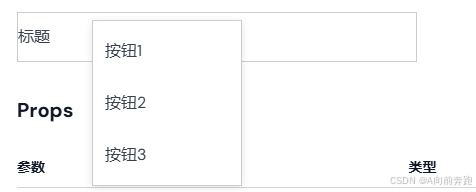
运行效果
HTML
<template>
  <div
    class="context-menu-wrapper"
    @contextmenu.prevent="showContextMenu"
    ref="contextMenuWrapper"
    :style="{
      width: width + 'px',
      height: height + 'px',
    }"
  >
    <!-- 上下文菜单 -->
    <transition name="context-menu-fade">
      <div
        v-if="isMenuVisible"
        class="context-menu"
        :style="{ top: `${menuPosition.y}px`, left: `${menuPosition.x}px` }"
        @mouseleave="hideContextMenu"
        ref="contextMenu"
      >
        <ul>
          <!-- 动态渲染菜单项 -->
          <li
            v-for="(item, index) in menuItems"
            :key="index"
            @click="handleAction(item)"
          >
            {{ item.label }}
          </li>
        </ul>
      </div>
    </transition>

    <!-- 父组件传入的内容 -->
    <span>{{ text }}</span>
  </div>
</template>
JS
<script setup lang="ts">
import { ref, onMounted, onUnmounted } from "vue";

interface MenuItem {
  label: string;
  action?: () => void;
}

// 接收父组件传递的菜单项、宽度和高度
const props = defineProps({
  menuItems: {
    type: Array as PropType<MenuItem[]>,
    required: true,
    default: [],
  },
  width: {
    type: Number,
    default: 50,
  },
  height: {
    type: Number,
    default: 50,
  },
  text: {
    type: String,
    default: "",
  },
});

// 组件状态
const isMenuVisible = ref(false);
const menuPosition = ref({ x: 0, y: 0 });

// 显示菜单
const showContextMenu = (event: MouseEvent) => {
  const contextMenuWrapper = event.currentTarget as HTMLElement;
  const rect = contextMenuWrapper.getBoundingClientRect();
  const x = event.clientX - rect.left;
  const y = event.clientY - rect.top;
  menuPosition.value = { x, y };
  isMenuVisible.value = true;
};

// 隐藏菜单
const hideContextMenu = () => {
  isMenuVisible.value = false;
};

// 处理菜单项点击事件
const handleAction = (item: MenuItem) => {
  if (item.action) {
    item.action(); // 调用父组件传入的事件
  } else {
    console.log(item.label);
  }
  hideContextMenu(); // 点击后隐藏菜单
};

// 监听点击事件,关闭菜单
const handleClickOutside = (event: MouseEvent) => {
  const contextMenu = document.querySelector(".context-menu") as HTMLElement;
  const contextMenuWrapper = document.querySelector(
    ".context-menu-wrapper"
  ) as HTMLElement;

  // 判断点击是否发生在菜单外部
  if (
    contextMenuWrapper &&
    !contextMenuWrapper?.contains(event.target as Node) &&
    !contextMenu?.contains(event.target as Node)
  ) {
    hideContextMenu();
  }
};

onMounted(() => {
  // 在组件挂载时添加全局点击事件监听
  document.addEventListener("click", handleClickOutside);
});

onUnmounted(() => {
  // 在组件卸载时移除事件监听
  document.removeEventListener("click", handleClickOutside);
});
</script>
CSS
<style>
.context-menu-wrapper {
  border: #ccc 1px solid;
  position: relative;
  display: flex;
  align-items: center;
}

.context-menu {
  position: absolute;
  background-color: white;
  border: 1px solid #ccc;
  box-shadow: 0 2px 8px rgba(0, 0, 0, 0.1);
  width: 150px;
  z-index: 9999;
}

.context-menu ul {
  padding: 0;
  margin: 0;
  list-style: none;
}

.context-menu li {
  padding: 8px 12px;
  cursor: pointer;
}

.context-menu li:hover {
  background-color: #f0f0f0;
}

/* 定义上下文菜单的动画 */
.context-menu-fade-enter-active,
.context-menu-fade-leave-active {
  transition:
    opacity 0.3s,
    transform 0.3s;
}

.context-menu-fade-enter,
.context-menu-fade-leave-to {
  opacity: 0;
  transform: translateY(-10px);
}
</style>
组件使用
 <right-click
    :width= "400"
    :height= "50"
    :text='标题'
    :menuItems=[
      {
        label: '按钮1',
        action: ()=>{ console.log('按钮1') }
      },
      {
        label: '按钮2',
        action: ()=>{ console.log('按钮2') }
      },
      {
        label: '按钮3',
        action: ()=>{ console.log('按钮3') }
      },
    ]
  />
这样就可以自定义右键弹出的菜单按钮和对应的功能了





 扫一扫
扫一扫


 1万+
1万+

 被折叠的 条评论
为什么被折叠?
被折叠的 条评论
为什么被折叠?
 到【灌水乐园】发言





