



作者简介:Java领域优质创作者、CSDN博客专家 、CSDN内容合伙人、掘金特邀作者、阿里云博客专家、51CTO特邀作者、多年架构师设计经验、多年校企合作经验,被多个学校常年聘为校外企业导师,指导学生毕业设计并参与学生毕业答辩指导,有较为丰富的相关经验。期待与各位高校教师、企业讲师以及同行交流合作
主要内容:Java项目、Python项目、前端项目、PHP、ASP.NET、人工智能与大数据、单片机开发、物联网设计与开发设计、简历模板、学习资料、面试题库、技术互助、就业指导等
业务范围:免费功能设计、开题报告、任务书、中期检查PPT、系统功能实现、代码编写、论文编写和辅导、论文降重、长期答辩答疑辅导、腾讯会议一对一专业讲解辅导答辩、模拟答辩演练、和理解代码逻辑思路等。
收藏点赞不迷路 关注作者有好处
文末获取源码

项目编号:2024-2025-BS-BD-005
一,环境介绍
语言环境:Python3.8
数据库:Mysql: mysql5.7
WEB框架:Django
开发工具:IDEA或PyCharm
开发技术:Python+数据集+数据分析+可视化展示+Flask
二,项目简介
中国经济的快速发展以及高铁建设的普及,使得越来越多的人选择高铁作为日常出行的交通工具。但是中国高铁每年运量大都集中在春节等假期,大量的出行人群集中出行使得高铁调度较为困难,难以有效调配运力满足人民群众出行的需要。而每年的高铁客流数据集累下来成为一个宠大的数据集,如何对这个数据进行分析和应用,为决策者提供相应的数据支撑,并对人群出行进行预测,以便于有效调配运力满足出行要求,是本课题要研究的主要目的。
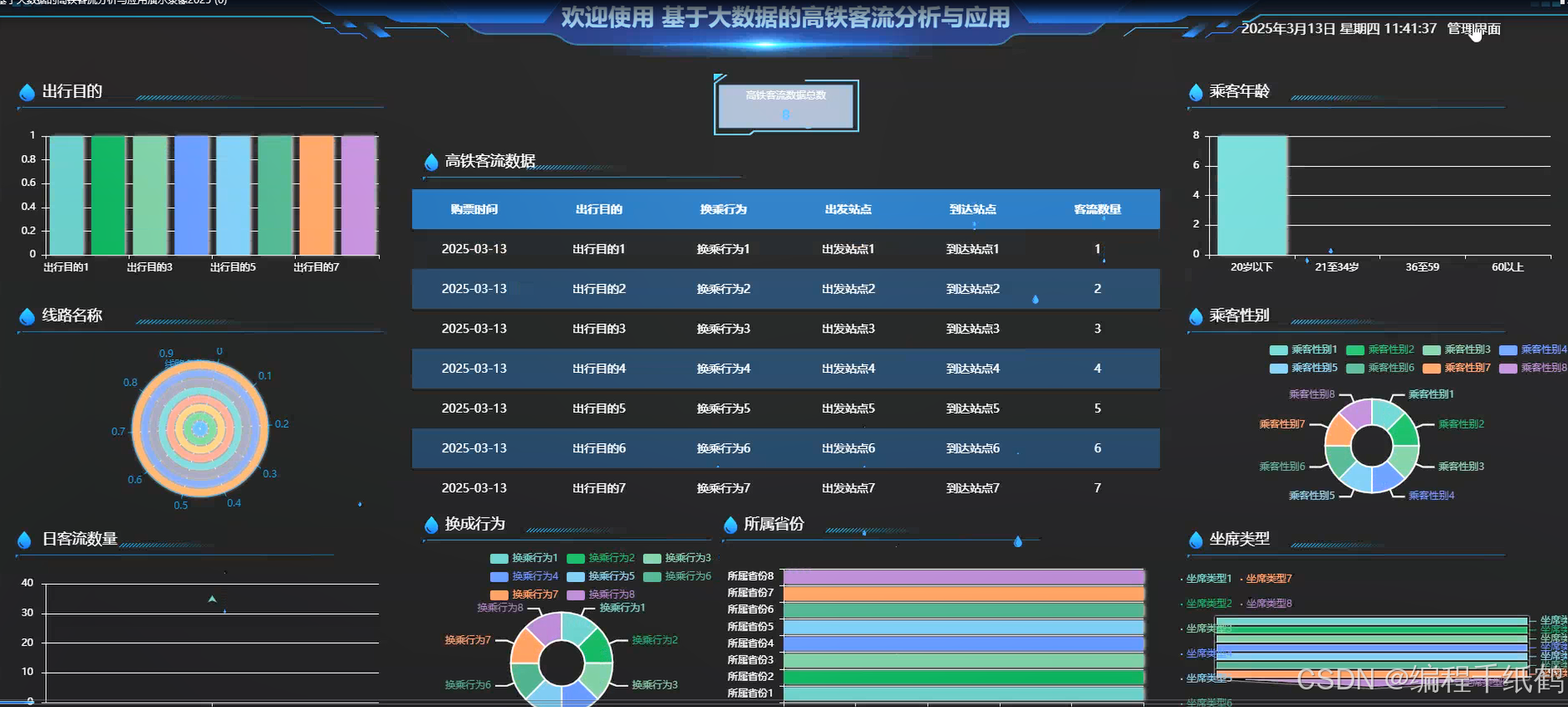
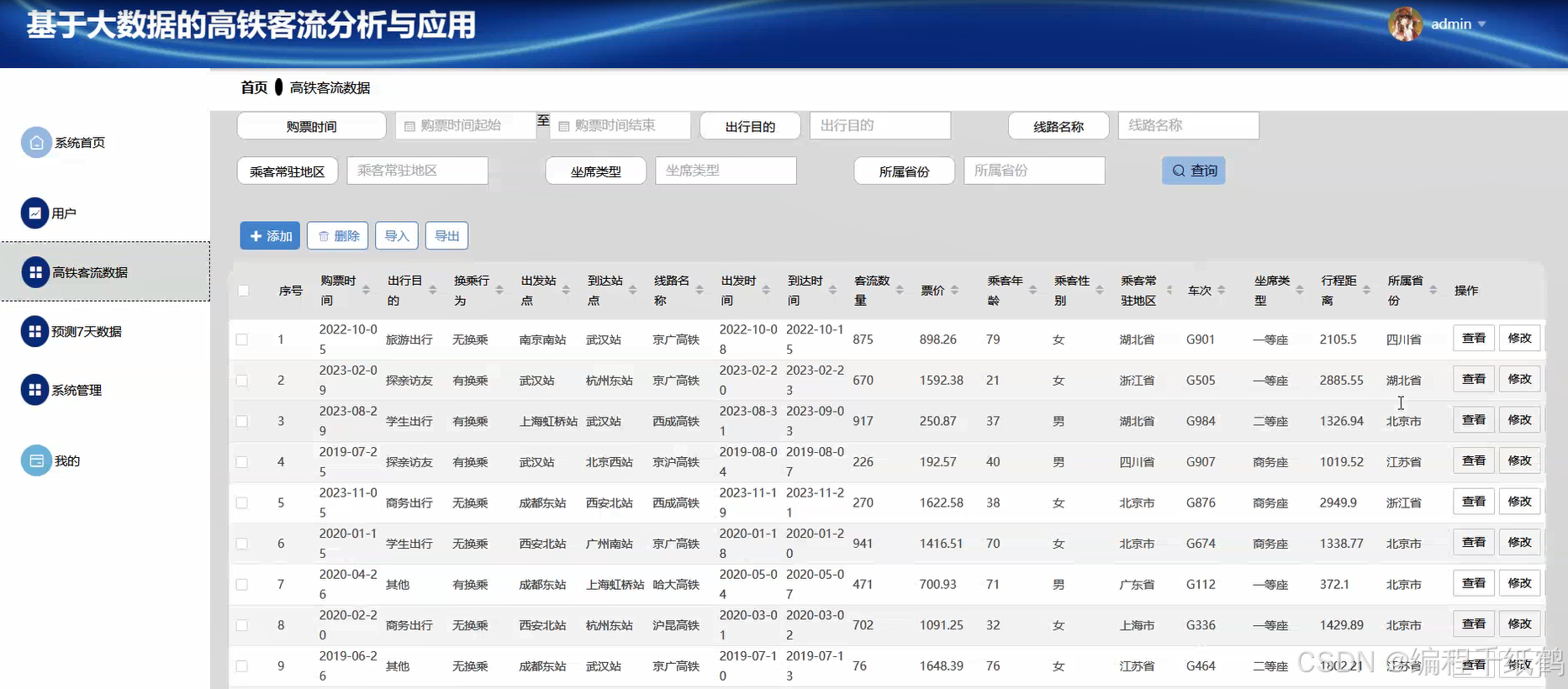
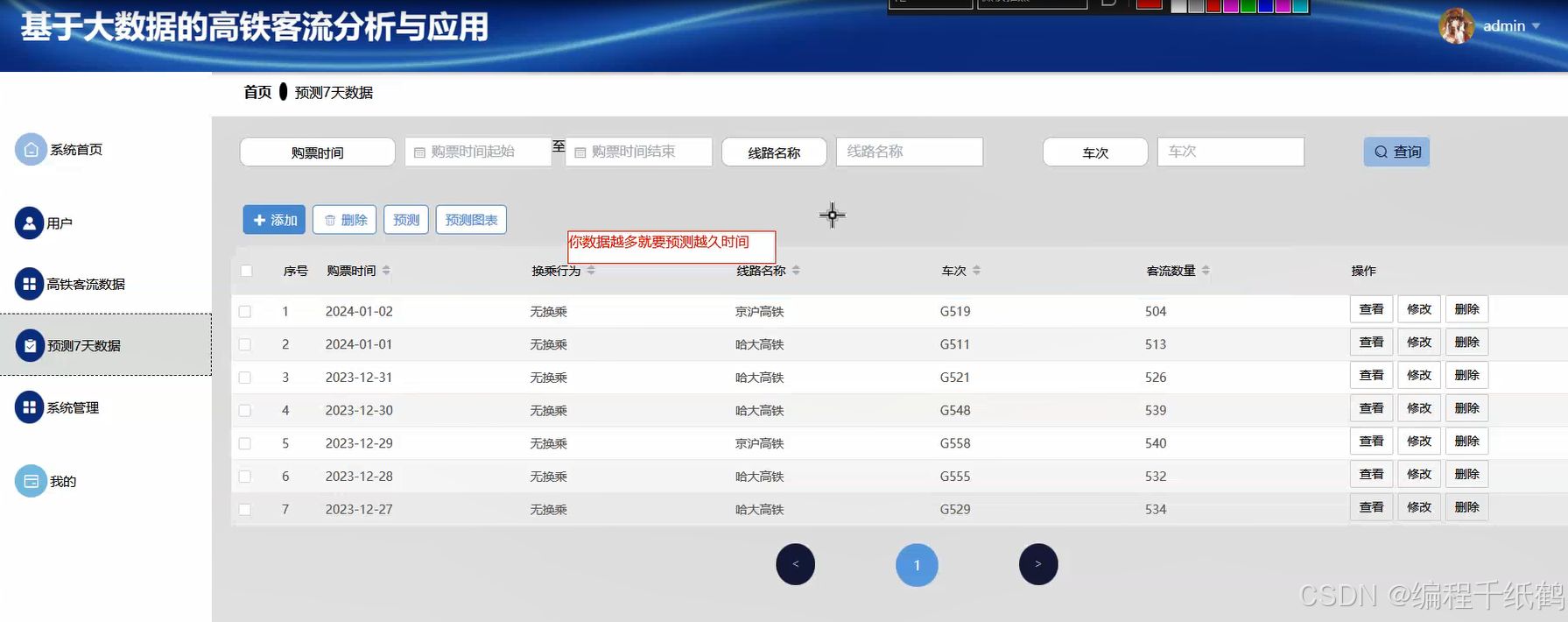
本课题主要研究如何使用大数据技术和数据分析技术,对高铁客流数据进行分析,根据需要了解信息,将数据以可视化大屏的方式来进行体现,以更加直观的视角来提供数据支撑。具体功能主要实现了通过Spark大数据技术实现高铁客户数据可视化分析、实现对高铁客流数据的基本管理、通过机器学习实现对客户数据的预测等核心功能,同时提供了用户注册登录,查看公告,在线留言等的相关辅助功能。在技术开发上主要采用大数据Spark技术,Django开发框架以及机器学习等相关技术进行开发实现.
三,系统展示

四,核心代码展示
import configparser
import re
import json
import os
import mysql.connector
from hdfs import InsecureClient
from pyhive import hive
import csv
from flask import jsonify, request
from api.main import main_bp
from utils.configread import config_read
from utils.codes import normal_code, system_error_code
from pyspark.sql import SparkSession
from pyspark.sql.functions import col, date_format
import shutil
# 获取当前文件路径的根目录
parent_directory = os.path.dirname(os.path.dirname(os.path.dirname(os.path.abspath(__file__))))

m_username = "Administrator"
hadoop_client = InsecureClient('http://localhost:9870')
dbtype, host, port, user, passwd, dbName, charset,hasHadoop = config_read(os.path.join(parent_directory,"config.ini"))

#将mysql里的相关表转成hive库里的表
def migrate_to_hive():

    mysql_conn = mysql.connector.connect(
        host=host,
        port=port,
        user=user,
        password=passwd,
        database=dbName
    )
    cursor = mysql_conn.cursor()

    hive_conn = hive.Connection(
        host='localhost',
        port=10000,
        username=m_username,
    )
    hive_cursor = hive_conn.cursor()
    #创建Hive数据库(如果不存在)
    hive_cursor.execute(f"CREATE DATABASE IF NOT EXISTS {dbName}")
    hive_cursor.execute(f"USE {dbName}")

    highspeedrailpassengerflowdata_table_path=f'/user/hive/warehouse/{dbName}.db/highspeedrailpassengerflowdata'
    #删除已有的hive表
    if hadoop_client.status(highspeedrailpassengerflowdata_table_path,strict=False):
        hadoop_client.delete(highspeedrailpassengerflowdata_table_path, recursive=True)
    # 在Hive中删除表
    highspeedrailpassengerflowdata_drop_table_query = f"""DROP TABLE highspeedrailpassengerflowdata"""
    hive_cursor.execute(highspeedrailpassengerflowdata_drop_table_query)
    cursor.execute("SELECT * FROM highspeedrailpassengerflowdata")
    highspeedrailpassengerflowdata_column_info = cursor.fetchall()
    #将数据写入 CSV 文件
    highspeedrailpassengerflowdata_path = os.path.join(parent_directory, "highspeedrailpassengerflowdata.csv")
    with open(highspeedrailpassengerflowdata_path, 'w', newline='', encoding='utf-8') as csvfile:
        writer = csv.writer(csvfile)
        # 写入数据行
        for row in highspeedrailpassengerflowdata_column_info:
            writer.writerow(row)
    highspeedrailpassengerflowdata_spakr_clear(highspeedrailpassengerflowdata_path)
    cursor.execute("DESCRIBE highspeedrailpassengerflowdata")
    highspeedrailpassengerflowdata_column_info = cursor.fetchall()
    create_table_query = "CREATE TABLE IF NOT EXISTS highspeedrailpassengerflowdata ("
    for column, data_type, _, _, _, _ in highspeedrailpassengerflowdata_column_info:
        match = re.match(r'(\w+)(\(\d+\))?', data_type)
        mysql_type = match.group(1)
        hive_data_type = get_hive_type(mysql_type)
        create_table_query += f"{column} {hive_data_type}, "
    highspeedrailpassengerflowdata_create_table_query = create_table_query[:-2] + ") row format delimited fields terminated by ','"
    hive_cursor.execute(highspeedrailpassengerflowdata_create_table_query)
    # 上传映射文件
    highspeedrailpassengerflowdata_hdfs_csv_path = f'/user/hive/warehouse/{dbName}.db/highspeedrailpassengerflowdata'
    hadoop_client.upload(highspeedrailpassengerflowdata_hdfs_csv_path, highspeedrailpassengerflowdata_path)
    cursor.close()
    mysql_conn.close()
    hive_cursor.close()
    hive_conn.close()

#转换成hive的类型
def get_hive_type(mysql_type):
    type_mapping = {
        'INT': 'INT',
        'BIGINT': 'BIGINT',
        'FLOAT': 'FLOAT',
        'DOUBLE': 'DOUBLE',
        'DECIMAL': 'DECIMAL',
        'VARCHAR': 'STRING',
        'TEXT': 'STRING',
    }
    if isinstance(mysql_type, str):
        mysql_type = mysql_type.upper()
    return type_mapping.get(str(mysql_type), 'STRING')

#执行hive查询
def hive_query():
    # 连接到Hive服务器
    conn = hive.Connection(host='localhost', port=10000, username=m_username,database=dbName)
    # 创建一个游标对象
    cursor = conn.cursor()
    try:

        #定义Hive查询语句
        chuxingmude_query = "SELECT COUNT(*) AS total, chuxingmude FROM highspeedrailpassengerflowdata GROUP BY chuxingmude"
        # 执行Hive查询语句
        cursor.execute(chuxingmude_query)
        # 获取查询结果
        chuxingmude_results = cursor.fetchall()
        chuxingmude_json_list=[]
        for row in chuxingmude_results:
            chuxingmude_json_list.append({"chuxingmude":row[1],"total":row[0]})
        #将JSON数据写入文件
        with open(os.path.join(parent_directory, "highspeedrailpassengerflowdata_groupchuxingmude.json"), 'w', encoding='utf-8') as f:
            json.dump(chuxingmude_json_list, f, ensure_ascii=False, indent=4)


        #定义Hive查询语句
        transferbehavior_query = "SELECT COUNT(*) AS total, transferbehavior FROM highspeedrailpassengerflowdata GROUP BY transferbehavior"
        # 执行Hive查询语句
        cursor.execute(transferbehavior_query)
        # 获取查询结果
        transferbehavior_results = cursor.fetchall()
        transferbehavior_json_list=[]
        for row in transferbehavior_results:
            transferbehavior_json_list.append({"transferbehavior":row[1],"total":row[0]})
        #将JSON数据写入文件
        with open(os.path.join(parent_directory, "highspeedrailpassengerflowdata_grouptransferbehavior.json"), 'w', encoding='utf-8') as f:
            json.dump(transferbehavior_json_list, f, ensure_ascii=False, indent=4)


        #定义Hive查询语句
        linename_query = "SELECT COUNT(*) AS total, linename FROM highspeedrailpassengerflowdata GROUP BY linename"
        # 执行Hive查询语句
        cursor.execute(linename_query)
        # 获取查询结果
        linename_results = cursor.fetchall()
        linename_json_list=[]
        for row in linename_results:
            linename_json_list.append({"linename":row[1],"total":row[0]})
        #将JSON数据写入文件
        with open(os.path.join(parent_directory, "highspeedrailpassengerflowdata_grouplinename.json"), 'w', encoding='utf-8') as f:
            json.dump(linename_json_list, f, ensure_ascii=False, indent=4)


        #定义Hive查询语句
        chengkexingbie_query = "SELECT COUNT(*) AS total, chengkexingbie FROM highspeedrailpassengerflowdata GROUP BY chengkexingbie"
        # 执行Hive查询语句
        cursor.execute(chengkexingbie_query)
        # 获取查询结果
        chengkexingbie_results = cursor.fetchall()
        chengkexingbie_json_list=[]
        for row in chengkexingbie_results:
            chengkexingbie_json_list.append({"chengkexingbie":row[1],"total":row[0]})
        #将JSON数据写入文件
        with open(os.path.join(parent_directory, "highspeedrailpassengerflowdata_groupchengkexingbie.json"), 'w', encoding='utf-8') as f:
            json.dump(chengkexingbie_json_list, f, ensure_ascii=False, indent=4)


        #定义Hive查询语句
        zuoxileixing_query = "SELECT COUNT(*) AS total, zuoxileixing FROM highspeedrailpassengerflowdata GROUP BY zuoxileixing"
        # 执行Hive查询语句
        cursor.execute(zuoxileixing_query)
        # 获取查询结果
        zuoxileixing_results = cursor.fetchall()
        zuoxileixing_json_list=[]
        for row in zuoxileixing_results:
            zuoxileixing_json_list.append({"zuoxileixing":row[1],"total":row[0]})
        #将JSON数据写入文件
        with open(os.path.join(parent_directory, "highspeedrailpassengerflowdata_groupzuoxileixing.json"), 'w', encoding='utf-8') as f:
            json.dump(zuoxileixing_json_list, f, ensure_ascii=False, indent=4)


        #定义Hive查询语句
        suoshushengfen_query = "SELECT COUNT(*) AS total, suoshushengfen FROM highspeedrailpassengerflowdata GROUP BY suoshushengfen"
        # 执行Hive查询语句
        cursor.execute(suoshushengfen_query)
        # 获取查询结果
        suoshushengfen_results = cursor.fetchall()
        suoshushengfen_json_list=[]
        for row in suoshushengfen_results:
            suoshushengfen_json_list.append({"suoshushengfen":row[1],"total":row[0]})
        #将JSON数据写入文件
        with open(os.path.join(parent_directory, "highspeedrailpassengerflowdata_groupsuoshushengfen.json"), 'w', encoding='utf-8') as f:
            json.dump(suoshushengfen_json_list, f, ensure_ascii=False, indent=4)

        where = ' WHERE 1 = 1 '
        ticketpurchasetime_query = f'''SELECT `ticketpurchasetime`, ROUND(SUM(`passengerflowquantity`), 2) AS `total`
            FROM highspeedrailpassengerflowdata {where} GROUP BY `ticketpurchasetime`'''
        #执行Hive查询语句
        cursor.execute(ticketpurchasetime_query)
        # 获取查询结果
        ticketpurchasetime_results = cursor.fetchall()
        ticketpurchasetime_json_list=[]
        for row in ticketpurchasetime_results:
            ticketpurchasetime_json_list.append({"ticketpurchasetime":row[0],"total":row[1]})
        #将JSON数据写入文件
        with open(os.path.join(parent_directory, "highspeedrailpassengerflowdata_valueticketpurchasetimepassengerflowquantity.json"), 'w', encoding='utf-8') as f:
            json.dump(ticketpurchasetime_json_list, f, ensure_ascii=False, indent=4)
        pass
    except Exception as e:
         print(f"An error occurred: {e}")
    finally:
        # 关闭游标和连接
        cursor.close()
        conn.close()

#spark数据清洗和预处理
def highspeedrailpassengerflowdata_spakr_clear(csvpath):
    try:
        #创建Spark会话
        spark = SparkSession.builder.appName("pythonn4tcz179").getOrCreate()
        df = spark.read.csv(csvpath, header=False, inferSchema=True)
        df = df.toDF(
            "id",
            "addtime",
            "ticketpurchasetime",
            "chuxingmude",
            "transferbehavior",
            "chufazhandian",
            "daodazhandian",
            "linename",
            "chufashijian",
            "daodashijian",
            "passengerflowquantity",
            "piaojia",
            "chengkenianling",
            "chengkexingbie",
            "chengkechangzhudiqu",
            "trainnumber",
            "zuoxileixing",
            "xingchengjuli",
            "suoshushengfen",
        )
        #显示原始数据
        df.show()
        #1.删除空值
        df_cleaned = df.dropna()
        #2.去除重复行
        df_cleaned = df_cleaned.dropDuplicates()
        df_cleaned = df_cleaned.withColumn("addtime", date_format(col("addtime"), 'yyyy-MM-dd HH:mm:ss'))
        df_cleaned = df_cleaned.withColumn("ticketpurchasetime", date_format(col("ticketpurchasetime"), 'yyyy-MM-dd'))
        df_cleaned = df_cleaned.withColumn("chufashijian", date_format(col("chufashijian"), 'yyyy-MM-dd'))
        df_cleaned = df_cleaned.withColumn("daodashijian", date_format(col("daodashijian"), 'yyyy-MM-dd'))
        #显示清洗后的数据
        df_cleaned.show()
        #保存清洗后的数据
        print(type(df_cleaned))
        output_path = 'highspeedrailpassengerflowdata_output_dir'  # 输出的目录
        df_cleaned.coalesce(1).write.csv(output_path, header=False, mode="overwrite")
        #手动移动生成的 CSV 文件到目标路径,并重命名
        for filename in os.listdir(output_path):
            if filename.startswith("part-") and filename.endswith(".csv"):
                shutil.move(os.path.join(output_path, filename), csvpath)
        #清理临时目录
        shutil.rmtree(output_path)
        #停止Spark会话
        spark.stop()
    except Exception as e:
        print("e:",e)

# hive分析
@main_bp.route("/pythonn4tcz179/shive/analyze", methods=['GET'])
def shive_analyze():
    if request.method in ["POST", "GET"]:
        msg = {"code": normal_code, "msg": "成功", "data": {}}
        try:
            migrate_to_hive()
            hive_query()
        except Exception as e:
            msg['code'] = system_error_code
            msg['msg'] = f"发生错误:{e}"
        return jsonify(msg)
五,相关作品展示
基于Java开发、Python开发、PHP开发、C#开发等相关语言开发的实战项目
基于Nodejs、Vue等前端技术开发的前端实战项目
基于微信小程序和安卓APP应用开发的相关作品
基于51单片机等嵌入式物联网开发应用
基于各类算法实现的AI智能应用
基于大数据实现的各类数据管理和推荐系统









 扫一扫
扫一扫


 1097
1097


 到【灌水乐园】发言



