



目录
2.6 创建图像缩放和颜色空间转换的上下文结构体swsCtx
一、基本概念
FFmpeg是一个开源的音视频处理框架,它提供了非常强大的库和命令行工具,用于录制、转换、流化以及播放几乎所有类型的音视频数据。FFmpeg拥有一个模块化的架构,主要分为几个部分:libavformat(处理音视频流的封装格式)、libavcodec(处理音视频编解码)、libavfilter(处理音视频数据的过滤)、libavutil(工具库)等。
架构上,FFmpeg通过一系列精心设计的数据结构来组织音视频数据,它支持几乎所有的编解码器(codecs),并且能够运行在多种操作系统和处理器架构之上。这种设计使得FFmpeg在处理音视频数据时具有极高的灵活性和可扩展性。
二、 音视频解码流程解析
2.1音视频编解码基本概念
音视频编解码流程包含编码和解码两个主要步骤:
编码 :编码过程是指将模拟信号(例如,来自麦克风或摄像头的信号)转换为数字信号,然后将数字信号通过压缩算法转换成更小的文件大小,以便存储和传输。这个过程涉及到数据的采样、量化、编码,以及可能的压缩。
解码 :解码过程则是编码的逆过程,目的是将压缩过的音视频数据流还原回人类可识别的音频和视频格式。解码器通常会逐帧或逐包处理数据,对数据进行解压缩、重建采样和量化值,最终输出原始的音视频流。
这里主要对解码流程进行研究,以下是 FFmpeg对视频的解析流程
av_register_all() //注册所有组件
|
avformat_open_input() //打开输入的视频文件
|
avformat_find_stream_info() //获取视频文件信息
|
avcodec_find_decoder() //查找对应的解码器
|
avcode_open2() //打开解码器
|
av_read_frame() //读取数据包
|
AVPacket
|
avcode_decode_video2() //解压一帧数据
|
AVFrame
|
sws_scale() //图像格式转换和缩放
|
渲染绘制到设备
2.2 FFmpeg解码相关函数和数据结构解析
2.1初始化相关
av_register_all() //: 注册所有组件
avformat_network_init();//初始化 FFmpeg 的网络支持,适用于通过网络协议(如 RTSP、HTTP 等)获取媒体数据的场景
2.2打开视频输入流
/**
* Open an input stream and read the header. The codecs are not opened.
* The stream must be closed with avformat_close_input().
*
* @param ps Pointer to user-supplied AVFormatContext (allocated by
* avformat_alloc_context). May be a pointer to NULL, in
* which case an AVFormatContext is allocated by this
* function and written into ps.
* Note that a user-supplied AVFormatContext will be freed
* on failure.
* @param url URL of the stream to open.
* @param fmt If non-NULL, this parameter forces a specific input format.
* Otherwise the format is autodetected.
* @param options A dictionary filled with AVFormatContext and demuxer-private
* options.
* On return this parameter will be destroyed and replaced with
* a dict containing options that were not found. May be NULL.
*
* @return 0 on success, a negative AVERROR on failure.
*
* @note If you want to use custom IO, preallocate the format context and set its pb field.
*///fmtCtx传入传出参数记录文件信息 文件地址(URL或本地地址) 指定格式()
int avformat_open_input(AVFormatContext **ps, const char *url,
const AVInputFormat *fmt, AVDictionary **options);
2.3获取视频文件信息
/**
* Read packets of a media file to get stream information. This
* is useful for file formats with no headers such as MPEG. This
* function also computes the real framerate in case of MPEG-2 repeat
* frame mode.
* The logical file position is not changed by this function;
* examined packets may be buffered for later processing.
*
* @param ic media file handle
* @param options If non-NULL, an ic.nb_streams long array of pointers to
* dictionaries, where i-th member contains options for
* codec corresponding to i-th stream.
* On return each dictionary will be filled with options that were not found.
* @return >=0 if OK, AVERROR_xxx on error
*
* @note this function isn't guaranteed to open all the codecs, so
* options being non-empty at return is a perfectly normal behavior.
*
* @todo Let the user decide somehow what information is needed so that
* we do not waste time getting stuff the user does not need.
*///获取媒体文件中的流信息。该函数会解析文件并填充 AVFormatContext 结构体中的 streams 字段
int avformat_find_stream_info(AVFormatContext *ic, AVDictionary **options);
2.4 查找对应的解码器并打开
/**
* Find a registered decoder with a matching codec ID.
*
* @param id AVCodecID of the requested decoder
* @return A decoder if one was found, NULL otherwise.
*/
const AVCodec *avcodec_find_decoder(enum AVCodecID id);打开解码器
const AVCodec *videoCodec = avcodec_find_decoder(videoStream->codecpar->codec_id);
//分配一个新的编解码上下文(AVCodecContext)
AVCodecContext *videoCodecCtx = avcodec_alloc_context3(videoCodec);
//编解码参数复制到编解码Contex
avcodec_parameters_to_context(videoCodecCtx, videoStream->codecpar)// 打开解码器
avcodec_open2(videoCodecCtx, videoCodec, nullptr)
2.5 分配帧
AVFrame *YuvFrame = av_frame_alloc();
AVFrame *RgbFrame = av_frame_alloc();//计算存储原始图像数据所需的最小缓冲区大小pix_fmt:像素格式(如 AV_PIX_FMT_YUV420P)。width:图像宽度。height:图像高度。align:缓冲区对齐方式(通常为 1 或 32)。
int numBytes = av_image_get_buffer_size(AV_PIX_FMT_RGB24, videoCodecCtx->width, videoCodecCtx->height, 1);
buffer = (uint8_t*)av_malloc(numBytes * sizeof(uint8_t));
av_image_fill_arrays(RgbFrame->data, RgbFrame->linesize, buffer, AV_PIX_FMT_RGB24, videoCodecCtx->width, videoCodecCtx->height, 1);
2.6 创建图像缩放和颜色空间转换的上下文结构体swsCtx
由 sws_getContext() 创建。它保存缩放算法、源/目标格式、尺寸等信息,供 sws_scale() 函数使用,完成视频帧的尺寸调整或像素格式转换。处理完成后需通过 sws_freeContext() 释放资源。
/**
* Allocate and return an SwsContext. You need it to perform
* scaling/conversion operations using sws_scale().
*
* @param srcW the width of the source image
* @param srcH the height of the source image
* @param srcFormat the source image format
* @param dstW the width of the destination image
* @param dstH the height of the destination image
* @param dstFormat the destination image format
* @param flags specify which algorithm and options to use for rescaling
* @param param extra parameters to tune the used scaler
* For SWS_BICUBIC param[0] and [1] tune the shape of the basis
* function, param[0] tunes f(1) and param[1] f´(1)
* For SWS_GAUSS param[0] tunes the exponent and thus cutoff
* frequency
* For SWS_LANCZOS param[0] tunes the width of the window function
* @return a pointer to an allocated context, or NULL in case of error
* @note this function is to be removed after a saner alternative is
* written
*/
struct SwsContext *sws_getContext(int srcW, int srcH, enum AVPixelFormat srcFormat,
int dstW, int dstH, enum AVPixelFormat dstFormat,
int flags, SwsFilter *srcFilter,
SwsFilter *dstFilter, const double *param);
2.7 解码相关和格式转化
int av_read_frame(AVFormatContext *s, AVPacket *pkt);从输入媒体文件中读取单个音频或视频帧数据包(AVPacket)。该函数成功时返回 0,失败时返回负的错误码。读取到的数据包可送入解码器进行解码,读取完毕后需使用 av_packet_unref 释放
int avcodec_send_packet(AVCodecContext *avctx, const AVPacket *pkt); 将数据包送入解码器
int avcodec_receive_frame(AVCodecContext *avctx, AVFrame *frame); 从解码器读取解码后的帧,无帧可取时返回AVERROR(EAGAIN)或AVERROR_EOF。必须与avcodec_send_packet配合使用,获取帧后需调用av_frame_unref释放。//将解码后的YUVFrame转换为RGBFrame便于后续显示
int ret = sws_scale(swsCtx, YuvFrame->data, YuvFrame->linesize, 0,YuvFrame->height, RgbFrame->data, RgbFrame->linesize);
2.8 资源释放相关
av_frame_free(AVFrame **frame):释放帧并置指针为 NULL。
av_packet_free(AVPacket **pkt):释放数据包并置指针为 NULL。
av_free(void *ptr):释放由 FFmpeg 分配的内存(如 av_malloc 分配的内存)。
avcodec_close(AVCodecContext *ctx):关闭解码器上下文(建议使用 avcodec_free_context)。
avcodec_free_context(AVCodecContext **ctx):释放并置上下文指针为 NULL。
avformat_close_input(AVFormatContext **ctx):关闭输入文件并置指针为 NULL。
avio_closep(AVIOContext **s):关闭并置 AVIO 上下文指针为 NULL。
sws_freeContext(SwsContext *ctx):释放图像缩放上下文。
swr_close(SwrContext *ctx):关闭音频重采样上下文(建议使用 swr_free)。
swr_free(SwrContext **ctx):释放音频重采样上下文并置指针为 NULL。
2.9 错误输出相关
av_strerror 将错误码转为字符串描述
av_log 输出日志信息,通常配合 AV_LOG_ERROR 等级别使用。可调用 av_log_set_level 设置日志等级。
2.10 相关数据结构
AVFormatContext *fmtCtx = nullptr;//封装格式上下文结构体,保存文件封装格式相关信息,用于存储媒体文件的信息和状态
AVStream *videoStream = nullptr;//多媒体流(如视频流或音频流)的信息,每个音视频流对应一个
AVCodecContext *videoCodecCtx = nullptr;//编解码上下文结构体,存储音视频编解码器的配置信息;配置编解码器的各种参数,比特率、帧率、分辨率等
.codec 编解码器的AVCodec
.width height 图像宽高(只针对视频)
.pix_fmt:像素格式(只针对视频)
.sample_rate:采样率(音频)
.sample_fmt 采样格式(音频)
AVCodec *avCoderc = nullptr; //每种视频扁家吗器(如H.264解码器)对用一个结构体
AVPacket packet;//用于存储一阵编码压缩后的数据包,包含音视频数据、时间戳、数据指针和数据大小等信息
.pts 显示时间戳
.dts 解码时间戳
.data 压缩编码数据
.size 压缩编码数据大小
.stream_index 所属流AVStream的索引
AVFrame *YuvFrame = nullptr;//存储一帧解码后像素数据
.data 解码后数据
.Linesize 对视频图像中一行像素的代下 音频:整个音频帧的大小
.width heigth 图像的宽高
.key_frame 是否为关键帧(只针对视频)
.pict_type 帧类型(只针对视频 I,P,B)
SwsContext *swsCtx = nullptr;//存储图像缩放和颜色空间转换的相关信息
三、视频解析播放
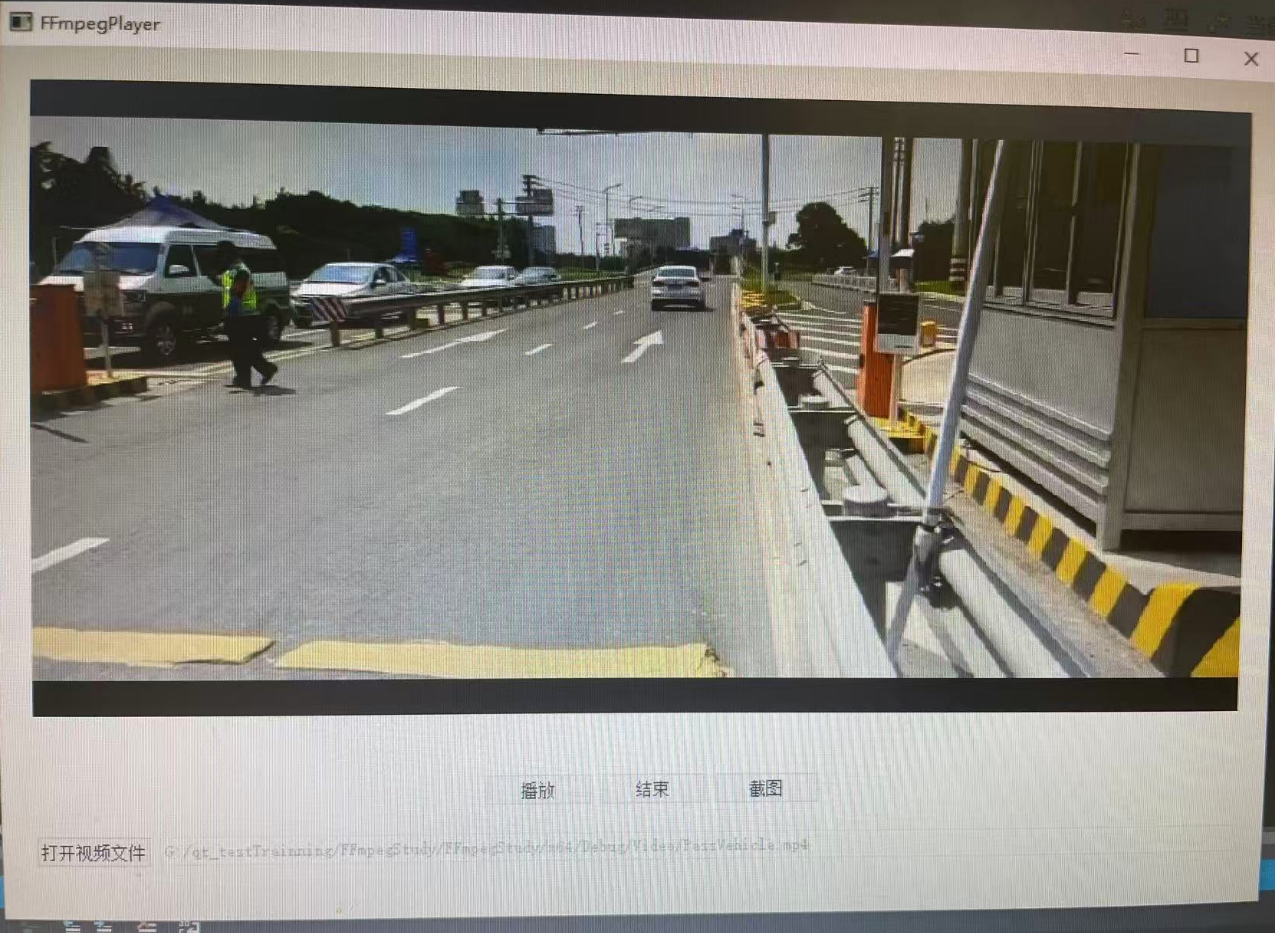
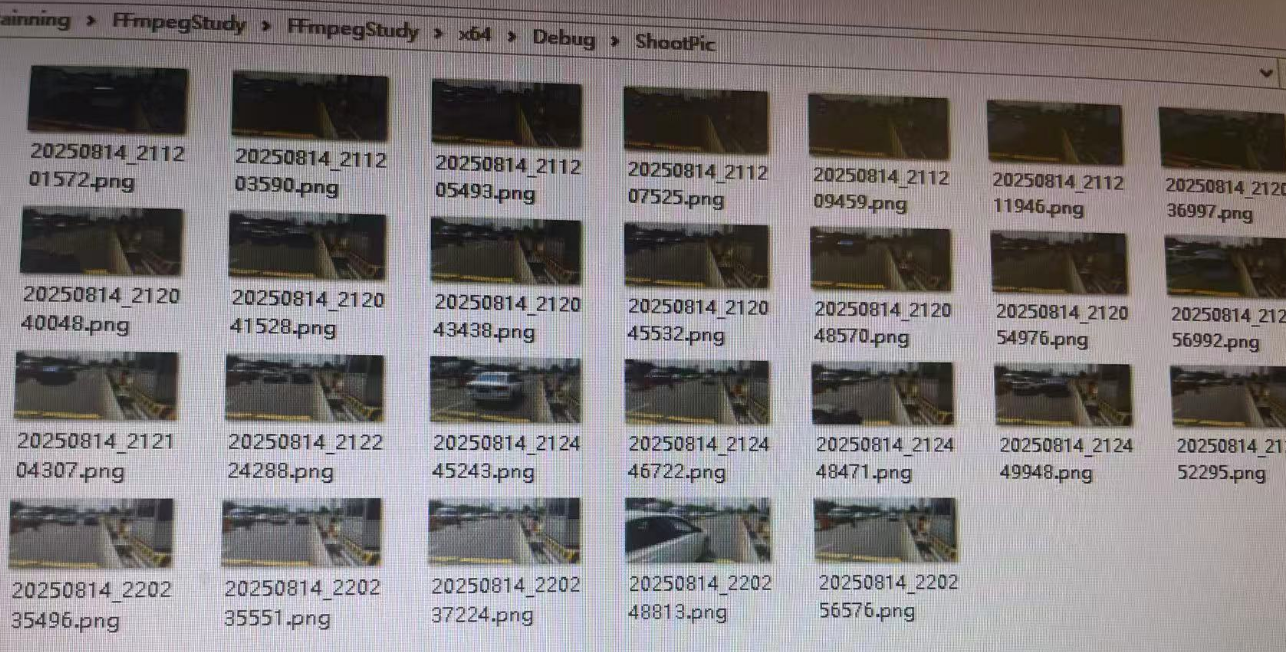
以下以视频文件解析播放为例,先解析视频流进行播放渲染,音频流暂不解析播放;视频支持播放、暂停、结束和重新播放,抽帧做截图等。
3.1播放器界面相关
头文件
#pragma once

#include <QtWidgets/QWidget>
#include "ui_FFmpegPlayer.h"
#include "DecoderHelper.h"
#include <QThread>
class FFmpegPlayer : public QWidget
{
	Q_OBJECT

public:
	FFmpegPlayer(QWidget *parent = Q_NULLPTR);
	~FFmpegPlayer();
private slots:
	void openFile();
	void play();
	void stop();
private:
	void clearVideo();

private:
	Ui::FFmpegPlayerClass ui;
	QTimer *timer;
private:
	QThread m_decodThread;
	DecoderHelper m_decoderHelper;
private:
	QString m_fileName;
	QString m_imagePath;
};
cpp文件代码
#include "FFmpegPlayer.h"
#include <QTimer>
#include <QDir>
#include <QFileDialog>
#include<QImage>
#include<QDebug>
#include<QMessageBox>
#include<QtConcurrent>

#pragma execution_character_set("utf-8")

FFmpegPlayer::FFmpegPlayer(QWidget *parent):QWidget(parent),timer(new QTimer(this))
{
	ui.setupUi(this);
	m_imagePath = QCoreApplication::applicationDirPath()+ QDir::separator() + "ShootPic";
	m_decoderHelper.moveToThread(&m_decodThread);
	m_decoderHelper.setImageDir(m_imagePath);


    connect(ui.pbOpenVideo, &QPushButton::clicked, this, &FFmpegPlayer::openFile);
	connect(ui.pbPlayer, &QPushButton::clicked, this, &FFmpegPlayer::play);
	connect(ui.pbStop, &QPushButton::clicked, this, &FFmpegPlayer::stop);
	connect(ui.pushShoot, &QPushButton::clicked, &m_decoderHelper, &DecoderHelper::takeScreenshot);

	connect(timer, &QTimer::timeout, this, [=]() {
		QMetaObject::invokeMethod(&m_decoderHelper, "decodeFrame", Qt::QueuedConnection);
	});
	connect(&m_decoderHelper, &DecoderHelper::stopSig, this, [=]() {
		stop();
	});


	connect(&m_decoderHelper, &DecoderHelper::updateFrameImageSig, this, [=](const QImage& img) {
		ui.DisplayLabel->setPixmap(QPixmap::fromImage(img).scaled(
			ui.DisplayLabel->size(), Qt::KeepAspectRatio));
		qApp->processEvents(); // 刷新界面
	});

	m_decodThread.start();

	//初始化 FFmpeg 的网络支持,适用于通过网络协议(如 RTSP、HTTP 等)获取媒体数据的场景
	avformat_network_init();
	ui.pbPlayer->setEnabled(false);
	ui.lineEdit->setEnabled(false);
}

void FFmpegPlayer::openFile() {
	QMetaObject::invokeMethod(&m_decoderHelper, "clearVideo", Qt::QueuedConnection);
	m_fileName = QFileDialog::getOpenFileName(this, tr("Open Video"), "", tr("Video Files (*.mp4 *.avi *.mkv)"));
	m_decoderHelper.setFilePath(m_fileName);
	ui.lineEdit->setText(m_fileName);
	QMetaObject::invokeMethod(&m_decoderHelper, "initFileCfg", Qt::QueuedConnection);
	ui.pbPlayer->setEnabled(true);
}

void FFmpegPlayer::play() {
	if (timer->isActive())
	{
		timer->stop();
		ui.pbPlayer->setText("播放");
	}
	else
	{
		timer->start(30);// 更新帧间隔时间(毫秒)
		ui.pbPlayer->setText("暂停");
	}
	ui.pbStop->setEnabled(true);
	ui.pushShoot->setEnabled(true);
}

void FFmpegPlayer::stop()
{
	timer->stop();
	QMetaObject::invokeMethod(&m_decoderHelper, "refreshVideoIndex", Qt::QueuedConnection);
	ui.pbPlayer->setEnabled(true);
	ui.pbPlayer->setText("播放");
	ui.pbStop->setEnabled(false);
	ui.pushShoot->setEnabled(true);
	ui.DisplayLabel->clear();
}


void FFmpegPlayer::clearVideo()
{
	if (timer->isActive())
	{
		timer->stop();
	}
	QMetaObject::invokeMethod(&m_decoderHelper, "clearParam", Qt::QueuedConnection);
}

FFmpegPlayer::~FFmpegPlayer() {
	m_decodThread.quit();//退出事件循环
	m_decodThread.wait();//等待线程退出
}
3.2解码相关
视频解码头文件
#pragma once
#include<QObject>
#include<QImage>

extern "C" {
#include <libavformat/avformat.h>
#include <libavcodec/avcodec.h>
#include <libswscale/swscale.h>
#include <libavutil/imgutils.h>
#include <libswresample/swresample.h>

}


class DecoderHelper:public QObject
{
	Q_OBJECT
public:
	DecoderHelper(QObject *parent = Q_NULLPTR);
	~DecoderHelper();
public:
	void setFilePath(QString &fileName);
	void setImageDir(QString&imagePath);

private:
	AVFormatContext *fmtCtx = nullptr;//用于存储媒体文件的信息和状态
	AVCodecContext *videoCodecCtx = nullptr;//存储编解码器的配置信息;配置编解码器的各种参数,比特率、帧率、分辨率等
	AVStream *videoStream = nullptr;//多媒体流(如视频流或音频流)的信息。
	int videoStreamIndex = -1;
	SwsContext *swsCtx = nullptr;//存储图像缩放和颜色空间转换的相关信息
	AVPacket packet;//用于存储编码后的数据包,包含音视频数据、时间戳、数据指针和数据大小等信息
	AVFrame *YuvFrame = nullptr;//读取的帧结构
	AVFrame *RgbFrame = nullptr;//转换的帧
	uint8_t *buffer = nullptr;
signals:
	void updateFrameImageSig(const QImage&img);//刷新帧信号
	void stopSig();//播放完信号

public slots:
   void decodeFrame();//解码帧
   void takeScreenshot();//抽帧截图
private:
	Q_INVOKABLE void initFileCfg();
	Q_INVOKABLE void refreshVideoIndex();
	Q_INVOKABLE void clearParam();

private:
	QString m_fileName;
	QString m_imagePath;
};
解码实现文件
#include "DecoderHelper.h"
#include <QDir>
#include <QDateTime>
#include <QDebug>
#include<QtConcurrent>

void DecoderHelper::setFilePath(QString &fileName)
{
	m_fileName = fileName;
}

void DecoderHelper::setImageDir(QString&imagePath)
{
	m_imagePath = imagePath;
}

void DecoderHelper::clearParam()
{
	av_packet_unref(&packet);
	av_frame_unref(YuvFrame);
	av_frame_unref(RgbFrame);
	avcodec_free_context(&videoCodecCtx);
	avformat_close_input(&fmtCtx);
	sws_freeContext(swsCtx);
	swsCtx = nullptr;
}

void DecoderHelper::initFileCfg() {
	if (!m_fileName.isEmpty()) {
		//fmtCtx传入传出参数记录文件信息 文件地址(URL或本地地址) 指定格式()
		if (avformat_open_input(&fmtCtx, m_fileName.toStdString().c_str(), nullptr, nullptr) != 0) {
			qDebug() << "Could not open file";
			return;
		}
		//获取媒体文件中的流信息。该函数会解析文件并填充 AVFormatContext 结构体中的 streams 字段
		if (avformat_find_stream_info(fmtCtx, nullptr) < 0) {
			qDebug() << "Could not find stream info";
			return;
		}
		//fmtCtx->nb_streams文件中所有流的总数(视频流+音频流+字幕流等)
		for (int i = 0; i < fmtCtx->nb_streams; ++i) {
			if (fmtCtx->streams[i]->codecpar->codec_type == AVMEDIA_TYPE_VIDEO) {
				videoStream = fmtCtx->streams[i];//视频流
				videoStreamIndex = i;
			}
		}

		if (!videoStream || audioStream ) {
			qDebug() << "No video stream found or No audio stream found";
			return;
		}

		//videoStream->codecpar 是一个指向 AVCodecParameters 结构的指针,包含编解码器参数。
		//codec_id 是编解码器的唯一标识符 根据 codec_id 查找对应的解码器,并返回一个指向 AVCodec 结构的指针
		const AVCodec *videoCodec = avcodec_find_decoder(videoStream->codecpar->codec_id);
		if (!videoCodec) {
			qDebug() << "Unsupported codec!";
			return;
		}
		//分配一个新的编解码上下文(AVCodecContext)
		videoCodecCtx = avcodec_alloc_context3(videoCodec);
		if (!videoCodecCtx) {
			qDebug() << "Failed to allocate codec context";
			return;
		}


		//编解码参数复制到编解码Contex
		if (avcodec_parameters_to_context(videoCodecCtx, videoStream->codecpar) < 0) {
			qDebug() << "Failed to copy codec parameters to context";
			return;
		}

		// 打开解码器
		if (avcodec_open2(videoCodecCtx, videoCodec, nullptr) < 0) {
			qDebug() << "Failed to open codec";
			return;
		}
		// 分配帧  AVFrame 结构体,用于存储解码后的帧
		YuvFrame = av_frame_alloc();
		RgbFrame = av_frame_alloc();

		//计算存储原始图像数据所需的最小缓冲区大小
		int numBytes = av_image_get_buffer_size(AV_PIX_FMT_RGB24, videoCodecCtx->width, videoCodecCtx->height, 1);
		buffer = (uint8_t*)av_malloc(numBytes * sizeof(uint8_t));
		if (!buffer)
		{
			qDebug() << "Failed to av_malloc";
			return;
		}
		av_image_fill_arrays(RgbFrame->data, RgbFrame->linesize, buffer, AV_PIX_FMT_RGB24, videoCodecCtx->width, videoCodecCtx->height, 1);


		//解码后视频帧的宽度和高度(以像素为单位)
		int dstWidth = videoCodecCtx->width; // 目标宽度
		int dstHeight = videoCodecCtx->height; // 目标高度

											   //创建图像缩放上下文
											   //源宽度 高度 目标像素格式 目的宽度 高度 像素格式
		swsCtx = sws_getContext(videoCodecCtx->width, videoCodecCtx->height,
			videoCodecCtx->pix_fmt,
			dstWidth, dstHeight,
			AV_PIX_FMT_RGB24,
			SWS_BILINEAR,
			nullptr, nullptr, nullptr);

		if (!swsCtx) {
			qDebug() << "Failed to create ";
		}
	}
}

void DecoderHelper::refreshVideoIndex()
{
	//int av_seek_frame(AVFormatContext *s, int stream_index, int64_t timestamp, int flags);
	//定位媒体文件到指定时间点 上下文 流索引 目标时间戳 定位标记
	av_seek_frame(fmtCtx, videoStreamIndex, 0, AVSEEK_FLAG_BACKWARD);
	//清空解码器内部的缓冲数据,通常在跳转(如 av_seek_frame)后调用,以清除旧的、不再需要的帧缓存,确保后续解码从新的位置开始
	avcodec_flush_buffers(videoCodecCtx);
}


void DecoderHelper::decodeFrame() {
	if (!fmtCtx || !videoStream || !videoCodecCtx || !swsCtx) {
		return;
	}
	//av_read_frame 从媒体文件中读取下一个数据包(AVPacket)
	while (true) {
		int ret = av_read_frame(fmtCtx, &packet);
		if (ret >= 0)
		{
			if (packet.stream_index == videoStream->index) {

				//将一个编码的数据包(AVPacket)送入解码器的函数
				if (avcodec_send_packet(videoCodecCtx, &packet) < 0) {
					av_packet_unref(&packet);// 用于释放数据包资源
					continue;
				}

				// 从解码器接收解码后的帧发送给播放器
				while (avcodec_receive_frame(videoCodecCtx, YuvFrame) >= 0) {
					int ret = sws_scale(swsCtx, YuvFrame->data, YuvFrame->linesize, 0,
						YuvFrame->height, RgbFrame->data, RgbFrame->linesize);

					//一般表示图片YUV格式最多四个平面 RGB格式一个平面即可其余为nullptr对应长度为0
					QImage image(RgbFrame->data[0], videoCodecCtx->width, videoCodecCtx->height,
						RgbFrame->linesize[0], QImage::Format_RGB888);
					emit updateFrameImageSig(image);

										   //sws_scale
										   //context:由 sws_getContext 返回的上下文。
										   //srcSlice:源图像的数据指针数组。
										   //srcStride:源图像的每行字节数。
										   //srcSliceY, srcSliceH:源图像的起始行和高度。
										   //dst:目标图像的数据指针数组。
										   //dstStride:目标图像的每行字节数。

										   // 释放当前帧的数据引用,重置帧,准备下一次使用
					av_frame_unref(YuvFrame);

				}
				av_packet_unref(&packet);
				break; // 只处理一帧
			}
		}
		else
		{
			// 读取完毕
			if (ret == AVERROR_EOF) {
				emit stopSig();
				break;
			}
			else {
				// 其他错误(如文件损坏)
				break;
			}
		}
	}
}

void DecoderHelper::takeScreenshot()
{
	// 检测RGB帧状态准备抽帧截图
	//I/O耗时在子线程跑 防止卡视频流解码
	QtConcurrent::run([&]() {
		if (!RgbFrame) {
			return;
		}
		// 构造 QImage(深拷贝数据)
		int numBytes = RgbFrame->linesize[0] * videoCodecCtx->height;
		QByteArray imageData((char*)RgbFrame->data[0], numBytes);
		QImage image(RgbFrame->data[0], videoCodecCtx->width, videoCodecCtx->height,
			RgbFrame->linesize[0], QImage::Format_RGB888);
		QString picPath = m_imagePath + QDir::separator() + QDateTime::currentDateTime().toString("yyyyMMdd_hhmmsszzz") + ".png";
		bool bnull = image.isNull();
		bool b = image.save(picPath);
	});
}

DecoderHelper::DecoderHelper(QObject *parent) :QObject(parent)
{}

DecoderHelper::~DecoderHelper()
{
	//关闭并释放解封装上下文
	if (fmtCtx) {
		avformat_close_input(&fmtCtx);
		fmtCtx = nullptr;
	}
	//释放解码器上下文
	if (videoCodecCtx) {
		avcodec_close(videoCodecCtx); // 关闭解码器
		avcodec_free_context(&videoCodecCtx);	//用于释放解码器上下文资源
		videoCodecCtx = nullptr;
	}
    //释放图像缩放转化上下文结构体
	if (swsCtx) {
		sws_freeContext(swsCtx);
		swsCtx = nullptr;
	}

	//释放压缩数据包 AVPacket
	av_packet_unref(&packet); // 清除内部引用
	//av_packet_free(&packet)); // 栈上的不用释放结构体

	//释放解码帧
	if (YuvFrame)
	{
		av_frame_unref(YuvFrame);
	}
	if (RgbFrame)
	{
		av_frame_unref(RgbFrame);
	}
}
3.3 测试结果





 扫一扫
扫一扫


 8179
8179

 被折叠的 条评论
为什么被折叠?
被折叠的 条评论
为什么被折叠?
 到【灌水乐园】发言





