


需求
对方OpcUaServer不支持权限等级None的连接,因此需要用openssl生成自签名的证书,然后跟对方交换证书,以便OpcUaClient能够支持加密连接。
步骤一 用openssl生成自签名证书
只下载到了3.0.3.3 版本,也可以用。根据Copilot的提示,我通过如下步骤给我的应用 DataX 生成了证书。
首先创建datax.cnf文件,内容如下,req_distinguished_name里面是关于国家、地区、公司、部门、应用等信息。subjectAltName 是证书的别名,要跟OpcUaClient的Uri一致。
[ req ]
default_bits       = 2048
default_md         = sha256
distinguished_name = req_distinguished_name
req_extensions     = v3_req
prompt             = no

[ req_distinguished_name ]
C  = CN
ST = BJ
L  = BJ
O  = EasyCloud
OU = Tech
CN = DataX

[ v3_req ]
subjectAltName = URI:urn:DataX
然后分别生成pem,crt,der,pfx等文件,其实用到的就pfx文件。
openssl req -new -key datax.key -out datax.csr -config datax.cnf

openssl x509 -req -days 10000 -in datax.csr -signkey datax.key -out datax.crt -extfile datax.cnf -extensions v3_req

openssl x509 -in datax.crt -outform der -out datax.der

pkcs12 -export -out datax.pfx -inkey datax.key -in datax.crt -password pass:000
步骤二 创建一个OpcUaClient xml配置文件
<?xml version="1.0" encoding="utf-8"?>
<ApplicationConfiguration
  xmlns:xsi="http://www.w3.org/2001/XMLSchema-instance"
  xmlns:ua="http://opcfoundation.org/UA/2008/02/Types.xsd"
  xmlns="http://opcfoundation.org/UA/SDK/Configuration.xsd"
>
<ApplicationName>DataX</ApplicationName>
<ApplicationUri>urn:DataX</ApplicationUri>
<ProductUri>uri:easycloud.com:DataX</ProductUri>
<ApplicationType>Client_1</ApplicationType>
  <SecurityConfiguration>
	<ApplicationCertificate>
	  <StoreType>Directory</StoreType>
	  <StorePath>pki/own</StorePath>
	  <SubjectName>DataX</SubjectName>
	</ApplicationCertificate>
    <TrustedIssuerCertificates>
      <StoreType>Directory</StoreType>
      <StorePath>pki/issuers</StorePath>
    </TrustedIssuerCertificates>
    <TrustedPeerCertificates>
      <StoreType>Directory</StoreType>
      <StorePath>pki/trusted</StorePath>
    </TrustedPeerCertificates>
    <RejectedCertificates>
      <StoreType>Directory</StoreType>
      <StorePath>pki/rejected</StorePath>
    </RejectedCertificates>
    <AutoAcceptUntrustedCertificates>true</AutoAcceptUntrustedCertificates>
    <RejectSHA1SignedCertificates>false</RejectSHA1SignedCertificates>
    <MinimumCertificateKeySize>1024</MinimumCertificateKeySize>
    <SuppressNonceValidationErrors>true</SuppressNonceValidationErrors>
  </SecurityConfiguration>
  <TransportQuotas>
    <OperationTimeout>60000</OperationTimeout>
    <MaxStringLength>2147483647</MaxStringLength>
    <MaxByteStringLength>2147483647</MaxByteStringLength>
    <MaxArrayLength>65535</MaxArrayLength>
    <MaxMessageSize>419430400</MaxMessageSize>
    <MaxBufferSize>65535</MaxBufferSize>
    <ChannelLifetime>60000</ChannelLifetime>
    <SecurityTokenLifetime>3600000</SecurityTokenLifetime>
  </TransportQuotas>
  <ClientConfiguration>
    <DefaultSessionTimeout>3600000</DefaultSessionTimeout>
    <MinSubscriptionLifetime>5000</MinSubscriptionLifetime>
  </ClientConfiguration>
  <ServerConfiguration>
    <MaxSubscriptionCount>100000</MaxSubscriptionCount>
    <MaxMessageQueueSize>1000000</MaxMessageQueueSize>
    <MaxNotificationQueueSize>1000000</MaxNotificationQueueSize>
    <MaxPublishRequestCount>10000000</MaxPublishRequestCount>
  </ServerConfiguration>

  <!-- Disables the hi-res clock if the QueryPerformanceCounter does work on a particular machine. -->
  <DisableHiResClock>true</DisableHiResClock>

</ApplicationConfiguration>
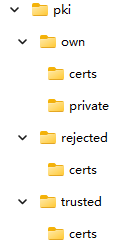
注意SecurityConfirguration 里面的配置与opcuaclient程序exe所在目录下的文件夹对上,然后把datax.pfx文件放到pki\own下面,pki\own\certs和pki\own\private 两个文件夹目前是空的。
步骤三 写一个OpcUaClient来加载OpcUaClient xml配置文件
本文的关键就是 await application.CheckApplicationInstanceCertificatesAsync(false, 2048); 不知道为什么,直接用openssl 创建的pfx,der并不能直接用,用红色这句可以用pki\own\datax.pfx生成一个 DataX[一长串].pfx 和 DataX[一长串].der 分别放在 pki\own\private 和 pki\own\certs下,生成的这个证书才能用!
        private async Task loadConfigureAsync(string xmlFile)
        {
            var application = new Opc.Ua.Configuration.ApplicationInstance
            {
                ApplicationName = OpcUaName,
                ApplicationType = ApplicationType.Client,
                CertificatePasswordProvider = new CertificatePasswordProvider("000000")
            };

            await application.LoadApplicationConfigurationAsync(xmlFile, false);
            //This will generate a valid certificate in the default store location.
            await application.CheckApplicationInstanceCertificatesAsync(false, 2048);
            m_configuration = application.ApplicationConfiguration;
        }





 扫一扫
扫一扫


 1302
1302

 被折叠的 条评论
为什么被折叠?
被折叠的 条评论
为什么被折叠?
 到【灌水乐园】发言





