








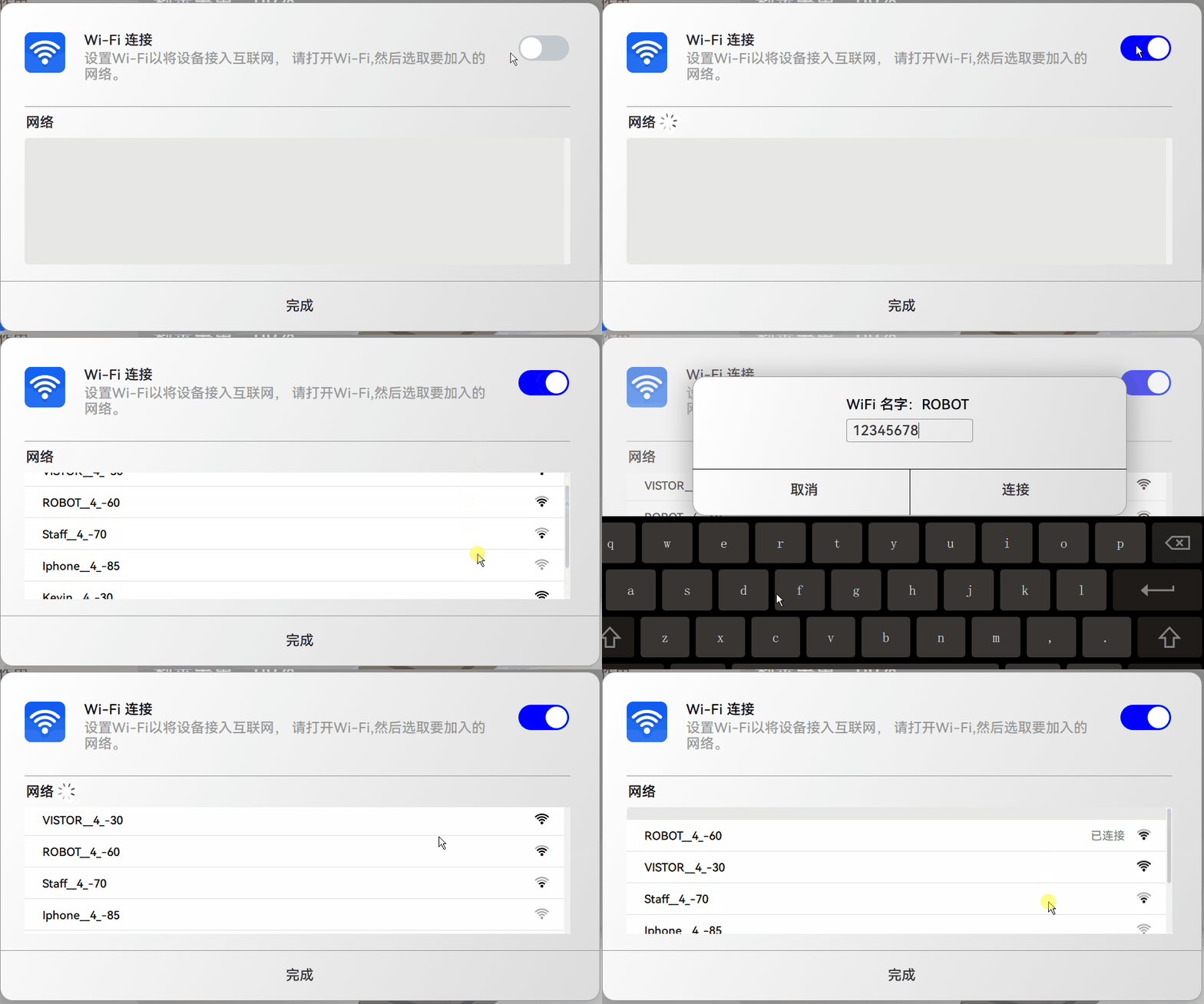
STA 功能:
1、打开wifi。 开关防止误按做了长按处理,原本组件按一下就打开或者关闭,可是wifi耗时,,防止误按以及重复按,重新做了开关组件,长按时间可设置。
2、搜索wifi列表 后台线程服务内搜索附近的wifi,并获得wifi信息传给UI,C++ 继承class WifiDataModel : public QAbstractListModel 实现
3、连接WiFi 连接后wifi移到第一个,显示已连接, 操作model实现
4、关闭WiFi
所有wifi操作都在线程内,UI 层面不会有卡顿, 所有结果都是线程返回, 不是UI上操作后就显示结果, 操作后等待线程返回 更新UI结果界面。
#ifndef WIFIDATAMODEL_H
#define WIFIDATAMODEL_H

#include <QAbstractListModel>
#include <QObject>
#include <QList>
#include <QDebug>

#include "wifidataitem.h"

class WifiDataModel : public QAbstractListModel
{
    Q_OBJECT

public:
    enum Roles {
        NameRole = Qt::UserRole + 1,
        PaswdRole,
        SecurityRole,
        SecRole,
        LevelRole,
        ConnectRole
    };

    explicit WifiDataModel(QObject *parent = nullptr);
    ~WifiDataModel();

    int rowCount(const QModelIndex &parent = QModelIndex()) const override;
    QVariant data(const QModelIndex &index, int role) const override;
    QHash<int, QByteArray> roleNames() const override;

    Q_INVOKABLE bool addWifiItemData(const QString &ssid, const QString &security, const int &sec, const int &signalevel);
    Q_INVOKABLE bool addAllScanResault();
    Q_INVOKABLE bool removeAllScanResault();

    Q_INVOKABLE bool removeWifiItemData(int index);
signals:
    void notifyConnectRet(int ret);

private:
    QList<WifiDataItem> m_items;
};

#endif // WIFIDATAMODEL_H
    WifiDataModel{
        id:wfModel
    }

    Rectangle{
        anchors.top: netTitle.bottom
        anchors.topMargin: 12
        anchors.left: upline.left
        width: 862
        height: 200
        radius: 5
        color: "#E7E7E6"

        ListView {
            id: listView
            clip: true
            anchors.fill: parent
            model: wfModel

            ScrollBar.vertical: ScrollBar{
                anchors.right: parent.right
                policy: ScrollBar.AsNeeded
                background: Rectangle{
                    color: "#f0f0f0"
                    radius: 3
                }
            }

            delegate: Rectangle {
                width: listView.width
                height: 50
                RowLayout {
                }
            }
        }


    }
AP 功能:
1、打开热点 使用配置文件配置热点名字和密码
2、关闭热点





 扫一扫
扫一扫


 3235
3235

 被折叠的 条评论
为什么被折叠?
被折叠的 条评论
为什么被折叠?
 到【灌水乐园】发言





