



 本文介绍了在Windows环境中使用PostgreSQL时遇到的文件权限问题及解决办法。即使已为postgres用户设置了正确的文件访问权限,仍然可能无法读取文件。文中提供了一个简单有效的解决方案:通过添加【everyone】用户来确保文件可以被正确读取。
问题描述:
在windows中,即使文件的【属性】中【安全】已有postgres用户相应的访问权限,但依然出现permission denied
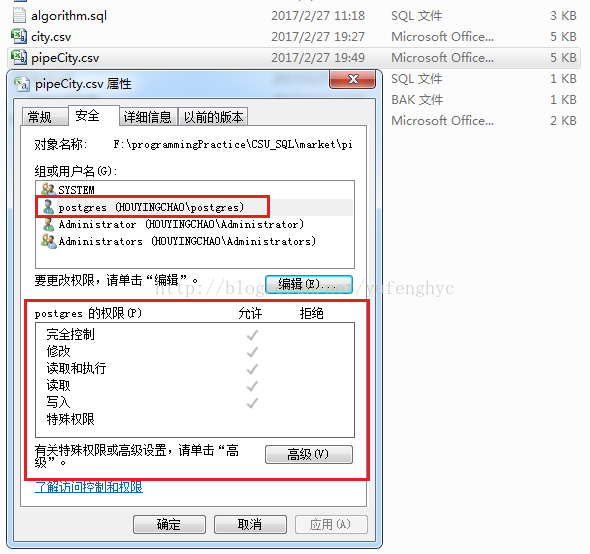
具体:
a_gp=# copy city from 'F:\programmingPractice\CSU_SQL\market\pipeCity.csv' with csv header delimiter ',';
ERROR:  could not open file "F:\programmingPractice\CSU_SQL\market\pipeCity.csv" for reading: Permission denied
解决方案:
添加【everyone】用户,这样就能读取文件
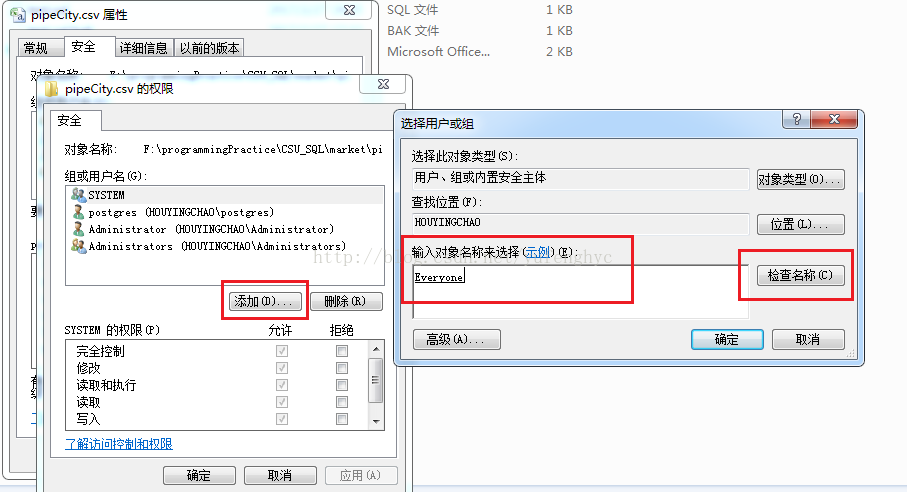
具体如下:
a_gp=# copy city from 'F:\programmingPractice\CSU_SQL\market\pipeCity.csv' with csv header delimiter ',';
ERROR:  could not open file "F:\programmingPractice\CSU_SQL\market\pipeCity.csv" for reading: Permission denied
a_gp=# copy city from 'F:\programmingPractice\CSU_SQL\market\pipeCity.csv' with csv header delimiter ',';
COPY 361





 扫一扫
扫一扫


 1万+
1万+

 被折叠的 条评论
为什么被折叠?
被折叠的 条评论
为什么被折叠?
 到【灌水乐园】发言





