



 本文介绍如何在LaTeX文档中使用标准包graphicx来嵌入带有透明背景的图片,并通过xcolor包设置不同的背景颜色。此外,还展示了如何利用PGF/TikZ实现更高级的效果,如图案填充和渐变背景。
You need the standard package graphicx to include the image. Loaded xcolor would also be a good idea. Here some examples which use a transparent test PNG I got from http://entropymine.com/jason/testbed/pngtrans/rgba16.png .
写道
\documentclass{article}
\usepackage{xcolor}
\usepackage{graphicx}
\begin{document}
\framebox{\includegraphics{rgba16.png}}
\colorbox{red}{\includegraphics{rgba16.png}}
\colorbox{white}{\includegraphics{rgba16.png}}
\colorbox{yellow}{\includegraphics{rgba16.png}}
\end{document}
\usepackage{xcolor}
\usepackage{graphicx}
\begin{document}
\framebox{\includegraphics{rgba16.png}}
\colorbox{red}{\includegraphics{rgba16.png}}
\colorbox{white}{\includegraphics{rgba16.png}}
\colorbox{yellow}{\includegraphics{rgba16.png}}
\end{document}
The first image shown is the original transparent PNG. As you can see the other work fine with some background color.

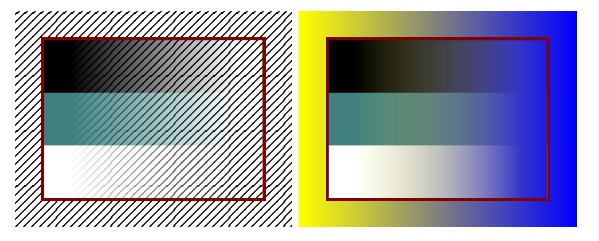
For advanced effects like patterns and shadings I would recommend you PGF/TikZ (i.e. the tikz package).
写道
\documentclass{article}
\usepackage{tikz}
\usetikzlibrary{patterns}
\begin{document}
\begin{tikzpicture}
\node [pattern=north east lines,inner sep=10pt] {\includegraphics{rgba16.png}};
\end{tikzpicture}
\begin{tikzpicture}
\node [shade,left color=yellow,right color=blue,inner sep=10pt] {\includegraphics{rgba16.png}};
\end{tikzpicture}
\end{document}
\usepackage{tikz}
\usetikzlibrary{patterns}
\begin{document}
\begin{tikzpicture}
\node [pattern=north east lines,inner sep=10pt] {\includegraphics{rgba16.png}};
\end{tikzpicture}
\begin{tikzpicture}
\node [shade,left color=yellow,right color=blue,inner sep=10pt] {\includegraphics{rgba16.png}};
\end{tikzpicture}
\end{document}





 扫一扫
扫一扫


 3356
3356

 被折叠的 条评论
为什么被折叠?
被折叠的 条评论
为什么被折叠?
 到【灌水乐园】发言





