


相信大家都用过CSDN 中结贴的功能吧(弹出的小黄窗体)
如下图所示:
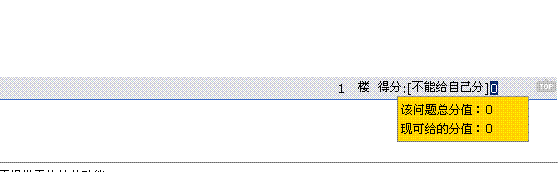
这个功能可以大家有时在项目中也要用到,我项目中就用到过
具体实现:
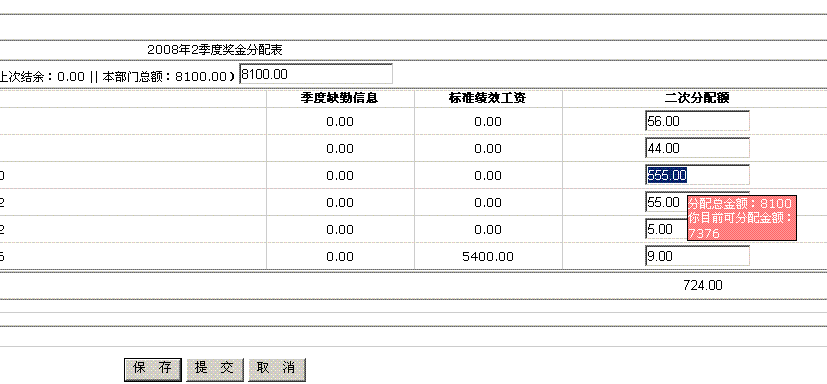
前台:

 <%
...
@ Page Language="C#" AutoEventWireup="true" CodeFile="Default.aspx.cs" Inherits="_Default"
%>
<%
...
@ Import Namespace="System.Data"
%>
<%
...
@ Page Language="C#" AutoEventWireup="true" CodeFile="Default.aspx.cs" Inherits="_Default"
%>
<%
...
@ Import Namespace="System.Data"
%>
 <!
DOCTYPE html PUBLIC "-//W3C//DTD XHTML 1.0 Transitional//EN" "http://www.w3.org/TR/xhtml1/DTD/xhtml1-transitional.dtd"
>
<
html
xmlns
="http://www.w3.org/1999/xhtml"
>
<
head
runat
="server"
>
<
title
></
title
>
<
script
language
="javascript"
type
="text/javascript"
>
...
<!
DOCTYPE html PUBLIC "-//W3C//DTD XHTML 1.0 Transitional//EN" "http://www.w3.org/TR/xhtml1/DTD/xhtml1-transitional.dtd"
>
<
html
xmlns
="http://www.w3.org/1999/xhtml"
>
<
head
runat
="server"
>
<
title
></
title
>
<
script
language
="javascript"
type
="text/javascript"
>
...
 <!-- //如CSDN一样的提示层
 function wfsr(txt)...{ event.cancelBubble=true oStr= "<div id='tip' style='position:absolute;border:1px solid #000000;background-color:#ff8080;font-size:9pt;color:#FFFFFF;;filter:progid:DXImageTransform.Microsoft.dropshadow(OffX=0,OffY=0,Color=gray,Positive=true);display:none'></div>"; if(typeof(tip)=="undefined") document.body.insertAdjacentHTML("BeforeEnd",oStr) tip.innerHTML="分配总金额:"+Number(document.getElementById("lbBUDGT02").value) + "<br/>你目前可分配金额:"+ (Number(document.getElementById("lbBUDGT02").value)-Number(document.getElementById("lbVal02").value)); tip.style.top=event.clientY+10 tip.style.left=event.clientX+10 tip.style.display=''
 } document.onclick=function()...{ if(typeof(tip)!=="undefined"&&event.srcElement.id!="tip"&&event.srcElement.parentElement.id!='tip') tip.style.display="none" } function myPosition(obj)...{ var t = obj.offsetTop,l = obj.offsetLeft; while (obj= obj.offsetParent)...{ t += obj.offsetTop; l += obj.offsetLeft; } alert(t); alert(l); } function clearNoNum(obj) ...{ //先把非数字的都替换掉,除了数字和. obj.value = obj.value.replace(/[^d.]/g,""); //必须保证第一个为数字而不是. obj.value = obj.value.replace(/^./g,""); //保证只有出现一个.而没有多个. obj.value = obj.value.replace(/....{2,}/g,"."); //保证.只出现一次,而不能出现两次以上 obj.value = obj.value.replace(".","$#$").replace(/./g,"").replace("$#$","."); } function chkN(str) ...{ if(/D/.test(str.value))...{alert('只能输入数字');str.value='0.00';} } function setVal02(obj) ...{ document.getElementById("lbVal02").innerText=""; var sum = 0; var txts = document.getElementById('<%=objGridView.ClientID%>').getElementsByTagName("INPUT"); for(var i=0;i<txts.length;i++) ...{ if(txts[i].type=="text") ...{ sum += Number(txts[i].value); document.getElementById("lbVal02").value = sum; } } } function Chk_BUDGT02BUDGT03() ...{ var budgt03 = document.getElementById("lbVal02").value; var budgt02 = document.getElementById("lbBUDGT02").value; if(Number(budgt03)>Number(budgt02)) ...{ alert("分配额总和"+budgt03+"不能大于可分配额"+budgt02 +",请重输检查输入");//给于提示 return false; } } //-->
  </
script
>
<
link
href
="../Css/style.css"
rel
="stylesheet"
type
="text/css"
/>
</
head
>
<
body
>
<
form
id
="form1"
runat
="server"
>
<
div
style
="text-align: center"
>
<
table
style
="width: 100%"
align
="center"
border
="1"
cellspacing
="0"
rules
="rows"
>
<
tr
>
<
td
colspan
="5"
align
="left"
>
当前位置:
<
asp:Label
ID
="lbPosition"
runat
="server"
Text
="Label"
></
asp:Label
>
<
asp:DropDownList
ID
="ddlBonus"
runat
="server"
OnSelectedIndexChanged
="ddlBonus_SelectedIndexChanged"
AutoPostBack
="True"
>
</
asp:DropDownList
></
td
>
</
tr
>
<
tr
>
<
td
colspan
="5"
>
<
asp:Label
ID
="lbddlBonusText"
runat
="server"
Text
="Label"
></
asp:Label
>
表
<
br
/>
<
div
style
="display:none"
>
(
<
asp:Label
ID
="lbYear"
runat
="server"
Text
="Label"
></
asp:Label
>
年
<
asp:Label
ID
="lbReason"
runat
="server"
Text
="Label"
></
asp:Label
>
季)
</
div
></
td
>
</
tr
>
<
tr
>
<
td
style
="width: 100px; height: 23px;"
>
部门:
<
asp:Label
ID
="lbSText"
runat
="server"
Text
='<%#strLbSTEXT
%
>
'>
</
asp:Label
></
td
>
<
td
style
="height: 23px;"
colspan
="3"
>
(上次结余:
<
asp:Label
ID
="lbBUDGT"
runat
="server"
Text
="Label"
></
asp:Label
>
|| 本部门总额:
<
asp:Label
ID
="lbBUDGT01"
runat
="server"
Text
="Label"
></
asp:Label
>
)
<
asp:TextBox
ID
="lbBUDGT02"
runat
="server"
></
asp:TextBox
></
td
>
<
td
style
="width: 100px; height: 23px;"
>
</
td
>
</
tr
>
<
tr
>
<
td
colspan
="5"
>
<
asp:GridView
ID
="objGridView"
runat
="server"
Width
="100%"
AutoGenerateColumns
="False"
OnRowDataBound
="objGridView_RowDataBound"
>
<
Columns
>
<
asp:TemplateField
HeaderText
="序号"
>
<
ItemTemplate
>
<
asp:Label
ID
="lbID"
runat
="server"
Text
='<%#Container.DataItemIndex+1%
>
'>
</
asp:Label
>
</
ItemTemplate
>
<
HeaderStyle
Width
="48px"
/>
<
ItemStyle
Width
="48px"
/>
</
asp:TemplateField
>
<
asp:BoundField
DataField
="SNAME"
HeaderText
="姓名"
>
<
HeaderStyle
Width
="50%"
/>
<
ItemStyle
Width
="50%"
/>
</
asp:BoundField
>
<
asp:BoundField
DataField
="KQXS"
HeaderText
="季度缺勤信息"
HtmlEncode
="False"
>
<
HeaderStyle
Width
="12%"
/>
<
ItemStyle
Width
="12%"
/>
</
asp:BoundField
>
<
asp:BoundField
DataField
="VAL01"
HeaderText
="标准绩效工资"
HtmlEncode
="False"
>
<
HeaderStyle
Width
="12%"
/>
<
ItemStyle
Width
="12%"
/>
</
asp:BoundField
>
<
asp:TemplateField
HeaderText
="二次分配额"
>
<
EditItemTemplate
>
</
EditItemTemplate
>
<
ItemTemplate
>
<
asp:Label
ID
="Label1"
runat
="server"
Text
='<%#
Bind("VAL02") %
>
' style="display:none;">
</
asp:Label
>
<
asp:TextBox
ID
="TextBox1"
runat
="server"
Text
='<%#
Bind("VAL02") %
>
' Width="100px" οnmοuseοut="tip.style.display='none';" οnmοuseοver='wfsr(this);this.select();this.focus();' οnclick="wfsr(this);this.select();this.focus();" οnchange="setVal02(this);">
</
asp:TextBox
>
</
ItemTemplate
>
</
asp:TemplateField
>
</
Columns
>
</
asp:GridView
>
</
td
>
</
tr
>
<
tr
>
<
td
style
="width: 100px; height: 23px;"
>
合计:
</
td
>
<
td
style
="width: 100px; height: 23px;"
>
</
td
>
<
td
style
="width: 100px; height: 23px;"
>
</
td
>
<
td
style
="width: 100px; height: 23px;"
>
</
td
>
<
td
style
="width: 100px; height: 23px;"
>
<
asp:TextBox
ID
="lbVal02"
style
="border:0px"
ReadOnly
="true"
runat
="server"
></
asp:TextBox
></
td
>
</
tr
>
<
tr
>
<
td
colspan
="5"
style
="height: 23px"
>
<
hr
color
="#bed6ff"
noshade
="noshade"
/>
<
asp:GridView
ID
="objForm"
runat
="server"
Width
="100%"
AutoGenerateColumns
="False"
>
<
Columns
>
<
asp:BoundField
DataField
="SNAME2"
HeaderText
="人力资源审核人"
>
<
HeaderStyle
Width
="30%"
/>
<
ItemStyle
Width
="30%"
/>
</
asp:BoundField
>
<
asp:BoundField
DataField
="ADVISE"
HeaderText
="审核意见"
/>
</
Columns
>
</
asp:GridView
>
</
td
>
</
tr
>
<
tr
>
<
td
colspan
="5"
style
="height: 69px"
>
<
hr
color
="#b6d3f1"
noshade
="noshade"
/>
<
table
>
<
tr
>
<
td
style
="height: 26px"
><
asp:Button
ID
="btnSave"
runat
="server"
Text
="保 存"
OnClick
="btnSave_Click"
OnClientClick
="return Chk_BUDGT02BUDGT03();"
/>
<
asp:Button
ID
="btnOK"
runat
="server"
Text
="提 交"
OnClick
="btnOK_Click"
OnClientClick
="return confirm('是否发起流程');"
/>
<
asp:Button
ID
="btnCancel"
runat
="server"
Text
="取 消"
/></
td
>
</
tr
>
</
table
>
</
td
>
</
tr
>
</
table
>
</
div
>
</
form
>
</
body
>
</
html
>
</
script
>
<
link
href
="../Css/style.css"
rel
="stylesheet"
type
="text/css"
/>
</
head
>
<
body
>
<
form
id
="form1"
runat
="server"
>
<
div
style
="text-align: center"
>
<
table
style
="width: 100%"
align
="center"
border
="1"
cellspacing
="0"
rules
="rows"
>
<
tr
>
<
td
colspan
="5"
align
="left"
>
当前位置:
<
asp:Label
ID
="lbPosition"
runat
="server"
Text
="Label"
></
asp:Label
>
<
asp:DropDownList
ID
="ddlBonus"
runat
="server"
OnSelectedIndexChanged
="ddlBonus_SelectedIndexChanged"
AutoPostBack
="True"
>
</
asp:DropDownList
></
td
>
</
tr
>
<
tr
>
<
td
colspan
="5"
>
<
asp:Label
ID
="lbddlBonusText"
runat
="server"
Text
="Label"
></
asp:Label
>
表
<
br
/>
<
div
style
="display:none"
>
(
<
asp:Label
ID
="lbYear"
runat
="server"
Text
="Label"
></
asp:Label
>
年
<
asp:Label
ID
="lbReason"
runat
="server"
Text
="Label"
></
asp:Label
>
季)
</
div
></
td
>
</
tr
>
<
tr
>
<
td
style
="width: 100px; height: 23px;"
>
部门:
<
asp:Label
ID
="lbSText"
runat
="server"
Text
='<%#strLbSTEXT
%
>
'>
</
asp:Label
></
td
>
<
td
style
="height: 23px;"
colspan
="3"
>
(上次结余:
<
asp:Label
ID
="lbBUDGT"
runat
="server"
Text
="Label"
></
asp:Label
>
|| 本部门总额:
<
asp:Label
ID
="lbBUDGT01"
runat
="server"
Text
="Label"
></
asp:Label
>
)
<
asp:TextBox
ID
="lbBUDGT02"
runat
="server"
></
asp:TextBox
></
td
>
<
td
style
="width: 100px; height: 23px;"
>
</
td
>
</
tr
>
<
tr
>
<
td
colspan
="5"
>
<
asp:GridView
ID
="objGridView"
runat
="server"
Width
="100%"
AutoGenerateColumns
="False"
OnRowDataBound
="objGridView_RowDataBound"
>
<
Columns
>
<
asp:TemplateField
HeaderText
="序号"
>
<
ItemTemplate
>
<
asp:Label
ID
="lbID"
runat
="server"
Text
='<%#Container.DataItemIndex+1%
>
'>
</
asp:Label
>
</
ItemTemplate
>
<
HeaderStyle
Width
="48px"
/>
<
ItemStyle
Width
="48px"
/>
</
asp:TemplateField
>
<
asp:BoundField
DataField
="SNAME"
HeaderText
="姓名"
>
<
HeaderStyle
Width
="50%"
/>
<
ItemStyle
Width
="50%"
/>
</
asp:BoundField
>
<
asp:BoundField
DataField
="KQXS"
HeaderText
="季度缺勤信息"
HtmlEncode
="False"
>
<
HeaderStyle
Width
="12%"
/>
<
ItemStyle
Width
="12%"
/>
</
asp:BoundField
>
<
asp:BoundField
DataField
="VAL01"
HeaderText
="标准绩效工资"
HtmlEncode
="False"
>
<
HeaderStyle
Width
="12%"
/>
<
ItemStyle
Width
="12%"
/>
</
asp:BoundField
>
<
asp:TemplateField
HeaderText
="二次分配额"
>
<
EditItemTemplate
>
</
EditItemTemplate
>
<
ItemTemplate
>
<
asp:Label
ID
="Label1"
runat
="server"
Text
='<%#
Bind("VAL02") %
>
' style="display:none;">
</
asp:Label
>
<
asp:TextBox
ID
="TextBox1"
runat
="server"
Text
='<%#
Bind("VAL02") %
>
' Width="100px" οnmοuseοut="tip.style.display='none';" οnmοuseοver='wfsr(this);this.select();this.focus();' οnclick="wfsr(this);this.select();this.focus();" οnchange="setVal02(this);">
</
asp:TextBox
>
</
ItemTemplate
>
</
asp:TemplateField
>
</
Columns
>
</
asp:GridView
>
</
td
>
</
tr
>
<
tr
>
<
td
style
="width: 100px; height: 23px;"
>
合计:
</
td
>
<
td
style
="width: 100px; height: 23px;"
>
</
td
>
<
td
style
="width: 100px; height: 23px;"
>
</
td
>
<
td
style
="width: 100px; height: 23px;"
>
</
td
>
<
td
style
="width: 100px; height: 23px;"
>
<
asp:TextBox
ID
="lbVal02"
style
="border:0px"
ReadOnly
="true"
runat
="server"
></
asp:TextBox
></
td
>
</
tr
>
<
tr
>
<
td
colspan
="5"
style
="height: 23px"
>
<
hr
color
="#bed6ff"
noshade
="noshade"
/>
<
asp:GridView
ID
="objForm"
runat
="server"
Width
="100%"
AutoGenerateColumns
="False"
>
<
Columns
>
<
asp:BoundField
DataField
="SNAME2"
HeaderText
="人力资源审核人"
>
<
HeaderStyle
Width
="30%"
/>
<
ItemStyle
Width
="30%"
/>
</
asp:BoundField
>
<
asp:BoundField
DataField
="ADVISE"
HeaderText
="审核意见"
/>
</
Columns
>
</
asp:GridView
>
</
td
>
</
tr
>
<
tr
>
<
td
colspan
="5"
style
="height: 69px"
>
<
hr
color
="#b6d3f1"
noshade
="noshade"
/>
<
table
>
<
tr
>
<
td
style
="height: 26px"
><
asp:Button
ID
="btnSave"
runat
="server"
Text
="保 存"
OnClick
="btnSave_Click"
OnClientClick
="return Chk_BUDGT02BUDGT03();"
/>
<
asp:Button
ID
="btnOK"
runat
="server"
Text
="提 交"
OnClick
="btnOK_Click"
OnClientClick
="return confirm('是否发起流程');"
/>
<
asp:Button
ID
="btnCancel"
runat
="server"
Text
="取 消"
/></
td
>
</
tr
>
</
table
>
</
td
>
</
tr
>
</
table
>
</
div
>
</
form
>
</
body
>
</
html
>
后台:
//
*******************************************************
//
*版本:V0.1
//
*作者:wyj
//
*时间:2008-4-24
//
*修改时间:
//
*******************************************************
using
System;
using
System.Data;
using
System.Configuration;
using
System.Collections;
using
System.Web;
using
System.Web.Security;
using
System.Web.UI;
using
System.Web.UI.WebControls;
using
System.Web.UI.WebControls.WebParts;
using
System.Web.UI.HtmlControls;
using
ChamcDoc.HRUser;
using
ChamcDoc.HR;
public
partial
class
_Default : System.Web.UI.Page
...
{ public string strORGEH = "50000013"; //CurrUser.getCurrUser().DeptID;//这个是经理登陆传过来的部门ID号 触发点(测试点:50000013) public string strCTYPE = "BON01"; //这个也是传入的是季度还是年终(BON01/BON02) protected string strWhere = ""; //传入的条件 public string strLbSTEXT = ""; //部门名称 public string strDEPID = ""; public string strPosition = "部门经理填写本部门奖金分配";//当前位置 public string strLbBUDGT = ""; //上次结余 public string strLbBUDGT01 = ""; //本部门总额 public string strLbBUDGT02 = ""; public string strLbBUDGT03 = ""; DataSet ds_Emp = new DataSet(); //员工奖金记录信息 DataSet ds_Dep = new DataSet(); //员工部门记录信息 public decimal sum_val01 = 0.00m; //标准绩效工资合计 public decimal sum_val02 = 0.00m; //二次分配合计 protected void Page_Load(object sender, EventArgs e) ...{ if (!IsPostBack) ...{ GetDepDataList(strORGEH); strCTYPE = this.ddlBonus.SelectedValue.ToString(); //给出列表初始选中状态 ViewState["CTYPE"] = (object)strCTYPE; GetDepBonusData_DEP(strORGEH,strCTYPE); onInit(strORGEH, strCTYPE); GetDepBonusData_EMP(strORGEH,strCTYPE); } } //得到各部门奖金分配员工列表数据 private void GetDepBonusData_EMP(string strORGEH,string CTYPE) ...{ strWhere = " ORGEH = " + strORGEH +" and CTYPE = '" + CTYPE + "'"; ds_Emp = HRBonusEmpList.Instance.GetList(strWhere); this.objGridView.DataSource = ds_Emp.Tables[0].DefaultView; objGridView.DataKeyNames = new string[] ...{ "ID" };//主键(注意DataKeyNames 是复数间接告诉我们这里是可以有多个字段即可以是联合主键) this.objGridView.DataBind(); } //得到各部门奖金分配部门列表数据 private void GetDepBonusData_DEP(string strORGEH,string CTYPE) ...{ strWhere = " ORGEH = " + strORGEH + " and CTYPE = '" + CTYPE + "'"; ds_Dep = HRBonusDepList.Instance.GetList(strWhere); if (ds_Dep.Tables[0].Rows.Count > 0) ...{ strDEPID = ds_Dep.Tables[0].Rows[0]["ID"].ToString(); //部门 this.lbSText.Text = ds_Dep.Tables[0].Rows[0]["STEXT"].ToString(); //部门 this.lbBUDGT.Text = ds_Dep.Tables[0].Rows[0]["BUDGT"].ToString(); //上次结余 this.lbBUDGT01.Text = ds_Dep.Tables[0].Rows[0]["BUDGT01"].ToString(); //本部门总额 this.lbBUDGT02.Text = ds_Dep.Tables[0].Rows[0]["BUDGT02"].ToString(); //总计 strLbBUDGT02 = ds_Dep.Tables[0].Rows[0]["BUDGT02"].ToString(); strLbBUDGT03 = ds_Dep.Tables[0].Rows[0]["BUDGT03"].ToString(); ViewState["strLbBUDGT02"] = (object)strLbBUDGT02; ViewState["strLbBUDGT03"] = (object)strLbBUDGT03; ViewState["strDEPID"] = (object)strDEPID; } } //得到所有要分配金额的列表 private void GetDepDataList(string strORGEH) ...{ DataSet ds = new DataSet(); strWhere = " ORGEH = '" + strORGEH + "' and ID not in (select DEPID from BOUNSWF_PROCESS where MARK = 3 or MARK = 1)"; ds = HRBonusDepList.Instance.GetList_YEREDEP(strWhere); if (ds.Tables[0].Rows.Count > 0) ...{ this.ddlBonus.DataSource = ds; ddlBonus.DataTextField = "Flag"; ddlBonus.DataValueField = "CTYPE"; ddlBonus.DataBind(); } } /**//// <summary> /// 做合计,显示字体标识等 /// </summary> /// <param name="sender"></param> /// <param name="e"></param> protected void objGridView_RowDataBound(object sender, GridViewRowEventArgs e) ...{ if (e.Row.RowType == DataControlRowType.DataRow) ...{ Label lbVal02 = (Label)e.Row.Cells[4].FindControl("Label1") as Label; if (e.Row.RowIndex >= 0) ...{ sum_val01 += Convert.ToDecimal(e.Row.Cells[3].Text); if (lbVal02.Text != "") ...{ sum_val02 += Convert.ToDecimal(lbVal02.Text); } } } //合计统计 this.lbVal02.Text = sum_val02.ToString("0.00"); } /**//// <summary> /// 保存数据 /// </summary> /// <param name="sender"></param> /// <param name="e"></param> protected void btnSave_Click(object sender, EventArgs e) ...{ for (int i = 0; i < objGridView.Rows.Count; i++) ...{ TextBox txt_val02 = objGridView.Rows[i].Cells[4].FindControl("TextBox1") as TextBox; HRBonusEmpList.Instance.CTYPE = ViewState["CTYPE"].ToString(); HRBonusEmpList.Instance.ORGEH = strORGEH.ToString(); HRBonusEmpList.Instance.VAL02 = Convert.ToDecimal(txt_val02.Text); //分配金额 HRBonusDepList.Instance.BUDGT02 = Convert.ToDecimal(ViewState["strLbBUDGT02"].ToString()); HRBonusDepList.Instance.BUDGT03 = Convert.ToDecimal(this.lbVal02.Text); HRBonusEmpList.Instance.ID = Convert.ToInt32(objGridView.DataKeys[i].Value); //员工ID CreateProcess(0); Page.ClientScript.RegisterStartupScript(this.GetType(), "", "<script>alert('数据保存成功!')</script>"); } } private void CreateProcess(int P_Mark) ...{ HRBonusDepList.Instance.ID = Convert.ToInt32(ViewState["strDEPID"].ToString()); //部门ID if (P_Mark == 1) ...{ WFProcess.Instance.PROCESSNAME = this.ddlBonus.SelectedItem.Text; WFProcess.Instance.PROCESSMEMO = this.ddlBonus.SelectedItem.Text; WFProcess.Instance.SNAME1 = "登陆者";//登陆者 WFProcess.Instance.BEGTIME = System.DateTime.Now;//当前时间 WFProcess.Instance.MARK = 1; //开始流程 } else ...{ WFProcess.Instance.PROCESSNAME = this.ddlBonus.SelectedItem.Text; WFProcess.Instance.PROCESSMEMO = this.ddlBonus.SelectedItem.Text; WFProcess.Instance.SNAME1 = "登陆者";//登陆者 WFProcess.Instance.BEGTIME = System.DateTime.Now;//当前时间 WFProcess.Instance.MARK = 1; //开始流程 } HRBonusEmpList.Instance.Update(P_Mark); //保存上次所分配的金额值 } /**//// <summary> /// 提交数据开始生成流程 /// </summary> /// <param name="sender"></param> /// <param name="e"></param> protected void btnOK_Click(object sender, EventArgs e) ...{ for (int i = 0; i < objGridView.Rows.Count; i++) ...{ TextBox txt_val02 = objGridView.Rows[i].Cells[4].FindControl("TextBox1") as TextBox; HRBonusEmpList.Instance.CTYPE = ViewState["CTYPE"].ToString(); HRBonusEmpList.Instance.ORGEH = strORGEH.ToString(); HRBonusEmpList.Instance.VAL02 = Convert.ToDecimal(txt_val02.Text); //分配金额 HRBonusDepList.Instance.BUDGT02 = Convert.ToDecimal(ViewState["strLbBUDGT02"].ToString()); HRBonusDepList.Instance.BUDGT03 = Convert.ToDecimal(this.lbVal02.Text); HRBonusEmpList.Instance.ID = Convert.ToInt32(objGridView.DataKeys[i].Value); //员工ID } CreateProcess(1); Response.Redirect("HRManageAudt.aspx"); } /**//// <summary> /// 生成5位随机数 /// </summary> /// <returns></returns> private string CreateRandom() ...{ Random ran = new Random(unchecked((int)DateTime.Now.Ticks)); int num = ran.Next(0, 9999) + 10000; return num.ToString(); } /**//// <summary> /// 下拉列表框改变时 /// </summary> /// <param name="sender"></param> /// <param name="e"></param> protected void ddlBonus_SelectedIndexChanged(object sender, EventArgs e) ...{ strCTYPE = this.ddlBonus.SelectedValue.ToString(); ViewState["CTYPE"] = (object)strCTYPE; strLbBUDGT02 = ViewState["strLbBUDGT02"].ToString(); GetDepBonusData_EMP(strORGEH, strCTYPE); GetDepBonusData_DEP(strORGEH, strCTYPE); onInit(strORGEH, strCTYPE); } //这里主要做页面初始化工作 private void onInit(string strORGEH, string CTYPE) ...{ if (this.ddlBonus.Items.Count > 0) ...{ if (this.ddlBonus.SelectedItem.Value == "BON01")//当选中的是季度奖金分配 ...{ this.lbddlBonusText.Text = this.ddlBonus.SelectedItem.Text; } else if (this.ddlBonus.SelectedItem.Value == "BON02") //当选中的年度奖金分配 ...{ this.lbddlBonusText.Text = this.ddlBonus.SelectedItem.Text; } } strWhere = " Mark = 2 and DepID = (select ID from HRBONUS_DEPLIST where ORGEH = " + strORGEH + " and CTYPE = '" + CTYPE + "')"; if (WFProcess.Instance.Exit(strWhere) > 0) //有返回的 ...{ this.objForm.Visible = true; this.lbPosition.Text = "部门经理修改返回本部门奖金分配";//当前位置 strWhere = " ProcessID = (select ProcessID from BOUNSWF_Process where Mark=2 and DepID = (select ID from HRBONUS_DEPLIST where ORGEH = " + strORGEH + " and CTYPE = '" + CTYPE + "'))"; DataSet ds = WFForm.Instance.GetList(strWhere); if (ds.Tables[0].Rows.Count > 0) ...{ this.objForm.DataSource = ds.Tables[0].DefaultView; this.objForm.DataBind(); } } else ...{ this.lbPosition.Text = strPosition;//当前位置 this.objForm.Visible = false; } } }
做得不好,只想给大家提个思路





 被折叠的 条评论
为什么被折叠?
被折叠的 条评论
为什么被折叠?
 到【灌水乐园】发言





