



 本文介绍了在将App上传到AppStore过程中遇到的错误ITMS-90049的解决办法,涉及到bundle标识符中包含不允许的字符问题。通过调整第三方Info.plist文件中的Bundleversion、Bundleidentifier及Bundleversionsstring,short等字段来解决。
10月22日,将App上传到Appstore审核时,提示错误,ERROR ITMS-90049:"This bundle is invalid. The bundle identifier contains disallowed characters. [See the section of the Application Programming Guide entitled The Application Bundle.]"
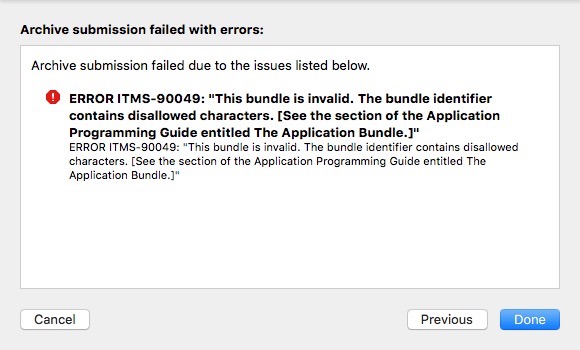
解决方法:
在项目导航栏搜索Info.plist文件,如下图
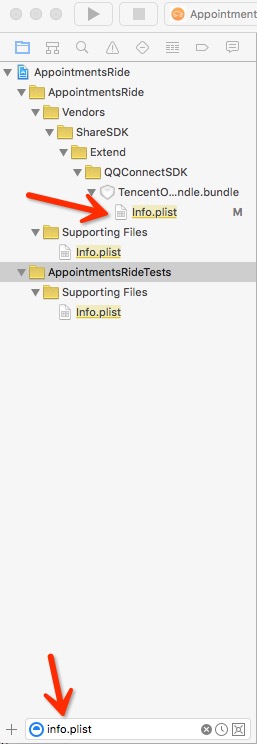
查找第三方的info.plist文件,如ShareSDK中的腾讯Bundle文件下的Info.plist文件。
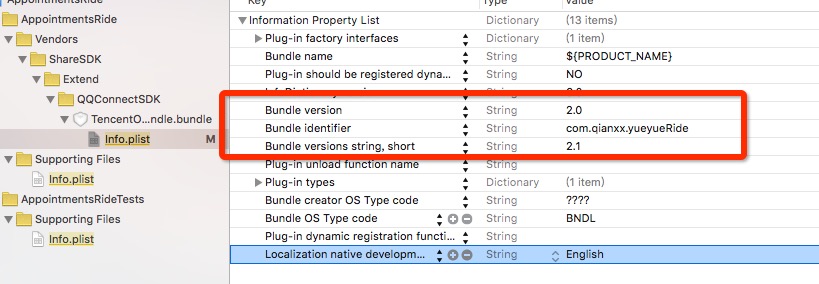
在该文件下添加或者修改以下几个字段:
- Bundle version
- Bundle identifier
- Bundle versions string, short
需要和系统自带的Info.plist文件一样。 如下图





 扫一扫
扫一扫


 1万+
1万+


 被折叠的 条评论
为什么被折叠?
被折叠的 条评论
为什么被折叠?
 到【灌水乐园】发言




