



 在Android中,使用ListView+SwipeRefreshLayout时,若列表无数据展示EmptyView,下拉刷新会不显示进度圈。问题在于版本较低的support-v4库。升级到26.0.0以上版本或通过监听解决此问题。
问题
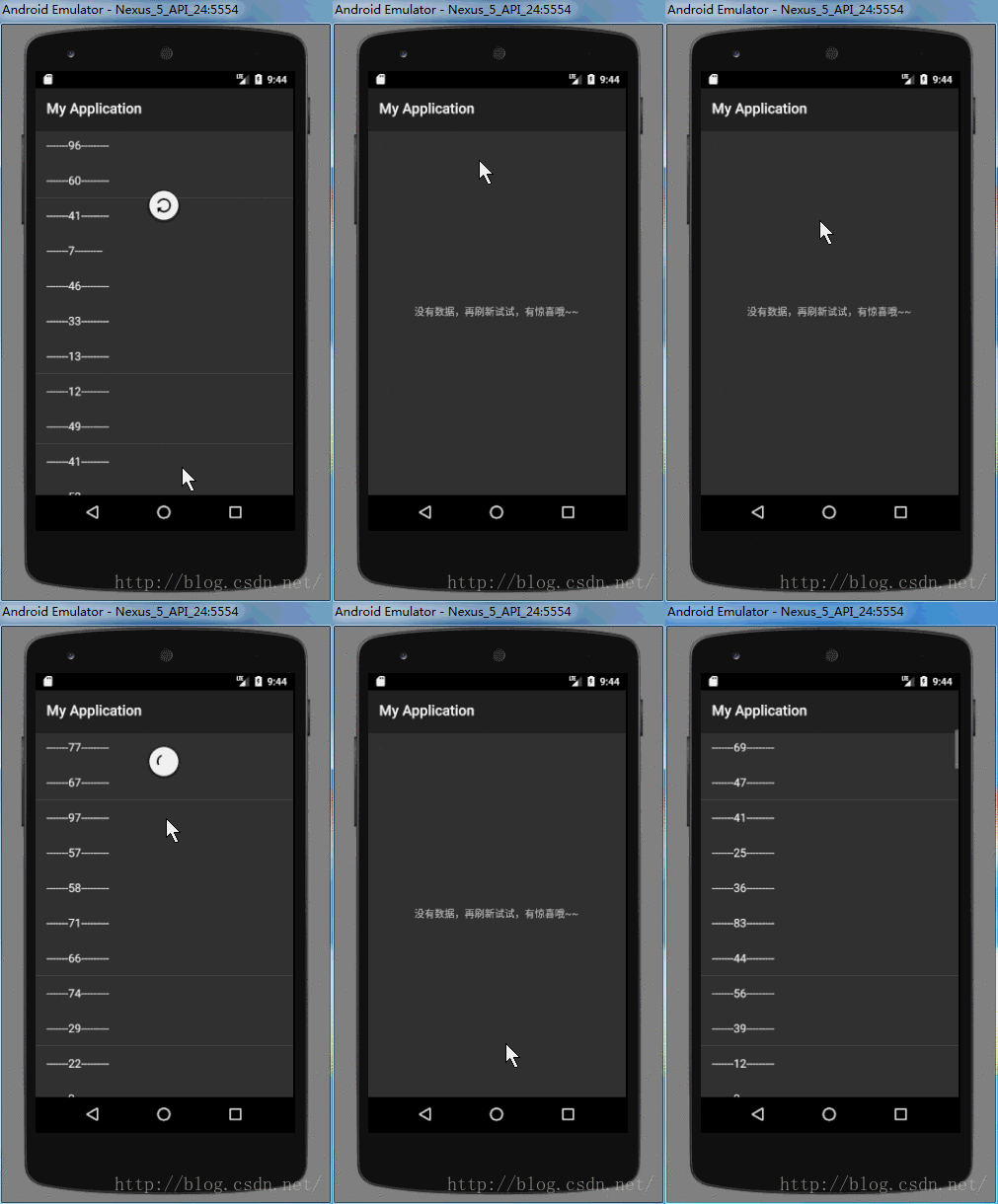
今天有一个新需求,要求在列表中没数据时,显示一个text,提示用户。列表是用ListView+SwipeRefreshLayout实现的,刚接手项目不久,看了下代码后就开始动手了。结果发现,当EmptyView(就是一个TextView)显示时,下拉刷新时,看不到进度圈,只有在松开时才会看到一下,而列表中有数据时,则下拉顺畅。
有图有真相,下面就是问题图,注意无数据时的下拉。
实现
我手撸了个demo,重现了这个问题。
先来看下xml,如下
<?xml version="1.0" encoding="utf-8"?>
<LinearLayout xmlns:android="http://schemas.android.com/apk/res/android"
    android:orientation="vertical" android:layout_width="match_parent"
    android:layout_height="match_parent">


    <android.support.v4.widget.SwipeRefreshLayout
        android:id="@+id/swipe_refresh_layout_demo"
        android:layout_width="match_parent"
        android:layout_height="match_parent">

        <FrameLayout
            android:layout_width="match_parent"
            android:layout_height="match_parent">
            <ListView
                android:id="@+id/lv_swipe_refresh_layout"
                android:layout_width="match_parent"
                android:layout_height="match_parent"/>

            <TextView
                android:id="@+id/tv_empty_swipe_refresh_layout"
                android:layout_width="match_parent"
                android:layout_height="match_parent"
                android:text="没有item可展示"
                android:gravity="center"
                android:visibility="gone"/>
        </FrameLayout>
    </android.support.v4.widget.SwipeRefreshLayout>

</LinearLayout>
很简单,就是FrameLayout中放一个ListView和一个TextView,当没有数据时,显示TextView,当有数据时显示ListView。
下面是代码
public class MainActivity extends Activity {

    SwipeRefreshLayout mSwipeRefreshLayout;
    ListView mListView;
    TextView mTextView;
    @Override
    protected void onCreate(Bundle savedInstanceState) {
        super.onCreate(savedInstanceState);
        setContentView(R.layout.activity_main);
        mSwipeRefreshLayout = (SwipeRefreshLayout) findViewById(R.id.swipe_refresh_layout_demo);
        mListView = (ListView) findViewById(R.id.lv_swipe_refresh_layout);
        mTextView = (TextView) findViewById(R.id.tv_empty_swipe_refresh_layout);
        mTextView.setOnTouchListener(new View.OnTouchListener() {
            @Override
            public boolean onTouch(View v, MotionEvent event) {
                if(event.getAction() == MotionEvent.ACTION_DOWN){
                    return true;
                }
                return false;
            }
        });

        init();
    }


    private void init() {
        loadData();
        refresh();
        mSwipeRefreshLayout.setOnRefreshListener(new SwipeRefreshLayout.OnRefreshListener() {
            @Override
            public void onRefresh() {
                loadData();
                mHandler.sendEmptyMessageDelayed(1, 1000);
            }
        });
    }

    boolean flag = true;
    private List<String> mDatas = new ArrayList<>();

    private void loadData() {
        if (flag) {
            for (int i = 0; i < 100; i++) {
                int num = (int) (Math.random() * 100);
                mDatas.add("-------" + num + "---------");
            }
        } else {
            mDatas.clear();
        }

        flag = !flag;

    }

    ArrayAdapter<String> mAdapter;
    private void refresh(){
        boolean isEmpty = mDatas.size() == 0;
        mListView.setVisibility(isEmpty ? View.GONE : View.VISIBLE);
        mTextView.setVisibility(isEmpty ? View.VISIBLE : View.GONE);
        if (isEmpty) {
            mTextView.setText("没有数据,再刷新试试,有惊喜哦~~");
        } else {
            if(mAdapter == null){
                mAdapter = new ArrayAdapter<>(this, android.R.layout.simple_list_item_1, mDatas);
                mListView.setAdapter(mAdapter);
            } else {
                mAdapter.notifyDataSetChanged();
            }
        }
    }


    Handler mHandler = new Handler(new Handler.Callback() {
        @Override
        public boolean handleMessage(Message msg) {

            switch (msg.what) {
                case 1:
                    refresh();
                    if (mSwipeRefreshLayout.isRefreshing()) {
                        mSwipeRefreshLayout.setRefreshing(false);
                    }
                    break;
            }

            return true;
        }
    });
}
解决
之前我在自己的Demo集中测试过,发现并没有这个问题,详细比对了demo和正式项目中的代码,没在代码上发现不同,上网查了一下,在一篇博客中找到了思路,果断比对demo和正式项目中的v4包,2个果然不一样。
- demo中是: ‘com.android.support:support-v4:26.0.0-alpha1’
- 正式项目中是: ‘com.android.support:support-v4:23.3.0’。
将正式项目中的v4包版本调到26,就可以正常运行了。效果如下

造成问题的原因
问题解决了,但还要深究一下其中的原因。debug源码,最终发现,当ListView显示,下拉刷新时,SwipeRefreshLayout的down事件被子View消费了,当Move时,才会调用自身的onTouchEvent方法。
而当ListView不显示,显示TextView时,SwipeRefreshLayout的down事件没有被子View消费,需要调用自己的onTouchEvent方法 。这个就是导致问题的原因。
根据上面的原因,可以有一种解决方式,如下
mTextView.setOnTouchListener(new View.OnTouchListener() {
    @Override
    public boolean onTouch(View v, MotionEvent event) {
        if(event.getAction() == MotionEvent.ACTION_DOWN){
            return true;
        }
        return false;
    }
});
经过测试,确定该方法是可行的。
至于为什么26.0.0版本的v4包可行,因为看不到源码,无法得知。





 扫一扫
扫一扫


 8000
8000

 被折叠的 条评论
为什么被折叠?
被折叠的 条评论
为什么被折叠?
 到【灌水乐园】发言





