叶帆工作室

嵌入式开发爱好者(十年开发经验,精通C/C++/VC/VB/C#...)

刘洪峰ID:yefanqiu
493514次访问,排名81好友0人,关注者130
微软MVP / CSDN 2008十大MVB/MSDN中文技术论坛版主
yefanqiu的文章
原创 213 篇
翻译 0 篇
转载 3 篇
评论 1035 篇
叶帆的公告
本博客原创文章,作者保留一切权利,需经作者同意后方可转载,转载时 请注明[叶帆工作室]及文章链接。yefan@vip.sina.com
【简介】叶帆[微软MVP]
【文章】叶帆文章列表
【软件】叶帆共享软件列表
最近评论
兰馨谷:多谢!!!


兰馨谷:确实不错
用了多年的VB也没怎么过深的去研究
总是觉得够用就满足了,呵呵很难进步了
用博主提到的其中一个方法
VB工程引用引用,
保存后文本编辑器查看相应GUID
未能成功,后来还是下载RegCtrls.exe
(显示全部类)获得类ID(GUID),并看出了
原来VB工程里引用的是TypeLib

出来打酱油的:做自动化的人软件开发水平真的很低,呵呵
侯磊:你们在北京有很多人可以交流,这对于提高水平有很大的帮助。俺在苏州也没有人跟俺交流,只能自己去思考了。郁闷
girlblank:生成dll的时候,出现
“代码生成器或链接器中出现未知的错误”
查看错误信息,如下显示:

“Microsoft (R) Incremental Linker Version 6.00.8447
Copyright (C) Microsoft Corp 1992-1998. All rights reserved.

LI……
文章分类
收藏
    相册
    叶帆照片
    【叶帆软件】
    [01]VB源码之友(V2.1.548)
    [02]API浏览器.net(V5.0)
    [03]叶帆成语词典(V2.0.8)
    [04]叶帆密码库(V1.2.8)
    【叶帆资源】
    DAO 2.0引擎
    叶帆快速通道
    Windows Embedded 专题
    中文MSDN
    叶帆圈子--工业自动化
    叶帆工作室(博客园)
    叶帆工控--工业自动化
    叶帆群组--工业应用开发
    微软中文技术论坛
    瑞康社区论坛
    叶帆友情链接
    张欣
    枕善居
    莫依
    葛涵涛
    郑建
    陈辉
    马宁
    马骐
    魏涛序
    黎波
    存档
    订阅我的博客
    XML聚合  FeedSky
    订阅到鲜果
    订阅到Google
    订阅到抓虾
    订阅到BlogLines
    订阅到Yahoo
    订阅到GouGou
    订阅到飞鸽
    订阅到Rojo
    订阅到newsgator
    订阅到netvibes

    原创 Windows Moblie 笔迹图板开发收藏

    新一篇: VS2008中文版安装和初试用

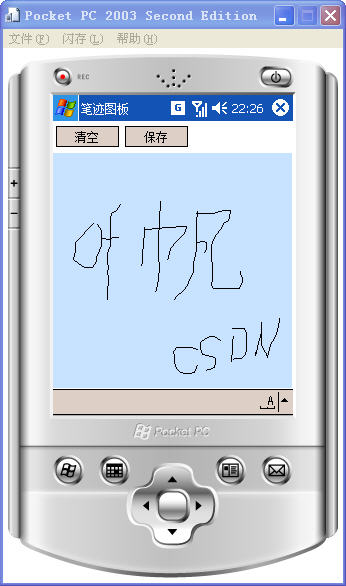
    这是应一个网友的问题而做的一个小程序,可以保存为位图,我觉得还是有一定的参考价值的,所以就把相关代码贴了出来 。
     

    using System;
    using System.Collections.Generic;
    using System.ComponentModel;
    using System.Data;
    using System.Drawing;
    using System.Text;
    using System.Windows.Forms;
    using System.IO;

    namespace HandImage
    {
        
    public partial class frmTest : Form
        {
            List
    <Points> HandTrack=new List<Points>();
            
    public Graphics pb_Graphics;
            Bitmap pb_BMP 
    = new Bitmap(239,235);

            
    int index = 0;    //第几笔
            public frmTest()
            {
                InitializeComponent();
            }

            
    private void pnlBar_MouseMove(object sender, MouseEventArgs e)
            {
                HandTrack[index].PT.Add(
    new Point(e.X, e.Y));
                pnlBar.Refresh();
            }

            
    private void pnlBar_Paint(object sender, PaintEventArgs e)
            {
                pb_Graphics 
    = Graphics.FromImage((System.Drawing.Image)pb_BMP);
                pb_Graphics.Clear(pnlBar.BackColor);
                
    foreach(Points item in  HandTrack)
                {
                    pb_Graphics.DrawLines(
    new Pen(Color.Black), item.PT.ToArray());  
                }
                e.Graphics.DrawImage(pb_BMP, 
    00);
                pb_Graphics.Dispose(); 
            }

            
    class Points
            {
                
    public List<Point> PT=new List<Point>();
            }

            
    private void btnClear_Click(object sender, EventArgs e)
            {
                index 
    = 0;
                HandTrack 
    = new List<Points>();
                pnlBar.Refresh();  
            }

            
    private void pnlBar_MouseUp(object sender, MouseEventArgs e)
            {
                index
    ++;
            }

            
    private void pnlBar_MouseDown(object sender, MouseEventArgs e)
            {
                HandTrack.Add(
    new Points());
                HandTrack[index].PT.Add(
    new Point(e.X, e.Y));
                pnlBar.Refresh();  
            }

            
    private void btnSave_Click(object sender, EventArgs e)
            {
                dlgSaveFile.Filter 
    = "位图(*.bmp)|*.bmp"
                
    if (dlgSaveFile.ShowDialog() == DialogResult.OK)
                {
                    
    string strFile = dlgSaveFile.FileName;
                    pb_BMP.Save(strFile, System.Drawing.Imaging.ImageFormat.Bmp); 
                }
            }
        }
    }

    发表于 @ 2008年04月02日 14:32:00|评论(loading...)|编辑

    旧一篇: 2008微软MVP成功连任—从VB转型为Windows Embedded

    评论

    #binrongsdxc 发表于2008-04-02 22:57:39  IP: 222.131.92.*
    变量 pnlBar 是个什么东东?怎么没有看到这什么地方定义的啊?
    #binrongsdxc 发表于2008-04-02 23:13:11  IP: 222.131.92.*
    哦,明白了,只不过是个PANEL

    namespace HandImage
    {
    partial class Form1
    {
    /// <summary>
    /// 必需的设计器变量。
    /// </summary>
    private System.ComponentModel.IContainer components = null;
    private System.Windows.Forms.MainMenu mainMenu1;

    /// <summary>
    /// 清理所有正在使用的资源。
    /// </summary>
    /// <param name="disposing">如果应释放托管资源,为 true;否则为 false。</param>
    protected override void Dispose(bool disposing)
    {
    if (disposing && (components != null))
    {
    components.Dispose();
    }
    base.Dispose(disposing);
    }

    #region Windows 窗体设计器生成的代码

    /// <summary>
    /// 设计器支持所需的方法 - 不要
    /// 使用代码编辑器修改此方法的内容。
    /// </summary>
    private void InitializeComponent()
    {
    this.mainMenu1 = new System.Windows.Forms.MainMenu();
    this.dlgSaveFile = new System.Windows.Forms.SaveFileDialog();
    this.pnlBar = new System.Windows.Forms.Panel();
    this.btnClear = new System.Windows.Forms.Button();
    this.btnSave = new System.Windows.Forms.Button();
    this.SuspendLayout();
    //
    // pnlBar
    //
    #binrongsdxc 发表于2008-04-02 23:14:36  IP: 222.131.92.*
    this.pnlBar.BackColor = System.Drawing.SystemColors.InactiveCaption;
    this.pnlBar.Location = new System.Drawing.Point(10, 29);
    this.pnlBar.Name = "pnlBar";
    this.pnlBar.Size = new System.Drawing.Size(227, 236);
    this.pnlBar.MouseDown += new System.Windows.Forms.MouseEventHandler(this.pnlBar_MouseDown);
    this.pnlBar.MouseMove += new System.Windows.Forms.MouseEventHandler(this.pnlBar_MouseMove);
    this.pnlBar.Paint += new System.Windows.Forms.PaintEventHandler(this.pnlBar_Paint);
    this.pnlBar.MouseUp += new System.Windows.Forms.MouseEventHandler(this.pnlBar_MouseUp);
    //
    // btnClear
    //
    this.btnClear.Location = new System.Drawing.Point(10, 3);
    this.btnClear.Name = "btnClear";
    this.btnClear.Size = new System.Drawing.Size(72, 20);
    this.btnClear.TabIndex = 1;
    this.btnClear.Text = "Clear";
    this.btnClear.Click += new System.EventHandler(this.btnClear_Click);
    //
    // btnSave
    //
    this.btnSave.Location = new System.Drawing.Point(104, 3);
    this.btnSave.Name = "btnSave";
    this.btnSave.Size = new System.Drawing.Size(72, 20);
    this.btnSave.TabIndex = 2;
    this.btnSave.Text = "Save";
    th
    #binrongsdxc 发表于2008-04-02 23:15:20  IP: 222.131.92.*
    this.btnSave.Click += new System.EventHandler(this.btnSave_Click);
    //
    // Form1
    //
    this.AutoScaleDimensions = new System.Drawing.SizeF(96F, 96F);
    this.AutoScaleMode = System.Windows.Forms.AutoScaleMode.Dpi;
    this.AutoScroll = true;
    this.ClientSize = new System.Drawing.Size(240, 268);
    this.Controls.Add(this.btnSave);
    this.Controls.Add(this.btnClear);
    this.Controls.Add(this.pnlBar);
    this.Menu = this.mainMenu1;
    this.Name = "Form1";
    this.Text = "Form1";
    this.ResumeLayout(false);

    }

    #endregion

    private System.Windows.Forms.SaveFileDialog dlgSaveFile;
    private System.Windows.Forms.Panel pnlBar;
    private System.Windows.Forms.Button btnClear;
    private System.Windows.Forms.Button btnSave;
    }
    }

    #zszzju 发表于2008-05-15 11:26:56  IP: 58.61.78.*
    抖动的太厉害了。
    #yefanqiu 发表于2008-05-15 11:55:23  IP: 61.50.221.*
    仅是一个示例,绘图时采用双缓冲就不会闪了
    发表评论  


    登录
    Csdn Blog version 3.1a
    Copyright © 叶帆


